The Wiert Corner – irregular stream of stuff

Jeroen W. Pluimers on .NET, C#, Delphi, databases, and personal interests

  • My badges

  • Twitter Updates

  • My Flickr Stream

  • Pages

  • All categories

  • Enter your email address to subscribe to this blog and receive notifications of new posts by email.

    Join 1,861 other subscribers

Archive for the ‘Raspberry Pi’ Category

Raspberry Pi Turn Tv On/Off CEC – Tim Leland

Posted by jpluimers on 2021/10/13

[WayBack] Raspberry Pi Turn Tv On/Off CEC – Tim Leland (with some quote fixes) via [Archive.is] Brad Fitzpatrick on Twitter: “lol tear (from )… “:

Install cec-utils

Once everything is installed you should be able to control the tv using the command below:

  • Turn tv on: echo 'on 0' | cec-client -s -d 1
  • Turn tv off: echo 'standby 0' | cec-client -s -d 1
  • Set active source: echo 'as' | cec-client -s -d 1
  • Tv status: echo 'pow 0' | cec-client -s -d 1

Troubleshooting Tips:

  • Make sure your tv supports cec and that it is enabled. Tv manufactures call CEC by different names so you may have to do some research depending on your brand.
  • Make sure you are using a new hdmi cable that is at least HDMI 1.2a

Different names for HDMI CEC

  • Samsung – Anynet+
  • Sony – BRAVIA Link or BRAVIA Sync
  • Sharp – Aquos Link
  • Hitachi – HDMI-CEC
  • AOC – E-link
  • Pioneer – Kuro Link
  • Toshiba – Regza Link or CE-Link
  • Onkyo – RIHD (Remote Interactive over HDMI)
  • LG – SimpLink
  • Panasonic – VIERA Link or HDAVI Control or EZ-Sync
  • Philips – EasyLink
  • Mitsubishi – NetCommand for HDMI
  • Runco International – RuncoLink

Credits: http://raspberrypi.stackexchange.com/questions/7054/cec-wake-up-command

Related:

–jeroen

Read the rest of this entry »

Posted in *nix, *nix-tools, Development, Hardware Development, Hardware Interfacing, HDMI, Power User, Raspberry Pi, Software Development | Leave a Comment »

MikroTik PoE: automatically power cycle and reboot device when it becomes unresponsive.

Posted by jpluimers on 2021/09/24

In the past I had these manual scripts to power-cycle a hung RaaspberryPi device:

/interface ethernet poe set ether5 poe-out=off
/interface ethernet poe set ether5 poe-out=forced-on

or on one line:

/interface ethernet poe set ether5 poe-out=off; /interface ethernet poe set ether5 poe-out=forced-on

I am going to try this script for the port having a Raspberry Pi on it (note: this requires a 48V power brick for the Mikrotik!) on RouterOS version 6.48.3 (stable):

/interface ethernet
set [ find default-name=ether5 ] comment="RaspberryPi" poe-out=\
    forced-on power-cycle-ping-address=192.168.124.38 power-cycle-ping-enabled=\
    yes power-cycle-ping-timeout=2m

The above has not worked for a long time as per [Wayback] No POE Power Cycle @ hEX POE – MikroTik:

But it might be fixed as of [Wayback] RouterOS version v6.47.3[stable] as per [Wayback] MikroTik Routers and Wireless – Software: 6.47.3 (2020-Sep-01 05:24):

*) poe – fixed “power-cycle” functionality on RB960GSP;

Similar issues exist on RB760iGS/Hex S, and there the fix requires new hardware in addition to firmware as per [Wayback] POE OUT issue on ether5 rb760igs (no power) – MikroTik

Note that I did disassemble both of these routers for inspection and there are obvious changes to the hardware to correct the PoE problems – most notably a completely different relay, capacitor and some minor circuit design changes.

If it still fails, I might try

[Wayback] No POE Power Cycle @ hEX POE – MikroTik: workaround script

:local ipPing ("x.x.x.x")
:local pingip
#
# pingip below RUNS and sets the variable
# to number of successful pings ie 3 means 3 of 45 success
# can also use ($pingip > 1) or ($pingip >= 1) both TESTED
# ($pingip >= 1) means if only 1 or 0 pings do the IF, not the ELSE
#
:log info ("ping CHECK script IS RUNNING NOW")
# first delay 90 b4 ping test incase this is running at POWER UP
:delay 90
:set pingip [/ping $ipPing count=45]
:if ($pingip <= 3) do={ :log warning (">95% lost ping LOSS to isp GW IP x.x.x.x via ether5 so DO POE powerCYCLE")
  /interface ethernet poe set ether5 poe-out=off
  :delay 12
  /interface ethernet poe set ether5 poe-out=auto-on
  :delay 10
  :log warning ("ether5 POE HAS BEEN TURNED BACK ON")
  :delay 90
  /system script run emailPOEresult
} else={
  :log warning ("PoeCyclePINGcheck ELSE ran so no ping loss detected by script")
}

Based on:

Read the rest of this entry »

Posted in Development, Hardware Development, Internet, MikroTik, Power User, Raspberry Pi, routers | Leave a Comment »

Actiegroep @SchipholWatch heeft een heuse woordvoerder: @alfredblokhuize. Ik sprak hem over hun eigen lawaaimeetapp @AppExplane en hun gebrek aan vertrouwen in de overheid. @NHNieuws

Posted by jpluimers on 2021/09/13

Actiegroep @SchipholWatch heeft een heuse woordvoerder: @alfredblokhuize. Ik sprak hem over hun eigen lawaaimeetapp @AppExplane en hun gebrek aan vertrouwen in de overheid. @NHNieuws

[Archive.is] Actiegroep ontwikkelt zelf app die lawaai Schiphol meet: “Geen vertrouwen in overheid” – NH Nieuws

Via:

De normale Android app voor incidenteel meten kun je downloaden via [WayBack] ExPlane – the app to register aviation noise / [WayBack] Explane +150K (@AppExplane) / Twitter.

Waarschijnlijk is er inmiddels een app om het continue te meten [Archive.is] SchipholWatch on Twitter: “Oudere telefoon voor continu meten vliegherrie …” / Twitter:

  • [WayBack] Oudere telefoon voor continu meten vliegherrie | SchipholWatch / [WayBack] New version of Explane under development | Explane.org
    • … Explane: er komt een nieuwe versie van de app, waarmee ook continu kan worden gemeten. Met de nieuwe versie kunnen omwonenden gedurende zelf te kiezen periodes alle overkomende vliegtuigen registreren en doorgeven aan de centrale database.

    • Daarvoor is geen aparte sim-kaart nodig, zolang de telefoon maar in het bereik van een bekend wifi-netwerk ligt.

    • Ook zal de nieuwe versie via Bluetooth kunnen communiceren met een goedkope (en eventueel waterdichte) decibel-meter.

    • is wel enkele maanden tijd nodig, omdat ook deze weer wordt gebouwd door onze vrijwilliger Roelof Meijer. Hij werkt op vrije dagen aan de app.

En voor Raspberry Pi:

[WayBack] GitHub – SchipholWatch/explane-pi

via

Andere initiatieven:

–jeroen

Posted in Arduino, Development, Hardware Development, Raspberry Pi, Software Development, Soldering | Leave a Comment »

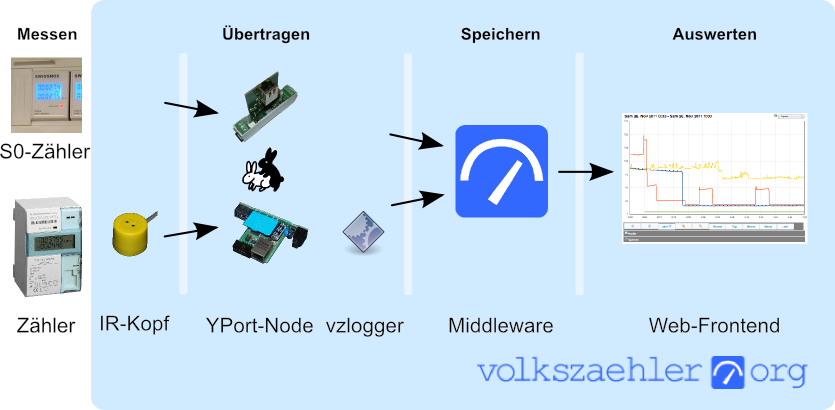
Build your own Infrared reader head for electriciti smart meters for around USD 6: haus-automatisierung.com [4K] – YouTube

Posted by jpluimers on 2021/03/24

In German, but very interesting IR-Lesekopf für SmartMeter selber bauen | haus-automatisierung.com [4K] – YouTube:

I could not find the promised follow-up video at haus-automatisierung.com – YouTube, but the manual steps and the site below have enough information for me.

Too bad the site is way to big to fully archive in the WayBack machine. I only saved the top pages:

Related: [WayBack] MQTT-Grundlagen-Kurs – haus-automatisierung.com

–jeroen

Read the rest of this entry »

Posted in Development, Hardware Development, Hardware Interfacing, IoT Internet of Things, Raspberry Pi, Software Development | Leave a Comment »

PoE to ethernet + micro USB converters

Posted by jpluimers on 2020/11/06

The first is 100mbit, some do not get it to work with Raspberry Pi 3B+, but others do get it to work, even at 1Gbit:

The second is 1Gbit, about 40% more expensive, but just works:

Via: [WayBack] Thread by @Nick_Craver: “Shout out to @mstum for reminding me 1Gb PoE USB splitters are completely viable for Raspberry Pis – now running a fi PoE switches and using just 1 outlet on the UPS: … Less wiring and if the network’s […]”

–jeroen

Posted in Development, Hardware Development, Power User, Raspberry Pi | Leave a Comment »

Good tips for powering any kind of LED strips from the Adafruit NeoPixel Überguide | Adafruit Learning System

Posted by jpluimers on 2020/10/22

Read these tips before playing with any kind of LED strips: [WayBack] Powering NeoPixels | Adafruit NeoPixel Überguide | Adafruit Learning System.

There are more, but these are the most important:

  • When connecting NeoPixels to any live power source or microcontroller, ALWAYS CONNECT GROUND (–) BEFORE ANYTHING ELSE. Conversely, disconnect ground last when separating.
  • Adding a 300 to 500 Ohm resistor between your microcontroller’s data pin and the data input on the first NeoPixel can help prevent voltage spikes that might otherwise damage your first pixel. Please add one between your micro and NeoPixel.
  • Before connecting a NeoPixel strip to ANY source of power, we very strongly recommend adding a large capacitor (1000 µF, 6.3V or higher) across the + and – terminals. This prevents the initial onrush of current from damaging the pixels.
  • Be extremely cautious with bench power supplies. Some — even reputable, well-regarded brands — can produce a large voltage spike when initially switched on, instantly destroying your NeoPixels!
    If you use a bench supply, do not connect NeoPixels directly. Turn on the power supply first, let the voltage stabilize, then connect the pixels (GND first).

Via: [WayBack] Bouw je eigen ledtafel – Tot slot – Achtergrond – Tweakers

–jeroen

Posted in Arduino, Development, Hardware Development, Hardware Interfacing, Raspberry Pi | Leave a Comment »

GL-AR300M – GL.iNet: nice small device allowing NAT over WAN, WiFi, 3G/4G modem, or OpenVPN

Posted by jpluimers on 2020/08/28

Still glad I got a few of [WayBack] GL-AR300M – GL.iNet: it makes travel life so much easier when you cannot use tethering.

I got the model GL-AR300M with external antennas (the GL-AR300M only has internal ones with a much shorter range).

Powered over USB, it runs OpenWRT and can NAT a local network towards an external network on the WAN, WiFi or (via USB) 3G/4G modem.

Despite doing only 2.4Ghz, it was a life saver in many occasions (there is a 5Ghz model, but it has over heating issues).

Read the rest of this entry »

Posted in Development, Ethernet, GL-AR300M, GL.iNet, Hardware, Hardware Development, LifeHacker, Network-and-equipment, Power User, Raspberry Pi, routers, VPN, WiFi | Leave a Comment »

Remote power control your IoT hardware and remote updating boot SD cards

Posted by jpluimers on 2020/07/16

Thomas Rini (of U-Boot and Yocto fame) mentioned these solutions for remote power control of IoT devices and remote updating SD cards in this slide State of the U-Boot – Thomas Rini, Konsulko Group:

Two power solutions I like myself are:

The combination of these allows for really flexible production and testing environments.

Slides at [WayBackELC2017 – State of the U-Boot.pdf

–jeroen

Read the rest of this entry »
Posted in Arduino, Development, ESP8266, ESP8266X, Hardware Development, Hardware Interfacing, IoT Internet of Things, Network-and-equipment, Odroid, Power User, Raspberry Pi | Leave a Comment »

Raspberry Pi, Tumbleweed, btrfs

Posted by jpluimers on 2020/06/15

I want to use btrfs as filesystem on a Raspberry Pi with opensuse Tumbleweed.

It is hard to find out how, so here are a few links that should help me from “opensuse” “tumbleweed” “btrfs” “raspberry” pi:

–jeroen


Posted in *nix, *nix-tools, Development, Hardware Development, Linux, openSuSE, Power User, Raspberry Pi, SuSE Linux, Tumbleweed | Leave a Comment »

GitHub – dschmenk/apple2pi: Apple II client/server for Raspberry Pi

Posted by jpluimers on 2020/05/28

[WayBack] GitHub – dschmenk/apple2pi: Apple II client/server for Raspberry Pi: hybrid computer of a Raspberry Pi inside an Apple II (either ][, or ][+, or //e) so the Apple II can be a front-end to the Raspberry Pi which then can run an Apple IIGS emulator, talk to the Apple II storage hardware and much more.

It can run [WayBack] RASPPLE II: A2CLOUD, A2SERVER, Apple II Pi for Raspberry Pi

Lot’s of videos below, all by David Schmenk https://www.youtube.com/user/dschmenk/videos

Via:

–jeroen


Posted in *nix, *nix-tools, //e, 6502, Apple, Apple ][, Development, Hardware Development, Hardware Interfacing, History, Power User, Raspberry Pi, USB | Leave a Comment »