Archive for the ‘Raspberry Pi’ Category
Posted by jpluimers on 2017/12/26
A cool set of YouTube videos by CWNE88:
The USB device used here is this one:
Tuner is AVerMedia AVerTV Volar Green
There are 2 models, but the good one uses firmware dvb-usb-it9135-02.fw The other one uses dvb-usb-af9035-02.fw but that didn’t seem to work as well and got hot. They look the same on the outside though.
ID 07ca:3835 AVerMedia Technologies, Inc. AVerTV Volar Green HD (A835B)
–jeroen
Posted in Development, Hardware Development, Power User, Raspberry Pi | Leave a Comment »
Posted by jpluimers on 2017/11/09
Interesting as it has steps for both OpenSuSE and Debian each well suited for running on a Raspberry Pi.
[WayBack] MX Backup – Postfix Email Server | samhobbs.co.uk
It seems postfix is a lot easier to configure than sendmail so I already like it.
First I need to read a bit more in Postfix greylisting.
I’ll need to catch up on Sam’s other parts with the postfix tag as well:
–jeroen
Posted in *nix, *nix-tools, Debian, Development, Hardware Development, Linux, openSuSE, Power User, Raspberry Pi, Raspbian, sendmail, SuSE Linux, Tumbleweed | Leave a Comment »
Posted by jpluimers on 2017/10/30
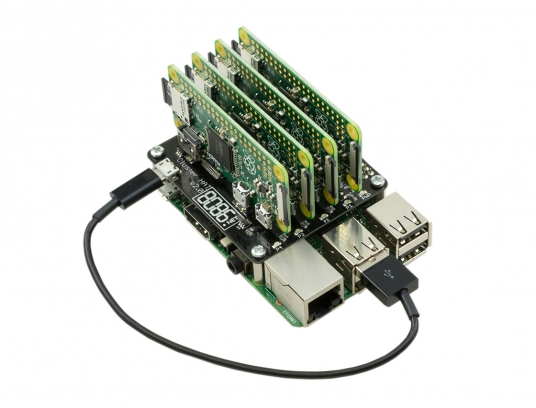 Interesting stuff; I wonder if there is a case for it as well:
The Cluster HAT interfaces a (Controller) Raspberry Pi A+/B+/2/3 with 4 Raspberry Pi Zeros Configured to use USB Gadget mode, it is an ideal tool for teaching, testing or simulating small scale clusters.
This Kit Includes 1 x Cluster HAT V2, 4 x Raspberry Pi Zero’s, 4 x 16GB Micro SD Cards.
Please Note. A Raspberry Pi B+/2/3, with SD Card & Power Supply are also required for set up. These items are NOT Included in the Kit but can be purchased separately.
Source: [WayBack] ModMyPi | Cluster HAT Kit Inc. 4 x Raspberry Pi Zero
Via Matthijs ter Woord.
–jeroen
Posted in Development, Hardware Development, Hardware Interfacing, Raspberry Pi | 2 Comments »
Posted by jpluimers on 2017/10/17
I ordered a UPS PIco HV3.0 A Stack 450 Plus and it arrived without any documentation on how to solder the parts together.
So I tried searching for them: https://www.google.com/search?q=UPS+PIco+HV3.0+A+Stack+450+Plus+installation+instructions which turned mostly github based URLs.
I learned there is a bit on github:
But despite code and documentation being there, no installation instructions on how to solder the stuff together.
Luckily, they responded quickly to my tweet So I got my “UPS PIco HV3.0 A Stack 450 Plus” @ModMyPi but no assembly instructions. Where do all the non-soldered parts go when using RPi3? and a quick respons thread revealing I needed 03_0x38_W_UPS PIco HV3.0.pdf which – TADAAAA – is on Google drive and on the forums at [WayBack] UPS PIco Firmware Update & Troubleshooting : Technical Support
So despite github providing an excellent platform for discussion and storing documentation, something archaic like a forum is used to store data in a disorganised way.
Too bad, as the document itself is 100+ page of invaluable documentation.
So in case of future bit-rot, here are the links:
Read the rest of this entry »
Posted in Development, Hardware Development, Hardware Interfacing, Raspberry Pi | Leave a Comment »
Posted by jpluimers on 2017/10/02
A while ago I wrote about -bash: warning: setlocale: LC_ALL: cannot change locale (en_US.UTF-8) on fresh Raspbian on Raspberry
I thought my locale issues were solved and they sort of were. Until I had to logon locally and managed to get one or more of these characters in my password:
~ (tilde)@ (at)# (hash)\ (backslash)| (pipe)" (double-quote)
Then logon would fail locally but work via ssh. Go figure!
Lot’s of people outside the UK using their Raspberry Pi with keyboard and monitor will now say: you’ve the default GB keyboard layout and your keyboard is not GB.
Bingo!
This is how US keys look when using a GB keyboard layout:
Read the rest of this entry »
Posted in *nix, Debian, Development, Hardware Development, Linux, Power User, Raspberry Pi, Raspbian | Leave a Comment »
Posted by jpluimers on 2017/09/28
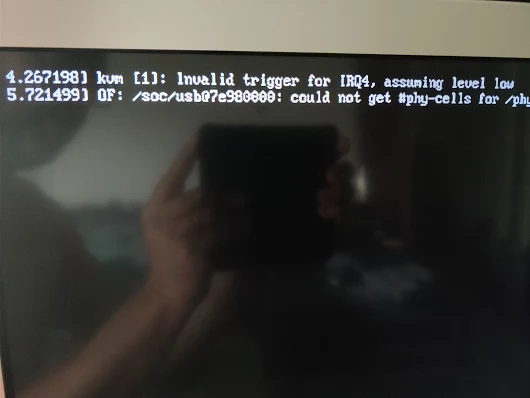
kvm [1]: Invalid trigger for IRQ4, assuming level low

OF: /soc/usb at 7e980000: could not get #phy-cells for /phy
Via [WayBack] Oops. – Jeroen Wiert Pluimers – Google+
This was after updating my Raspberry Pi 3 with Tumbleweed to 20170920.
Not sure what do do now. Some searches didn’t reveal much:
–jeroen
Posted in *nix, Development, Hardware Development, Linux, openSuSE, Power User, Raspberry Pi, SuSE Linux, Tumbleweed | Leave a Comment »
Posted by jpluimers on 2017/08/24
Many networks have DHCP Manual allocation (commonly called static allocation) handing out static/fixed IP addresses over DHCP so you can centralise IP address handout based on MAC (or other attributes).
Here are some links that should me get going making my pi-hole Raspberry Pi using DHCP instead of static IP addresses.
Yucky way to set a static IP: How do I set a static IP address in Raspbian “Jessie” using /etc/dhcpcd.conf? – Pi-Hole: A Black Hole For Internet Advertisements [WayBack]
–jeroen
Posted in Development, Hardware Development, Power User, Raspberry Pi | Leave a Comment »
Posted by jpluimers on 2017/08/17
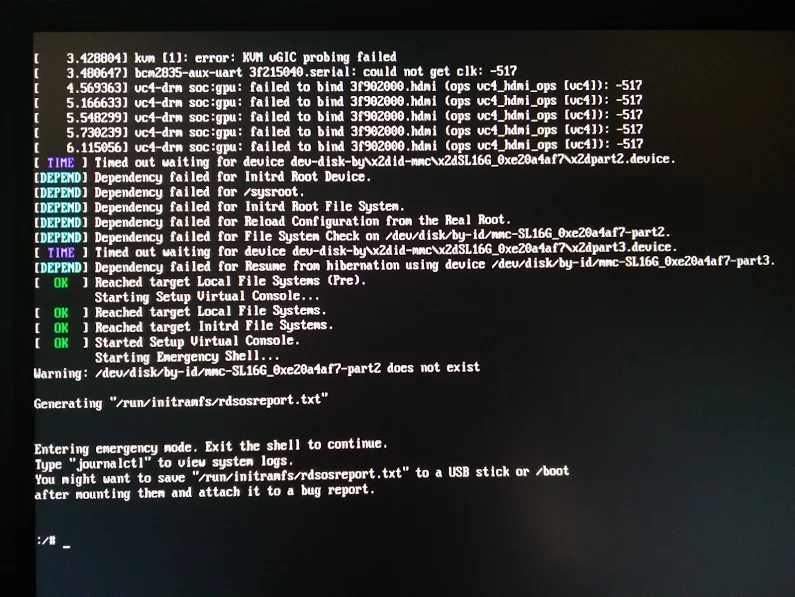
Reproduction of A start job is running for dev-disk-by... – Google Photos / Oops. Let’s see if I can reproduce it, as I think this is related: https://…
Reproducible steps below.
Related:
Tried tips from last link: fails as well
These are the modifications of the steps further on based on the last link above.
- After first boot, verify the WiFi drivers are there:
# rpm -qa | grep bcm43xx

bcm43xx-firmware-20170410-2.1.noarch
- After editing
/etc/dracut.conf.d/raspberrypi_modules.conf, perform sudo mkinitrd without any -f
- After reboot, same error
Error result
At boot time:
 A start job is running for dev-disk-by\…
After waiting:
Reproducible steps
- download (or a more recent one) from http://download.opensuse.org/repositories/devel:/ARM:/Factory:/Contrib:/RaspberryPi3/images/ :
- Install them on a MicroSD card
- Put in Raspberry Pi 3 and boot
- Get the IP address of the machine, then SSH into it (
ssh root@ip-address, password linux)
- Follow the steps from [WayBack] openSUSE on Raspberry Pi 3: From Zero to Functional System in a Few Easy Steps – SUSE Blog | SUSE Communities to get WiFi working:
- Edit
/etc/dracut.conf.d/raspberrypi_modules.conf and remove the sdhci-iproc from the first and # on the last line:From :
add_drivers+=" sdhci-iproc bcm2835-sdhost bcm2835_dma mmc_block dwc2 "
# Workaround for Wifi
#omit_drivers+=" sdhci-iproc"
To :
add_drivers+=" bcm2835-sdhost bcm2835_dma mmc_block dwc2 "
# Workaround for Wifi
omit_drivers+=" sdhci-iproc"
- Run these commands:
mkinitrd -f
reboot
- Check in
Yast if wlan0 exists in System -> Network Settings, then assign an SSIS plus credentials to it
- Verify the list contains
BCM43430 WLAN card
- Select it
- Click the
Edit button
- Put the check mark next to
Dynamic Address then select DHCP and the kind of DHCP (in my caseboth version 4 and 6)
- Click the
Next button
- Keep
Operating Mode as Managed
- Click the
Scan Network button
- Select
Network Name (ESSID) from the list
- Select
Authentication Mode from the list
- Put the check mark for
Key Input Type as Passphrase
- Enter the
Encryption Key
- Click the
Next button
- Click the
OK button
- Quit
Yast
- Wait a few moments, then very with
ip a that wlan0 got an IP address
- Update the system:
zypper refresh
zypper dist-upgrade
- Reboot
- Wait for the error to occur on the HDMI screen (USB keyboard does not work there, so I cannot copy logs)
Gist log until 7. is below.
IRC chat transcript opensuse-factory
[10:40am] <wiert> TL;DR: Tumbleweed on Rpi3; enable WiFi according to site and forum instructions; zypper dist-upgrade; boot failure.
[10:41am] <wiert> without enabling WiFi everything is fine.
[10:41am] <wiert> spare RPi3s get in next week, so I’ll configure this one for my brother without WiFi for now.
[10:43am] <fvogt> Hm, that guide can’t actually work that way (unless something changed significantly)
[10:43am] <wiert> it worked in the sense that it got WiFi working. it failed in the sense that you cannot upgrade any more (:
[10:43am] <fvogt> The omit_drivers line removed the driver for the sd card controller, so it’s no surprise that it doesn’t boot anymore. It needs a different device tree
[10:44am] <fvogt> I guess you upgraded the kernel + DT? You must not do that
[10:44am] <wiert> funny as after the mkinitrd, a reboot went fine.
[10:44am] <wiert> it’s only that after a zypper dup it fails.
[10:44am] <mnowak__> DimStar, I wan’t $$ only on Windows, I should not have to re-define $prompt_sign. I guess I need to move the second $prompt_sign to the if-clause below
[10:45am] <fvogt> wiert: Ah, so it ships with a WiFi enabled DT + Kernel with the TW image
[10:45am] <fvogt> If you zypper dup then, it’ll switch to the DT + Kernel from plain TW, breaking everything
[10:46am] <wiert> What’s DT?
[10:46am] <wiert> driver-tree?
[10:46am] <fvogt> Close, device-tree
[10:46am] <wiert> (that gist has all the steps I performed)
[10:46am] <fvogt> It contains the assignment of memory and other HW resources to each other and drivers
[10:47am] <fvogt> That’s most likely the issue
[10:48am] <fvogt> You can recover from that by downloading the right .dtb file and putting it on the sd card manually
[10:48am] <fvogt> Alternatively, the u-boot embedded one should still work, so you can delete the DT on the SD and it should boot again (with some missing peripherals though)
[10:51am] <wiert> I’ve already put a fresh disk image on it and I’m in the midst of configuring it for my brother (he’s mentally retarded and I’m putting it behind his TV so he can view his agenda electronically to see if that gives him more stability in organising his life; I need to be at his place in 2 hours)
[11:27am] <wiert> @fvogt: I will add this part of the IRC chat to that blog post and try to get your suggestions done when the spare RPI3s get in.
–jeroen
Read the rest of this entry »
Posted in *nix, Development, Hardware Development, Linux, openSuSE, Power User, Raspberry Pi, SuSE Linux, Tumbleweed | Leave a Comment »
Posted by jpluimers on 2017/04/12
 Interesting hardware project: NeonHorizon/lipopi: Guide to setting up LiPo batteries on the Raspberry Pi
Pictures: Daniel Bull – Google+
Basically it’s a mini-UPS that works for any Raspberry Pi, but for a model 3 you have to add a tiny capacitor.
From the readme:
- Description: LiPoPi is a guide to setting up the Raspberry Pi with a LiPo battery including both running and charging it
- Project Website: GitHub
- Requirements: A Raspberry Pi (any model – see notes about the Raspbery Pi 3) and an Adafruit PowerBoost 500 Charger or 1000C Charger
- Skillset: Requires soldering skills and a basic knowledge of the command line
- License: GPL Version 3
–jeroen
Read the rest of this entry »
Posted in Development, Hardware Development, Raspberry Pi | Leave a Comment »
Posted by jpluimers on 2017/04/11
I’m going to build this later, but as the follow up on shortening the RUN pins of a Raspberry Pi to reset it in The woods and trees of OpenSuSE on single-board computers – image abbreviations – and getting it installed using OS X, I want to see if the below will work for me to have a pair (maybe trio?) of Raspberry Pi devices watch each other and reset any hung one.
The need comes because sometimes a Raspberry Pi either hangs or just won’t finish a reboot sequence:
Basically a Raspberry Pi has GPIO pins that can drive electromechanic (like mechanical relay) or electronic (like transistor+resistors or SSR solid-state relay). Examples:
So basic steps:
- Get switching gear (relay+diode, transistor+resistors or solid-state-relay)
- On each Pi modify the RUN holes so it has a header
- Connect header to switching gear
- Write watch-dog code to monitor other Pi and flip GPIO pin
- Test, test, test
And since I’m relatively new at electronics:
–jeroen
Read the rest of this entry »
Posted in *nix, Development, Hardware Development, Linux, openSuSE, Power User, Raspberry Pi, SuSE Linux | Leave a Comment »


 The Wiert Corner - irregular stream of stuff