The Wiert Corner – irregular stream of stuff

Jeroen W. Pluimers on .NET, C#, Delphi, databases, and personal interests

  • My badges

  • Twitter Updates

  • My Flickr Stream

  • Pages

  • All categories

  • Enter your email address to subscribe to this blog and receive notifications of new posts by email.

    Join 1,862 other subscribers

Archive for the ‘Hardware Interfacing’ Category

Interesting: Electric Imp with Arduino (via: electric imp – developer kits)

Posted by jpluimers on 2012/05/28

Electric Imp – that wants to power The Internet of Things using imps – is introducing some really interesting hardware, one of the devevelopment kits combining Arduino and Imp on one board:

Duino: Arduino, with Imp

Featuring an ATMEGA328 processor, this board is compatible with the Arduino Uno but instead of having a USB-serial port on it, it has an Imp socket. You can use a modified version of the Arduino IDE to update the ATMEGA code from anywhere in the world when an Imp is plugged in, and use simple serial commands in your Arduino programs to control other Imp devices.

The ATMEGA will operate standalone when no imp card is inserted.

Dimensions: 72mm x 54mm x 14mm

Power supply: USB Mini-B socket (5v) or 2.1mm barrel jack (7-12v)

Price: $20

Some must read links:

–jeroen

via: electric imp – developer kits.

Posted in Arduino, Hardware Development, Hardware Interfacing, USB | 2 Comments »

Hardware Will Cut You

Posted by jpluimers on 2010/11/16

Amanda Wozniak on hardware design (which is almost, but not quite entirely unlike software design).

Quote from a viewer:

Very cool, fast paced intro. Its odd to hear about hardware design from software based world we now have – i started when things were reversed and it was/is near impossible to convey that there are different design processes. I wish production sw folks would realize that prototype != production, but once sw works sorta, it ships. Also interesting views on CAD SW and how unlike photoshop, houdini, etc it is. Perhaps the industry is ripe for a package that does recognize last 15yrs of software improvements.

Quote from the video:

If you want start tinkering around, get an Arduino. It is like 30 bucks…. Arduino is like electronics for artists. If artists can do it, so can you.

–jeroen

via Hardware Will Cut You.

Posted in Development, Hardware Development, Hardware Interfacing | Leave a Comment »

Great new ESXi 4.1 feature: USB Pass Through

Posted by jpluimers on 2010/10/18

A great new ESXi 4.1 feature us the much simplified support of USB Pass Through.

In fact it is one of the biggest reasons I updated so quickly; I have been running it now for almost 3 months now. Read the rest of this entry »

Posted in ESXi4, Hardware Interfacing, Power User, USB, VMware | 3 Comments »

Manually call the “Safely Remove Hardware” dialog — HotSwap! – hot eject and hot insert SATA hard-drives – practical use with ICY BOX 266StUSD « The Wiert Corner – Jeroen Pluimers’ irregular stream of Wiert stuff

Posted by jpluimers on 2009/09/09

I forgot to explicitly mention that the normal “Safely Remove Hardware” icon in the system tray notification area sometimes disappears.

Today, I bumped in such a system, so I was glad I had a reference explaining how manually call the “Safely Remove Hardware” dialog to solve it.

But now I had this dumb icon:

So here are the full steps, including icon.

1. Add a shortcut with this command line:

[script sourcecode=’cscript’]
RunDll32.exe shell32.dll,Control_RunDLL hotplug.dll
[/sourcecode]

2. Change the icon to take icons from this DLL:

[script sourcecode=’cscript’]
%SystemRoot%\system32\hotplug.dll
[/sourcecode]

3. Name the shortcut “Safely Remove Hardware”

So, now you have a nice shortcut with the correct.
This shortcut works, even when it is gone from the system tray:

BTW: Rob van der Woude has a nice page with rundll32 scripts.

–jeroen

Posted in CommandLine, Development, Hardware Interfacing, Software Development, USB | Leave a Comment »

HotSwap! – hot eject and hot insert SATA hard-drives – practical use with ICY BOX 266StUSD

Posted by jpluimers on 2009/08/30

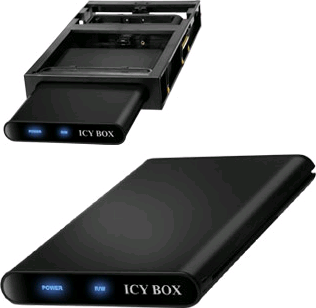
RaidSonic ICY BOX IB-266StUSD-B and IB-266StUS-BOver the last couple of years, I have upgraded a few SATA laptop hard-disk drives to larger ones.
The easiest way to reuse these drives, is to put them into an external USB enclosure.
But: USB does not deliver the speed of SATA.

So, a few years ago, I found the ICY BOX IB-266StUSD-B from RaidSonic – the picture at the top.
This box contains both the actual enclosure part IB-266StUS-B (note the missing D from the part number) – the picture on the bottom, and a docking station that fits in a regular 3.5″ external bay (now normally used for multi-card readers, in the past used for floppy drives or ZIP drives).

The cool thing is that the enclosure has both an USB and an eSATA connection:
IB-266StUS-B has both eSATA and USB connections 

Even cooler is that the docking station also has a SATA connection. Which means that as soon as you insert the HDD, you have full SATA speed.

Now the not so cool thing is that Windows does not allow you to hot eject or hot insert a SATA drive.
Or does it?
In fact it does allow inserts, and even ejects, but with a lot of fiddling with Device Manager, and only if your SATA driver allows it from within the Device Manager.

This is where HotSwap! kicks in… Read the rest of this entry »

Posted in Development, Hardware Interfacing | 1 Comment »

Spoken @ DevDays 2009 NL – download is online: .NET & hardware – capture video & control servos, in a fun application

Posted by jpluimers on 2009/06/02

Last week I spoke at the GeekNight of the Dutch Microsoft DevDays 2009.
A great conference, signalling two important industry wide trends:

  • Cloud computing
  • Natural user interfaces

There were many interesting presentations on both, and we are only at the beginning of those trends: interesting times are ahead!

My presentation (.NET & hardware – capture video & control servos, in a fun application) was as a GeekNight session.
That imposed geeky stuff, but in addition it addressed an important point: there will be many more means of interaction.
In particular, my ‘geek’ combination of hardware and software would react on movements seen by the webcam by pointing the beam of the laserpointer towards the largest area that moved.

After that I enjoyed the long Pentecost weekend (yes, the monday after Pentecost is a Holiday in the Netherlands, so most people have a day off then).

Today I updated my Conferences, seminars and other public appearances page with my DevDays materials to download.

It contains both the sourcecode, and the presentation in English.

Enjoy the download :-)

–jeroen

Posted in .NET, C#, C# 2.0, C# 3.0, DevDays09, Development, Event, Hardware Interfacing, Servo, Software Development, USB, WebCam | Leave a Comment »