Archive for the ‘Hardware Interfacing’ Category
Posted by jpluimers on 2018/06/19
I never realised that Amazon Alexa has an open source account on GitHub: https://github.com/alexa
There are full instructions on getting a Java based Alexa Voice Service (AVS) – also used by Amazon Echo – to run on a Raspberri Pi (3 or better recommended, works on 2 as well) with this extra hardware:
- USB microphone
- Speaker with a 3.5mm audio plug
- USB WiFi (essential for Raspberry Pi 2, optional if you want to boost your WiFi signal on a Raspberry Pi 3)
Full instructions are at Raspberry Pi · alexa/alexa-avs-sample-app Wiki and a video is below: https://www.youtube.com/watch?v=baec1CbV6A0
I should find some time to try this out (:
–jeroen
Read the rest of this entry »
Posted in Development, Hardware, Hardware Development, Hardware Interfacing, Software Development | Leave a Comment »
Posted by jpluimers on 2018/06/08
Be sure to read the comments at USB serial converters from FTDI are quite popular – Thomas Mueller (dummzeuch) – Google+ [WayBack] as it tells more about how to set genuine and fake FTDI chips apart (often before buying them, you cannot tell) and how to replace fake ones buy genuine ones.
Getting back to original means de-soldering fake chips, and soldering new genuine chips on the boards.
Fake chips:
- have limited batches of the same serial (although there are ways to reprogram the serial, see links below)
- connecting multiple adapters with the same serial causes trouble
- are mangled by various FTDI drivers (either their PID is reset, or fake-data is inserted in the serial stream)
- have problems operating at higher data rates
Note that the workarounds for these fake chips mean you cannot use more recent chips.
Links from Thomas’s post and other relevant links on the various kinds of genuine/fake and getting fake ones work again
Fake chips can cause you a lot of headaches – and time – sorting out communication problems: [WayBack] esptool-ck, esp8266, and FTDI Bug Hunting – vilimblog
Two years ago, this shoot-out (with results on github) had a great conclusion:
Buy either an adapter with a genuine FTDI chip, or one of the Silicon Labs CP2102 chips.
The FTDI chip is the only one attaining 3M baud rates.
Overview articles:
SiLabs chips seem to be the only without much trouble:
- [WayBack] SiLabs CP210x USB Adapters For The Win – vilimblog
- The “Legacy Utilities” allow you to re-program the serial on any
cp210x device, no matter the chip source:
- Review of a Generic USB RS 232/485/TTL Adapter (“Winners” branded) – YouTube:
- Almost anything with FTDI/Prolific chips that comes from ebay/aliexpress should be assumed to be counterfeit – easy way to test this is to buy 2 and see if their serial numbers match. You don’t really want to waste your time with fake ones, you’ll end up spending more on those if you try to get them for as cheap as possible. Itead sells an adapter for 6.8 USD with genuine FT232RL chips, but they aren’t in as convenient dongle form factor, but might be worth more than your own time replacing fake chips with genuine ones.Although not mentioned here, CH340/1 should generally be avoided, while they work fine for short periods of time, for longer use they seem to be as unreliable as the counterfeit FTDI/Prolific chips on Linux.
I haven’t seen or recognized a fake CP210x chip yet, so my guess would be that these are generally fine no matter where you get them. One big advantage of those is the integrated voltage 3.3V regulator, which can save some space when rolling your own boards.
FTDI related:
Genuine FTDI seems to be the easiest to find:
- The cheapest solution is re-soldering chips:
- Way more expensive, but saves a lot of time are complete adapters
Prolific has similar issues, driver v3.4.25.218 still works with fake chips:
–jeroen
Related posts where I mentioned some of the trouble with FTDI chips:
Read the rest of this entry »
Posted in *nix, Development, Hardware Development, Hardware Interfacing, Legacy Ports: COM, Linux, openSuSE, Power User, SuSE Linux | Leave a Comment »
Posted by jpluimers on 2017/10/30
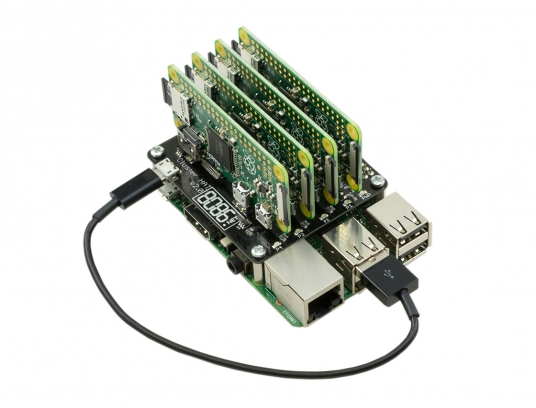 Interesting stuff; I wonder if there is a case for it as well:
The Cluster HAT interfaces a (Controller) Raspberry Pi A+/B+/2/3 with 4 Raspberry Pi Zeros Configured to use USB Gadget mode, it is an ideal tool for teaching, testing or simulating small scale clusters.
This Kit Includes 1 x Cluster HAT V2, 4 x Raspberry Pi Zero’s, 4 x 16GB Micro SD Cards.
Please Note. A Raspberry Pi B+/2/3, with SD Card & Power Supply are also required for set up. These items are NOT Included in the Kit but can be purchased separately.
Source: [WayBack] ModMyPi | Cluster HAT Kit Inc. 4 x Raspberry Pi Zero
Via Matthijs ter Woord.
–jeroen
Posted in Development, Hardware Development, Hardware Interfacing, Raspberry Pi | 2 Comments »
Posted by jpluimers on 2017/10/17
I ordered a UPS PIco HV3.0 A Stack 450 Plus and it arrived without any documentation on how to solder the parts together.
So I tried searching for them: https://www.google.com/search?q=UPS+PIco+HV3.0+A+Stack+450+Plus+installation+instructions which turned mostly github based URLs.
I learned there is a bit on github:
But despite code and documentation being there, no installation instructions on how to solder the stuff together.
Luckily, they responded quickly to my tweet So I got my “UPS PIco HV3.0 A Stack 450 Plus” @ModMyPi but no assembly instructions. Where do all the non-soldered parts go when using RPi3? and a quick respons thread revealing I needed 03_0x38_W_UPS PIco HV3.0.pdf which – TADAAAA – is on Google drive and on the forums at [WayBack] UPS PIco Firmware Update & Troubleshooting : Technical Support
So despite github providing an excellent platform for discussion and storing documentation, something archaic like a forum is used to store data in a disorganised way.
Too bad, as the document itself is 100+ page of invaluable documentation.
So in case of future bit-rot, here are the links:
Read the rest of this entry »
Posted in Development, Hardware Development, Hardware Interfacing, Raspberry Pi | Leave a Comment »
Posted by jpluimers on 2017/03/30
Some links that helped me getting FTDI USB serial communication to Raspberry Pi systems going:
–jeroen
Posted in Apple, Communications Development, Development, Hardware Development, Hardware Interfacing, iMac, Legacy Ports: COM, Mac, Mac OS X / OS X / MacOS, MacBook, MacBook Retina, MacBook-Air, MacBook-Pro, MacMini, OS X 10.10 Yosemite, OS X 10.9 Mavericks, Power User, Raspberry Pi, USB | Leave a Comment »
Posted by jpluimers on 2017/02/01
I need to check these against a Chromecast v2 as the below URLs are from a v1 device:
More is possible by using cURL: Chromecast Hacking Has Begun | fiquett.com
sleep 8h; while true; do
curl -H "Content-Type: application/json" http://192.168.71.113:8008/apps/YouTube -X POST -d 'v=somevideo';
done
Related:
–jeroen
via:
Posted in Chromecast, Communications Development, Development, Google, Hardware Interfacing, HTTP, https, Internet protocol suite, REST, Security, TCP | 3 Comments »



 The Wiert Corner - irregular stream of stuff