Archive for the ‘Android’ Category
Posted by jpluimers on 2016/05/19
Android ADB over TCP/IP can be a bit of a pain to setup. Some devices have a built-in option to enable this (by default on port 5555), otherwise you have to connect through USB first, then use ADB to enable TCP/IP:
adb tcpip 5555
I got it to work without being root, but on some devices you need to be.
See these links for more information:
Note that while writing this, ADB For Chrome could not run over TCP/IP.
–jeroen
Posted in Android, Android Devices, Development, Mobile Development, OnePlus One, Power User, Software Development | 2 Comments »
Posted by jpluimers on 2016/02/19
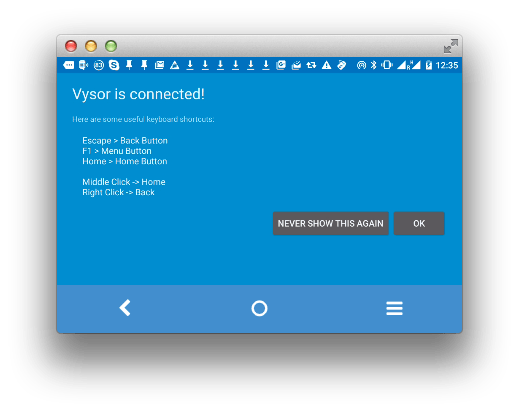
Just updated Cool: Vysor screen sharing by Koush with this:
Edit 20160217: new keyboard/mouse shortcuts
- Old: keyboard shortcuts
Escape -> Back Button;F1 -> Menu Button;Home -> Home Button;
- New: mouse shortcuts
Middle Click -> Home;Right Click -> Back
Now hopefully the screen resolution thing will be fixed: [Wayback/Archive] github.com/koush/vysor.io/issues/68
–jeroen
Posted in Android, Android Devices, Chrome, Development, Google, Keyboards and Keyboard Shortcuts, KVM keyboard/video/mouse, Mobile Development, Power User, Vysor | Leave a Comment »
Posted by jpluimers on 2015/11/17
If you ever need a universal Android ADB driver for Windows, then use this one: koush/UniversalAdbDriver.
I never noticed it was there until Koushik Dutta posted about a signing trick on Google+.
Windows drivers need to be signed, so what he does is generate a self signed certificate on the fly during installation, sign the driver install it, and drop the private key of the certificate.
Each installation has its own key, Microsoft is happy, and it is proven the driver signature mechanism in Windows has a hole.
If you want to do similar things, then this commit is what you are looking for: Use a self signed, self destructing signing cert. · e8b78fe · koush/UniversalAdbDriver.
It isn’t rocket science, but not trivial C# either, so this is a great example of something that works.
–jeroen
Posted in .NET, Android, C#, Development, Mobile Development, Software Development | Leave a Comment »
Posted by jpluimers on 2015/01/29
Thanks Kristian Köhntopp for mentioning this, so it got on my research list:
a new reverse-engineering framework that works on the intermediate representation Jimple and supports all the features above and a lot more.
…
CodeInspect supports as input format a complete Android Application Package (apk), just the Android bytecode (dex-file) or a jar-file.
In the following we will describe the different features based on a malicious Android apk.
The figure above is a screenshot of CodeInspect. As one can see, CodeInspect is based on the Eclipse RCP framework
…
–jeroen
via: CodeInspect says “Hello World”: A new Reverse-Engineering Tool for Android and Java Bytecode | Secure Software Engineering.
Read the rest of this entry »
Posted in Android, Development, Java, Java Platform, Mobile Development, Software Development | Leave a Comment »
Posted by jpluimers on 2014/10/30
Downloads:
CodeRage 9 Files!
This year I presented Push notifications with Android. Here are the files mentioned in the session!
Session:
Android Push Notifications
Want to send push notifications to your clients or employees? This session goes over setting up GCM, installing push notifications into your application, and calling GCM to push those messages to your app.
Level: Intermediate
Jeff Lefebvre
Q&A:
Read the rest of this entry »
Posted in Android, Android Devices, Appmethod, Delphi, Delphi XE7, Development, Mobile Development, Power User, Software Development | Tagged: android, Push notifications | 4 Comments »
Posted by jpluimers on 2014/09/11
Interesting:
Android Wear is designed to work with Android phones running 4.3 or higher. Not sure what version of Android you have? Visit g.co/WearCheck on your phone to see if it’s compatible with Android Wear.
My Google Nexus 4: check!
–jeroen
via: Android Wear Check.
Posted in Android, Android Devices, AndroidWear, Development, Google, Mobile Development, Power User | Leave a Comment »
Posted by jpluimers on 2014/08/15
Designer’s guide to DPI.
On retina, Hi-DPI, Android, iOS, scaling, DP, SP, etc.
–jeroen
Posted in Android, Development, iOS Development, Mobile Development, Software Development, User Experience (ux), Windows Phone Development | Leave a Comment »
Posted by jpluimers on 2014/04/16
Thanks a lot Steve Pomeroy! And shame on me for finding out (through Michael Panzer, thanks for your notification) this chart only today (he published this chart on 2013-08-20).
Steve’s quote on it:
After struggling with trying to figure out how various pieces fit together, I’ve done some research and put together the complete Android Activity/Fragment lifecycle chart. This has two parallel lifecycles (activities and fragments) which are organized vertically by time. Lifecycle stages will occur in the vertical order in which they’re displayed, across activities and fragments. In this way, you can see how your fragments interact with your activities.
In addition to the attached image, I’ve also got an SVG: http://staticfree.info/~steve/complete_android_fragment_lifecycle.svg which is suitable for printing.
If this is missing lifecycle steps or is inaccurate in any way, let me know so I can update it!
Note: there is also a large bitmap of the chart.
–jeroen Read the rest of this entry »
Posted in Android, Development, Mobile Development, Software Development | Leave a Comment »





 The Wiert Corner - irregular stream of stuff