Archive for the ‘Development’ Category
Posted by jpluimers on 2016/06/16
Since quite a few commands that you regularly see mentioned on the web have been removed from OpenSuSE net-tools, I’ve created a few bash aliases in /etc/bash.bashrc.local below.
Note the original commands are not good have been deprecated for years on various distros and therefore removed:
# stuff removed from net-tools
# see https://features.opensuse.org/317197 and https://build.opensuse.org/package/view_file/network:utilities/net-tools/net-tools.changes
## Because of changes on Thu Apr 10 12:33:41 UTC 2014
alias "arp=echo 'use \"ip neigh\" or \"ip -r neight\"' && ip neigh"
alias "ifconfig=echo 'use \"ip a\"' && ip a"
alias "netstat= echo 'use \"ss\" or \"ss -r\"' && ss"
alias "route=echo 'use \"ip r\"' && ip r"
## Because of changes on Sun Mar 29 00:41:21 UTC 2015
alias "ipmaddr=echo 'use \"ip maddr\"' && ip maddr"
alias "iptunnel=echo 'use \"ip tunnel\"' && ip tunnel"
Some bits of the net-tools change-log:
-------------------------------------------------------------------
Sun Mar 29 00:41:21 UTC 2015 - jengelh@inai.de
- ipmaddr and iptunnel are obsolete too, move them to subpackage.
(Superseded by `ip maddr` and `ip tunnel`)
- remove redundant %clean section
-------------------------------------------------------------------
Thu Apr 10 12:33:41 UTC 2014 - mmarek@suse.cz
- Move arp, ifconfig, netstat and route to a -deprecated subpackage
(fate#317196, fate#317197)
- Drop the rarp tool, which has been broken since kernel 2.3
Note that the -lntu parameter seems to be the same for both ss and netstat: [WayBack] Get a list of Open Ports in Linux – Super User
–jeroen
via File net-tools.changes of Package net-tools – openSUSE Build Service.
Posted in *nix, *nix-tools, bash, bash, Development, Linux, openSuSE, Power User, Scripting, Software Development, SuSE Linux | Leave a Comment »
Posted by jpluimers on 2016/06/15
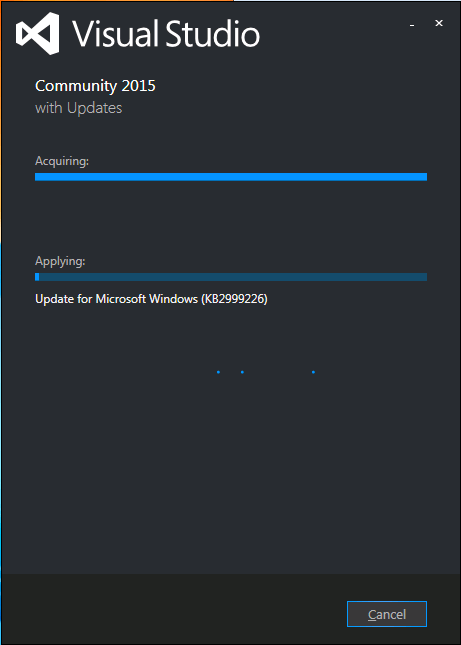
Visual Studio 2015 install stuck on “acquiring” KB2999226
I had exactly the same when installing Visual Studio 2015 on a Windows 7 x64 system: stuck on “Acquiring” the “Update for Microsoft Windows (KB2999226)”.
So as mentioned in the StackOverflow answers for the below question, I manually downloaded “Update for Windows 7 for x64-based Systems (KB2999226)” which you can get directly at https://download.microsoft.com/download/1/1/5/11565A9A-EA09-4F0A-A57E-520D5D138140/Windows6.1-KB2999226-x64.msu.
Be sure to quit both the Visual Studio 2015 installation as well as any (“automagically interfering” background Windows Updates), as otherwise you get this error:
If you still get that error, then
- try to stop/start the
wuauserv service: usually it gets rid of the error.
- When it still occurs, try a clean boot, then re-apply the KB.
Applying the KB can take a long while, even on fast hardware.
–jeroen
Source: Stuck while installing Visual Studio 2015 (Update for Microsoft Windows (KB2999226)) – Stack Overflow
Posted in .NET, Development, Software Development, Visual Studio 2015, Visual Studio and tools | Leave a Comment »
Posted by jpluimers on 2016/06/15
This is what the Delphi [WayBack] System.Classes.TThread.NameThreadForDebugging (introduced in Delphi 2010) is based on:
//
// Usage: SetThreadName (-1, "MainThread");
//
#include <windows.h>
const DWORD MS_VC_EXCEPTION=0x406D1388;

#pragma pack(push,8)
typedef struct tagTHREADNAME_INFO
{
   DWORD dwType; // Must be 0x1000.
   LPCSTR szName; // Pointer to name (in user addr space).
   DWORD dwThreadID; // Thread ID (-1=caller thread).
   DWORD dwFlags; // Reserved for future use, must be zero.
} THREADNAME_INFO;
#pragma pack(pop)

void SetThreadName( DWORD dwThreadID, char* threadName)
{
   THREADNAME_INFO info;
   info.dwType = 0x1000;
   info.szName = threadName;
   info.dwThreadID = dwThreadID;
   info.dwFlags = 0;

   __try
   {
      RaiseException( MS_VC_EXCEPTION, 0, sizeof(info)/sizeof(ULONG_PTR), (ULONG_PTR*)&info );
   }
   __except(EXCEPTION_EXECUTE_HANDLER)
   {
   }
}
Related:
For Delphi 2009 and 2007: It is implemented in the SetThreadName method of the IdGlobal unit.
–jeroen
Posted in C++, Delphi, Development, Software Development | Leave a Comment »
Posted by jpluimers on 2016/06/14
Quoting John Hart‘s brilliant answer:
Using --resolve leverages all of the normal logic that applies, but simply pretends the DNS lookup returned the data in your command-line option. It works just like /etc/hosts should.
Note --resolve takes a port number, so for HTTPS you would use
Https: curl --resolve 'yada.com:443:127.0.0.1' https://yada.com/something
Http: curl --resolve 'yada.com:80:127.0.0.1' http://yada.com/something
It requires curl 7.21.3 or higher (from the end of 2010). Which by now everybody should have.
–jeroen
more via: Set cURL to use local virtual hosts – Stack Overflow.
Posted in *nix, bash, cURL, Development, Power User, Scripting, Software Development | Leave a Comment »
Posted by jpluimers on 2016/06/12
I found a working solution here.It works by using hg strip from the mq extension:$ hg strip my_pruned_branchAs mentioned in the comments, this should only be used for unpublished changesets.
Source: mercurial – Remove experimental branch – Stack Overflow
You need mercurial strip for that which ships with Mercurial 2.8 and up but isn’t enabled by default.
Enabling is easy and can be done globally or on a per-repository base which I like better: just edit your .hg/hgrc file inside your repository and add these lines:
[extensions]

strip =
The source StripExtension – Mercurial forgets to mention you can enable this on a repository base.
I used it to delete an experimental branch that I hadn’t yet pushed to the outside world.
–jeroen
Posted in Development, DVCS - Distributed Version Control, Mercurial/Hg, Source Code Management | Leave a Comment »
Posted by jpluimers on 2016/06/09
I fully agree with Kevin Powick who wrote Good article. Not only applicable to commercial website development, but almost all commercial software.
“You only get what you measure, so be careful what you measure.”
How One Jira Ticket Made My Employer $1MM/Month: 7 Metrics that Actually Matter — JavaScript Scene — Medium
And more highly valuable tips when writing any type of software.
Somewhere in the middle are his golden additions to the Agile values:
Individuals and interactions over processes and tools
Working software over comprehensive documentation
Customer collaboration over contract negotiation
Responding to change over following a plan
If that doesn’t look familiar, you really need to read this.
I’ll add some more of my favorite dev team values:
Skills over titles
Continuous delivery over deadlines
Support over blame
Collaboration over competition
After that he focuses on a few of them explaining where you could go completely wrong and how to do it “the right way”.
Highly recommended reading.
–jeroen
Posted in Agile, Development, Scrum, Software Development | Leave a Comment »
Posted by jpluimers on 2016/06/08
Known IDE Packages in DelphiPrompted by a comment +Jeroen Wiert Pluimers ‘s Google+ post I had a look at what is actually listed in [HKEY_CURRENT_USER\Software\Borland|Codegear|Embarcadero\BDS|Delphi\#.0\Known IDE Packages] … – Thomas Mueller (dummzeuch) – Google+
Source: Known IDE Packages in Delphi Prompted by a comment +Jeroen Wiert Pluimers ‘s…
Related:
Posted in Delphi, Development, Software Development, Uncategorized | 1 Comment »
Posted by jpluimers on 2016/06/08
Boy I wish I had known this earlier. Like years ago…
In the Solution Explorer:
- Right Click Project
- Project Build Oder.
- Use the dialog to change the build order
It is next to the “Project Dependencies” in this image from Sara Ford:

Sara Ford: change “Project Build Order”
In the resulting dialog, you can change the build order within your solution.
This can be very useful when – for various reasons – you cannot have Project Level dependencies for an assembly, but have to have Assembly Reference dependencies for individual assemblies.
At a client I bumped into this, and this dialog was a life saver for us.
Others have used it because some Visual Studio versions miscalculate the dependencies.
–jeroen
Did you know… How to change the build order for your solution? – #333 – Sara Ford’s Weblog – Site Home – MSDN Blogs.
Posted in .NET, C#, C# 2.0, C# 3.0, C# 4.0, C# 5.0, C# 6 (Roslyn), Development, Software Development, Visual Studio 11, Visual Studio 2008, Visual Studio 2010, Visual Studio 2012, Visual Studio 2013, Visual Studio and tools | Leave a Comment »
Posted by jpluimers on 2016/06/07
Via the answer below I created the renew alias. I already had the first two aliases.
alias route-and-ipaddresses="netstat -nr | grep 'Internet\|Gateway\|default' && echo && ifconfig | grep '\: flags\|inet\|inet6' && echo more detailed info through ifconfig and netstat -nr"

alias whatismyip="curl http://whatismyip.akamai.com && echo"

alias renew_dhcp="sudo ipconfig set en0 DHCP && echo waiting 10 seconds for DHCP lease to be obtained && sleep 10 && route-and-ipaddresses && whatismyip"
–jeroen
via: network – How can I release and renew my DHCP lease from Terminal? – Ask Different.
Posted in Apple, bash, Development, Mac, Mac OS X / OS X / MacOS, Mac OS X 10.6 Snow Leopard, MacBook, MacBook Retina, MacBook-Air, MacBook-Pro, MacMini, OS X 10.10 Yosemite, OS X 10.8 Mountain Lion, OS X 10.9 Mavericks, Power User, Scripting, Software Development | Leave a Comment »


 The Wiert Corner - irregular stream of stuff