The Wiert Corner – irregular stream of stuff

Jeroen W. Pluimers on .NET, C#, Delphi, databases, and personal interests

  • My badges

  • Twitter Updates

  • My Flickr Stream

  • Pages

  • All categories

  • Enter your email address to subscribe to this blog and receive notifications of new posts by email.

    Join 1,862 other subscribers

Archive for the ‘Delphi’ Category

Since when is the PLATFORMTARGETS resource included in non-package binaries?

Posted by jpluimers on 2021/04/20

A while ago, I discovered that most (if not all) Delphi compiled Windows binaries contain the PLATFORMTARGETS resource.

This is a resource introduced in Delphi XE2 meant to be included in package binaries only.

The documentation back then clearly indicates this:

Relatively recent documentation too: [WayBack] 64-bit Windows Application Development – RAD Studio: Making Your Components Available at Design Time and Run Time

Still all my Delphi compiled binaries contain the PLATFORMTARGETS resource.

When did the compiler behaviour change to include PLATFORMTARGETS in ALL binaries?

–jeroen

Read the rest of this entry »

Posted in Delphi, Development, Software Development | Leave a Comment »

Spring4D conference materials

Posted by jpluimers on 2021/04/15

From a while ago, but still very relevant:

Materials

Timeline

twitter.com/search?q=%23Spring4D&src=typd

Read the rest of this entry »

Posted in Delphi, Development, Software Development | Leave a Comment »

“F2063 Could not compile used unit” can also mean you have a DCU file of that unit for the wrong compiler version

Posted by jpluimers on 2021/04/14

It took me a file to figure out another cause for “F2063 Could not compile used unit“, this was for a 3rd party library that had parts of the units as source files, but other parts as DCU files.

The offending unit only had DCU files, and those were in the path.

It finally occurred to me that I had a project having a DCU for the wrong Delphi version in the path.

That version check is easy to do: the 4th byte of a unit contains the CompilerVersion value with which the DCU file was compiled, and should be used with:

The first entry is for CompilerVersion value 31 (for hexadecimal value $1F) which corresponds with Delphi 10.2 Tokyo.

The last last is for CompilerVersion value 32 (for hexadecimal value $20) which corresponds with Delphi 10.3 Rio.

All versions are in Delphi version info table: C# Builder, Delphi 8 through 10.3 Rio and Appbuilder.

Related:

On the DCU and TPU file formats:

–jeroen

Posted in Delphi, Development, Software Development | Leave a Comment »

Odd error on my Delphi research list: “E2213 Bad packaged unit format”

Posted by jpluimers on 2021/04/13

Just so I remember this did not compile in Delphi XE8 a while ago:

[dcc32 Fatal Error] DisableAlignPropertyEditor.dpr(15): E2213 Bad packaged unit format: c:\program files (x86)\embarcadero\studio\16.0\lib\Win32\release\rtl.dcp.System.SysUtils - Expected version: 29.0, Windows Unicode(x86) Found version: 32.0, Windows Ansi(x86)

Possible starting point: “E2213 Bad packaged unit format” “Expected version” “Found version” “Windows Unicode” “Windows Ansi” – Google Search

–jeroen

Posted in Delphi, Delphi XE8, Development, Software Development | Leave a Comment »

Delphi TestInsight: when supporting it, test if it is running at all. Same library has a deferer pattern.

Posted by jpluimers on 2021/04/08

Interesting idea by Cesar Romero (who has some interesting repositories at [WayBack] cesarliws (Cesar Romero) · GitHub and [WayBack] cesarliws — Bitbucket) when using TestInsight for Delphi: first test if TestInsight is running at all: [WayBack] foundation-4-delphi/Foundation.Test.Utils.pas at master · cesarliws/foundation-4-delphi · GitHub.

function IsTestInsightRunning: Boolean;
{$IFDEF TESTINSIGHT}
var
  TestInsightClient: ITestInsightClient;
begin
  TestInsightClient := TTestInsightRestClient.Create;
  TestInsightClient.StartedTesting(0);
  Result := not TestInsightClient.HasError;
end;
{$ELSE}
begin
  Result := False;
end;
{$ENDIF}

procedure RunRegisteredTests;
begin
  ReportMemoryLeaksOnShutdown := True;

{$IFDEF TESTINSIGHT}
  if IsTestInsightRunning then
    TestInsight.DUnit.RunRegisteredTests
  else
{$ENDIF}
    DUnitTestRunner.RunRegisteredTests;
end;

Another interesting bit from the same library is the deferer pattern (which is different from the promise pattern!)  in [WayBack] foundation-4-delphi/Foundation.System.pas at master · cesarliws/foundation-4-delphi · GitHub with the below code examples.

I think a better name might be DeferExecutionToEndOfScopeFor.

procedure ProcessFile (const FileName: string);
var
  File: TFile;
begin
  File: = TFile.Open (FileName);
  Defer (File.Close);
  while not File.EOF
  begin
    // ... process file
  end;
end; // Defer will be executed here [File.Close]

procedure ExecSql (const ConnectionString, Sql: string);
var
  Database: TDatabase;
  Exec: IDeferred;
  Query: TQuery;
begin
  Database: = TDatabase.Create (ConnectionString);
  Exec: = Defer (Database.Free);
  Database.Open;
  Exec.Defer (Database.Close);

  Query: = Database.Query (SQL);
  Exec.Defer (Query.Free);
  Exec.Defer (Query.Close);
  if Query.IsEmpty then
   Exit;

  while not Query.EOF
  begin
    // ... process query
  end;

  Exec.Defer (
    procedure
    begin
      Writeln ('Finished ExecSql');
    end
  );
end; // Defer will be executed here [Writeln, Query.Close, Database.Close, Database.Free]

–jeroen

Posted in Delphi, Development, Software Development, Spring4D, TestInsight | Leave a Comment »

ReturnAddressUnit to provide ReturnAddress to Delphi versions not supporting it, and prevent CallerAddr warnings for Delphi versions having ReturnAddress. See https://bitbucket.org/jeroenp/wiert.me/src/8ae6cf29ffc601fde7c1182dead740adddb13fb8/Native/Delphi/Library/RTL/ReturnAddressUnit.pas

Posted by jpluimers on 2021/04/07

From a check-in a while ago, when some Delphi versions complained about CallerAddr having been replaced by ReturnAddress and other versions not understanding ReturnAddress, but having CallerAddr.

The code in the [WayBack] gist and on [WayBack] BitBucket:

ReturnAddressUnit to provide ReturnAddress to Delphi versions not supporting it, and prevent CallerAddr warnings for Delphi versions having ReturnAddress. See https://bitbucket.org/jeroenp/wiert.me/src/…/Native/Delphi/Library/RTL/ReturnAddressUnit.pas

Basically the code maps a variable having a variable ReturnAddress that is a function reference returning a pointer to a function and redirects to CallerAddr when there is no ReturnAddress available. This is the case for anything below Delphi XE2, and avoids W1000 Symbol 'CallerAddr' is deprecated: 'Use ReturnAddress' for Delphi XE2 and up

It is an extract from [WayBack] dunit-extension/TestCaseExtension.pas at master · fabriciocolombo/dunit-extension · GitHub.

There is more interesting code in [WayBack] GitHub – fabriciocolombo/dunit-extension: Extended DUnit TestCase provides assertions to the types Date, Enumerator, Double, and other types, and a class to help run tests with output as XML, text and GUI mode and even more in [WayBack] fabriciocolombo (Fabricio Colombo) · GitHub , which are on my list of things to play with in the future.

Some more [WayBack] commits are at [WayBack] GitHub – cesarliws/dunit-extension (more on [WayBack] Cesar Romero tomorrow).

I think the code from Fabricio is inspired by [WayBack] ZeosLib/TestFrameWork.pas at master · svn2github/ZeosLib · GitHub as it uses the same HAS_BUILTIN_RETURNADDRESS define.

The code by Fabricio is smarter though.

Via: “Delphi” “CallerAddr” “ReturnAddress” – Google Search

–jeroen

Read the rest of this entry »

Posted in Delphi, Development, DUnit, Software Development | Leave a Comment »

msbuild verbosity is not passed to the Delphi command-line compiler any more, but for found units, you can use /p:DCC_OutputDependencies and for dfm/resource files /p:DCC_OutputDependencies

Posted by jpluimers on 2021/04/06

Last week, I wrote about msbuild verbosity levels. The post was both for my own documentation, but also out of need as I wanted to have way more verbose logging for a Delphi build process involving search path configurations.

When using my Delphi build script you can both pass msbuild options and Delphi compiler options:

Run-Dependend-rsvars-From-Path.bat 5 msbuild -verbosity:detailed "/p:DCC_OutputDependencies=true" MyProject.dproj

The bold one is the msbuild parameter, the italic one the Delphi compiler parameter for unit dependencies. They are directly passed to msbuild:

...\msbuild.exe /target:build /p:DCC_BuildAllUnits=true /p:config=Debug -verbosity:detailed "/p:DCC_OutputDependencies=true" MyProject.dproj

You can multiple options too:

Run-Dependend-rsvars-From-Path.bat 5 msbuild -verbosity:detailed "/p:DCC_OutputDependencies=true" "/p:DCC_Quiet=false" MyProject.dproj

In addition to unit dependencies, you can also get an overview of .dfm and other resource file dependencies by passing /p:DCC_OutputDRCFile=true on the command-line this will generate a DRC file that not just has all the resource string constants in it, but also a comment section specifying all resource files including these file types:

Both DCC_OutputDependencies and DCC_OutputDRCFile can also be set to true in a .dproj file and are configurable under two different project option paths:

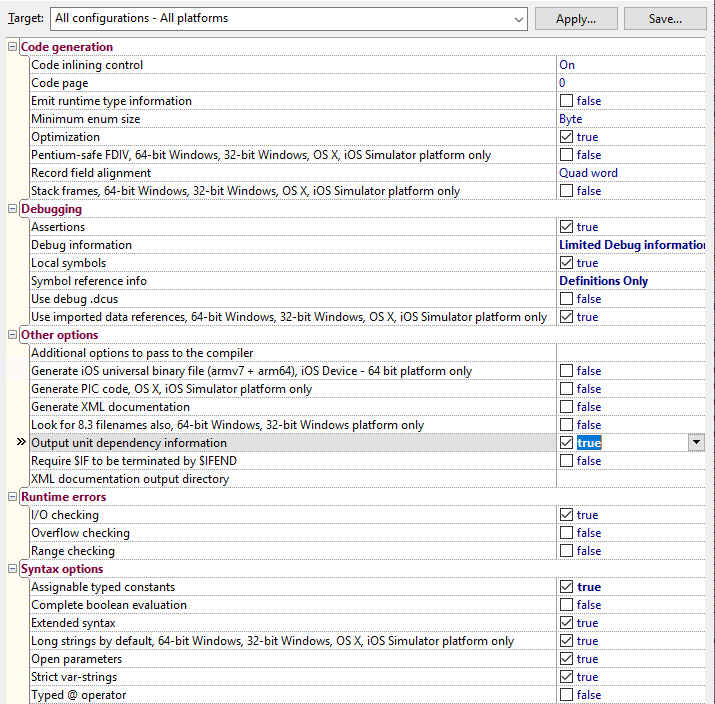
  • DCC_OutputDependencies: “Project Options” -> “Delphi Compiler” -> “Compiling” -> “Output unit dependency information”
  • DCC_OutputDRCFile: “Project Options” -> “” -> “Delphi Compiler” -> “Linking” -> “Ouput resource string .drc file”

The -verbosity:detailed however, is not passed to the various Delphi DCC compilers, as somewhere along the line, the CodeGear.Delphi.Targets got changed to Quiet="true" somewhere in-between Delphi 2007 and Delphi 2010.

Delphi 2007 had from Borland.Delphi.Targets files containing from Quiet="$(DCC_Quiet)"; the file got renamed and changes likely in Delphi 2009. See these related posts:

This means as of then on, the DCC commandline compilers will always output non-verbose logging. Even specifying "/p:DCC_AdditionalSwitches=-Q-" will not help: you will just get blank lines.

In the past, one of the things the verbose DCC logging would help you to see which files where accessed using the actual build. This was a tremendous help when figuring out search path problems that kick in every now and then.

For units, there is a little trick you can use here: it’s the /p:DCC_OutputDependencies=true" option you see above.

It will output an additional file with the .d extension that:

  • on the first two lines are an empty line followed by lining having the the .dpr filenamea space and a backslash
  • continues with units in reverse order of dependency:
    • optional lines having two tabs, a full .dcu filename (even if the file was actually a .pas file), a space and a backslash
    • a final line having two tabs, a full .dcu filename (even if the file was actually a .pas file) but no space or backslash

That file is relatively easy to scan or parse for path problems.

Project settings

I am not sure at which Delphi version the depends feature became a project setting, but it is. The odd thing: it does not always work, at least not in the Delphi 102. Tokyo installations I have used.

In a .dproj file, it is inside this element: <DCC_OutputDependencies>true</DCC_OutputDependencies> just like the msbuild name.

In the UI, you can find it here:

Related

–jeroen

Posted in Continuous Integration, Delphi, Development, msbuild, Software Development | Leave a Comment »

Delphi TestInsight: running both DUnitX and DUnit tests in a test project

Posted by jpluimers on 2021/04/06

If you want to run both DUnitX and DUnit tests in a test project using TestInsight as runner encapsulation, then you need to be aware that when there are no DUnitX tests, it will raise an exception.

So use this code to prevent that:

    try
      TestInsight.DUnitX.RunRegisteredTests;
    finally
      TestInsight.DUnit.RunRegisteredTests;
    end;

–jeroen

Posted in Conference Topics, Conferences, Delphi, Development, Event, Software Development | Leave a Comment »

msbuild verbosity levels

Posted by jpluimers on 2021/03/31

Passing verbosity levels to msbuild on the one hand can help to quickly locate issues that go otherwise unnoticed, but also make your output so large that it is hard to search through.

Some build targets (Delphi!) do not pass the verbosity to their underlying tools, so for those cases you have to find other means to increase underlying verbosity.

You can always pass msbuild options by using the commandline (even abbreviate them as described in [WayBack] MSBuild Command-Line Reference – Visual Studio | Microsoft Docs: You can specify the following verbosity levels: q[uiet]m[inimal]n[ormal]d[etailed], and diag[nostic]).

Often you also can use your IDE can also specify verbosity levels, for instance:

The currently specified verbosity values in ascending order according to [WayBack] LoggerVerbosity Enum (Microsoft.Build.Framework) | Microsoft Docs:

Quiet 0 Quiet verbosity, which displays a build summary.
Minimal 1 Minimal verbosity, which displays errors, warnings, messages with MessageImportance values of High, and a build summary.
Normal 2 Normal verbosity, which displays errors, warnings, messages with MessageImportance values of High, some status events, and a build summary.
Detailed 3 Detailed verbosity, which displays errors, warnings, messages with MessageImportance values of High or Normal, all status events, and a build summary.
Diagnostic 4 Diagnostic verbosity, which displays all errors, warnings, messages, status events, and a build summary.

Note that in the past, Detailed was called Details:

[WayBack] visual studio 2010 – What is output at the different MSBuild output verbosity levels? – Stack Overflow:

  • Quiet: only shows the result of your build.
  • Minimal: shows some configurations of your msbuild, and the CSC task.
  • Normal: This will show all the targets and its mainly steps.
  • Details: In addition to normal, this flag shows the task and it’s implementation within the each target.
  • Diagnostic: Contains all the information that a MSBuild need and produce, it’s switches, parameteres, prerequisites and etc. The input parameter of the target and task, and also contains the value of the input and output parameter, the detail steps of the task execution. The time execution for each task.

In matrix form, as per [WayBack] Obtaining Build Logs with MSBuild – Visual Studio | Microsoft Docs:

The following table shows how the log verbosity (column values) affects which types of message (row values) are logged.

Quiet Minimal Normal Detailed Diagnostic
Errors
Warnings
High-importance Messages
Normal-importance Messages
Low-importance Messages
Additional MSBuild-engine information

–jeroen

Posted in Continuous Integration, Delphi, Development, msbuild, Software Development | 1 Comment »

Delphi: got “EOleException with message ‘Microsoft MSXML is not installed'” in a console or test project?

Posted by jpluimers on 2021/03/31

Did you ever get this run-time error in a console or test project?

EOleException with message 'Microsoft MSXML is not installed'

It means that CoInitialize or CoInitializeEx needs to be called in the thread that uses MSXML.

Then an easy workaround is to:

  1. use the unit System.Win.ComObj in any unit that (indirectly) uses Xml.XMLDoc (for instance any unit using an XML Data Binding generated unit),
  2. use the unit System.SysUtils as well (because it defines TProcedure used below)
  3. add this code in in your initialization section (which is what VCL TApplication.Initialize does):

if InitProc <> nil then TProcedure(InitProc); // Calls CoInitialize for the main thread and prevents "EOleException with message 'Microsoft MSXML is not installed'"

The initialization section of System.Win.ComObj sets up InitProc to cals CoInitialize for the main thread, which usually suffices for these simple VCL projects, but not for most console or test projects.

Based on ideas I got after reading [WayBack] 为什么LoadXMLDocument在线程类中使用会报错?-CSDN论坛 (for which Google Translate actually does a goot job [Archive.is])

–jeroen

Posted in Conference Topics, Conferences, Delphi, Development, Event, Software Development, Undocumented Delphi | Leave a Comment »