


ODAC version history is confusing wheres [WayBack] Oracle Data Access Components – FAQ talks about version 6.00, [WayBack] Oracle Data Access Components History talks about version 10.x.y.
The history page is correct.
–jeroen
Posted by jpluimers on 2021/06/01
ODAC version history is confusing wheres [WayBack] Oracle Data Access Components – FAQ talks about version 6.00, [WayBack] Oracle Data Access Components History talks about version 10.x.y.
The history page is correct.
–jeroen

Posted in Delphi, Development, Software Development | Leave a Comment »
Posted by jpluimers on 2021/05/27
Quoting this in full because it nicely illustrated the introduction of an intermediate variable that cannot be assigned to a second time after initial setup by the with statement: [WayBack] Embarcadero Newsgroup Archive :: embarcadero.public.delphi.ide :: Re: Delphi 2010 Compile error E2064 Left side cannot be assigned to.
Subject: Re: Delphi 2010 Compile error E2064 Left side cannot be assigned to Posted by: Uwe Schuster (jediv…@bitcommander.de) Date: Sat, 10 Oct 2009 Finn Tolderlund wrote:
> I get this error in Delphi 2010 with the code below:
> But if I remove the()from the line, it compiles and executes ok.
> Is it a bug in the compiler?
> …
>with (Pal.palPalEntry[i]) do // Compile error: E2064 Left side cannot be assigned to
>with Pal.palPalEntry[i] do // Works fineThis is no bug, because the parenthesis generates an intermediate
non-addressable value and D2010 does not longer allow write access to intermediate values with “with”.—
Uwe
This also might explain Delphi 10.2 Tokyo introduced a “with” warning: for most “with” statements, W1048 is raised ([RSP-17326] with statements generate W1048 unsafe typecast warning – Embarcadero Technologies), assuming that the intermediate is a pointer variable.
–jeroen
Posted in Delphi, Development, Software Development | Leave a Comment »
Posted by jpluimers on 2021/05/26
Bummer: I tried to inherit the build events from a base configuration, then add some extra steps for some of the inheriting configurations.
Those configurations just executed the extra steps, not the inherited steps.
This affects Visual Studio, Delphi and any other tool based on msbuild, as this is an ms-build thing:
How do I then specify additional project-specific Post-Build Events? The usual “Inherit from parent or project defaults” is missing, and I would rather not have to manually add
barto every single project as it makes it hard to maintain.
–jeroen
Posted in .NET, Continuous Integration, Delphi, Development, msbuild, Software Development, Visual Studio and tools | Leave a Comment »
Posted by jpluimers on 2021/05/26
Got the below error on Delphi 10.2 Tokyo with ODAC trial from DevArt at Delphi startup time (Error: Access violation at address 188F3528 in module 'DataSetManager250.bpl'. Read of address 00000000.).
My guess it is some configuration prerequisite which – when not existing – is handled very ungracefully.
This might have to do with my installation being a non-administrator Delphi user, but the ODAC installation requiring UAC elevation to administrative level.
In short this means the installing user is different from the user that runs Delphi.
Related (indicating it was fixed years ago, but apparently isn’t) via dsmtoolwindow.getpreferences – Google Search:
try to change the registry branch:
HKEY_CURRENT_USER\Software\Devart\DataSetManager\BDS\13.0to
HKEY_CURRENT_USER\Software\Devart\DataSetManager\BDS\14.0(change the version number
13.0to14.0)
Workaround is to unregister the DataSetManager250.bpl package, though I have to figure out what functionality that disables.
[188F3528]{DataSetManager250.bpl} Dsmtoolwindow.GetPreferences + $18
[23CA524D]{Jcl240.bpl  } Jclhookexcept. + $0
[50060B13]{rtl250.bpl  } System.@HandleAnyException (Line 19991, "System.pas" + 13) + $0
[211B3A05]{designide250.bpl} DockForm.TDockableForm.FormCreate (Line 258, "DockForm.pas" + 11) + $1B
[188F2DEA]{DataSetManager250.bpl} Dsmtoolwindow.TDsmToolWindow.FormCreate + $4E
[50C06BC1]{vcl250.bpl  } Vcl.Forms.TCustomForm.DoCreate (Line 3788, "Vcl.Forms.pas" + 3) + $C
[50C067DD]{vcl250.bpl  } Vcl.Forms.TCustomForm.AfterConstruction (Line 3671, "Vcl.Forms.pas" + 1) + $D
[50060039]{rtl250.bpl  } System.@AfterConstruction (Line 18301, "System.pas" + 2) + $5
[188EBE9B]{DataSetManager250.bpl} Dsmtoolwindow.TDsmToolWindow + $43B
[188EA93D]{DataSetManager250.bpl} Dsmtoolwindow.TDsmToolWindow.CreateForm + $19
[188F7C81]{DataSetManager250.bpl} Dsmexpert.initialization + $31
[50061276]{rtl250.bpl  } System.InitUnits (Line 22833, "System.pas" + 21) + $0
[500612E6]{rtl250.bpl  } System.@PackageLoad (Line 22861, "System.pas" + 8) + $0
[188A1A09]{DataSetManager250.bpl} __dbk_fcall_wrapper + $195
[188F6DA1]{DataSetManager250.bpl} Initialize + $5
[500A0377]{rtl250.bpl  } System.SysUtils.InitializePackage (Line 25779, "System.SysUtils.pas" + 4) + $0
[500A04D1]{rtl250.bpl  } System.SysUtils.LoadPackage (Line 25830, "System.SysUtils.pas" + 18) + $5
[21E1AFAF]{delphicoreide250.bpl} PasCppPakMgr.TIDEDesignPackage.ClearModules (Line 2189, "PasCppPakMgr.pas" + 14) + $10
[204E9A94]{coreide250.bpl} PakLoad.TPackage.DoLoadPackage (Line 146, "PakLoad.pas" + 0) + $8
[204E9C09]{coreide250.bpl} PakLoad.TPackage.Load (Line 220, "PakLoad.pas" + 7) + $7
[204EC425]{coreide250.bpl} PakMgr.TDesignPackage.Load (Line 591, "PakMgr.pas" + 2) + $2
[21E1B2CB]{delphicoreide250.bpl} PasCppPakMgr.TIDEDesignPackage.Load (Line 2292, "PasCppPakMgr.pas" + 4) + $3
[50060039]{rtl250.bpl  } System.@AfterConstruction (Line 18301, "System.pas" + 2) + $5
[21E1B0DF]{delphicoreide250.bpl} PasCppPakMgr.TIDEDesignPackage.DelayLoad (Line 2217, "PasCppPakMgr.pas" + 11) + $4
[21E1572A]{delphicoreide250.bpl} PasCppPakMgr.LoadDesignPackage (Line 463, "PasCppPakMgr.pas" + 10) + $5
[0B6A0F84]{IDEFixPack.dll} SplashProgress2005p.HookedLoadDesignPackage (Line 277, "SplashProgress2005p.pas" + 3) + $3
[21E15A33]{delphicoreide250.bpl} PasCppPakMgr.LoadProjectPackages (Line 534, "PasCppPakMgr.pas" + 52) + $11
[21F20DBF]{delphicoreide250.bpl} BasePasProjOpts.TProjOptsManager.DoLoadPackages (Line 1604, "BasePasProjOpts.pas" + 22) + $6
[21F21BB4]{delphicoreide250.bpl} BasePasProjOpts.TProjOptsManager.LoadPackages (Line 1839, "BasePasProjOpts.pas" + 0) + $0
[21F22BD5]{delphicoreide250.bpl} BasePasProjOpts.TProjectOptions.LoadPackages (Line 2419, "BasePasProjOpts.pas" + 0) + $5
[22585BF3]{delphide250.bpl} DelphiProject.TDelphiProjectCreationTrait.LoadDefaultLibraries (Line 256, "DelphiProject.pas" + 1) + $1F
[2058A109]{coreide250.bpl} ProjectGroup.TDefaultProjectWrapper.LoadDefaultLibraries (Line 3544, "ProjectGroup.pas" + 5) + $31
[206DB2B9]{coreide250.bpl} Desktop.LoadDefaultDesktopState (Line 966, "Desktop.pas" + 3) + $9
[206DC0D5]{coreide250.bpl} Desktop.LoadDesktop (Line 1223, "Desktop.pas" + 73) + $0
[0049FBA8]{bds.exe     } AppMain.PostCreateInit (Line 2154, "AppMain.pas" + 57) + $0
[004A00B6]{bds.exe     } AppMain.TAppBuilder.CMPostCreateInit (Line 2257, "AppMain.pas" + 4) + $1
[50AC4C16]{vcl250.bpl  } Vcl.Controls.TControl.WndProc (Line 7326, "Vcl.Controls.pas" + 91) + $6
[50C110C3]{vcl250.bpl  } Vcl.Forms.TApplication.WndProc (Line 10270, "Vcl.Forms.pas" + 194) + $1
[50AC97FB]{vcl250.bpl  } Vcl.Controls.TWinControl.WndProc (Line 10197, "Vcl.Controls.pas" + 166) + $6
[50C080B5]{vcl250.bpl  } Vcl.Forms.TCustomForm.WndProc (Line 4546, "Vcl.Forms.pas" + 209) + $5
[50AC8DC8]{vcl250.bpl  } Vcl.Controls.TWinControl.MainWndProc (Line 9896, "Vcl.Controls.pas" + 3) + $6
[5016EBC4]{rtl250.bpl  } System.Classes.StdWndProc (Line 17406, "System.Classes.pas" + 9) + $2
[50C11A6F]{vcl250.bpl  } Vcl.Forms.TApplication.ProcessMessage (Line 10613, "Vcl.Forms.pas" + 23) + $1
[50C11AB2]{vcl250.bpl  } Vcl.Forms.TApplication.HandleMessage (Line 10643, "Vcl.Forms.pas" + 1) + $4
[50C11DE5]{vcl250.bpl  } Vcl.Forms.TApplication.Run (Line 10781, "Vcl.Forms.pas" + 26) + $3
[005088E2]{bds.exe     } bds.bds (Line 212, "" + 7) + $7
Notes:
%APPDATA% points to %USERPROFILE%\AppData\Roaming (where usually %USERPROFILE% is on the %HOMEDRIVE%)Fix script (the double backslash \\ is needed, otherwise the final double quote " becomes part of the path name):
setlocal
:: 19.0 is the version for Delphi 10.2 Tokyo
set ProductVersion=19.0
reg add "HKEY_CURRENT_USER\Software\Devart\DataSetManager\BDS\%ProductVersion%" /v "ConfigFilePath" /f /t REG_SZ /d "%APPDATA%\Embarcadero\BDS\%ProductVersion%\\"
endlocal
This allows for an XML file named DataSetManager.cfg to be created in the ConfigFilePath directory.
Even though Process Monitor will show access to the below keys, there is no need to add any values there:
KEY_CURRENT_USER\Software\Devart\DBMonitorKEY_CURRENT_USER\SOFTWARE\Devart\ODACHKLM\Software\WOW6432Node\Devart\ODACHKLM\Software\WOW6432Node\Devart\OdacAnother thing when running ODAC trial and licensed applications
---------------------------
ODAC
---------------------------
%1 is not a valid Win32 application
ODAC Trial version needs additional "bpl" files to be present on the user PC.
If you build your project without run-time packages you need:
  dac250.bpl
  odac250.bpl
---------------------------
OK
---------------------------
This message is incomplete; what it should say is that any BPL dependencies must be deployed. One way to find out about those is to use I wanted to know the loaded DLLs in a process like Process Explorer shows, but from the console: Sysinternals ListDLLs to the rescue.
Another way is to use TDUMP (see [WayBack] TDUMP.EXE, the File Dumping Utility) and search for the import tables. I did just that for the 10.2 trial; below is the full list.
There is way better documentation at Devart ODAC Deployment: Deploying Windows applications built without run-time packages which fails to properly archive in the WayBack machine (it gets into a redirect loop) so I quote it in full:
Deploying Windows applications built without run-time packages
You do not need to deploy any files with ODAC-based applications built without run-time packages, provided you are using a registered version of ODAC.
You can check your application does not require run-time packages by making sure the “Build with runtime packages” check box is not selected in the Project Options dialog box.
Trial Limitation Warning
If you are evaluating deploying Windows applications with ODAC Trial Edition, you will need to deploy the following DAC BPL files:
dacXX.bpl always odacXX.bpl always and their dependencies (required IDE BPL files) with your application, even if it is built without run-time packages:
rtlXX.bpl always dbrtlXX.bpl always vcldbXXX.bpl always Deploying Windows applications built with run-time packages
You can set your application to be built with run-time packages by selecting the “Build with runtime packages” check box in the Project Options dialog box before compiling your application.
In this case, you will also need to deploy the following BPL files with your Windows application:
dacXX.bpl always odacXX.bpl always dacvclXX.bpl if your application uses the OdacVcl unit odacvclXX.bpl if your application uses the OdacVcl unit crcontrolsXX.bpl if your application uses the CRDBGrid component
From those posts and the below full list, you also need to deploy the bold dependencies:
dac250.bpl
rtl250.bpldbrtl250.bplodac250.bpl
rtl250.bpldbrtl250.bpldac250.bplTo get around errors like "E2202 Required package 'odac' not found", you need to ensure the correct .dcp files for ODAC are referenced.
Unlike Delphi, the ODAC .dcp files contain a version number, so in your required packages list, ensure you add them not like rtl;dbrtl, but like dac250;odac250.
dac250.bpl
Imports from kernel32.dll
Imports from rtl250.bpl
Imports from wsock32.dll
Imports from dbrtl250.bpl
Imports from ole32.dll
Imports from user32.dll

dacfmx250.bpl
Imports from kernel32.dll
Imports from rtl250.bpl
Imports from dbrtl250.bpl
Imports from user32.dll
Imports from fmx250.bpl
Imports from dac250.bpl

dacvcl250.bpl
Imports from kernel32.dll
Imports from rtl250.bpl
Imports from dbrtl250.bpl
Imports from user32.dll
Imports from dac250.bpl
Imports from vcl250.bpl

dcldac250.bpl
Imports from vclactnband250.bpl
Imports from wininet.dll
Imports from shell32.dll
Imports from user32.dll
Imports from version.dll
Imports from oleaut32.dll
Imports from dac250.bpl
Imports from dacvcl250.bpl
Imports from vcldb250.bpl
Imports from dcldb250.bpl
Imports from xmlrtl250.bpl
Imports from kernel32.dll
Imports from rtl250.bpl
Imports from designide250.bpl
Imports from ole32.dll
Imports from dbrtl250.bpl
Imports from gdi32.dll
Imports from vcl250.bpl

odac250.bpl
Imports from kernel32.dll
Imports from rtl250.bpl
Imports from dbrtl250.bpl
Imports from version.dll
Imports from user32.dll
Imports from dac250.bpl
Imports from advapi32.dll

odacvcl250.bpl
Imports from kernel32.dll
Imports from odac250.bpl
Imports from rtl250.bpl
Imports from dbrtl250.bpl
Imports from dac250.bpl
Imports from dacvcl250.bpl
Imports from vcl250.bpl

dclodac250.bpl
Imports from vclactnband250.bpl
Imports from odac250.bpl
Imports from dcldac250.bpl
Imports from odacvcl250.bpl
Imports from shell32.dll
Imports from user32.dll
Imports from dac250.bpl
Imports from dcldb250.bpl
Imports from vcldb250.bpl
Imports from dacvcl250.bpl
Imports from vclimg250.bpl
Imports from kernel32.dll
Imports from xmlrtl250.bpl
Imports from rtl250.bpl
Imports from designide250.bpl
Imports from dbrtl250.bpl
Imports from vcl250.bpl

odacfmx250.bpl
Imports from kernel32.dll
Imports from odac250.bpl
Imports from rtl250.bpl
Imports from dacfmx250.bpl
Imports from dbrtl250.bpl
Imports from fmx250.bpl
Imports from dac250.bpl

dclodacfmx250.bpl
Imports from kernel32.dll
Imports from odac250.bpl
Imports from odacfmx250.bpl
Imports from rtl250.bpl
Imports from dacfmx250.bpl
Imports from dbrtl250.bpl
Imports from fmx250.bpl
Imports from dac250.bpl

oraprov250.bpl
Imports from kernel32.dll
Imports from odac250.bpl
Imports from dsnap250.bpl
Imports from rtl250.bpl
Imports from dbrtl250.bpl
Imports from dac250.bpl

dcloraprov250.bpl
Imports from kernel32.dll
Imports from odac250.bpl
Imports from dsnap250.bpl
Imports from rtl250.bpl
Imports from dbrtl250.bpl
Imports from oraprov250.bpl
Imports from dac250.bpl

datasetmanager250.bpl
Imports from vclactnband250.bpl
Imports from dcldac250.bpl
Imports from comctl32.dll
Imports from user32.dll
Imports from dac250.bpl
Imports from vclx250.bpl
Imports from dacvcl250.bpl
Imports from dcldb250.bpl
Imports from vcldb250.bpl
Imports from kernel32.dll
Imports from xmlrtl250.bpl
Imports from rtl250.bpl
Imports from designide250.bpl
Imports from dbrtl250.bpl
Imports from gdi32.dll
Imports from vcl250.bpl

crcontrols250.bpl
Imports from kernel32.dll
Imports from rtl250.bpl
Imports from dbrtl250.bpl
Imports from user32.dll
Imports from dac250.bpl
Imports from vcldb250.bpl
Imports from vcl250.bpl
Imports from gdi32.dll

dclcrcontrols250.bpl
Imports from kernel32.dll
Imports from rtl250.bpl
Imports from dbrtl250.bpl
Imports from crcontrols250.bpl
Imports from dac250.bpl
Imports from vcldb250.bpl
Imports from vcl250.bpl

oramigwizard250.dll
Imports from vclactnband250.bpl
Imports from odac250.bpl
Imports from odacvcl250.bpl
Imports from dcldac250.bpl
Imports from shell32.dll
Imports from user32.dll
Imports from dac250.bpl
Imports from vclx250.bpl
Imports from dcldb250.bpl
Imports from vcldb250.bpl
Imports from dacvcl250.bpl
Imports from vclimg250.bpl
Imports from kernel32.dll
Imports from xmlrtl250.bpl
Imports from dclodac250.bpl
Imports from rtl250.bpl
Imports from designide250.bpl
Imports from dbrtl250.bpl
Imports from vcl250.bpl

packagewizard250.dll
Imports from vclactnband250.bpl
Imports from odac250.bpl
Imports from odacvcl250.bpl
Imports from dcldac250.bpl
Imports from dac250.bpl
Imports from vclx250.bpl
Imports from dacvcl250.bpl
Imports from vcldb250.bpl
Imports from dcldb250.bpl
Imports from vclimg250.bpl
Imports from kernel32.dll
Imports from xmlrtl250.bpl
Imports from dclodac250.bpl
Imports from rtl250.bpl
Imports from designide250.bpl
Imports from dbrtl250.bpl
Imports from vcl250.bpl
–jeroen

Posted in Delphi, Delphi 10.2 Tokyo (Godzilla), Development, Software Development | Leave a Comment »
Posted by jpluimers on 2021/05/25
Often it is useful to have 3rd party components part of a repository so it is easier to increase portability.
For instance when you want to include or exclude some of them in certain projects by installing/deinstalling them to/from the IDE.
This can be useful for cases where components bite each other, or you want to vary the components in use by version without spinning up new VMs (Delphi registration counts can be a pain for new VMs; you need to be very careful as you can never decrease your registration count).
I usually do this by having 3 batch files:
If successful, I can uninstall the library.
I especially take this approach with 3rd party libraries that stuff to global places (inside the Delphi installation directory, or worse, inside the Windows directories).
That way, I can try to ensure that compilation of running only uses files from the repository, making my options for portability larger.
Examples I did this for are for instance QuickReports and ODAC.
Some bits are tricky to get right, especially loading dependencies.
It helps to understand that for executable files Windows also searches for dependencies in the directory of the executable file.
For libraries, that does not happen. Which means that if a BPL has dependencies, they either have to be explicitly loaded before (for instance by being in the Known Packages registry entries), or on the search PATH.
Delphi has the %BDSCOMMONDIR% directory in the search PATH. It usually points to “%PUBLIC%\Documents\Embarcadero\Studio\%ProductVersion%\Bpl” (where ProductVersion=19.0 for Delphi 10.2 Tokyo).
There might be a away around this using manifests, but this means modifying the BPL files, which is beyond the point of having these copy scripts.
More on those environment variables in a later blog post.
Related:
–jeroen
Posted in Conference Topics, Conferences, Delphi, Delphi 10.2 Tokyo (Godzilla), Development, Event, Software Development | Leave a Comment »
Posted by jpluimers on 2021/05/20
In Windows, historically most people approach investigation GUI first. Having turned 50 a while ago, I am no exception.
My real roots however are on the command-line and scripting: roughly 1980s Apple DOS, CP/M, SunOS (yay sh Bourne shell!), MS-DOS, 4DOS, and VAX/VMS (yay DCL shell!), from the 1990s on, some Solaris, a little bit of AIX, HP-UX and quite a bit of Linux, MacOS (né OS/X né Mac OS), and some BSD descendants derivatives (SunOS, AIX and MacOS are based on the Berkeley Software Distribution), and this century a more growing amount of PowerShell).
So I was glad to find out the makers of Process Explorer also made [WayBack] ListDLLs – Windows Sysinternals | Microsoft Docs (via windows get dlls loaded in process – Google Search)
List all the DLLs that are currently loaded, including where they are loaded and their version numbers.
ListDLLs is a utility that reports the DLLs loaded into processes. You can use it to list all DLLs loaded into all processes, into a specific process, or to list the processes that have a particular DLL loaded. ListDLLs can also display full version information for DLLs, including their digital signature, and can be used to scan processes for unsigned DLLs.
Usage
listdlls [-r] [-v | -u] [processname|pid]
listdlls [-r] [-v] [-d dllname]
Parameter Description processname Dump DLLs loaded by process (partial name accepted). pid Dump DLLs associated with the specified process id. dllname Show only processes that have loaded the specified DLL. -r Flag DLLs that relocated because they are not loaded at their base address. -u Only list unsigned DLLs. -v Show DLL version information.
Download: [WayBack] ListDlls.zip.
Now it is much easier to generate a draft deploy list of DLLs (and for Delphi: BPLs) based on a process running on a development machine.
Example output (the -r flags relocation warnings; the first part is the [WayBack] shim that Chocolatey created around the second which is from SysInternals):
Posted in Conference Topics, Conferences, Delphi, Development, Event, History, Software Development, Windows Development | Leave a Comment »
Posted by jpluimers on 2021/05/20
A few notes on the ODAC install:
The 25 is
DllSuffixminus trailing zero for Delphi 10.2 Tokyo, or the “real” Delphi version; see Delphi version info table.
%USERPROFILE% directory of the local administrator user that installed it: %USERPROFILE%\Documents\Devart\ODAC for RAD Studio 10.2\Demos
%PUBLIC%\Documents\Devart\ODAC for RAD Studio 10.2\Demos%ProgramFiles(x86)%\Devart\ODAC for RAD Studio 10.2–jeroen
Posted in Delphi, Development, Software Development | Leave a Comment »
Posted by jpluimers on 2021/05/19
Editing [WayBack] What is a Delphi DCU file? – Stack Overflow for more historic correctness and adding links prompted me to archive some older material and search for some more, basically because while historically very relevant, link rot makes a lot of that stuff harder and harder to find.
The legendary full page colour advert published in the 12th 1983 issue of Byte Magazine on page 456 is at the bottom of this post (Many BYTE magaine issues have been archived at https://archive.org/details/byte-magazine).
The smaller version below is from WayBack: Sip from the Firehose : November 2008 marks the 25th anniversary of Turbo Pascal v1.0! (this article is not available on the Embarcadero or Idera site any more).
I also included more adverts in reverse chronological order at the end:
The last two via [WayBack] saundby.com: Software for the Ampro Little Board.
--jeroen

Posted in Conference Topics, Conferences, CP/M, Delphi, Development, Event, History, MS-DOS, Pascal, Power User, Software Development, Turbo Pascal, UCSD Pascal, Z80 | Leave a Comment »
Posted by jpluimers on 2021/05/18
A while ago, I needed to get RowVersion binary data out of SQL Server. People around me told me it is stored as BigInt.
I luckily bumped into [WayBack] sql server – Cast rowversion to bigint – Stack Overflow.
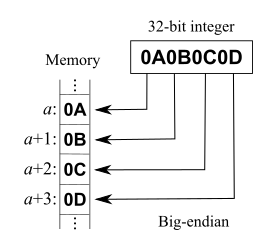
That post explains RowVersion is not stored as BigInt. Both RowVersion and BigInt take up 8 bytes of storage, but RowVersion is big-endian and unsigned, whereas BigInt is little-endian and signed.
A few quotes from it:
In my C# program I don’t want to work with byte array, therefore I cast rowversion data type to bigint:
SELECT CAST([version] AS BIGINT) FROM [dbo].[mytable]So I receive a number instead of byte array. Is this conversion always successful and are there any possible problems with it? If so, in which data type should I cast rowversion instead?
and
You can convert in C# also, but if you want to compare them you should be aware that rowversion is apparently stored big-endian, so you need to do something like:
byte[] timestampByteArray = ... // from datareader/linq2sql etc...
var timestampInt = BitConverter.ToInt64(timestampByteArray, 0);
timestampInt = IPAddress.NetworkToHostOrder(timestampInt);
It’d probably be more correct to convert it as ToUInt64, but then you’d have to write your own endian conversion as there’s no overload on NetworkToHostOrder that takes uint64. Or just borrow one from Jon Skeet (search page for ‘endian’).
Code: [WayBack] Jon Skeet: Miscellaneous Utility Library
Related:
The Intel x86 and also AMD64 / x86-64 series of processors use the little-endian format, and for this reason, it is also known in the industry as the “Intel convention“.
Endianness is also important
Additionally, as Mark pointed out,
BitConverter.GetUInt64is not converting properly. Mark is not completely right–BitConverteris either big-endian or little-endian depending on the system it’s running on.
--jeroen

Posted in .NET, Database Development, Delphi, Development, Jon Skeet, Software Development, SQL Server | Leave a Comment »
Posted by jpluimers on 2021/05/18
[WayBack] Any idea why we get this error, or even better, how to fix it : [dcc32 Error] JclRTTI.pas(663): E2134 Type ‘<void>’ has no type info We compile same c… – Tommi Prami – Google+
So the JCL needs to have the compiler setting Emit runtime type information set to true (which is the default for projects, but can be turned off).
Thanks Stefan Glienke for reporting the fix.
–jeroen
Posted in Delphi, Development, Software Development | Leave a Comment »



 The Wiert Corner - irregular stream of stuff