LINQ uses delayed execution, so a lot of errors will not only absent during compile time, nor at LINQ query setup, but delayed until the portions of the query are being executed.
A while ago I needed unique temporary directories. This appears not to be standard functionality in the .NET System.IO.Path or System.IO.Directory class.
The approach uses String.Normalize to split the input string into constituent glyphs (basically separating the “base” characters from the diacritics) and then scans the result and retains only the base characters. It’s just a little complicated, but really you’re looking at a complicated problem.
Example code:
using System;
using System.Text;
using System.Globalization;

namespace StringToAsciiConsoleApplication
{
    class Program
    {
        static void Main(string[] args)
        {
            string unicode = "áìôüç";
            string ascii = unicode.ToAscii();
            Console.WriteLine("Unicode\t{0}", unicode);
            Console.WriteLine("ASCII\t{0}", ascii);
        }
    }

    public static class StringExtensions
    {
        public static string ToAscii(this string value)
        {
            return RemoveDiacritics(value);
        }

        // http://stackoverflow.com/questions/249087/how-do-i-remove-diacritics-accents-from-a-string-in-net
        private static string RemoveDiacritics(this string value)
        {
            string valueFormD = value.Normalize(NormalizationForm.FormD);
            StringBuilder stringBuilder = new StringBuilder();

            foreach (System.Char item in valueFormD)
            {
                UnicodeCategory unicodeCategory = CharUnicodeInfo.GetUnicodeCategory(item);
                if (unicodeCategory != UnicodeCategory.NonSpacingMark)
                {
                    stringBuilder.Append(item);
                }
            }

            return (stringBuilder.ToString().Normalize(NormalizationForm.FormC));
        }
    }
}
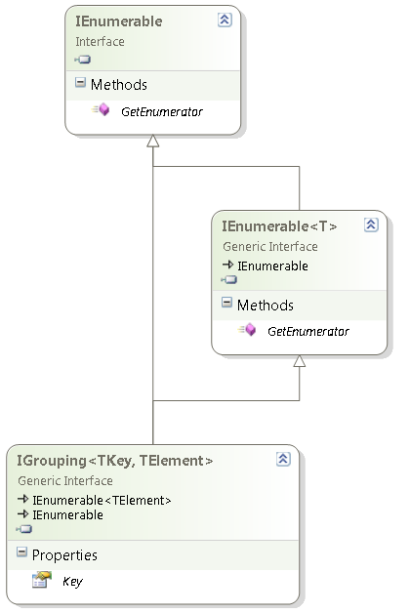
You also need to be a bit careful to make sure the group keys are indeed distinct.
Most people don’t see the IGrouping<TKey, TElement> because they use the var keyword to implicitly the LINQ result.
Often – when using any anonymous type – var is the only way of using that result.
That is fine, but has the consequence that it hides the actual type, which – when not anonymous – is a good way of seeing what happens behind the scenes.
Note that I don’t cover all the LINQ group by stuff, here, for instance, I skipped the into part.
There are some nice examples on MSDN covering exactly that both using Method based and Expression based LINQ.
I just watched this interview with Anders Hejlsberg for the first time. This is truly an amazing interview. It’s rather long, about 1 hour, but it is so worth it. I’m not giving anything away… you’ll have to just watch and enjoy.
I am giving a few things away: trip down memory lane, putting big parts of software development history into perspective,
Since Anders has been so versatile, influential and still humble, this is a must watch for anyone in the software field. To quote Research Channel:
This episode features industry luminary, Anders Hejlsberg. Before coming to Microsoft in 1996 he was well noted for his work as the principal engineer of Turbo Pascal and the chief architect of the Delphi product line. At Microsoft, he was the architect for the Visual J++ development system and the Windows Foundation Classes (WFC). Promoted to Distinguished Engineer in 2000, Anders is the chief designer of the C# programming language and a key participant in the development of Microsoft’s .NET Framework. In this show, Anders is joined by a surprise guest. This episode of ‘Behind the Code’ is hosted by Barbara Fox – former senior security architect of cryptography and digital rights management for Microsoft.
(PS: how a video published in the C# 3 era can be so current <g>).
And if you feel for more, here, here, here, here and here are some more, are a few lists of videos where Anders speaks.
From a historic perspective, I like these most:
All of the supported aspects are linked to articles from excellent authors. There is far more on the internet about Delphi and Generics, but those are a good start.



 The Wiert Corner - irregular stream of stuff