The Wiert Corner – irregular stream of stuff

Jeroen W. Pluimers on .NET, C#, Delphi, databases, and personal interests

  • My badges

  • Twitter Updates

  • My Flickr Stream

  • Pages

  • All categories

  • Enter your email address to subscribe to this blog and receive notifications of new posts by email.

    Join 1,862 other subscribers

Archive for the ‘C# 5.0’ Category

.NET/C#: from Unicode to ASCII (yes, this is one-way): converting Diacritics to “regular” ASCII characters.

Posted by jpluimers on 2013/06/11

A while ago, I needed to export pure ASCII text from a .NET app.

An important step there is to convert the diacritics to “normal” ASCII characters. That turned out to be enough for this case.

This is the code I used which is based on Extension Methods and this trick from Blair Conrad:

The approach uses String.Normalize to split the input string into constituent glyphs (basically separating the “base” characters from the diacritics) and then scans the result and retains only the base characters. It’s just a little complicated, but really you’re looking at a complicated problem.

Example code:

using System;
using System.Text;
using System.Globalization;

namespace StringToAsciiConsoleApplication
{
    class Program
    {
        static void Main(string[] args)
        {
            string unicode = "áìôüç";
            string ascii = unicode.ToAscii();
            Console.WriteLine("Unicode\t{0}", unicode);
            Console.WriteLine("ASCII\t{0}", ascii);
        }
    }

    public static class StringExtensions
    {
        public static string ToAscii(this string value)
        {
            return RemoveDiacritics(value);
        }

        // http://stackoverflow.com/questions/249087/how-do-i-remove-diacritics-accents-from-a-string-in-net
        private static string RemoveDiacritics(this string value)
        {
            string valueFormD = value.Normalize(NormalizationForm.FormD);
            StringBuilder stringBuilder = new StringBuilder();

            foreach (System.Char item in valueFormD)
            {
                UnicodeCategory unicodeCategory = CharUnicodeInfo.GetUnicodeCategory(item);
                if (unicodeCategory != UnicodeCategory.NonSpacingMark)
                {
                    stringBuilder.Append(item);
                }
            }

            return (stringBuilder.ToString().Normalize(NormalizationForm.FormC));
        }
    }
}

–jeroen

Posted in .NET, .NET 3.5, .NET 4.0, .NET 4.5, ASCII, C#, C# 3.0, C# 4.0, C# 5.0, Development, Encoding, Software Development, Unicode | Leave a Comment »

Some links on Registry and LINQ

Posted by jpluimers on 2013/05/28

A few notes for my research list:

One important thing that most of the code examples miss is to close the registry keys when they are done with them.


–jeroen

Posted in .NET, .NET 4.0, .NET 4.5, C#, C# 4.0, C# 5.0, Development, Software Development | Leave a Comment »

Counting Lines of Source Code in PowerShell | Precision Computing

Posted by jpluimers on 2013/04/30

Precision Computing is a site by Lee Holmes having a great blog with PowerShell tips. Of course he does, as he is part of the PowerShell team and he wrote Windows PowerShell Cookbook: The Complete Guide to Scripting Microsoft’s New Command Shell.

The Counting Lines of Source Code in PowerShell entry is on counting C# code lines (and shows some great performance optimization tips).

I knew about the blog, and bumped into the entry because of file – Lines-of-code counting for many C# solutions – Stack Overflow.

Last year I inherited a suite of .NET projects totaling about 4 million LOC. Which I want to drastically reduce to make it more maintainable.

–jeroen

Posted in .NET, C#, C# 1.0, C# 2.0, C# 3.0, C# 4.0, C# 5.0, CommandLine, Development, PowerShell, Software Development | Leave a Comment »

.NET/C# – Some notes in IGrouping (via: Grouping in LINQ is weird (IGrouping is your friend) – Mike Taulty’s Blog)

Posted by jpluimers on 2013/04/02

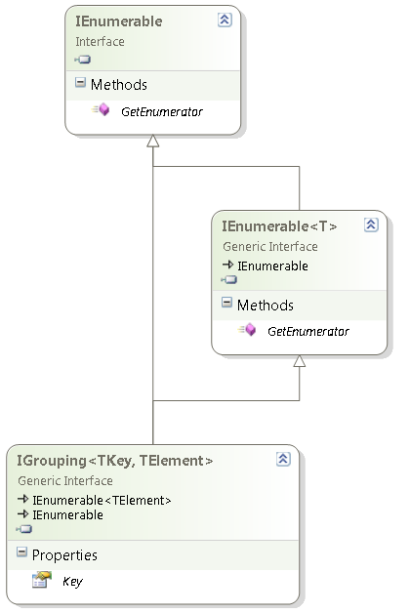
IGrouping interface diagram (click to enlarge)

IGrouping interface diagram (click to enlarge)

One of the things most people find hard to use in LINQ is GroupBy or the LINQ expression group … by (they are mostly equivalent).

When starting to use that, I was also confused, mainly because of two reasons:

  1. GroupBy returns a IGrouping<TKey, TElement> generic interface, but the classes that implement it are internal and not visble from outside the BCL (although you could artificially create your own).
    This interface extends the IEnumerable<TElement> in a full “is a” fashion adding a Key member.
    This has two consequences:

    1. Because it is a “is a” extension of the IEnumerable<TElement>, you can use foreach to enumerate the TElement members for the current group inside the grouping.
      No need to search for a Value that has the Elements, as the Group is the Elements.
    2. The Key member is indeed the current instance of what you are grouping over. Which means that Count<TElement>, are for the current group in the grouping.
  2. The LINQ expression syntax for grouping on multiple columns is not straightforward:
    1. Grouping on multiple columns uses a bit different syntax than you are used from SQL.
      (Another difference is that SQL returns a set, but groups are IEnumerable)
    2. You also need to be a bit careful to make sure the group keys are indeed distinct.

Most people don’t see the IGrouping<TKey, TElement> because they use the var keyword to implicitly the LINQ result.
Often – when using any anonymous type – var is the only way of using that result.
That is fine, but has the consequence that it hides the actual type, which – when not anonymous – is a good way of seeing what happens behind the scenes.

David Klein gave an example for the multi column grouping and also shows that if you use LINQPad, you can actually see the IGrouping<TKey, TElement> in action.

Mike Taulty skipped the Group By Syntax for Grouping on Multiple Columns in his Grouping in LINQ is weird (IGrouping is your friend). So my examples include that.

Note that I don’t cover all the LINQ group by stuff, here, for instance, I skipped the into part.
There are some nice examples on MSDN covering exactly that both using Method based and Expression based LINQ.

The examples are based on these two classes, similar to what Mike did. Read the rest of this entry »

Posted in .NET, .NET 3.5, .NET 4.0, .NET 4.5, C#, C# 3.0, C# 4.0, C# 5.0, Development, LINQ, Software Development | Leave a Comment »

.NET/C# small program that shows you your proxy settings, demonstrates LINQ to Registry, and String.Contains

Posted by jpluimers on 2013/03/05

I’ve been working at a client where they have hardened most of their systems in a not so programmer friendly way. One of the things you cannot to is start RegEdit, not even for viewing. Since I need Fiddler2 to poke through their Internet Proxy in order to get access to an external TFS server, and their machines often reboot due to maintenance cycles, sometimes my proxy settings are dead. This tiny app shows you how to get display your proxy settings, demonstrating:

Enjoy! (Note, you could have done this with PowerShell in a very easy way too, as it access the Registry just like it was a file system).

When using Fiddler, it shows output like this:

AutoConfigProxy=wininet.dll
ProxyEnable=1
MigrateProxy=1
ProxyHttp1.1=1
ProxyOverride=<-loopback>
ProxyServer=http=127.0.0.1:8888;https=127.0.0.1:8888;

LINQ to Registry

One of the drawbacks of Registry work is that you need to dispose of your keys. That is handled inside ReadOnlyAccessToRegistryKey.Run which also handles your Code Access Security. This means that the lambda expression (could just as well have been an anonymous method) can just concentrate on the LINQ stuffreturning an enumeration of anonymous types. You need the ‘let’ portion if you also want to perform ‘where’ on the values.

using System;
using System.Collections.Generic;
using System.Linq;
using BeSharp.Win32;
using Microsoft.Win32;

namespace LinqToRegistryShowProxySettings
{
    class Program
    {
        static void Main(string[] args)
        {
            try
            {
                run();
            }
            catch (Exception ex)
            {
                Console.WriteLine(ex);
                throw;
            }
        }

        static void run()
        {
            const string internetSettingsKey = @"Software\Microsoft\Windows\CurrentVersion\Internet Settings";

            ReadOnlyAccessToRegistryKey.Run(Registry.CurrentUser, internetSettingsKey,
                registryKey =>
                {
                    var keyValues = from name
                                 in registryKey.GetValueNames()
                                    //let keyValue = new { key = name, value = registryKey.GetValue(name).ToString() } // only if you need the Value in the Where, as it created for all occurences
                                    where
                                    name.Contains("proxy", StringComparison.OrdinalIgnoreCase) ||
                                    name.Contains("autoConfig", StringComparison.OrdinalIgnoreCase)
                                    select new { key = name, value = registryKey.GetValue(name).ToString() };

                    foreach (var keyValue in keyValues)
                    {
                        Console.WriteLine("{0}={1}", keyValue.key, keyValue.value);
                    }
                }
            );

        }
    }
}

ReadOnlyAccessToRegistryKey

This manages the Code Access Security since you will access the registry readonly. It also disposes the RegistryKey instance. The Code Access Security access and revert must be in the same method, so you cannot create a class that does the Assert in the constructor, and the dispose in the Disposer.

using System;
using Microsoft.Win32;
using System.Security.Permissions;
using System.Security;

namespace BeSharp.Win32
{
    public class ReadOnlyAccessToRegistryKey
    {
        public static void Run(RegistryKey hiveRegistryKey, string subKeyName, Action action)
        {
            string fullKeyName = hiveRegistryKey.Combine(subKeyName);
            RegistryPermission readRegistryPermission = new RegistryPermission(RegistryPermissionAccess.Read, fullKeyName);
            readRegistryPermission.Assert();
            try
            {
                using (RegistryKey registryKey = hiveRegistryKey.OpenSubKey(subKeyName))
                {
                    action(registryKey);
                }
            }
            finally
            {
                CodeAccessPermission.RevertAssert();
            }
        }
    }
}

Extensions for the Registry:

  • easy way to get the full names for HKLM, HKCU, etc.
  • Combine key names (and insert \ between them)
  • implements a Contains method for strings (thanks to StackOverflow); should be in a separate class, will do that in the library.
using System;
using Microsoft.Win32;

namespace BeSharp.Win32
{
    public static class RegistryExtensions
    {
        // Hives: http://en.wikipedia.org/wiki/Windows_Registry
        public readonly static string HKCC = Registry.CurrentConfig.Name;
        public readonly static string HKCR = Registry.ClassesRoot.Name;
        public readonly static string HKCU = Registry.CurrentUser.Name;
#if Obsolete
        [Obsolete]
        public readonly static string HKDD = Registry.DynData.Name;
#endif
        public readonly static string HKLM = Registry.LocalMachine.Name;
        public readonly static string HKPD = Registry.PerformanceData.Name;
        public readonly static string HKU = Registry.Users.Name;

        public static string Combine(this string keyName, string subKeyName)
        {
            string result = string.Format(@"{0}\{1}", keyName, subKeyName);
            return result;
        }

        public static string Combine(this RegistryKey registryKey, string subKeyName)
        {
            string result = registryKey.Name.Combine(subKeyName);
            return result;
        }

        public static string Combine(this RegistryKey registryKey, RegistryKey subRegistryKey)
        {
            return registryKey.Combine(subRegistryKey.Name);
        }

        //http://stackoverflow.com/questions/444798/case-insensitive-containsstring/444818#444818

        public static bool Contains(this string value, string substring, StringComparison stringComparison = StringComparison.CurrentCulture)
        {
            int index = value.IndexOf(substring, stringComparison);
            bool result = (index >= 0);
            return result;
        }
    }
}

–jeroen

Posted in .NET, .NET 4.0, .NET 4.5, C#, C# 4.0, C# 5.0, Development, PowerShell, Scripting, Software Development, Visual Studio 11, Visual Studio 2010, Visual Studio and tools | 2 Comments »

Command line tool to manage Windows 7 Libraries, with source code – The Old New Thing – Site Home – MSDN Blogs

Posted by jpluimers on 2013/02/28

Interesting: Command line tool to manage Windows 7 Libraries, with source code – The Old New Thing – Site Home – MSDN Blogs.

Especially as next to some documentation, it points to these two:

–jeroen

Posted in .NET, .NET 2.0, .NET 3.0, .NET 3.5, .NET 4.0, .NET 4.5, Batch-Files, C#, C# 2.0, C# 3.0, C# 4.0, C# 5.0, Development, Scripting, Software Development | Leave a Comment »

Behind the Code with Anders Hejlsberg (via: Cape Cod Gunny Does Delphi: Priceless)

Posted by jpluimers on 2013/02/26

I remember having heard this interview on audio a long while ago, but couldn’t find it back. Now I stumbled across Cape Cod Gunny writing about this great video where Anders Hejlsberg is interviews by Research Channel for an hour. To quote Cape Cod Gunny:

I just watched this interview with Anders Hejlsberg for the first time. This is truly an amazing interview. It’s rather long, about 1 hour, but it is so worth it. I’m not giving anything away… you’ll have to just watch and enjoy.

I am giving a few things away: trip down memory lane, putting big parts of software development history into perspective,

Since Anders has been so versatile, influential and still humble, this is a must watch for anyone in the software field. To quote Research Channel:

This episode features industry luminary, Anders Hejlsberg. Before coming to Microsoft in 1996 he was well noted for his work as the principal engineer of Turbo Pascal and the chief architect of the Delphi product line. At Microsoft, he was the architect for the Visual J++ development system and the Windows Foundation Classes (WFC). Promoted to Distinguished Engineer in 2000, Anders is the chief designer of the C# programming language and a key participant in the development of Microsoft’s .NET Framework. In this show, Anders is joined by a surprise guest. This episode of ‘Behind the Code’ is hosted by Barbara Fox – former senior security architect of cryptography and digital rights management for Microsoft.

Thanks Gunny for pointing me at this!

–jeroen

via: Cape Cod Gunny Does Delphi: Priceless: Behind the Code with Anders Hejlsberg.

(PS: how a video published in the C# 3 era can be so current <g>).

And if you feel for more, here, hereherehere and here are some more, are a few lists of videos where Anders speaks.
From a historic perspective, I like these most:

Posted in .NET, .NET 1.x, .NET 2.0, .NET 3.0, .NET 3.5, .NET 4.0, .NET 4.5, C#, C# 1.0, C# 2.0, C# 3.0, C# 4.0, C# 5.0, Delphi, Delphi 1, Delphi 3, Delphi 4, Delphi 5, Delphi 6, Development, Software Development | 4 Comments »

Vista and up: CardGames.dll (was: Delphi – back in 1996 – CARDS.DLL component wrapper in Delphi 1 and 2!)

Posted by jpluimers on 2013/02/19

About 3 years ago, I wrote a small article about the Cards.dll that I encapsulated even longer ago.

I just did some looking around to see on which versions of Windows Cards.dll was still available, as Card.dll has been there since the Windows 16-bit era.

Conclusion: this C# example shows was available on Windows XP, but it seems not available on Windows Vista and up.

The successor is CardGames.dll, which is far bigger than Cards.dll, only has resources (but way more than Cards.dll), and no code.

I’ll probably use XN Resource Editor 3.1 for some investigation later on to see how to get some demos running on more modern versions of Windows (:

–jeroen

via:

Posted in .NET, C#, C# 1.0, C# 2.0, C# 3.0, C# 4.0, C# 5.0, Delphi, Development, Software Development | 4 Comments »

Impossible: Property using Generics in Delphi. Interfaces/classes/methods/fields/constraints/type inferencing are

Posted by jpluimers on 2013/01/30

Just in case you wonder about Property using Generics in Delphi, they are not possible.

Thanks David for mentioning it, Hallvard for mentioning it even earlier and Rudy for confirming it.

These are supported with Generics in Delphi:

All of the supported aspects are linked to articles from excellent authors. There is far more on the internet about Delphi and Generics, but those are a good start.

Thanks Malcolm, Phil, Barry, Hallvard, Jolyon and many others for posting all those articles!

Note that this is not possible in C# either, Julian Bucknall organized a chat and explains why, but there is a workaround which I might try to port to Delphi in the future.

–jeroen

via: Property using Generics in Delphi – Stack Overflow.

Posted in .NET, .NET 2.0, .NET 3.0, .NET 3.5, .NET 4.0, .NET 4.5, C#, C# 2.0, C# 3.0, C# 4.0, C# 5.0, Delphi, Delphi 2009, Delphi 2010, Delphi XE, Delphi XE2, Delphi XE3, Development, Software Development | 3 Comments »

.NET/C#: do not do “if (!Directory.Exists(path)) Directory.CreateDirectory(path))”

Posted by jpluimers on 2013/01/24

During code reviews, I often see people do things like this:

if (!Directory.Exists(directoryPath))
    Directory.CreateDirectory(directoryPath);

or this:

DirectoryInfo directoryInfo = new DirectoryInfo(directoryPath);
if (!directoryInfo.Exists)
    directoryInfo.Create();

You don’t need the if statements here. Read the rest of this entry »

Posted in .NET, .NET 1.x, .NET 2.0, .NET 3.0, .NET 3.5, .NET 4.0, .NET 4.5, C#, C# 1.0, C# 2.0, C# 3.0, C# 4.0, C# 5.0, Development, Software Development | 1 Comment »