Since I switch a lot between languages, I tend to forget what indentation, spacing and termination to use.
So from the Indentation/Length/Spacing/Termination sections in [WayBack] Code Layout and Formatting · PowerShell Practice and Style:
Posted by jpluimers on 2021/09/22
Since I switch a lot between languages, I tend to forget what indentation, spacing and termination to use.
So from the Indentation/Length/Spacing/Termination sections in [WayBack] Code Layout and Formatting · PowerShell Practice and Style:
Posted in .NET, CommandLine, Development, PowerShell, PowerShell, Scripting, Software Development | Leave a Comment »
Posted by jpluimers on 2021/09/15
For my link archive:
Via:
–jeroen
Posted in .NET, .NET Core, ASP.NET, C#, Chrome, Chrome, Development, Firefox, Google, Power User, Safari, Software Development, Web Browsers | Leave a Comment »
Posted by jpluimers on 2021/09/08
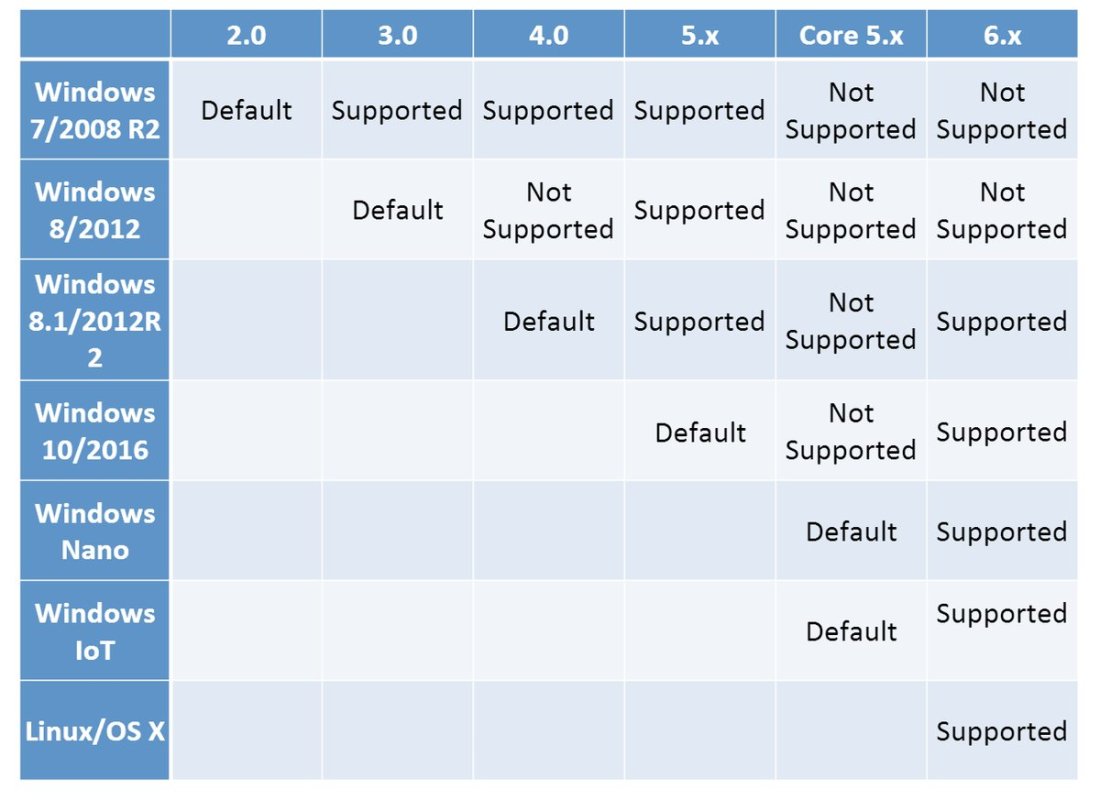
By now, probably newer versions have come out, but this should give a rough indication of the 2019 state of [WayBack] PowerShell OS Support Matrix – mohitgoyal.co:
For 5.1 and lower, you can find the prerequisites in [WayBack] Windows PowerShell System Requirements – PowerShell | Microsoft Docs.
–jeroen
Posted in .NET, CommandLine, Development, PowerShell, PowerShell, Scripting, Software Development | Leave a Comment »
Posted by jpluimers on 2021/09/07
If you get [WayBack] “A parameter cannot be found that matches parameter name ‘PassThru'” as PowerShell error, then likely the PowerShell version is too old to support -PassThru, which likely means you have are running pre-Windows 10 version.
PowerShell 3 (introduced in 2012) added the -PassThru parameter that allowed to chain multiple commands from one list pipe.
Another reason for the error might be that the command you use does not support the -PassThru parameter.
To check which commandlets support -PassThru, use the below command (the output is from a Windows 8.1 machine running PowerShell 4.0).
Posted in .NET, CommandLine, Development, PowerShell, PowerShell, Software Development | Leave a Comment »
Posted by jpluimers on 2021/08/24
The Flux architecture is often used in ReactJS, but there are also implementations outside that realm.
So here are some links for my archive:
Flux is the application architecture that Facebook uses for building client-side web applications. It complements React’s composable view components by utilizing a unidirectional data flow. It’s more of a pattern rather than a formal framework, and you can start using Flux immediately without a lot of new code.
–jeroen
Posted in .NET, C#, Delphi, Development, JavaScript/ECMAScript, ReactJS, Scripting, Software Development | Leave a Comment »
Posted by jpluimers on 2021/08/12
Interesting approach in [WayBack] Attacking Technical Debt – ardalis.
The tech stuff is C# and .NET based, but the general approach can be applied in a universal way.
via:Â [WayBack] Jim Holmes on Twitter “Great post by @ardalis on attacking Technical Debt. … You should also read my series on creating a Technical Debt Payment Plan, starting here: …”
So also read
–jeroen
Posted in .NET, C#, Development, Software Development, Technical Debt | Leave a Comment »
Posted by jpluimers on 2021/08/04
If this is still open, please vote for it: [WayBack] Naming of naming styles should reflect their casing · Issue #35243 · dotnet/roslyn · GitHub
Having the drop down of naming styles reflect the actual output in one way or the other will make it way easier to select the correct one.
Besides that, a few new naming styles are suggested in this issue, like snake_case which is great for translating APIs that are already in that form.
Via:
–jeroen
Posted in .NET, C#, C# 6 (Roslyn), C# 7, C# 8, Development, Software Development | Leave a Comment »
Posted by jpluimers on 2021/07/29
Reminder to self (as I keep forgetting how versatile extension methods can be):
[WayBack] Mark Pintar sur Twitter : “The nice thing about extension methods is one can add it to most types. Even works of int, float and other primitive types… “
An interesting way of allowing methods on enumerated types is by using extension methods: [WayBack] Unity sample MonoBehaviour explaining how to associate simple strings with enums. · GitHub.
A more elaborate example from [WayBack] NoraGrace-Chess/Position.cs at master · ericoldre/NoraGrace-Chess · GitHub is below the fold.
Via:
using System; using System.ComponentModel; using UnityEngine; public class EnumDescription : MonoBehaviour { public enum PlayerState { Unknown, [Description("Alive and kicking")] Alive, [Description("Dead as a duck")] Dead } // Start is called before the first frame update void Start() { var state = PlayerState.Dead; Debug.Log("Player is " + state.GetDescription()); } } public static class EnumExtensions { public static string GetDescription(this Enum value) { var type = value.GetType(); var name = Enum.GetName(type, value); if (name != null) { var field = type.GetField(name); if (field != null) { if (Attribute.GetCustomAttribute(field, typeof(DescriptionAttribute)) is DescriptionAttribute attr) return attr.Description; } } return name; } }
Posted in .NET, C#, Development, Software Development | Leave a Comment »
Posted by jpluimers on 2021/07/20
–jeroen
Posted in .NET, Design Patterns, Development, Software Development | Leave a Comment »
Posted by jpluimers on 2021/07/15
For my link archive: [WayBack] c# – Algorithm to check whether a certain hour falls into a given time period – Stack Overflow answered by [WayBack] kennytm:
Assume you only have the time and not the date.
if end_time >= start_time: return start_time <= current_time <= end_time else: return start_time <= current_time or current_time <= end_time
I totally agree with this comment:
This is brilliant! Thanks a lot. – Martin Dimitrov [WayBack]
I love it when algorithms are simple and elegant.
It reminded me of another scheduling related algorithm: [WayBack] Activity Selection Problem | Greedy Algo-1 – GeeksforGeeks
–jeroen
Posted in .NET, Algorithms, C#, Development, Software Development | Leave a Comment »