On my research list for Visual Studio 2017 and up: [WayBack] How to Integrate ILMerge into Visual Studio Build Process to Merge Assemblies? – Stack Overflow
–jeroen
Posted by jpluimers on 2020/03/19
On my research list for Visual Studio 2017 and up: [WayBack] How to Integrate ILMerge into Visual Studio Build Process to Merge Assemblies? – Stack Overflow
–jeroen
Posted in .NET, Development, Software Development, Visual Studio and tools | Leave a Comment »
Posted by jpluimers on 2020/02/26
Me at [WayBack] emulation – How to safely remove/uninstall Android Virtual Device .img files added by Visual Studio Emulator for Android – Stack Overflow:
Since after uninstalling the “Visual Studio Emulator for Android” component, you cannot get to the “AVD Manager” any more, you have to manually delete this directory:
%LocalAppData%\Microsoft\VisualStudioEmulatorThis works for both Visual Studio 2017 and Visual Studio 2015.
In addition, you might want to run “AppWiz.cpl“, then remove “Android SDK Tools”, which is also not automatically removed by the Visual Studio installer (at least not in Visual Studio 2015).
This will get rid of the multi-gigabyte folder
%ProgramFiles(x86)%\Android\android-sdk\
–jeroen
Posted in .NET, Development, Software Development, Visual Studio 2015, Visual Studio 2017, Visual Studio and tools | Leave a Comment »
Posted by jpluimers on 2020/02/26
This post is a reminder to myself that not all mappings from XSD to programming languages are possible.
There are many impossible cases, so this is just a general reminder.
A Delphi specific case for instance is the mapping of enumerations: one reason is that XSD enumerations are case sensitive, but the Delphi language is not: [WayBack] Using XML Enumerations with Delphi XML Data Binding Wizard – Stack Overflow.
More generic examples from my answer to the above question:
I’ve seen horrible things with wildcards that are sort of mappable to Java, but not to C#. This could likely go on for much longer…
–jeroen
Posted in C#, Delphi, Development, Java, Java Platform, Software Development, XML, XML/XSD, XSD | 2 Comments »
Posted by jpluimers on 2020/02/19
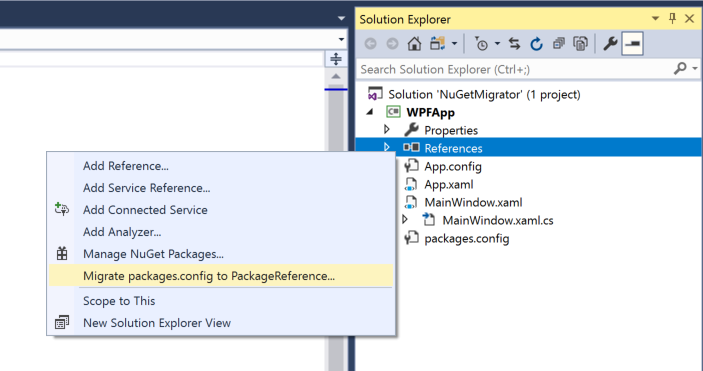
Since I often forget to cleanup some bits of a migration: [WayBack] Migrate to PackageReference with 3 clicks:
Related:
–jeroen
Posted in .NET, Development, Software Development, Visual Studio 2015, Visual Studio 2017, Visual Studio and tools | Leave a Comment »
Posted by jpluimers on 2020/02/18
This is indeed an interesting live way to learn about C# even if you think you know most of it:
[WayBack] Scott Hanselman on Twitter: Learn C# in your browser, no install! Practice your .NET skills on an ChromeBook if you like! Your choice!
Here you go:
–jeroen
Posted in .NET, C#, Development, Software Development | Leave a Comment »
Posted by jpluimers on 2020/02/13
Since I really want to switch most of my SSMS usage to a tool being less resource intensive, as a truckload of my work is just running scripts, not browsing through data: [WayBack] Use the Visual Studio Code mssql extension for SQL Server | Microsoft Docs
This tutorial shows how to use the mssql extension for VS Code. This extension allows you to edit and run Transact-SQL scripts in VS Code.
This will also make it a lot easier to run my code from a Mac.
–jeroen
Posted in .NET, Database Development, Development, Software Development, SQL Server, Visual Studio and tools, vscode Visual Studio Code | Leave a Comment »
Posted by jpluimers on 2020/02/13
If a part of a method requires implicit setup/tear-down code (for instance when using managed types like arrays, strings, etc), especially in rarely taken execution paths, then consider putting that code in a separate method.
I bumped into this recently, and found out it does not just hold for Delphi, it can happen in other languages too.
A Delphi example I found back is this one: [WayBack] Delphi Corner Weblog: Speed problems caused by code that never ran.
The problem with Delphi is that the language does not have local scope (variables are at the start of the method) which means the penalty is for the full method.
I bumped into this in C# where a piece of legacy code had the variables declared away from the block where they finally were used.
This historically grew, because originally they were used in more placed of the code.
The refactoring limiting the scope just never put the declaration close to the usage hence violating the proximity principle.
Via: [WayBack] Ouch! Code that doesn’t get executed can still cause other code in the same procedure to become much slower. Of course, in retrospect, once you know the… – Thomas Mueller (dummzeuch) – Google+
–jeroen
Posted in .NET, Delphi, Development, Software Development | Leave a Comment »
Posted by jpluimers on 2020/02/12
[WayBack] Alex Thissen @ Techorama Netherlands 2018: Building real world production-ready Web API’s with .NET Core
Follow [WayBack] Alex Thissen(@alexthissen) on Twitter
Pictures taken during session (likely in reverse order; needs cleanup of duplicates/blurs).
Many more [WayBack] Techorama 2018 Netherlands stuff at:
More pictures I took during sessions:
They are in reverse order of the what I attended of the [WayBack] Techorama Netherlands 2018: Schedule: Pathé, Ede, The Netherlands – See the full schedule of events happening Oct 2 – 3, 2018 and explore the directory of Speakers & Attendees.
Sessions I could archive, or find recordings of:
--jeroen
Posted in .NET, .NET Standard, ASP.NET, Conferences, Development, Event, Software Development | Leave a Comment »
Posted by jpluimers on 2020/01/23
Another blast from the past. I’ve been using many development environment all my live, so I have been using .NET very early on allowing me to make a good comparison: [WayBack] Delphi developer switching to C# – Stack Overflow.
I have a broad toolbox because we’ve never lived in a “silver bullet” era: any problem needs a combination of tools to solve them. Having a broad toolset allows you to pick and choose more easily. Mastering the different tools however requires a lot of effort and time. You really need to love this profession to put that energy in it.
I heavily use both for software development.
Development speed of server apps (web apps, web services, windows services) is much higher in .NET.
Development speed of business apps (pure Windows UI) is much higher in Delphi.
Development of sexy apps is a pain in both environments.
A few things you should know:
- Learning the .NET framework will take a lot of time: it is huge, but contains a lot of gizmos (some gems are really well hidden).
- Don’t lose yourself in following all new trends at once: generics, lambda, LINQ, each are nice, but grasping them all at once is only for a few of us
- For web apps, skip WebForms, but learn ASP.NET MVVC (yes, the Ruby guys were right after all); learn HTML 5 and JavaScript too.
- For sexy Windows apps, learn WPF, but be prepared for a steep learning curve (designer, and framework are radically different)
- Don’t get a too sexy UI: it costs you a disproportional amount of time while your users are waiting for functionality
- Like the market has been bashing Delphi since version 1, the market is bashing SilverLight too
- Skip WinForms; if you need something like WinForms, then Delphi is way more productive (even more so if you have an existing Delphi VCL codebase).
- WPF is just as thread-friendly as the VCL or WinForms (read: neither of the 3 is thread friendly)
- Don’t perform rewrites of your Delphi stuff in .NET (or for that matter any other 1:1 rewrite from platform A into platform B): it is a waste of your time.
- Threading and synchronization are a pain in all development environments. The pain is not so much in the general stuff (the Concurrent Collections in the .NET 4 framework helps, as do the Delphi OmniThreadLibrary), but in getting the final details and exception cases right is the real pain.
- Garbage collection does not mean that you won’t leak memory: it means that you won’t leak when your app terminates, but while it runs the leaks are way harder to detect (boy, I wish I had the FastMM memory monitor for .NET)
–jeroen
Posted in .NET, C#, Delphi, Development, Software Development | 3 Comments »
Posted by jpluimers on 2020/01/22
If you ever get an exit code 9009 from xcopy like the one below, then try using the full path to xcopy. It should be there, it should not matter, but it does if someone changed your path.
[Exec Error] The command " xcopy ....\Shared\DLL\FastMM\FastMM_FullDebugMode.dll .\Win32\Debug\ /y&& xcopy ....\Shared\DLL\OpenSSL\libeay32.dll .\Win32\Debug\ /y&& xcopy ....\Shared\DLL\OpenSSL\ssleay32.dll .\Win32\Debug\ /y&& xcopy ....\Shared\DLL\gRPC\nghttp2.dll .\Win32\Debug\ /y&& xcopy ....\Shared\DLL\gRPC\sgcWebSockets.dll .\Win32\Debug\ /y" exited with code 9009.
Preliminary solution: replace xcopy with C:\Windows\System32\xcopy.exe .
Final solution: look with Process Explorer and Process Monitor what the exact environment PATH is. It should include C:\WINDOWS\system32;C:\WINDOWS;C:\WINDOWS\System32\Wbem;
If it does not, then find out what is changing your path.
Related:
–jeroen
Posted in .NET, Delphi, Development, Software Development | Leave a Comment »