The Wiert Corner – irregular stream of stuff

Jeroen W. Pluimers on .NET, C#, Delphi, databases, and personal interests

  • My badges

  • Twitter Updates

  • My Flickr Stream

  • Pages

  • All categories

  • Enter your email address to subscribe to this blog and receive notifications of new posts by email.

    Join 1,861 other subscribers

Archive for the ‘.NET’ Category

Delphi XE6 and up regression: “‘9999-12-31 23:59:59,1000’ is not a valid date and time” when passing a SOAP message with 9999-11-31T23:59:59.9999999; QC144171

Posted by jpluimers on 2018/09/06

A valid SOAP message with <urn:timeStamp>9999-11-31T23:59:59.9999999</urn:timeStamp> in a xs:dateTime field return '9999-12-31 23:59:59,1000' is not a valid date and time from a Delphi application with this SOAP response:

<SOAP-ENV:Envelope xmlns:SOAP-ENV="http://schemas.xmlsoap.org/soap/envelope/" xmlns:xsd="http://www.w3.org/2001/XMLSchema" xmlns:xsi="http://www.w3.org/2001/XMLSchema-instance" xmlns:SOAP-ENC="http://schemas.xmlsoap.org/soap/encoding/">
  <SOAP-ENV:Body>
    <SOAP-ENV:Fault>
      <faultcode>SOAP-ENV:Server</faultcode>
      <faultstring>'9999-12-31 23:59:59,1000' is not a valid date and time</faultstring>
      <faultactor/>
    </SOAP-ENV:Fault>
  </SOAP-ENV:Body>
</SOAP-ENV:Envelope>

The reason is this exception:

exception class EConvertError with message ''9999-12-31 23:59:59,1000' is not a valid date and time'.

This is from a .NET based test case passing in timeStamp = DateTime.MaxValuewhich is handled perfectly fine by other SOAP web services tested.

I know about different resolutions of time stamps, but would never expect the 999.9999 milliseconds to be rounded up to 1000 as it is always safer to truncated away from an upper limit.

A test using Soap UI [WayBack] with this parameter finally worked (max 3 digits second fraction):

<urn:timeStamp>9999-12-31T23:59:59.999</urn:timeStamp>

The true origin of problem is in this method in the Soap.XSBuiltIns unit which has been unchanged since at least Delphi 7:

function TXSBaseTime.GetMilliSecond: Word;
begin
  Result := Round(FractionalSeconds*1000);
end;

The problem exposed itself because as of Delphi XE6 the core of function TXSBaseCustomDateTime.GetAsDateTime piece was changed from

Result := EncodeDateTime(Year, Month, Day, Hour, Minute, Second, 0);

to

Result := EncodeDateTime(Year, Month, Day, Hour, Minute, Second, Millisecond);

A combination of lack of test cases and understanding XML specifications failed to reveal this bug.

The standards specify (among others):

  • '.' s+ (if present) represents the fractional seconds;
    The above is not limiting the amount of digits, not talking about milliseconds either.
  • All ·minimally conforming· processors ·must· support year values with a minimum of 4 digits (i.e., YYYY) and a minimum fractional second precision of milliseconds or three decimal digits (i.e. s.sss). However, ·minimally conforming· processors ·may· set an application-defined limit on the maximum number of digits they are prepared to support in these two cases, in which case that application-defined maximum number ·must· be clearly documented.
    Delphi not only limits the fractional second precission, it changes the limit over time and does not document the limit. Three strikes…
  • s -- represents a digit used in the time element "second". The two digits in a ss format can have values from 0 to 60. In the formats described in this specification the whole number of seconds ·may· be followed by decimal seconds to an arbitrary level of precision. This is represented in the picture by "ss.sss". A value of 60 or more is allowed only in the case of leap seconds.
    Given buggy the fractional second handling through milliseconds, the leap second handling is ripe for a test case as well.
    Strictly speaking, a value of 60 or more is not sensible unless the month and day could represent March 31, June 30, September 30, or December 31 in UTC. Because the leap second is added or subtracted as the last second of the day in UTC time, the long (or short) minute could occur at other times in local time. In cases where the leap second is used with an inappropriate month and day it, and any fractional seconds, should considered as added or subtracted from the following minute.

The reproduction is quite simple:

Read the rest of this entry »

Posted in .NET, C#, Conference Topics, Conferences, Delphi, Development, Event, SOAP/WebServices, Software Development, XML, XML/XSD | Leave a Comment »

Some search links on Delphi and C# WSDL imports I need to investigate further

Posted by jpluimers on 2018/09/05

Sometimes, the Delphi WSDL importer imports fine, but the generated code does not accept test cases sent by other tools.

Below are some links for messages and comment fragments that I want to investigate further.

I have included the .NET message, because my experience is that searching on those gives more accurate results for something that could be broken in more than one environment.

Based on those:

Some on-line tools prefer the WSDL to be in one document, but a lot of WSDL documents use import and or include features, so here are some links on that too:

Bruneau Babet correctly informed me that – though Delphi SOAP clients support both document literal and RPC encoded – Delphi SOAP servers cannot support document literal, as they can only support RPC encoded. Through that I found

  • [WayBack] Apache CXF — WSDLValidator
    • Check the WSDL document for XML well-formedness.
    • Validate the WSDL document against its XML schema.
    • Validate the WSDL document using some of the semantic rules defined in the WSDL specification.
    • Validate the WSDL document against custom validation rules, such as those defined by the Web Services Interoperability (WS-I) organization (i.e. WS-I Basic Profile rules).
    • Validate the WSDL against strange exceptions, incorrectly generated code and general bad WSDL issues.

Back on those days, the big plan was to move everything Delphi to the .NET platform which supports both document literal and RPC encoded.

All in all, document literal has been on the radar with the Delphi R&D team since at least 2009, and nothing has been done.

References:

I looks like a wsdl message request part entries need to be named parameters for some tooling to correctly infer document/literal in a wrapped way. Some links for further research on this:

When you are surely running SOAP over HTTP, you can use this small class to raise exceptions which automatically get translated into SOAP Faults having the right return code using a trick I bumped into a few years ago from [WayBack] web services – Accessing the original TWebRequest object in a Delphi SOAP Server – Stack Overflow:

unit SoapFaultWithHttpCodeExceptionUnit;

interface

uses
  System.SysUtils;

type
  ESoapFaultWithHttpCodeException = class(Exception)
  strict private
    FHttpStatusCode: Integer;
  public
    constructor Create(const AHttpStatusCode: Integer);
    property HttpStatusCode: Integer read FHttpStatusCode;
  end;

implementation

uses
  Winapi.WinHTTP,
  Soap.WebBrokerSOAP,
  Web.HTTPApp,
  IdCustomHTTPServer;

constructor ESoapFaultWithHttpCodeException.Create(const AHttpStatusCode: Integer);
var
  IdHTTPResponseInfo: TIdHTTPResponseInfo;
  ReasonString: string;
  WebDispatcher: IWebDispatcherAccess;
begin
  IdHTTPResponseInfo := TIdHTTPResponseInfo.Create(nil, nil, nil);
  try
    FHttpStatusCode := AHttpStatusCode;
    IdHTTPResponseInfo.ResponseNo := AHttpStatusCode;
    ReasonString := Format('%d: %s', [AHttpStatusCode, IdHTTPResponseInfo.ResponseText]);
    inherited Create(ReasonString);

    // https://stackoverflow.com/questions/10405227/accessing-the-original-twebrequest-object-in-a-delphi-soap-server
    if Supports(GetSOAPWebModule, IWebDispatcherAccess, WebDispatcher) then
    begin
      WebDispatcher.Response.StatusCode := HTTP_STATUS_SERVER_ERROR;
      WebDispatcher.Response.ReasonString := ReasonString;
    end

  finally
    IdHTTPResponseInfo.Free;
  end;
end;

end.

jeroen

Read the rest of this entry »

Posted in .NET, C#, Conference Topics, Conferences, Delphi, Development, Event, SOAP/WebServices, Software Development, XML/XSD | Leave a Comment »

C#/JSON deep verify if object instances are equivalent

Posted by jpluimers on 2018/09/05

Some notes to verify object equivalence:

–jeroen

Posted in .NET, C#, Development, Software Development | Leave a Comment »

c# – All possible array initialization syntaxes – Stack Overflow

Posted by jpluimers on 2018/09/04

Since I tend to forget in-line array expression: [Archive.is] c# – All possible array initialization syntaxes – Stack Overflow:

These are the current declaration and initialization methods for a simple array.
string[] array = new string[2]; // creates array of length 2, default values
string[] array = new string[] { "A", "B" }; // creates populated array of length 2
string[] array = { "A" , "B" }; // creates populated array of length 2
string[] array = new[] { "A", "B" }; // created populated array of length 2
Also note that in the declarations above, the first two could replace the string[] on the left with var (C# 3+), as the information on the right is enough to infer the proper type. The third line must be written as displayed, as array initialization syntax alone is not enough to satisfy the compiler’s demands. The fourth could also use inference. So if you’re into the whole brevity thing, the above could be written as
var array = new string[2]; // creates array of length 2, default values
var array = new string[] { "A", "B" }; // creates populated array of length 2
string[] array = { "A" , "B" }; // creates populated array of length 2
var array = new[] { "A", "B" }; // created populated array of length 2 

–jeroen

Posted in .NET, C#, Development, Software Development | Leave a Comment »

What are your favorite extension methods for C#? (codeplex.com/extensionoverflow) – Stack Overflow

Posted by jpluimers on 2018/09/04

From an archive a long time ago: by now this question is probably deleted because well Stack Overflow:

Explanations how they work: [WayBackhttp://stackoverflow.com/questions/4338333/object-how-top-most-base-class-got-method/4338509

The codeplex repository https://extensionoverflow.codeplex.com has been forked at https://github.com/devkhan/ExtensionOverflow

–jeroej

Posted in .NET, C#, Development, Software Development | Leave a Comment »

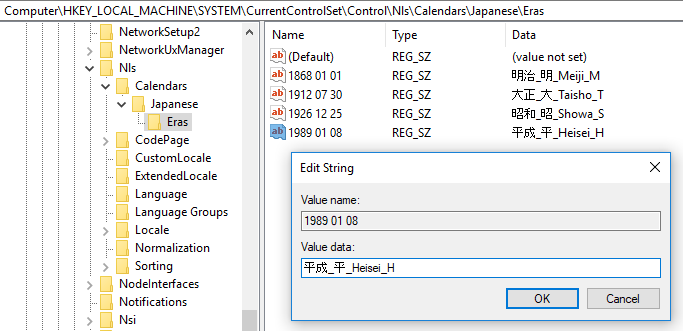
Handling a new era in the Japanese calendar in .NET | .NET Blog

Posted by jpluimers on 2018/08/30

A first-hand look from the .NET engineering teams: [WayBack] Handling a new era in the Japanese calendar in .NET | .NET Blog

Very important if your software has to do anything with Japan, which – for global software and web applications – can be a lot.

Via: [WayBack] If you thought Y2K, leap years, easter and lent were complex, take a look at the Japanese era challenge… – Lars Fosdal – Google+

–jeroen

Posted in .NET, Development, Software Development | Leave a Comment »

.net – How to generate service reference with only physical wsdl file – Stack Overflow

Posted by jpluimers on 2018/08/28

Since I always forget that you can add a service reference by hand-pasting the full path to a local WSDL file, then hit Go: [WayBack] .net – How to generate service reference with only physical wsdl file – Stack Overflow

–jeroen

Read the rest of this entry »

Posted in .NET, Development, Software Development, Visual Studio 2015, Visual Studio and tools | Leave a Comment »

Nick Craver on Twitter: “This is worth repeating: We’re migrating Stack Overflow to .NET Core. **It’s not because of performance**. There are enough major wins without even factoring performance for us to move. Any performance gains are 100% in the bonus category. We’d migrate with a 0% perf improvement.…”

Posted by jpluimers on 2018/08/21

If you are on .NET, migrate to .NET Core. If you start with .NET, start with .NET Core.

Based on:

–jeroen

Edit: nice comment on [WayBack] If you are on .NET, migrate to .NET Core. If you start with .NET, start with .NET Core. Based on: [WayBack] Nick Craver on Twitter: “This is worth repea… – Jeroen Wiert Pluimers – Google+:

Vincent Parrett's profile photo

We are porting Continua CI to .net core 2.1, I’ve been working on it for a few months now (along with other things of course), I had to contribute to a few open source projects to help get all our dependencies onto .net core, and for the most part it’s been pretty easy. I did have to change the windows service stuff, and since there is no WCF server stuff in .net core we have to find a replacement for that for server to agent communications (still exploring options, but probably going with halibut).

What hasn’t (and still isn’t) easy is porting MVC4/5 stuff to asp.net core. So many little changes that drive me absolutely potty. I was getting so frustrated that I had to put it aside for a while and work on other things, just to get my sanity back!

Posted in .NET, .NET Core, Development, Software Development | Leave a Comment »

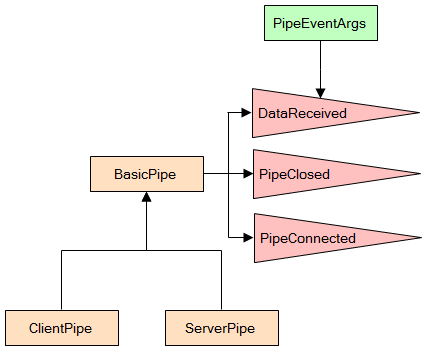
Full Duplex Asynchronous Read/Write with Named Pipes – CodeProject

Posted by jpluimers on 2018/08/21

When you run on Windows: [WayBackFull Duplex Asynchronous Read/Write with Named Pipes – CodeProject

via:

–jeroen

Posted in .NET, C#, Development, Software Development, WinForms | Leave a Comment »

Reading files that are locked by other references: c# – Notepad beats them all? – Stack Overflow

Posted by jpluimers on 2018/08/16

Cool feature borrowed from Notepad, which can read files locked by other references (for instance a process having the handle open): [WayBackc# – Notepad beats them all? – Stack Overflow.

The example from the answer is in .NET, but can be used in a native environment as well (Notepad is a native application).

Notepad reads files by first mapping them into memory, rather than using the “usual” file reading mechanisms presumably used by the other editors you tried. This method allows reading of files even if they have an exclusive range-based locks.

You can achieve the same in C# with something along the lines of:

using (var f = new FileStream(processIdPath, FileMode.Open, FileAccess.Read, FileShare.ReadWrite))
using (var m = MemoryMappedFile.CreateFromFile(f, null, 0, MemoryMappedFileAccess.Read, null, HandleInheritability.None, true))
using (var s = m.CreateViewStream(0, 0, MemoryMappedFileAccess.Read))
using (var r = new StreamReader(s))
{
    var l = r.ReadToEnd();
    Console.WriteLine(l);
}

Via: [WayBack] Maintaining Notepad is not a full-time job, but it’s not an empty job either – The Old New Thing

–jeroen

Posted in .NET, Delphi, Development, Software Development, The Old New Thing, Windows Development | Leave a Comment »