The Wiert Corner – irregular stream of stuff

Jeroen W. Pluimers on .NET, C#, Delphi, databases, and personal interests

  • My badges

  • Twitter Updates

  • My Flickr Stream

  • Pages

  • All categories

  • Enter your email address to subscribe to this blog and receive notifications of new posts by email.

    Join 1,830 other subscribers

Archive for the ‘.NET’ Category

What are your favorite extension methods for C#? (codeplex.com/extensionoverflow) – Stack Overflow

Posted by jpluimers on 2018/09/04

From an archive a long time ago: by now this question is probably deleted because well Stack Overflow:

Explanations how they work: [WayBackhttp://stackoverflow.com/questions/4338333/object-how-top-most-base-class-got-method/4338509

The codeplex repository https://extensionoverflow.codeplex.com has been forked at https://github.com/devkhan/ExtensionOverflow

–jeroej

Posted in .NET, C#, Development, Software Development | Leave a Comment »

Handling a new era in the Japanese calendar in .NET | .NET Blog

Posted by jpluimers on 2018/08/30

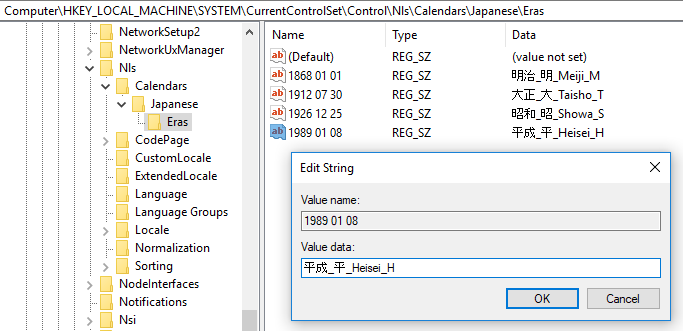
A first-hand look from the .NET engineering teams: [WayBack] Handling a new era in the Japanese calendar in .NET | .NET Blog

Very important if your software has to do anything with Japan, which – for global software and web applications – can be a lot.

Via: [WayBack] If you thought Y2K, leap years, easter and lent were complex, take a look at the Japanese era challenge… – Lars Fosdal – Google+

–jeroen

Posted in .NET, Development, Software Development | Leave a Comment »

.net – How to generate service reference with only physical wsdl file – Stack Overflow

Posted by jpluimers on 2018/08/28

Since I always forget that you can add a service reference by hand-pasting the full path to a local WSDL file, then hit Go: [WayBack] .net – How to generate service reference with only physical wsdl file – Stack Overflow

–jeroen

Read the rest of this entry »

Posted in .NET, Development, Software Development, Visual Studio 2015, Visual Studio and tools | Leave a Comment »

Nick Craver on Twitter: “This is worth repeating: We’re migrating Stack Overflow to .NET Core. **It’s not because of performance**. There are enough major wins without even factoring performance for us to move. Any performance gains are 100% in the bonus category. We’d migrate with a 0% perf improvement.…”

Posted by jpluimers on 2018/08/21

If you are on .NET, migrate to .NET Core. If you start with .NET, start with .NET Core.

Based on:

–jeroen

Edit: nice comment on [WayBack] If you are on .NET, migrate to .NET Core. If you start with .NET, start with .NET Core. Based on: [WayBack] Nick Craver on Twitter: “This is worth repea… – Jeroen Wiert Pluimers – Google+:

Vincent Parrett's profile photo

We are porting Continua CI to .net core 2.1, I’ve been working on it for a few months now (along with other things of course), I had to contribute to a few open source projects to help get all our dependencies onto .net core, and for the most part it’s been pretty easy. I did have to change the windows service stuff, and since there is no WCF server stuff in .net core we have to find a replacement for that for server to agent communications (still exploring options, but probably going with halibut).

What hasn’t (and still isn’t) easy is porting MVC4/5 stuff to asp.net core. So many little changes that drive me absolutely potty. I was getting so frustrated that I had to put it aside for a while and work on other things, just to get my sanity back!

Posted in .NET, .NET Core, Development, Software Development | Leave a Comment »

Full Duplex Asynchronous Read/Write with Named Pipes – CodeProject

Posted by jpluimers on 2018/08/21

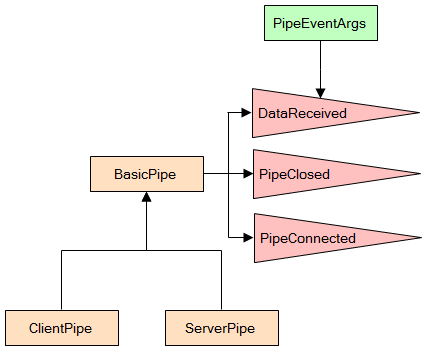
When you run on Windows: [WayBackFull Duplex Asynchronous Read/Write with Named Pipes – CodeProject

via:

–jeroen

Posted in .NET, C#, Development, Software Development, WinForms | Leave a Comment »

Reading files that are locked by other references: c# – Notepad beats them all? – Stack Overflow

Posted by jpluimers on 2018/08/16

Cool feature borrowed from Notepad, which can read files locked by other references (for instance a process having the handle open): [WayBackc# – Notepad beats them all? – Stack Overflow.

The example from the answer is in .NET, but can be used in a native environment as well (Notepad is a native application).

Notepad reads files by first mapping them into memory, rather than using the “usual” file reading mechanisms presumably used by the other editors you tried. This method allows reading of files even if they have an exclusive range-based locks.

You can achieve the same in C# with something along the lines of:

using (var f = new FileStream(processIdPath, FileMode.Open, FileAccess.Read, FileShare.ReadWrite))
using (var m = MemoryMappedFile.CreateFromFile(f, null, 0, MemoryMappedFileAccess.Read, null, HandleInheritability.None, true))
using (var s = m.CreateViewStream(0, 0, MemoryMappedFileAccess.Read))
using (var r = new StreamReader(s))
{
    var l = r.ReadToEnd();
    Console.WriteLine(l);
}

Via: [WayBack] Maintaining Notepad is not a full-time job, but it’s not an empty job either – The Old New Thing

–jeroen

Posted in .NET, Delphi, Development, Software Development, The Old New Thing, Windows Development | Leave a Comment »

Why Skylake CPUs Are Sometimes 50% Slower – How Intel Has Broken Existing Code – Alois Kraus

Posted by jpluimers on 2018/08/09

[WayBack] Why Skylake CPUs Are Sometimes 50% Slower – How Intel Has Broken Existing Code – Alois Kraus reports that the PAUSE instruction on Intel Skylake architecture takes an order of magnitude longer than on previous architectures.

This impacts spinlock code in .NET 4.x and .NET Core 2, and likely impacts other spinlock code as well. The .NET core fix gets back-ported to .NET 4.x.

Since Delphi XE, the Delphi RTL code has borrowed ideas from .NET implementing this kind of code, so I filed [WayBack] QualityCentral: 144063 PAUSE instruction on Intel Skylake takes order of magnitude longer: important for SpinWait/SpinLock code (because Google can index it).

It is no coincidence that a Senior Scaleability Engineer at Booking.com mentioned it on his G+ stream ([WayBack] The “Pause” instruction changed timing dramatically in Skylake. Spinlock implementation based on pause will need adjustments. – Kristian Köhntopp – Google+) as changes like this can heavily impact server systems.

–jeroen

via: [WayBack] The “Pause” instruction changed timing dramatically in Skylake. Spinlock implementation based on pause will need adjustments.I hope a fix for this will be back-ported for many Delphi versions. – Jeroen Wiert Pluimers – Google+

Posted in .NET, .NET 4.0, Delphi, Development, Software Development | Leave a Comment »

Pretty printing HTML is the same as formatting code: How do you format code in Visual Studio Code (VSCode) – Stack Overflow

Posted by jpluimers on 2018/07/18

I was looking for a HTML pretty printer (…) but in Visual Studio code, that is called code formatting, which supports many languages out of the box (including HTML) without requiring extensions like Atom.io (see below).

The shortcuts are at [WayBack] How do you format code in Visual Studio Code (VSCode) – Stack Overflow.

For Mac OS X/OS X/MacOS they are (the second one only appears when you have a code selection):

  • document: ShiftOptionF
  • selection: CommandK CommandF

Read the rest of this entry »

Posted in Development, Software Development, Visual Studio and tools, vscode Visual Studio Code | Leave a Comment »

Professional techniques for C# – Lecture Notes Parts 1..4 of 4 – CodeProject

Posted by jpluimers on 2018/07/10

If you’re new to C#, below is a good series of articles to get started.

Even if you’re not so new, there are quite some interesting bits to learn from them:

  1. [WayBackAn advanced introduction to C# – Lecture Notes Part 1 of 4 – CodeProject
    1. Introduction
    2. The right development environment
    3. Basic concepts
    4. Namespaces
    5. Data types and operators
    6. Reference and value types
    7. Control flow
    8. Object-oriented programming
    9. Inheritance and polymorphism
    10. Access modifiers
    11. Properties
    12. The constructor
    13. Abstract classes and interfaces
    14. Exception handling
    15. Outlook
    16. Other Articles in this Series
    17. References
    18. History
  2. [WayBackMastering C# – Lecture Notes Part 2 of 4 – CodeProject
    1. Introduction
    2. Enumerations
    3. Delegates
    4. Auto-generated properties
    5. Generic types
    6. Generic methods
    7. Constraints
    8. Lambda expressions
    9. Anonymous objects & inferring types
    10. Extension methods
    11. LINQ
    12. Windows Forms development
    13. Custom drawing in Windows Forms
    14. Outlook
    15. Other Articles in this Series
    16. References
    17. History
  3. [WayBackAdvanced programming with C# – Lecture Notes Part 3 of 4 – CodeProject
    1. Introduction
    2. Events
    3. The .NET standard event pattern
    4. Reflection
    5. Dynamic Types
    6. Accessing the file system
    7. Streams
    8. Threads
    9. Thread-communication
    10. The Task Parallel Library
    11. Tasks and threads
    12. Awaiting async methods
    13. Outlook
    14. Other Articles in this Series
    15. References
    16. History
  4. [WayBackProfessional techniques for C# – Lecture Notes Part 4 of 4 – CodeProject
    1. Introduction
    2. More control on events
    3. Overloading operators
    4. The yield statement
    5. Iterators
    6. Understanding co- and contra-variance
    7. Using attributes effectively
    8. Elegant binding
    9. Unsafe code
    10. Communication between native and managed code
    11. Effective C#
    12. Outlook
    13. Other Articles in this Series
    14. References
    15. History


–jeroen

Posted in C#, Development, Software Development | Leave a Comment »

Visual Studio – Add File As Link

Posted by jpluimers on 2018/07/04

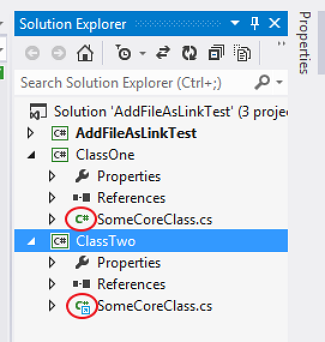
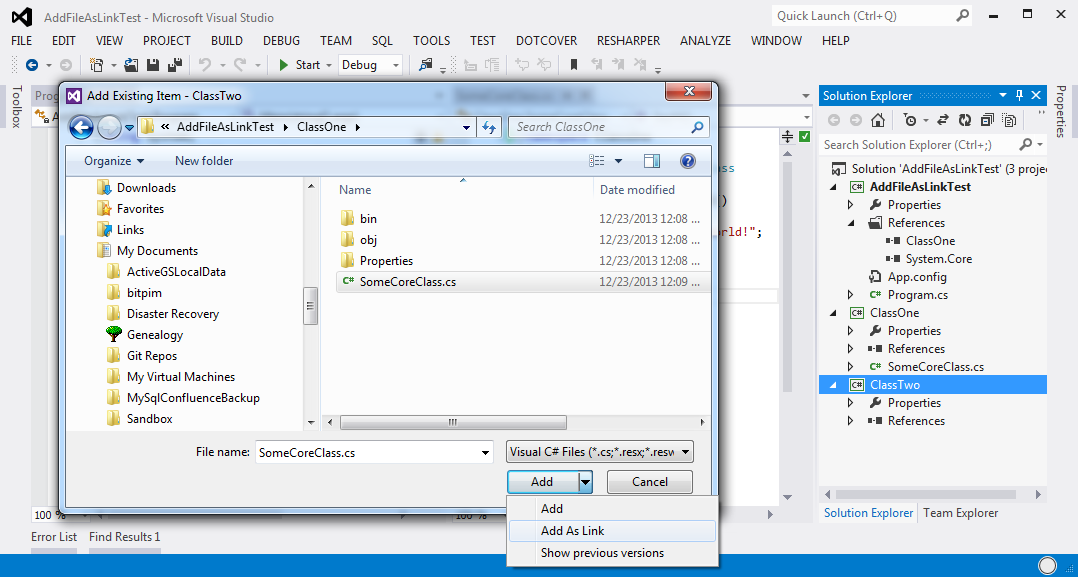
Since I forget where they hid the [WayBack] Visual Studio – Add File As Link feature, two images from the linked post:

  1. The icon in the link is different from the normal file:
  2. Adding as a link is  not a separate menu item, but a modification of the file open dialog overlaying the default Add button with two more options: Add; Add as Link (note Show Previous Versions is a feature of non-Home version of Windows Vista and up).
    Do not double click the file name, as that will add (AND COPY TO THE CURRENT PROJECT DIRECTORY !!!1!!!) that file to your current project.

A step by step instruction is at [WayBack] c# – Add File as a Link on Visual Studio – Debug vs Publish – Stack Overflow.

–jeroen

Posted in .NET, Development, Software Development, Visual Studio and tools | Leave a Comment »