The Wiert Corner – irregular stream of stuff

Jeroen W. Pluimers on .NET, C#, Delphi, databases, and personal interests

  • My badges

  • Twitter Updates

  • My Flickr Stream

  • Pages

  • All categories

  • Enter your email address to subscribe to this blog and receive notifications of new posts by email.

    Join 1,830 other subscribers

Archive for the ‘.NET’ Category

paulcbetts/refit: The automatic type-safe REST library for Xamarin and .NET

Posted by jpluimers on 2019/04/03

This is so cool: [WayBack] paulcbetts/refit: The automatic type-safe REST library for Xamarin and .NET. It’s  inspired by Square’s [WayBack] Retrofit library which does the same for Java.

They basically allow you to use attributes on interfaces to define a type-safe wrapper around any REST interface, then instantiate a connection to it for making calls.

No more manual HttpClient fiddling!

Since it requires only .NET 1.4, you can basically run it on any platform as it’s supported covered by the implementations .NET Core, Mono and the full .NET Framework.

Quite a lot of projects already use it; I got there via the first link:

–jeroen

Via: [WayBack] Exploring refit, an automatic type-safe REST library for .NET Standard https://www.hanselman.com/blog/ExploringRefit… – Jeroen Wiert Pluimers – Google+

Posted in .NET, C#, Development, Java, Java Platform, Software Development | Leave a Comment »

A while ago, Lars Fosdal was on a .NET and C# link spree. Some of his links are here

Posted by jpluimers on 2019/03/27

–jeroen

Posted in .NET, Development, Software Development | Leave a Comment »

Value types not having parameterless constructors…

Posted by jpluimers on 2019/03/27

The list below is based on a G+ discussion in a single language, but has way broader aspects.

It’s on value types, mutability, parameterless constructors and expectations of compiled code.

I’ve bitten myself in the foot with mutable types in too many languages too often, so I started advocating this years ago at clients, and now in this blog-post.

TL;DR:

Read the rest of this entry »

Posted in .NET, C#, C++, Delphi, Development, Jon Skeet, Software Development | 2 Comments »

Image recognition with C# and Emgu libraries: a .NET wrapper around Intel OpenCV – CodeProject

Posted by jpluimers on 2019/03/26

Cool article for doing image stuff from within C#: [Archive.isImage recognition with C# and Emgu libraries – CodeProject

–jeroen

Posted in .NET, C#, Development, Software Development | Leave a Comment »

Tips and Tricks in the Visual Studio Debugger | Microsoft Docs

Posted by jpluimers on 2019/01/30

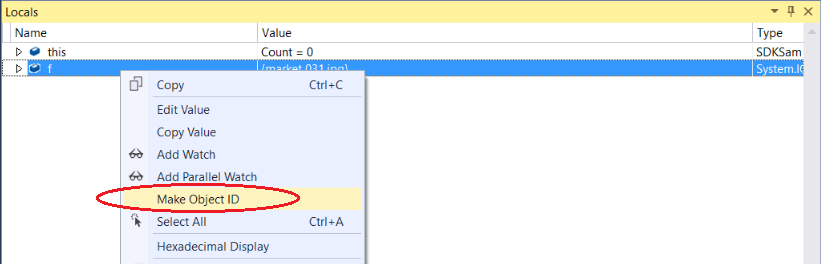
A few things in there that I didn’t know yet (like pinning data tips, tracking out-of-scope variables with object-ID and debugger attachment): [WayBackTips and Tricks in the Visual Studio Debugger | Microsoft Docs.

Via: [WayBackUsing the debugger in #VisualStudio? Learn how to pin #data tips, change the execution flow, & more w/ these tips & tricks: http://msft.social/wbmUes – Lars Fosdal – Google+

–jeroen


–jeroen

Posted in .NET, C#, Development, Software Development | Leave a Comment »

Convert Indesign Sketch to code: Petra Sketch Plugin | Melbourne | Applying Code

Posted by jpluimers on 2019/01/22

Interesting code generator from 3D models into Xamarin, Delphi or Oxygene code:

[WayBack] Petra Sketch Plugin | Melbourne | Applying Code

Convert Sketch drawings to iOS, macOS, Android a​nd​ Windows native drawing code.

[WayBack] Documentation of Petra Sketch Plugin | Melbourne | Applying Code

Via:

–jeroen

Posted in .NET, C#, Delphi, Development, Software Development, Xamarin Studio | Leave a Comment »

from a WSDL import: empty “Reference.cs” – Google Search

Posted by jpluimers on 2019/01/10

A search for empty “Reference.cs” – Google Search seems to indicate this happens with referenced types that – despite turning off that option – from the Visual Studio 2017 IDE sometimes results in an empty Reference.cs.

My solution: import in an empty project, then move the reference to the existing project and add it.

[WayBack] c# – Sometimes adding a WCF Service Reference generates an empty reference.cs – Stack Overflow

–jeroen

Posted in .NET, C#, Development, Software Development, Visual Studio 2015, Visual Studio 2017, Visual Studio and tools | Leave a Comment »

To Heap or not to Heap; That’s the Large Object Question? – CodeProject

Posted by jpluimers on 2018/12/27

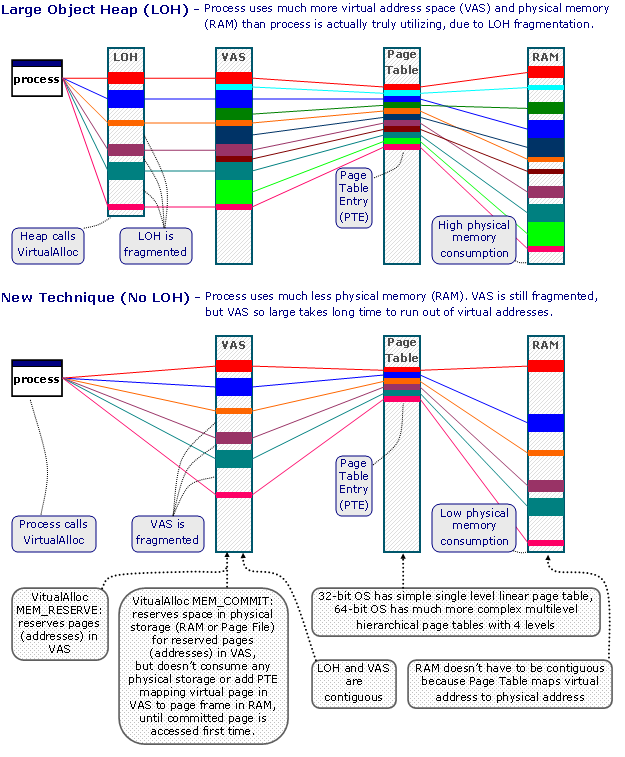
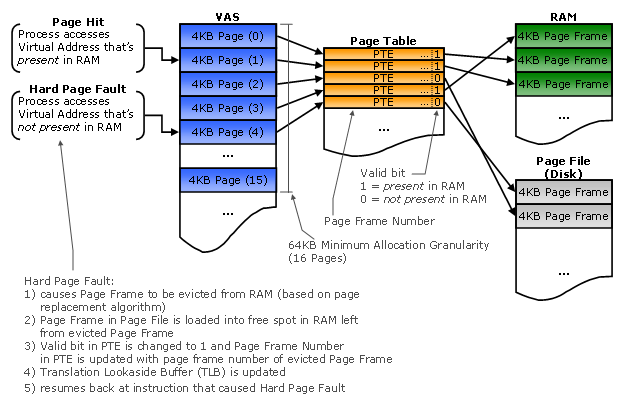
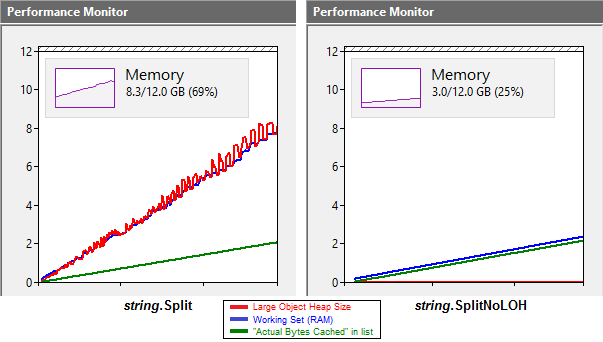
Interesting discussion on an alternative to the LoH: [WayBackTo Heap or not to Heap; That’s the Large Object Question? – CodeProject.

Via: [WayBack] To Heap or not to Heap; That’s the Large Object Question?Detailed analysis of large object heap allocation impacts under .NET: “…would it be better t… – Lars Fosdal – Google+

–jeroen


Posted in .NET, Development, Software Development | Leave a Comment »

Take C# 8.0 for a spin | .NET Blog

Posted by jpluimers on 2018/12/06

[WayBack] Take C# 8.0 for a spin | .NET Blog: A first-hand look from the .NET engineering teams

Either:

download and install Preview 1 of .NET Core 3.0 and Preview 1 of Visual Studio 2019.

or with Visual Studio Code

[WayBack] Bill Wagner on Twitter: “@cecilphillip @MadsTorgersen @VisualStudio @code Yes, install .NET Core 3 preview, add the 8.0 element and it works fine.”

Then play around with:

  • Nullable reference types
  • Ranges and indices
  • Asynchronous streams

Via: [WayBack] Mads Torgersen on Twitter: “I blogged a little walkthrough of the three major C# 8.0 features (nullable reference types, range and index expressions and async streams) shipping in Preview 1 of @VisualStudio 2019 and Preview 1 of .NET Core 3.0. Hope you like it!https://t.co/4uM7JlSRwE”

–jeroen

Read the rest of this entry »

Posted in C#, C# 8, Development, Software Development | Leave a Comment »

UTF-8 support for single byte character sets is beta in Windows and likely breaks a lot of applications not expecting this (via Unicode in Microsoft Windows: UTF-8 – Wikipedia)

Posted by jpluimers on 2018/12/04

Uh-oh: [WayBack] Unicode in Microsoft Windows: UTF-8 – Wikipedia:

Microsoft Windows has a code page designated for UTF-8code page 65001. Prior to Windows 10 insider build 17035 (November 2017),[7] it was impossible to set the locale code page to 65001, leaving this code page only available for:

  • Explicit conversion functions such as MultiByteToWideChar
  • The Win32 console command chcp 65001 to translate stdin/out between UTF-8 and UTF-16.

This means that “narrow” functions, in particular fopen, cannot be called with UTF-8 strings, and in fact there is no way to open all possible files using fopen no matter what the locale is set to and/or what bytes are put in the string, as none of the available locales can produce all possible UTF-16 characters.

On all modern non-Windows platforms, the string passed to fopen is effectively UTF-8. This produces an incompatibility between other platforms and Windows. The normal work-around is to add Windows-specific code to convert UTF-8 to UTF-16 using MultiByteToWideChar and call the “wide” function.[8] Conversion is also needed even for Windows-specific api such as SetWindowText since many applications inherently have to use UTF-8 due to its use in file formats, internet protocols, and its ability to interoperate with raw arrays of bytes.

There were proposals to add new API to portable libraries such as Boost to do the necessary conversion, by adding new functions for opening and renaming files. These functions would pass filenames through unchanged on Unix, but translate them to UTF-16 on Windows.[9] This would allow code to be “portable”, but required just as many code changes as calling the wide functions.

With insider build 17035 and the April 2018 update (nominal build 17134) for Windows 10, a “Beta: Use Unicode UTF-8 for worldwide language support” checkbox appeared for setting the locale code page to UTF-8.[a] This allows for calling “narrow” functions, including fopen and SetWindowTextA, with UTF-8 strings. Microsoft claims this option might break some functions (a possible example is _mbsrev[10]) as they were written to assume multibyte encodings used no more than 2 bytes per character, thus until now code pages with more bytes such as GB 18030 (cp54936) and UTF-8 could not be set as the locale.[11]


  1. Jump up^ [WayBack“UTF-8 in Windows”Stack Overflow. Retrieved July 1, 2011.
  2. Jump up^ [WayBack“Boost.Nowide”.
  3. Jump up^ [WayBackhttps://docs.microsoft.com/en-us/cpp/c-runtime-library/reference/strrev-wcsrev-mbsrev-mbsrev-l
  4. Jump up^ [WayBack“Code Page Identifiers (Windows)”msdn.microsoft.com.

Via [WayBack] Microsoft Windows Beta UTF-8 support for Ansi API could break things. Wiki Article of the Change… – Tommi Prami – Google+

Related, as handling encoding is hard, especially if it is changed or not your default:

–jeroen

Posted in .NET, C, C++, Delphi, Development, Encoding, GB 18030, Power User, Software Development, UTF-16, UTF-32, UTF-8, UTF16, UTF32, UTF8, Windows, Windows 10 | 2 Comments »