The Wiert Corner – irregular stream of stuff

Jeroen W. Pluimers on .NET, C#, Delphi, databases, and personal interests

  • My badges

  • Twitter Updates

  • My Flickr Stream

  • Pages

  • All categories

  • Enter your email address to subscribe to this blog and receive notifications of new posts by email.

    Join 1,860 other subscribers

Archive for the ‘.NET’ Category

Pretty printing HTML is the same as formatting code: How do you format code in Visual Studio Code (VSCode) – Stack Overflow

Posted by jpluimers on 2018/07/18

I was looking for a HTML pretty printer (…) but in Visual Studio code, that is called code formatting, which supports many languages out of the box (including HTML) without requiring extensions like Atom.io (see below).

The shortcuts are at [WayBack] How do you format code in Visual Studio Code (VSCode) – Stack Overflow.

For Mac OS X/OS X/MacOS they are (the second one only appears when you have a code selection):

  • document: ShiftOptionF
  • selection: CommandK CommandF

Read the rest of this entry »

Posted in Development, Software Development, Visual Studio and tools, vscode Visual Studio Code | Leave a Comment »

Professional techniques for C# – Lecture Notes Parts 1..4 of 4 – CodeProject

Posted by jpluimers on 2018/07/10

If you’re new to C#, below is a good series of articles to get started.

Even if you’re not so new, there are quite some interesting bits to learn from them:

  1. [WayBackAn advanced introduction to C# – Lecture Notes Part 1 of 4 – CodeProject
    1. Introduction
    2. The right development environment
    3. Basic concepts
    4. Namespaces
    5. Data types and operators
    6. Reference and value types
    7. Control flow
    8. Object-oriented programming
    9. Inheritance and polymorphism
    10. Access modifiers
    11. Properties
    12. The constructor
    13. Abstract classes and interfaces
    14. Exception handling
    15. Outlook
    16. Other Articles in this Series
    17. References
    18. History
  2. [WayBackMastering C# – Lecture Notes Part 2 of 4 – CodeProject
    1. Introduction
    2. Enumerations
    3. Delegates
    4. Auto-generated properties
    5. Generic types
    6. Generic methods
    7. Constraints
    8. Lambda expressions
    9. Anonymous objects & inferring types
    10. Extension methods
    11. LINQ
    12. Windows Forms development
    13. Custom drawing in Windows Forms
    14. Outlook
    15. Other Articles in this Series
    16. References
    17. History
  3. [WayBackAdvanced programming with C# – Lecture Notes Part 3 of 4 – CodeProject
    1. Introduction
    2. Events
    3. The .NET standard event pattern
    4. Reflection
    5. Dynamic Types
    6. Accessing the file system
    7. Streams
    8. Threads
    9. Thread-communication
    10. The Task Parallel Library
    11. Tasks and threads
    12. Awaiting async methods
    13. Outlook
    14. Other Articles in this Series
    15. References
    16. History
  4. [WayBackProfessional techniques for C# – Lecture Notes Part 4 of 4 – CodeProject
    1. Introduction
    2. More control on events
    3. Overloading operators
    4. The yield statement
    5. Iterators
    6. Understanding co- and contra-variance
    7. Using attributes effectively
    8. Elegant binding
    9. Unsafe code
    10. Communication between native and managed code
    11. Effective C#
    12. Outlook
    13. Other Articles in this Series
    14. References
    15. History


–jeroen

Posted in C#, Development, Software Development | Leave a Comment »

Visual Studio – Add File As Link

Posted by jpluimers on 2018/07/04

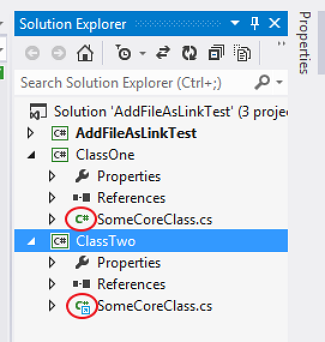
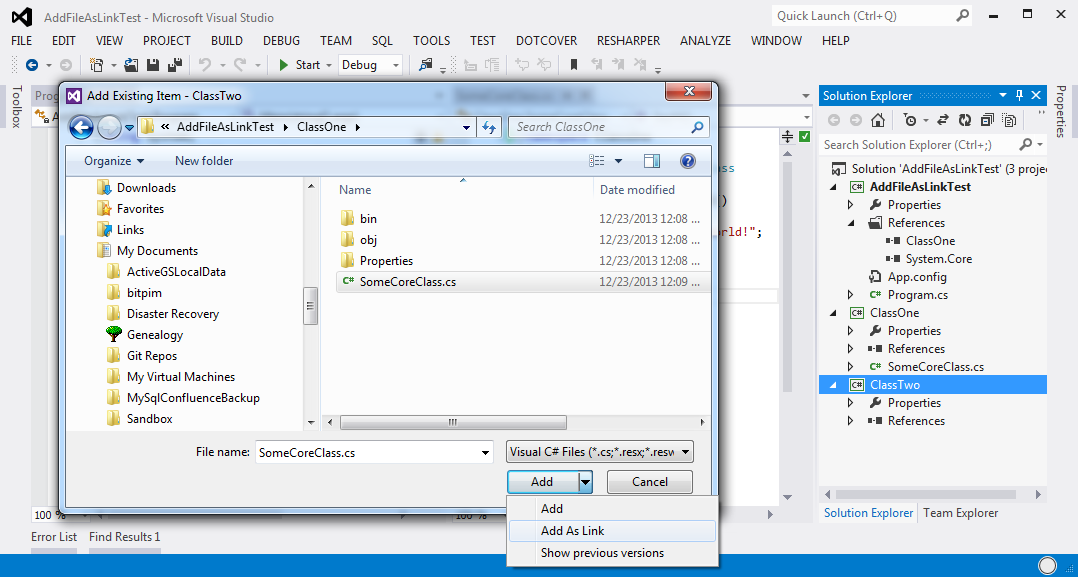
Since I forget where they hid the [WayBack] Visual Studio – Add File As Link feature, two images from the linked post:

  1. The icon in the link is different from the normal file:
  2. Adding as a link is  not a separate menu item, but a modification of the file open dialog overlaying the default Add button with two more options: Add; Add as Link (note Show Previous Versions is a feature of non-Home version of Windows Vista and up).
    Do not double click the file name, as that will add (AND COPY TO THE CURRENT PROJECT DIRECTORY !!!1!!!) that file to your current project.
A step by step instruction is at [WayBack] c# – Add File as a Link on Visual Studio – Debug vs Publish – Stack Overflow.

–jeroen

Posted in .NET, Development, Software Development, Visual Studio and tools | Leave a Comment »

VM disk sizes

Posted by jpluimers on 2018/06/29

I forgot to schedule the post below. It is still relevant if you create a machine with lots of Delphi versions on it.

Read the rest of this entry »

Posted in .NET, .NET 2.0, .NET 3.0, .NET 3.5, Database Development, Delphi, Delphi 2007, Delphi XE, Delphi XE2, Delphi XE3, Delphi XE4, Delphi XE5, Development, Firebird, InterBase, Power User, Software Development, Windows, Windows 8 | 2 Comments »

I wish the Delphi language supported multi-line strings

Posted by jpluimers on 2018/06/21

Very often, I see people ask for how to embed multi-line strings in a Delphi source file.

The short answer is: you can’t.

The long answer is: you can’t and if you want you have to hack your way around.

The answer should be: just like any of these languages that do support multiline strings:

Many languages support this through a feature called HEREDOC.

Now in Delphi and other languages like Java are building ugly workarounds like for instance this one: [WayBackRAD Studio Tip: Using resource scripts to organize project dependencies. – Chapman World.

–jeroen

Posted in .NET, C#, Delphi, Development, JavaScript/ECMAScript, Python, Ruby, Scripting, Software Development | 17 Comments »

Build 2018: The Future of C#

Posted by jpluimers on 2018/06/13

A cool preview of things to come in C# 8: [WayBackBuild 2018: The Future of C#

Via: [WayBack] C# 8 changes, exemplified #csharp – Lars Fosdal – Google+

–jeroen

Posted in .NET, C#, Development, Software Development | Leave a Comment »

Thread by @shanselman: “Sure. Not too complex. Thread -> .NET is a family. * Core runs on containers, many Linuxes, Windows and Mac. OSS, moves fast. * Framework […]”

Posted by jpluimers on 2018/06/01

Interesting [Archive.isThread by @shanselman: “Sure. Not too complex. Thread -> .NET is a family. * Core runs on containers, many Linuxes, Windows and Mac. OSS, moves fast. * Framework […]”

It answers [Archive.is] Thread by @domenic: “Having been out of the scene for over 5 years now, I’m extraordinarily confused by what’s going on over in .NET land. Not only the “what”, b […]”

Dominic was confused by .NET Core going to support Windows desktop UI apps as platform specific packages to a a cross platform foundation as announced in [WayBack] .NET Core 3 and Support for Windows Desktop Applications | .NET Blog

Via: [WayBack] Miguel de Icaza on Twitter: “Good thread on the evolution of modern .NET by @shanselman… “

–jeroen

Posted in .NET, Development, Software Development | Leave a Comment »

The .NET garbage collector sort-of documented: coreclr/garbage-collection.md at master · dotnet/coreclr

Posted by jpluimers on 2018/05/31

Very interesting read: “Garbage Collection Design” by Maoni Stephens at [WayBackcoreclr/garbage-collection.md at master · dotnet/coreclr.

It’s part of this series of documents:

The Book of the Runtime

Welcome to the Book of the Runtime (BOTR) for the .NET Runtime. This contains a collection of articles about the non-trivial internals of the .NET Runtime. Its intended audience are people actually modifying the code or simply wishing to have a deep understanding of the runtime. Below is a table of contents.

at [WayBackcoreclr/Documentation/botr at master · dotnet/coreclr

I got there via these links:

–jeroen

Posted in .NET, Development, Software Development | Leave a Comment »

Some useful Visual Studio Keyboard bindings – via my comment at “Allow for floating windows · Issue #10121 · Microsoft/vscode · GitHub”

Posted by jpluimers on 2018/05/30

The thread at [WayBack]: Allow for floating windows · Issue #10121 · Microsoft/vscode · GitHub made me discover a few things, which I have commented there.

Reminder to self: find the Windows keyboard shortcuts as well.

Thanks @steinhh for the CmdK O keyboard combination. I was not aware of that yet and I am going to use this next week on a multi-monitor system to see how well that works.

Your tip made me found the PDFs below and made me make the lists/screenshots below as well.

Terrific! Thank you, thank you!

The bindings (on Mac) I found with their screenshots:

  • CmdShiftP: show all commands
    screenshot 2018-05-20 15 27 30
  • CmdK O: open current file in new Window
  • CmdShiftN: open a new window
    screenshot 2018-05-20 15 27 00
  • CmdK CmdR: open keyboard shortcuts reference PDF for current OS in the default web-browser
  • CmdK CmdS: open keyboard shortcuts editor
    screenshot 2018-05-20 15 24 07

The keyboard shortcuts editor has a search which can find bindings on the keybinding name itself or the command name:

  • screenshot 2018-05-20 15 31 58
  • screenshot 2018-05-20 15 33 19

–jeroen

Posted in Development, Software Development, Visual Studio and tools, vscode Visual Studio Code | Leave a Comment »

fremag/MemoScope.Net: Dump and analyze .Net applications memory ( a gui for WinDbg and ClrMd )

Posted by jpluimers on 2018/05/10

It’s a great too, so I need to invest more time into using MemoScope.Net – Dump and analyze .Net applications memory ( a gui for WinDbg and ClrMd )

Way too manny features to describe here, so get that at the GitHub repository below.

  • Heap statistics
  • Query instances
  • Instance content and references
  • Compare dumps
  • Threads and stacks
  • Deadlocks
  • Delegates
  • Dump process memory

Source: [Archive.is/WayBackfremag/MemoScope.Net: Dump and analyze .Net applications memory ( a gui for WinDbg and ClrMd )

Via Matthijs ter Woord.

–jeroen

Read the rest of this entry »

Posted in .NET, Development, Software Development | Leave a Comment »



