The Wiert Corner – irregular stream of stuff

Jeroen W. Pluimers on .NET, C#, Delphi, databases, and personal interests

  • My badges

  • Twitter Updates

  • My Flickr Stream

  • Pages

  • All categories

  • Enter your email address to subscribe to this blog and receive notifications of new posts by email.

    Join 1,861 other subscribers

Archive for the ‘.NET’ Category

Solution for “Why do I get a ‘LoaderLock’ Error when debugging my Managed DirectX application” (The ZBuffer)

Posted by jpluimers on 2011/03/17

I maintain some .NET code that still uses the MDX 1.1 (since MDX 2.0 got cancelled, and this project cannot be brought to XNA).

Every now and then, you get a Loader Lock error.

ZBfufer provides the solution (I always use choice #3): Read the rest of this entry »

Posted in .NET, C#, C# 2.0, C# 3.0, Development, Software Development, Visual Studio 2005, Visual Studio 2008, Visual Studio and tools | Leave a Comment »

Visual Studio 2010 Ux #fail: finding the Macro Recorder and Context Menus toolbars #VS2010 #Ux

Posted by jpluimers on 2011/03/16

When you want to enable (or disable) a toolbar in Visual Studio 2010, there are three options to go, of which the last two are equivalent:

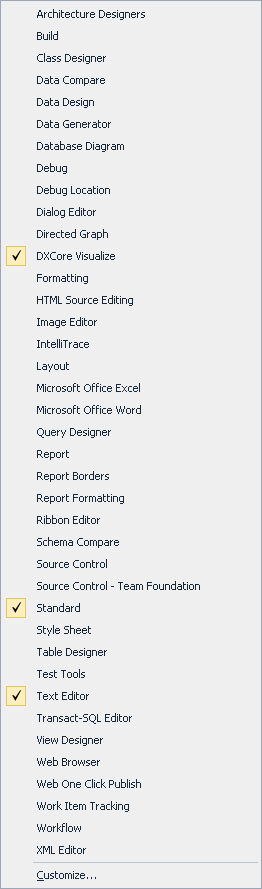
  1. Right click in the toolbar area to get a Context Menu, then check/unckeck the toolbar
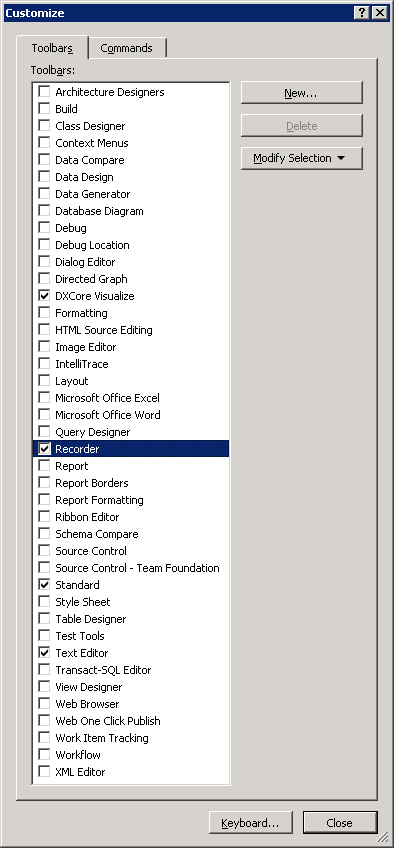
  2. Right click in the toolbar area to get a Context Menu, choose Customize and check/uncheck the toolbar(s) in the dialog.
  3. In the Tools Menu, choose Customize and check/uncheck the toolbar(s) in the dialog.

The first one is the easiest; you can see the resulting Context Menu in the left picture (click on it to enlarge).
The last two require an extra step; you can see the resulting dialog in the right most picture (click on it to enlarge).

Given the size of those lists, you’d think all toolbars are in both.

Wrong!

These are missing from the Context Menu:

  • Context Menus
  • Recorder

I consider this a serious Ux problem; if the Context Menu was much shorter (like 10 entries or so), it would be pretty obvious they are not.

It took me more than 10 minutes to find the Recorder toolbar which would have been vastly shorter if both lists were the same.

(Another Ux failure that caused my search to be this long is that I was looking for ‘Macro Recorder’ since all entries in the menu contain the word ‘Macro’; Recorder could as well point to a Toolbar for screen, video or audio recording).

–jeroen

Posted in .NET, Development, Software Development, Usability, User Experience (ux), Visual Studio 2010, Visual Studio and tools | Leave a Comment »

Why does Recording the TemporaryMacro sometimes fail in Visual Studio 2010? #durftevragen #dtv #daretoask

Posted by jpluimers on 2011/03/16

Every now and then, while recording a TemporaryMacro in Visual Studio 2010, I get this error message:


---------------------------
Microsoft Visual Studio
---------------------------
No TemporaryMacro in designated Recording Project
---------------------------
OK
---------------------------

The Recording a macro topic on MSDN suggest this solution:

Sounds like your macros directory is messed up.  Open Macro Explorer (View\Other Windows\Macro Explorer) and make sure you get the MyMacros element.

However, that works.

And if I check that, the next time I record a TemporaryMacro it just works.

I never had this in Visual Studio 2008, 2005 or older.

Anyone seen this behaviour too?

Anyone who knows why this happens?

–jeroen

via: Recording a macro.

Posted in .NET, Development, Software Development, Visual Studio 2010, Visual Studio and tools | Leave a Comment »

“Try to avoid foreach/for loops”–Over my Dead Body! | Visual Studio Feeds

Posted by jpluimers on 2011/03/16

Zack Owens wrote a nice article comparing various loop constructs.

Summary:
If the semantics are the same, it does not matter if you use foreach, for, while or do while: they all  have equal speed.

So: choose the loop construct that best fits the problem you are trying to solve.

–jeroen

via: “Try to avoid foreach/for loops”–Over my Dead Body! | Visual Studio Feeds.

Posted in .NET, C#, Delphi, Prism, Software Development | 12 Comments »

online: Create a GUID

Posted by jpluimers on 2011/03/10

Don’t you love this kind of sites:

Create a GUID at createguid.com

–jeroen

via Create a GUID.

Posted in .NET, Delphi, Development, Software Development | 14 Comments »

c# – PRISM + MEF — How to specify which export to use? – Stack Overflow

Posted by jpluimers on 2011/03/10

When you export different implementations of the same interface, importing the right one requires a “named contract“.

Like Danny Thorpe wrote: “Ah, named contracts. I had forgotten about that!”, indeed the first answer is nice!

–jeroen

via c# – PRISM + MEF — How to specify which export to use? – Stack Overflow.

Posted in .NET, Development, MEF, Software Development | Leave a Comment »

C# generics: Constraints on Type Parameters

Posted by jpluimers on 2011/03/10

I usually forget the exact details on C# constraints when using generics.

One of the especially irritating things is that you cannot apply all the constraints you want.

Some built-in language features are covered by special types in the .NET framework class library, for instance enums.

Which means that code like this will not compile:

        // Error	1	Constraint cannot be special class 'System.Enum'
        public static T StringToEnum(string name) where T : System.Enum
        {
            return (T)Enum.Parse(typeof(T), name);
        }

You need to replace it with the code below, which uses the fact that an enum is a ValueType (hence the struct constraint) implementing the interfaces IComparable, IFormattable and IConvertible constraints: Read the rest of this entry »

Posted in .NET, C#, C# 2.0, Development, Software Development | Leave a Comment »

Cool tool: .NET Version Detector

Posted by jpluimers on 2011/03/09

Cool tool from ASoft.NET Version Detector.

.NET Version Detector is a native application, which means it isn’t dependent on any version of .NET to run.

.NET Version Detector is a handy tool for vendors of .NET applications also.

Knowing which versions a user has installed and where they are located on the hard drive.

ASoft allows for a vendor to bundle .NET Version Detector with its application (for free!) so that it is easier to get some generic and exact information on the frameworks.

But before doing so, contact ASoft first!

–jeroen

via: .NET Version Detector.

Posted in .NET, Development, Power User, Software Development | Leave a Comment »

Why is the result of RoundTo(87.285, -2) => 87.28 – Stack Overflow

Posted by jpluimers on 2011/03/08

Programmers on all sorts of platforms get this wrong all the time (I admit having done this in bad ways myself too).

In short: Don’t expect floating point values in a computer to be represented as decimals.

Rob Kennedy wrote a very nice answer on this:

The exact value 87.285 is not representable as a floating-point value in Delphi. A page on my Web site shows what that value really is, as Extended, Double, and Single:

87.285 = + 87.28500 00000 00000 00333 06690 73875 46962 12708 95004 27246 09375

87.285 = + 87.28499 99999 99996 58939 48683 51519 10781 86035 15625

87.285 = + 87.28500 36621 09375

And David Heffernan points to the best link you can get on this topic:

The classic reference on floating point is What Every Computer Scientist Should Know About Floating-Point Arithmetic.

For currency based calculations, if indeed this is, you should use a base 10 number type rather than base 2 floating point. In Delphi that means `Currency`.

–jeroen

via delphi – Why is the result of RoundTo(87.285, -2) => 87.28 – Stack Overflow.

Posted in .NET, Algorithms, C#, Delphi, Development, Floating point handling, Software Development | 14 Comments »

If you use MonoTouch for iOS, be sure to update the iOS SDK (it doens’t auto update)

Posted by jpluimers on 2011/03/08

If you don’t update the Apple iOS SDK (which doesn’t auto update), then the Apple Store will reject your MonoTouch apps.

A big thank you to Peter van Ooijen for figuring this out

–jeroen

via: The appstore, iOs versions and Monotouch (4.0 won’t do) | Visual Studio Feeds.

Posted in .NET, Development, MonoTouch, Software Development | Leave a Comment »