The Wiert Corner – irregular stream of stuff

Jeroen W. Pluimers on .NET, C#, Delphi, databases, and personal interests

  • My badges

  • Twitter Updates

  • My Flickr Stream

  • Pages

  • All categories

  • Enter your email address to subscribe to this blog and receive notifications of new posts by email.

    Join 1,862 other subscribers

Archive for the ‘Visual Studio and tools’ Category

Visual Studio Smart Tag keyboard shortcuts: Ctrl-. and Shift+Alt-F10

Posted by jpluimers on 2012/07/04

I’m a keyboard fan, so recently I have put up a new Keyboards and Keyboard Shortcuts category and tried to add all old relevant posts to it (staying organized is time consuming, but in the end it pays back by being able to find back stuff faster).

At conferences, presentations, and clients people often wonder “how do you get to such-and-such IDE feature so quickly” and the answer usually is: be sure you know your keyboard shortcuts. Which isn’t easy, as documentation for them is often spread out, and to find the information: you have to know how the underlying actions are called.

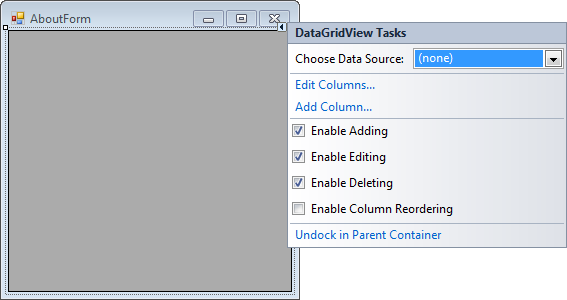
A long time ago (I think it was in version 2005) Visual Studio introduced Smart Tags. Most posts talk only about one kind of Smart Tags, but the Visual Studio IDE has two kinds:

  • A tiny triangle in the designer
  • A combobox drop-down button like control in the code editor

Both listen to these keyboard shortcuts (most cheat sheets miss at least one of these, but you can find them at Pre-defined keyboard shortcuts and at the VS2008 C# keyboard cheatsheet):

  • Shift-Alt-F10
    The shortcut is called View.ShowSmartTag, View.ObjectBrowserGoToSearchCombo
  • Ctrl-.                    (yes, the . is a period)
    The shortcut seems to be called Edit.Generate

The pictures below show the Smart Tag in action.
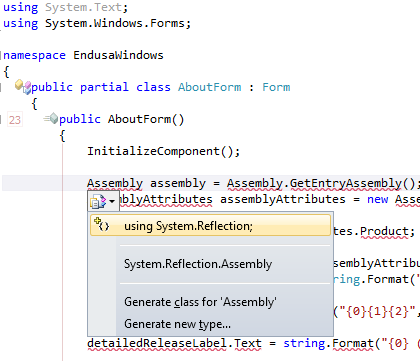
           

Oh BTW: the red squiggly lines and some of the other adornments in the screenshot are from CodeRush, one of the most keyboard-centric additions to Visual Studio I know.

–jeroen

Posted in Keyboards and Keyboard Shortcuts, Visual Studio 11, Visual Studio 2005, Visual Studio 2008, Visual Studio 2010, Visual Studio and tools | Leave a Comment »

Known #VS2010 issue + workaround: Visual Studio 2010 crashes when trying to edit a macro or record a temporary macro (via: Microsoft Connect)

Posted by jpluimers on 2012/07/03

Vsaenv: Cannot find one or more components. Please reinstall the application.One of my Visual Studio 2010 VMs gives me an error when recording a temporary macro:

---------------------------
Vsaenv
---------------------------
Cannot find one or more components. Please reinstall the application.
---------------------------
OK
---------------------------

Followed by: Read the rest of this entry »

Posted in .NET, Development, Software Development, Visual Studio 2010, Visual Studio and tools | Leave a Comment »

Visual Studio and Delphi: Getting a new GUID in the code editor

Posted by jpluimers on 2012/06/28

Earlier this week, I already wrote about different idioms in different IDEs.

Here is another one, again a feature I don’t use often: getting a fresh GUID in the IDE. Read the rest of this entry »

Posted in .NET, C#, C# 1.0, C# 2.0, C# 3.0, C# 4.0, C# 5.0, Delphi, Development, Software Development, Visual Studio and tools | 7 Comments »

.NET/C# – WinForms splash screen research material

Posted by jpluimers on 2012/06/21

I’m in the midst of converting a suite of WinForms C# projects from a range of .NET versions (1.x till 3.x) to 4 totalling some million lines of code.

One of the problems is that some people hacked together some splash screen stuff using multi-threading, doing all sorts of things that was forbidden in .NET 1 (and broke in .NET 2+).

On my research list for getting this to work:

  1. Mahin Gupta | Winforms splash screen – Great work by Tom. which is an update of
  2. A Pretty Good Splash Screen in C# – CodeProject.

–jeroen

Posted in .NET, C#, C# 1.0, C# 2.0, C# 3.0, C# 4.0, Development, Software Development, Visual Studio 2002, Visual Studio 2003, Visual Studio 2005, Visual Studio 2008, Visual Studio 2010, Visual Studio and tools, WinForms | Leave a Comment »

Direct Visual Studio 2012 RC and Windows 8 Release Preview ISO download URLs

Posted by jpluimers on 2012/06/20

Somehow many software vendors seem to make it a sport to make it hard to get download URLs.

So here is a bunch of direct download URLs for the (almost new <g>) Visual Studio 2012 RC (formerly and internally known as Visual Studio 11).

There are both ISO files (big, but convenient for offline installation).

Visual Studio 2012 (formerly VS11) ISO downloads
Edition Download page Download binary
Ultimate http://go.microsoft.com/fwlink/?LinkId=247147 http://download.microsoft.com/download/6/9/7/697096F6-4EEA-4704-AF2D-F3BAF57C7634/VS2012_RC_ULT_ENU.iso
Premium http://go.microsoft.com/fwlink/?LinkId=247144 http://download.microsoft.com/download/4/D/6/4D602B41-DFB6-4350-89CD-DC78B0C06996/VS2012_RC_PREM_ENU.iso
Professional http://go.microsoft.com/fwlink/?LinkId=247141 http://download.microsoft.com/download/0/B/2/0B29F8C6-C2C7-4187-A792-BDBAFB1802ED/VS2012_RC_PRO_ENU.iso
Test Professional http://go.microsoft.com/fwlink/?LinkId=247152 http://download.microsoft.com/download/F/A/D/FAD0D06E-A8BA-40D4-8F12-FE94A153EB85/VS2012_RC_TESTPRO_ENU.iso
Express For windows 8 http://go.microsoft.com/?linkid=9810160 http://download.microsoft.com/download/A/7/C/A7C0FFAF-E8D6-45F9-8820-0A7972DF5683/VS2012_RC_WinExp_ENU.iso

Web installers (depending on the choose install options, the total download can be a lot less than the complete ISO, but your system needs to be online during the full installation process).

Visual Studio 2012 (formerly VS11) ISO downloads
Edition Download page Download binary
Ultimate http://go.microsoft.com/?linkid=9810263 http://download.microsoft.com/download/6/9/7/697096F6-4EEA-4704-AF2D-F3BAF57C7634/vs_ultimate.exe
Premium http://go.microsoft.com/?linkid=9810243 http://download.microsoft.com/download/4/D/6/4D602B41-DFB6-4350-89CD-DC78B0C06996/vs_premium.exe
Professional http://go.microsoft.com/?linkid=9810223 http://download.microsoft.com/download/0/B/2/0B29F8C6-C2C7-4187-A792-BDBAFB1802ED/vs_professional.exe
Test Professional http://go.microsoft.com/?linkid=9810304 http://download.microsoft.com/download/F/A/D/FAD0D06E-A8BA-40D4-8F12-FE94A153EB85/vs_testprofessional.exe
Express For windows 8 http://go.microsoft.com/?linkid=9810150 http://download.microsoft.com/download/A/7/C/A7C0FFAF-E8D6-45F9-8820-0A7972DF5683/win8express_full.exe

You can find similar Windows 8 Release Preview download links here (they were distilled from the official download page, which now gives a 404 because of the atdmt link redirect is broken).

I use the x64 and x86 shortcuts for the x64 and x86 ISO links.

The Windows 8 Release Preview Upgrade Assistant also comes in handy.

The above links give a sustained transfer rate here of at least 3 megabit/second.

–jeroen

Posted in .NET, .NET 4.5, C#, C# 5.0, Development, Power User, Software Development, Visual Studio 11, Visual Studio and tools, Windows, Windows 8 | Leave a Comment »

TFS – Undelete File or Folder – brilliantly easy from the Visual Studio IDE: just enable “Show deleted items in the Source Control Explorer”

Posted by jpluimers on 2012/06/19

Never knew it was so brilliantly easy to undelete files from TFS: you can do it in Visual Studio, by enabling “Show deleted items in the Source Control Explorer” in the settings.

Just look at TFS – Undelete File or Folder for the screen shots.

Not sure in which Visual Studio version this got introduced, but it works in VS 2010 and up.

–jeroen

Posted in Development, Software Development, Source Code Management, TFS (Team Foundation System), Visual Studio 11, Visual Studio 2010, Visual Studio and tools | Leave a Comment »

Glyphs are apparently a designer term for icons that are not colorful. Get them at TheNounProject.com – via Scott Hanselman

Posted by jpluimers on 2012/06/05

Scott’s blog posts usually contain a truckload of side information in between the main topic.

He was discussing the new ‘designed’ look of Visual Studio 11 (the mantra: just give it a shot, and then tell how you like it; I like the new look and feel very much).

And he also mentioned a site of monochrome Glyphs I hadn’t seen before:

Glyphs are apparently a designer term for icons that are not colorful. You can see a lot of glyphs at http://thenounproject.com

Those glyphs are awesome!

–jeroen

via: Change Considered Harmful? – The New Visual Studio Look and Feel – Scott Hanselman.

Posted in Development, Software Development, User Experience (ux), Visual Studio 11, Visual Studio and tools | Leave a Comment »

Adding a “Reverse Assignment” to CodeRush for Visual Studio .NET (via: Q35048 – DevExpress Support Center, Knowledge Base, Code Samples)

Posted by jpluimers on 2012/05/16

As a Delphi user, I’m missing the “Reverse Assignment” feature in the Visual Studio version of CodeRush.

Since CodeRush is very extendable (Mark is still explaining to people how the idea for that came from Delphi Packages back in the mid 90s), you can add this one yourself, as the a answer to this DevExpress support issue shows:

Q:

Is there a quick way to reverse the assignment in CodeRush?  For example:

FROM:
Field[“test1”] = edTest1.Value;
Field[“test2”] = edTest2.Value;

TO:
edTest1.Value = Field[“test1”];
edTest2.Value = Field[“test2”];

I know Delphi had this capability in its refactoring, does CodeRush for Visual Studio?

Thanks

Daniel Schipper


Read the rest of this entry »

Posted in .NET, C#, C# 2.0, C# 3.0, C# 4.0, Development, Software Development, Visual Studio 2005, Visual Studio 2008, Visual Studio 2010, Visual Studio and tools | Leave a Comment »

KB2251481 update issues (via: MS11-049: Description of the security update for Visual Studio 2005 SP1: June 14, 2011)

Posted by jpluimers on 2012/03/29

August 2011, Microsoft re-issued KB2251481. They should not have done that, because if you have the original KB2251481 installed (also known as KB2251481.T369_32ToU865_32) you need to go through the hoopla below to uninstall it.

In stead, they should have released a new version that automatically uninstalls a previously installed one, then installs itself.

It is not the first patch that Microsoft did wrong, but this one is the “Microsoft Visual Studio 2005 Service Pack 1 XML Editor Security Update”. Every now and then I come across it when doing work on some archived virtual machines that contain Visual Studio 2005 (which I used a lot in the past, and occasionally still use for doing some maintenance work for clients that long ago ditched stuff they thought they’d never need to use again).

The really stupid thing is the error message you get when it cannot get installed: John Doe user will never find out why it failed, let alone figure out how to get it install properly.

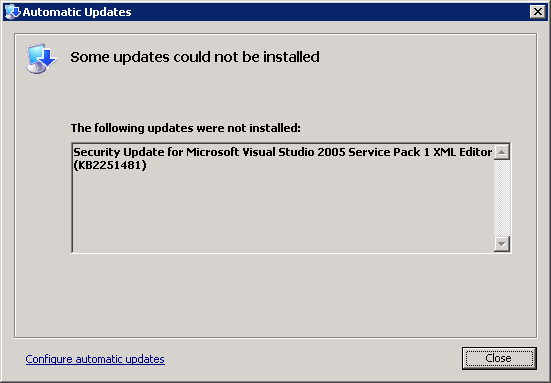
This is the message you will see:

[Automatic Updates]
Some updates could not be installed
The following updates were note installed:
Security Update for Microsoft Visual Studio 2005 Service Pack 1 XML Editor (KB2251481)
[Close]

The message doesn’t even include that it is trying to install the August 2011 version (hinting that there might be an earlier version you need to uninstall). Read the rest of this entry »

Posted in .NET, C#, C# 2.0, Development, Software Development, Visual Studio 2005, Visual Studio and tools | Leave a Comment »

A few reminders to self for AMP in VS11: debugging, writing, etc

Posted by jpluimers on 2012/03/15

Reminders to self:

–jeroen

via: The Moth – GPU Debugging with VS 11.

Posted in .NET, C#, Development, Software Development, Visual Studio 11, Visual Studio and tools | Leave a Comment »