The Wiert Corner – irregular stream of stuff

Jeroen W. Pluimers on .NET, C#, Delphi, databases, and personal interests

  • My badges

  • Twitter Updates

  • My Flickr Stream

  • Pages

  • All categories

  • Enter your email address to subscribe to this blog and receive notifications of new posts by email.

    Join 1,862 other subscribers

Archive for the ‘Visual Studio and tools’ Category

Visual Studio 2010: you should run the Remote Debugging Monitor from a local drive to avoid 0x8007000E E_OUTOFMEMORY

Posted by jpluimers on 2011/04/14

Setting up remote debugging is always a precarious thing, no matter what kind of development platform: the online documentation tells you the standard steps, but usually they don’t suffice.

This case is Visual Studio 2010 remote debugging, where the development environment is on a workstation running Windows 7, and the debug target is on Windows Server 2008 R2.
Both are x64 versions.

There is a remote desktop connection to the server, and the server can see the workstation files on the \\TSCLIENT\C share.

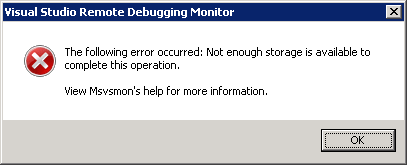
This is the error when running msvsmon.exe from \\tsclient\C\Program Files (x86)\Microsoft Visual Studio 10.0\Common7\IDE\Remote Debugger\x64:
[Visual Studio Remote Debugging Monitor]
The following error occurred: Not enough storage is available to complete this operation.

View Msvsmon's help for more information.
[OK]

(Funny BTW that the x64 Remote Debugging Monitor is in fact in an x86 path).

The solution is simple: copy the x64 directory local, then start it from there.

The reason in that the user credentials on the server don’t have enough rights on the \\TSCLIENT\C directory tree, so Windows barfs on it.

This pointed me into the right direction when I started Process Monitor from the same \\TSCLIENT\C share: Read the rest of this entry »

Posted in .NET, Debugging, Development, Remote Debugging, Software Development, Visual Studio 2010, Visual Studio and tools | Leave a Comment »

SharePoint 2010 error: Retrieving the COM class factory for component with CLSID {BDEADF26-C265-11D0-BCED-00A0C90AB50F} failed due to the following error: 800703fa – SharePointWiz

Posted by jpluimers on 2011/04/11

Somehow in a production environment I did get this error too:

System.Runtime.InteropServices.COMException (0x80040154): Retrieving the COM class factory for component with CLSID {BDEADF26-C265-11D0-BCED-00A0C90AB50F} failed due to the following error: 80040154.

These two posts helped me to solve it:

SharePoint 2010 beta error: Retrieving the COM class factory for component with CLSID {BDEADF26-C265-11D0-BCED-00A0C90AB50F} failed due to the following error: 800703fa – SharePointWiz – Site Home – MSDN Blogs.

Rhythmic Coding: Retrieving the COM class factory for component with CLSID {BDEADF26-C265-11D0-BCED-00A0C90AB50F} failed due to the following error: 80040154.

The solution is deceptively simple:

Resolution: It is because you are trying to build a x86 application. Go to project properties and set type to x64 everywhere. Then rebuild and debug. The Error Vanishes!

The SharePoint 2010 dll’s are all x64, and Visual Studio 2010 by default still starts .NET projects in x86 mode for both Release and Debug settings.

–jeroen

Posted in .NET, .NET 4.0, C#, C# 4.0, Development, SharePoint, Software Development, Visual Studio 2010, Visual Studio and tools, Web Development | 8 Comments »

Visual Studio 2010 “Solution Explorer Tools” addin: Collapse all, Select current item, Collapse all except current item. Highly recommended.

Posted by jpluimers on 2011/04/07

When you have lots of projects in a solution, quickly the tree in the Solution Explorer gets a mess, especially if you have “Track Active Item in Solution Explorer” enabled.

“Solution Explorer Tools” addin for Visual Studio 2010 helps with that.

It adds three buttons to solution explorer

  1. Select current item
  2. Collapse all
  3. Collapse all except current item

The first one basically means you will never need to enable “Track Active Item in the Solution Explorer” again.

The second and third quickly get rid of the mess in the Solution Explorer.

Highly recommended!

–jeroen

via: Solution Explorer Tools.

Posted in .NET, Development, Software Development, Visual Studio and tools | Leave a Comment »

Bootstrap and DVD ISO Download details: Microsoft Visual Studio 2010 Service Pack 1

Posted by jpluimers on 2011/03/30

The Download details: Microsoft Visual Studio 2010 Service Pack 1 (Installer) initially lets you download a bootstrap installer that only downloads the Service Pack 1 parts you actually need.

A bit further down on that page is the link to the full ISO DVD image with the anything you might need when updating multiple systems.

–jeroen

Posted in .NET, Development, Software Development, Visual Studio 2010, Visual Studio and tools | Leave a Comment »

How to clear the “ErrorList” window before compiling

Posted by jpluimers on 2011/03/22

It seems that all versions of Visual Studio suffer from this behaviour:

Visual Studio (VS) doesn’t always clear the “Error List” window of existing errors when you compile a different project but simply appends new errors to it.

Simplest solution: Build | Clean All.
That takes some time (especially on large solutions), but I haven’t found an easier way.

Have you?

–jeroen

via: How to clear the “ErrorList” window before compiling.

Posted in .NET, Development, Software Development, Visual Studio and tools | Leave a Comment »

Solution for “Why do I get a ‘LoaderLock’ Error when debugging my Managed DirectX application” (The ZBuffer)

Posted by jpluimers on 2011/03/17

I maintain some .NET code that still uses the MDX 1.1 (since MDX 2.0 got cancelled, and this project cannot be brought to XNA).

Every now and then, you get a Loader Lock error.

ZBfufer provides the solution (I always use choice ): Read the rest of this entry »

Posted in .NET, C#, C# 2.0, C# 3.0, Development, Software Development, Visual Studio 2005, Visual Studio 2008, Visual Studio and tools | Leave a Comment »

Visual Studio 2010 Ux #fail: finding the Macro Recorder and Context Menus toolbars #VS2010 #Ux

Posted by jpluimers on 2011/03/16

When you want to enable (or disable) a toolbar in Visual Studio 2010, there are three options to go, of which the last two are equivalent:

  1. Right click in the toolbar area to get a Context Menu, then check/unckeck the toolbar
  2. Right click in the toolbar area to get a Context Menu, choose Customize and check/uncheck the toolbar(s) in the dialog.
  3. In the Tools Menu, choose Customize and check/uncheck the toolbar(s) in the dialog.

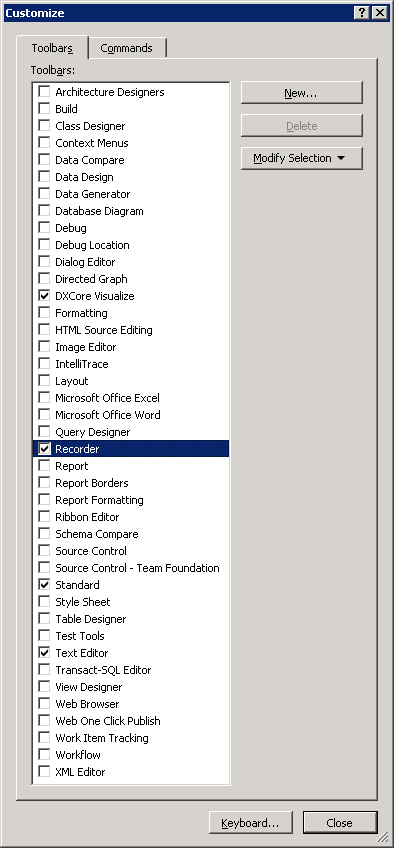
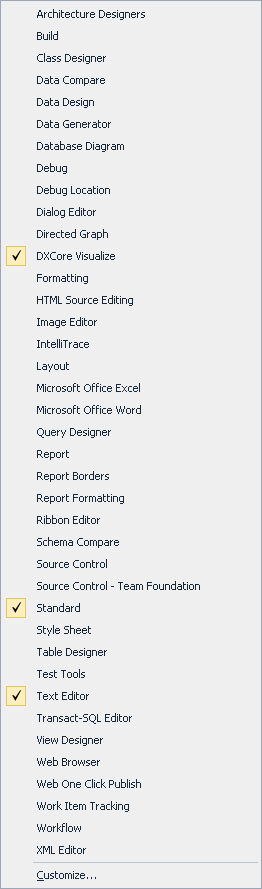
The first one is the easiest; you can see the resulting Context Menu in the left picture (click on it to enlarge).
The last two require an extra step; you can see the resulting dialog in the right most picture (click on it to enlarge).

Given the size of those lists, you’d think all toolbars are in both.

Wrong!

These are missing from the Context Menu:

  • Context Menus
  • Recorder

I consider this a serious Ux problem; if the Context Menu was much shorter (like 10 entries or so), it would be pretty obvious they are not.

It took me more than 10 minutes to find the Recorder toolbar which would have been vastly shorter if both lists were the same.

(Another Ux failure that caused my search to be this long is that I was looking for ‘Macro Recorder’ since all entries in the menu contain the word ‘Macro’; Recorder could as well point to a Toolbar for screen, video or audio recording).

–jeroen

Posted in .NET, Development, Software Development, Usability, User Experience (ux), Visual Studio 2010, Visual Studio and tools | Leave a Comment »

Why does Recording the TemporaryMacro sometimes fail in Visual Studio 2010? #durftevragen #dtv #daretoask

Posted by jpluimers on 2011/03/16

Every now and then, while recording a TemporaryMacro in Visual Studio 2010, I get this error message:


---------------------------
Microsoft Visual Studio
---------------------------
No TemporaryMacro in designated Recording Project
---------------------------
OK
---------------------------

The Recording a macro topic on MSDN suggest this solution:

Sounds like your macros directory is messed up.  Open Macro Explorer (View\Other Windows\Macro Explorer) and make sure you get the MyMacros element.

However, that works.

And if I check that, the next time I record a TemporaryMacro it just works.

I never had this in Visual Studio 2008, 2005 or older.

Anyone seen this behaviour too?

Anyone who knows why this happens?

–jeroen

via: Recording a macro.

Posted in .NET, Development, Software Development, Visual Studio 2010, Visual Studio and tools | Leave a Comment »

Supporting Office 2003 from .NET: getting the Office 2003 Primary Interop Assemblies

Posted by jpluimers on 2011/02/22

Often you work with projects not having the latest stuff.
Sometimes that is a good thing: latest stuff is not always best :-)

In this case, the client had Office 2003, and needed to do some Excel automation from .NET.
The development systems however had Office 2007 on it, so importing Excel defaults to the Office 2007 Primary Interop Assembly: Office version 12 in stead of 11. Read the rest of this entry »

Posted in .NET, C#, C# 2.0, C# 3.0, C# 4.0, Delphi, Development, Prism, Software Development, Visual Studio 2005, Visual Studio 2008, Visual Studio 2010, Visual Studio and tools | Leave a Comment »

If Your Visual Studio 2005 Solutions Open Slowly, Check WebsiteCache | Thomas F. Abraham – On Technology

Posted by jpluimers on 2011/02/15

If you use Visual Studio 2005 for some old projects that have not yet been converted, and they open very slowly: read this post on If Your Visual Studio Solutions Open Slowly Check WebsiteCache by Thomas F. Abraham.

Emptying your WebsiteCache directory solves the issue: it had about 30-thousand empty directories in it.

The location depends on your Windows version:

  • Windows XP, Windows Server 2003 and below:
    “%USERPROFILE%\Local Settings\Application Data\Microsoft\WebsiteCache”
  • Windows Vista, Windows Server 2008 and up:
    “%USERPROFILE%\AppData\Local\Microsoft\WebsiteCache”

This bug has been fixed in Visual Studio 2008 and up.

–jeroen

via:  If Your Visual Studio Solutions Open Slowly, Check WebsiteCache | Thomas F. Abraham – On Technology.

Posted in .NET, C#, C# 2.0, Development, Software Development, Visual Studio 2005, Visual Studio 2008, Visual Studio 2010, Visual Studio and tools | Leave a Comment »