The Wiert Corner – irregular stream of stuff

Jeroen W. Pluimers on .NET, C#, Delphi, databases, and personal interests

  • My badges

  • Twitter Updates

  • My Flickr Stream

  • Pages

  • All categories

  • Enter your email address to subscribe to this blog and receive notifications of new posts by email.

    Join 1,861 other subscribers

Archive for the ‘Scripting’ Category

VMware ESXi console: viewing all VMs, suspending and waking them up: part 1

Posted by jpluimers on 2021/04/22

I think the easiest way to list all VMs is the vim-cmd vmsvc/getallvms command, but it has a big downside: the output is a mess.

The reason is that the output:

  • has a lot of columns (Vmid, Name, Datastore, File, Guest OS, Version, Annotation),
  • more than 500 characters per line (eat that 1080p monitor!),
  • and potentially more than one line per VM as the Annotation is a free-text field that can have newlines.

Example output on one of my machines:


Vmid Name File Guest OS Version Annotation
10 X9SRI-3F-W10P-EN-MEDIA [EVO860_500GB] VM/X9SRI-3F-W10P-EN-MEDIA/X9SRI-3F-W10P-EN-MEDIA.vmx windows9_64Guest vmx-14
5 PPB Local_Virtual Machine_v4.0 [EVO860_500GB] VM/PPB-Local_Virtual-Machine_v4.0/PPB Local_Virtual Machine_v4.0.vmx centos64Guest vmx-11 PowerPanel Business software(Local) provides the service which communicates
with the UPS through USB or Serial cable and relays the UPS state to each Remote on other computers
via a network.
It also monitors and logs the UPS status. The computer which has been installed the Local provides
graceful,
unattended shutdown in the event of the power outage to protect the hosted computer.

As an alternative, you could use esxcli vm process list, but that gives IDs that are way harder to remember:


PPB Local_Virtual Machine_v4.0
World ID: 2099719
Process ID: 0
VMX Cartel ID: 2099713
UUID: 56 4d 74 f8 c8 22 41 27-a3 88 49 df 8b dc d6 63
Display Name: PPB Local_Virtual Machine_v4.0
Config File: /vmfs/volumes/5d35e7d8-e8df636f-46b9-0025907d9d5c/VM/PPB-Local_Virtual-Machine_v4.0/PPB Local_Virtual Machine_v4.0.vmx
X9SRI-3F-W10P-EN-MEDIA
World ID: 2099728
Process ID: 0
VMX Cartel ID: 2099717
UUID: 56 4d 51 ac f6 cf e4 0b-b6 86 2f 53 a2 8a 4b ea
Display Name: X9SRI-3F-W10P-EN-MEDIA
Config File: /vmfs/volumes/5d35e7d8-e8df636f-46b9-0025907d9d5c/VM/X9SRI-3F-W10P-EN-MEDIA/X9SRI-3F-W10P-EN-MEDIA.vmx

I got both of the above commands from [Wayback] VMware Knowledge Base: Performing common virtual machine-related tasks with command-line utilities (2012964).

Back to the columns that vim-cmd vmsvc/getallvms returns:

  • Vmid is an unsigned integer
  • Name can have spaces
  • Datastore has square brackets [ and ] around it
  • File can contain spaces
  • Guest OS is an identifier without spaces (it is a value from [Wayback] the vSphere API VcVirtualMachineGuestOsIdentifier
  • Version looks like vmx-# where # is an unsigned integer
  • Annotation is multi-line free-form so potentially can have lines starting like being Vmid, but the chance that a line looks exactly like a non-annotated one is very low

So let’s find a grep or  sed filter to get just the lines without annotation continuations. Though in general I try to avoid regular expressions as they are hard to both write and read, but with Busybox there is no much choice.

I choose sed, just in case I wanted to do some manipulation in addition to matching.

Busybox sed

Though the source code [Wayback] sed.c\editors – busybox – BusyBox: The Swiss Army Knife of Embedded Linux indicates sed.c - very minimalist version of sed, the implementation actually is reasonably feature rich, just not feature complete. That’s OK given the aim of Busybox to be small.

Luckily, deep in the busybox sed code, it indicates that extended regular expressions are supported (support is in [Wayback] /uClibc/plain/libc/misc/regex/regcomp.c (look for regcomp, do not get confused by xregcomp on call sites as that is [Wayback] just a tiny wrapper to call regcomp).

The support has become better over time, like [Wayback] gnu – sed Command on BusyBox expects different syntax? – Super User shows.

This means far less escaping than basic regular expressions, capture groups are supported as well as character classes (so [[:digit:]] is more readable than [0-9]), and the + is supported to match once or more (so [0-9]+ means one or more digits, as does [[:digit:]]+, but [d]+ or \d+ don’t ). Unfortunately named capture groups are not supported (so documenting parts of the regular expression like (?<Vmid>^[[:digit:]]+) is not possible, it will give you an error [Wayback] Invalid preceding regular expression).

But first a few of the sed commandline options and their order:

vim-cmd vmsvc/getallvms | sed -n -E -e '/(^[[:digit:]]+)/p'
  1. -n outputs only matching lines that have a p print command.
  2. -E allows extended regular expressions (you can also use -r for that)
  3. -e adds a (in this case extended) regular expression
  4. '/(^[[:digit:]]+)/p' is the extended regular expression embedded in quotes
    1. / at the start indicates that sed should match the regular expression on each line it parses
    2. /p at the end indicates the matching line should be printed
    3. Parentheses ( and ) surround a capture group
    4. ^[[:digit:]]+ matches 1 or more digits at the start of the line

The grep command is indeed much shorter, but does not allow post-editing:

vim-cmd vmsvc/getallvms | grep -E '(^[[:digit:]]+)'

Building a sed filter

I came up with the below sed regular expression to filter out lines:

  1. starting with a Vmid unsigned integer
  2. having a [Datastore] before the File
  3. have a Guest OS identifier after File
  4. have a Version matching vmx-# after File where # is an unsigned integer
  5. optionally has an Annotation after Version
vim-cmd vmsvc/getallvms | sed -n -E -e  "/^([[:digit:]]+)(\s+)((\S.+\S)?)(\s+)(\[\S+\])(\s+)(.+\.vmx)(\s+)(\S+)(\s+)(vmx-[[:digit:]]
+)(\s*?)((\S.+)?)$/p"

A longer expression that I used to fiddle around with is at regex101.com/r/A7MfKu and contains named capture groups. I had to nest a few groups and use the ? non-greedy (or lazy) operator a few times to ensure the fields would not include the spaces between the columns.

Others use different expressions as for instance explained in [Wayback] Get all VMs with “vmware-vim-cmd vmsvc/getallvms” – VMware Technology Network VMTN:

Output from “vim-cmd vmsvc/getallvms” is really challenging to process. Our normal approaches such as awk column indexes, character index, and regular expression are all error prone here. The character index of each column varies depending on maximum field length of, for example, VM name. And the presence of spaces in VM names throws off processing as awk columns. And VM name could contain almost any character, foiling regex’s.

Printing capture groups

The cool thing is that it is straightforward to modify the expression to print any of the capture groups in the order you wish: you convert the match expression (/match/p) into a replacement expression (s/match/replace/p) and print the required capture groups in the replace part. A short example is at [Wayback] regex – How to output only captured groups with sed? – Stack Overflow.

There is one gotcha though: Busybox sed only allows single-digit capture group numbers, and we have far more than 9 capture groups. This fails and prints 0 after the output of capture group 1 instead of printing capture group 10, similar for 2 after group 1 instead of printing group 12:

vim-cmd vmsvc/getallvms | sed -n -E -e  "s/^([[:digit:]]+)(\s+)((\S.+\S)?)(\s+)(\[\S+\])(\s+)(.+\.vmx)(\s+)(\S+)(\s+)(vmx-[[:digit:]]+)(\s*?)((\S.+)?)$/Vmid:\1 Guest:\10 Version:\12 Name:\3 Datastore:\7 File:\8/p"

So we need to cut down on capture groups first by removing all capture groups around the \s white-space matching:

vim-cmd vmsvc/getallvms | sed -n -E -e  "/^([[:digit:]]+)\s+((\S.+\S)?)\s+(\[\S+\])\s+(.+\.vmx)\s+(\S+)\s+(vmx-[[:digit:]]+)\s*?((\S.+)?)$/p"

Then we get this to print some of the capture groups:

vim-cmd vmsvc/getallvms | sed -n -E -e "s/^([[:digit:]]+)\s+((\S.+\S)?)\s+(\[\S+\])\s+(.+\.vmx)\s+(\S+)\s+(vmx-[[:digit:]]+)\s*?((\S.+)?)$/Vmid:\1 Guest:\6 Version:\7 Name:\3 Datastore:\4 File:\5 Annotation:\8/p"

With this output:

Vmid:10 Guest:windows9_64Guest Version:vmx-14 Name:X9SRI-3F-W10P-EN-MEDIA Datastore:[EVO860_500GB] File:VM/X9SRI-3F-W10P-EN-MEDIA/X9SRI-3F-W10P-EN-MEDIA.vmx Annotation:
Vmid:5 Guest:centos64Guest Version:vmx-11 Name:PPB Local_Virtual Machine_v4.0 Datastore:[EVO860_500GB] File:VM/PPB-Local_Virtual-Machine_v4.0/PPB Local_Virtual Machine_v4.0.vmx Annotation:PowerPanel Business software(Local) provides the service which communicates

Figuring out power state for each VM

This will be in the next installment, as by now this already has become a big blog-post (:

–jeroen

Posted in *nix, *nix-tools, ash/dash, ash/dash development, Development, ESXi6, ESXi6.5, ESXi6.7, ESXi7, Power User, RegEx, Scripting, Software Development, Virtualization, VMware, VMware ESXi | Leave a Comment »

Busybox sh (actually ash derivative dash): checking exit codes

Posted by jpluimers on 2021/04/20

Even if you include a double quotes "sh" in a Google search to force only sh (in the early days this was the Thompson shell, but nowadays usually a Bourne shell or derivative) results, almost all unix like scripting examples you find are based on bash (the Bourne again shell), so I was glad I dug a bit deeper into what the actual Busybox shell is.

I wanted to know which shell Busybox uses and what capabilities it has, as ESXi ships with this very slimmed down set of tools (called applets in Busybox speak).

It does not even include ssh: that gap is often filled by [Wayback] Dropbear SSH, which was used by ESXi and named dbclient (I think with ESXi 6.0 it was replaced with a more regular ssh implementation): [Wayback] How to compile a statically linked rsync binary for ESXi.

Busybox shell source code is at [Wayback] ash.c\shell – busybox – BusyBox: The Swiss Army Knife of Embedded Linux and indicates the shell is the ash (the Almquist shell) derivative dash (yes, you guessed it right: the Debian Almquist shell), ported from NetBSD and debianized:

 * Copyright (c) 1997-2005 Herbert Xu <herbert@gondor.apana.org.au>
 * was re-ported from NetBSD and debianized.
...
//config:   The most complete and most pedantically correct shell included with
//config:   busybox. This shell is actually a derivative of the Debian 'dash'
//config:   shell (by Herbert Xu), which was created by porting the 'ash' shell
//config:   (written by Kenneth Almquist) from NetBSD.

nx like systems have a shell hell similar to Windows DLL hell: there are too many, and their differences and be both subtle and frustrating. To get a feel, browse through Source: Comparison of command shells – Wikipedia (yes, some shells from other operating environments like DOS, OS/2, VMS and Windows, but the majority is nx).

Since ash is sufficiently different from bash (for example [Wayback] ash – exit code for a piped process), I always want to know what shell code (which often comes from bash as it is so ubiquitous) will work.

There is hardly any shell documentation at the Busybox site. There is [Wayback] BusyBox – The Swiss Army Knife of Embedded Linux, the source code at [Wayback] ash.c\shell – busybox – BusyBox: The Swiss Army Knife of Embedded Linux does not offer much either,

A manual page of it is at [Archive.is] ash(1) [minix man page]. There you see the age: back then, “exit status” is used where nowadays many people would use “exit code”. It does not explain how to check for specific exit codes.

Because ash is derived from the Bourne shell, this page was of great help for me to grasp exit code handing: [Wayback] Exit Codes – Shell Scripting Tutorial

A Bourne Shell Programming / Scripting Tutorial for learning about using the Unix shell.

Here two examples from that page to get me going:

#!/bin/sh
# Second attempt at checking return codes
grep "^${1}:" /etc/passwd > /dev/null 2>&1
if [ "$?" -ne "0" ]; then
  echo "Sorry, cannot find user ${1} in /etc/passwd"
  exit 1
fi
USERNAME=`grep "^${1}:" /etc/passwd|cut -d":" -f1`
NAME=`grep "^${1}:" /etc/passwd|cut -d":" -f5`
HOMEDIR=`grep "^${1}:" /etc/passwd|cut -d":" -f6`

echo "USERNAME: $USERNAME"
echo "NAME: $NAME"
echo "HOMEDIR: $HOMEDIR"

and

#!/bin/sh
# A Tidier approach

check_errs()
{
  # Function. Parameter 1 is the return code
  # Para. 2 is text to display on failure.
  if [ "${1}" -ne "0" ]; then
    echo "ERROR # ${1} : ${2}"
    # as a bonus, make our script exit with the right error code.
    exit ${1}
  fi
}

### main script starts here ###

grep "^${1}:" /etc/passwd > /dev/null 2>&1
check_errs $? "User ${1} not found in /etc/passwd"
USERNAME=`grep "^${1}:" /etc/passwd|cut -d":" -f1`
check_errs $? "Cut returned an error"
echo "USERNAME: $USERNAME"
check_errs $? "echo returned an error - very strange!"

This basically means that status code handling is the same as in bash, so constructs can be used like [Wayback] bash – How to check the exit status using an if statement – Stack Overflow:

$? is a parameter like any other. You can save its value to use before ultimately calling exit.

exit_status=$?
if [ $exit_status -eq 1 ]; then
    echo "blah blah blah"
fi
exit $exit_status

Read the rest of this entry »

Posted in *nix, *nix-tools, ash/dash, ash/dash development, bash, bash, BusyBox, Development, Power User, Scripting, Software Development, ssh/sshd | 1 Comment »

Small batch file to recursively compact a directory using NTFS compression

Posted by jpluimers on 2021/04/07

compact-directory-recursively.bat:

if [%1]==[] goto :eof
call compact /s /c %1 %1\*.*

Example usage:

compact-directory-recursively.bat C:\ProgramData\{51D553F1-B483-41C2-B35E-6D461D9E0F9C}

compact-directory-recursively.bat "C:\ProgramData\Package Cache"

@for /d %d in (*.*) do @call compact-directory-recursively.bat "%d"

The @ signs are to get less output clutter.

–jeroen

Posted in Batch-Files, Development, Scripting, Software Development | Leave a Comment »

Exit Vim 2 Win

Posted by jpluimers on 2021/04/01

[WayBack] Exit Vim 2 Win shows the use of vim.js for a challenge.

Source code at [WayBack] GitHub – idoco/exit-vim-2-win: Exiting vim eventually

–jeroen

Posted in Apri1st, Development, Fun, JavaScript/ECMAScript, Software Development | Leave a Comment »

linux – How can I execute a series of commands in a bash subshell as another user using sudo? – Stack Overflow

Posted by jpluimers on 2021/03/31

Based on [WayBack] linux – How can I execute a series of commands in a bash subshell as another user using sudo? – Stack Overflow:

alias restart-spotlight-service-as-root="sudo bash -c 'echo stop;launchctl stop com.apple.metadata.mds;echo start;launchctl start com.apple.metadata.mds;echo started'"

The bold bits above sudo bash -c 'echo stop;launchctl stop com.apple.metadata.mds;echo start;launchctl start com.apple.metadata.mds;echo started' allow the commands between single quotes to executed in one new bash shell under sudo.

–jeroen

Posted in *nix, *nix-tools, Apple, bash, bash, Development, Mac OS X / OS X / MacOS, Power User, Scripting, Software Development | Leave a Comment »

JSONPlaceholder – Fake online REST API for developers

Posted by jpluimers on 2021/03/25

A great way for testing REST JSON calls is using the [WayBack] JSONPlaceholder – Fake online REST API for developers:

Fake Online REST API for Testing and Prototyping
Serving ~200M requests per month
Powered by JSON Server [WayBack] + LowDB [WayBack]

It is like [WayBack] Placeholder.com: Placeholder Images Done For You [JPG, GIF & PNG] but for JSON and supports both CORS and JSON-P for cross domain requests.

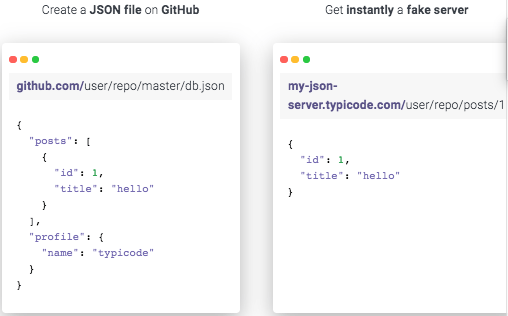
You can either use that site (which has a predefined set of REST calls) or the basic [WayBack] My JSON Server – Fake online REST server for teams that allows you to respond it to a db.json file from github:

Fake Online REST server for teams

Create a JSON file on GitHub

github.com/user/repo/master/db.json
{
  "posts": [
    {
      "id": 1,
      "title": "hello"
    }
  ],
  "profile": {
    "name": "typicode"
  }
}

Get instantly a fake server

my-json-server.typicode.com/user/repo/posts/1
{
  "id": 1,
  "title": "hello"
}

Related

Documentation

There is basic documentation at the repository [WayBack] GitHub – typicode/jsonplaceholder: A simple online fake REST API server:

Read the rest of this entry »

Posted in Communications Development, Development, HTTP, Internet protocol suite, JavaScript/ECMAScript, JSON, REST, Scripting, Software Development, TCP | Leave a Comment »

Mixed JScript/batch file hybrid to create Windows shortcuts

Posted by jpluimers on 2021/03/25

I bumped into this amazing JScript/batch file hybrid. It starts as a batch file, then continues as a JScript script, and creates/updates .lnk files: [WayBack] batch.scripts/shortcutJS.bat at master · npocmaka/batch.scripts · GitHub.

Wow. Just wow.

Not that I would want to be the one maintaining it (:

Via [WayBack] batch file – How do I create a shortcut via command-line in Windows? – Stack Overflow of which I like these answers most:

  • Check the shortcutJS.bat – it is a jscript/bat hybrid and should be used with .bat extension:

    call shortcutJS.bat -linkfile "%~n0.lnk" -target  "%~f0" -linkarguments "some arguments"
    

    With -help you can check the other options (you can set icon , admin permissions and etc.)

  • Nirsoft’s NirCMD can create shortcuts from a command line, too. (Along with a pile of other functions.) Free and available here:

    http://www.nirsoft.net/utils/nircmd.html

    Full instructions here: http://www.nirsoft.net/utils/nircmd2.html#using (Scroll down to the “shortcut” section.)

    Yes, using nircmd does mean you are using another 3rd-party .exe, but it can do some functions not in (most of) the above solutions (e.g., pick a icon # in a dll with multiple icons, assign a hot-key, and set the shortcut target to be minimized or maximized).

    Though it appears that the shortcutjs.bat solution above can do most of that, too, but you’ll need to dig more to find how to properly assign those settings. Nircmd is probably simpler.

–jeroen

Posted in Batch-Files, Development, Scripting, Software Development | Leave a Comment »

Mikrotik: script to set clock to Amsterdam, enable ntp, then show latest ntp correction

Posted by jpluimers on 2021/03/11

For my script list:

/system ntp client set enabled=yes server-dns-names=0.pool.ntp.org,1.pool.ntp.org,2.pool.ntp.org,3.pool.ntp.org
/delay 10
/system ntp client print

If the delay was long enough, you will see output like this:

             enabled: yes
         primary-ntp: 0.0.0.0
       secondary-ntp: 0.0.0.0
    server-dns-names: 0.pool.ntp.org,1.pool.ntp.org,2.pool.ntp.org,3.pool.ntp.org
                mode: unicast
       poll-interval: 15m
       active-server: 149.210.230.59
    last-update-from: 149.210.230.59
  last-update-before: 29s290ms
     last-adjustment: 702us

If the delay was too short, the lines after mode will not be present.

–jeroen

Posted in Development, RouterOS, Scripting, Software Development | Leave a Comment »

GitHub – pastpages/savepagenow: A simple Python wrapper for archive.org’s “Save Page Now” capturing service

Posted by jpluimers on 2021/03/11

This makes it way easier to save WayBack content:

[WayBack] GitHub – pastpages/savepagenow: A simple Python wrapper for archive.org’s “Save Page Now” capturing service

A poor-mans alternative is the below bash script from [WayBack] Saving of public Google+ content at the Internet Archive’s Wayback Machine by the Archive Team has begun : plexodus:

For Linux, MacOS / OSX, BSD, and other Unix-like operating systems (including Android with Termux, or Windows, with a Unix/Linux environment), the following script (I’ve saved this as archive-url) will archive the requested URL:

#!/bin/bash
# archive-url
# Archive selected URL at the Internet Archive

curl -s -I -H "Accept: application/json" "https://web.archive.org/save/${1}" |
grep '^x-cache-key:' | sed "s,https,&://,; s,\(${1}\).*$,\1,"

Save that to your execution path (I’ve chosen ~/bin, you might use /usr/local/bin or another location on your $PATH, and invoke as, say (again referring to the G+MM homepage):

$ archive-url https://plus.google.com/communities/112164273001338979772

If you have a list of URLs in a file (or pipelined from command output), you can request all of them to be archived in a simple bash loop. I’m using xargs here to run ten simultaneous requests from the file gplus-urllist:

cat gplus_urllist | while read url do xargs -I{} -P 10 archive-url {}; done

I’ve run this on over 10,000 URLs over a modest residential broadband connection in a hair over two hours.

Note that such requests trigger an archive by the Internet Archive from one of its archiving nodes, you’re not sending the page to the Archive yourself. In particular, archival from regions defaulting to another language may result in the Google+ site content (but not post or comments) being in a different language. I’ve frequently seen my pages turning up in Japanese, for instance.

–jeroen

Posted in bash, Development, Python, Scripting, Software Development | Leave a Comment »

Debouncing and Throttling Explained Through Examples | CSS-Tricks

Posted by jpluimers on 2021/03/10

TL;DR of https://css-tricks.com/debouncing-throttling-explained-examples/:

  • debounce: Grouping a sudden burst of events (like keystrokes) into a single one.
  • throttle: Guaranteeing a constant flow of executions every X milliseconds. Like checking every 200ms your scroll position to trigger a CSS animation.
  • requestAnimationFrame: a throttle alternative. When your function recalculates and renders elements on screen and you want to guarantee smooth changes or animations. Note: no IE9 support.

Full article [WayBackDebouncing and Throttling Explained Through Examples | CSS-Tricks

Delphi implementations:

–jeroen

Posted in Algorithms, Delphi, Development, JavaScript/ECMAScript, Scripting, Software Development | Leave a Comment »