The Wiert Corner – irregular stream of stuff

Jeroen W. Pluimers on .NET, C#, Delphi, databases, and personal interests

  • My badges

  • Twitter Updates

  • My Flickr Stream

  • Pages

  • All categories

  • Enter your email address to subscribe to this blog and receive notifications of new posts by email.

    Join 1,839 other subscribers

Archive for the ‘Scripting’ Category

Python “NameError: name ‘socket’ is not defined”

Posted by jpluimers on 2019/09/05

I bumped into this a while ago, but could not find back the code example showing it, so below is the SO question to solve it:

NameError: name 'socket' is not defined

[WayBackHow to refer to a standard library in a logging configuration file?

Related: [WayBack[Tutor] Socket error in class

–jeroen

Posted in Development, Python, Scripting, Software Development | Leave a Comment »

python multithreading wait till all threads finished

Posted by jpluimers on 2019/09/04

A great tip from [WayBack] python multithreading wait till all threads finished:

ou need to use join method of Thread object in the end of the script.

t1 = Thread(target=call_script, args=(scriptA + argumentsA))
t2 = Thread(target=call_script, args=(scriptA + argumentsB))
t3 = Thread(target=call_script, args=(scriptA + argumentsC))

t1.start()
t2.start()
t3.start()

t1.join()
t2.join()
t3.join()

Thus the main thread will wait till t1t2 and t3 finish execution.

I’ve used a similar construct that’s used by the multi-threading code I posted a few ways ago (on Passing multiple parameters to a Python method: the * tag) in the ThreadManager class below.

But first some of the other links that helped me getting that code as it is now:

Example:

class ThreadManager:
    def __init__(self):
        self.threads = []

    def append(self, *threads):
        for thread in threads:
            self.threads.append(thread)

    def runAllToCompletion(self):
        ## The loops are the easiest way to run one methods on all entries in a list; see https://stackoverflow.com/questions/2682012/how-to-call-same-method-for-a-list-of-objects
        # First ensure everything runs in parallel:
        for thread in self.threads:
            thread.start()
        # Then wait until all monitoring work has finished:
        for thread in self.threads:
            thread.join()
        # here all threads have finished

def main():
    ## ...
    threadManager.append(
        UrlMonitorThread(monitor, "http://%s" % targetHost),
        SmtpMonitorThread(monitor, targetHost, 25),
        SmtpMonitorThread(monitor, targetHost, 587),
        SshMonitorThread(monitor, targetHost, 22),
        SshMonitorThread(monitor, targetHost, 10022),
        SshMonitorThread(monitor, targetHost, 20022))

    threadManager.runAllToCompletion()

–jeroen

Posted in Development, Python, Scripting, Software Development | Leave a Comment »

how to filter name/value pairs under a registry key by name and value in PowerShell?

Posted by jpluimers on 2019/09/03

A very concise way for [WayBackhow to filter name/value pairs under a registry key by name and value in PowerShell?:

$path = 'hkcu:\Software\Microsoft\Windows\CurrentVersion\Extensions'
(Get-ItemProperty $path).PSObject.Properties |
  Where-Object { $_.Name -match '^xls' ` -or $_.Value -match 'msaccess.exe$' } |
  Select-Object Name, Value

Thanks montonero for getting me on that path and pointing me to the hidden PSObject property which by itself has Properties, and making me find these links with background information:

More in-depth information:

  • [WayBack] Get-Member (Microsoft.PowerShell.Utility)
    • The Get-Member cmdlet gets the members, the properties and methods, of objects. To specify the object, use the InputObject parameter or pipe an object to Get-Member. To get information about static members, the members of the class, not of the instance, use the Static parameter. To get only certain types of members, such as NoteProperties, use the MemberType parameter.
    • -Force

      Adds the intrinsic members (PSBase, PSAdapted, PSObject, PSTypeNames) and the compiler-generated get_ and set_ methods to the display. By default, Get-Member gets these properties in all views other than Base and Adapted, but it does not display them.

      The following list describes the properties that are added when you use the Force parameter:

      • PSBase: The original properties of the .NET Framework object without extension or adaptation. These are the properties defined for the object class and listed in MSDN.
      • PSAdapted. The properties and methods defined in the Windows PowerShell extended type system.
      • PSExtended. The properties and methods that were added in the Types.ps1xml files or by using the Add-Member cmdlet.
      • PSObject. The adapter that converts the base object to a Windows PowerShell PSObject object.
      • PSTypeNames. A list of object types that describe the object, in order of specificity. When formatting the object, Windows PowerShell searches for the types in the Format.ps1xml files in the Windows PowerShell installation directory ($pshome). It uses the formatting definition for the first type that it finds.
  • [WayBack] PSObject Class (System.Management.Automation)
    • Wraps an object providing alternate views of the available members and ways to extend them. Members can be methods, properties, parameterized properties, etc.
  • [WayBack] PSObject.Properties Property (System.Management.Automation)
    • Gets the Property collection, or the members that are actually properties.
      Is of type PSMemberInfoCollection<PSPropertyInfo>
  • [WayBack] PSMemberInfoCollection<T> Class
    • Serves as the collection of members in an PSObject or MemberSet
  • [WayBack] PSPropertyInfo Class (System.Management.Automation)
    • Serves as a base class for all members that behave like properties.
  • [WayBack] Difference between PSObject, Hashtable and PSCustomObject
  • [WayBack] Combining Objects Efficiently – Use a Hash Table to Index a Collection of Objects
    • With objects objects everywhere it may not seem apparent, but hash tables are still needed.  When the PowerShell mind sets to work it can be very easy to use where and selects everywhere to get you…
  • [Archive.isCustom objects default display in PowerShell 3.0
  • [WayBack] Using PSObject to store data in PowerShell | 9to5IT
    • PowerShell’s PSObject is a powerful tool which is used to store, retrieve, sort and export data. Here is how to use PSObject to store data in PowerShell.

–jeroen

Posted in CommandLine, Development, PowerShell, PowerShell, Scripting, Software Development | Leave a Comment »

Python: variables in the class scope are class, not instance

Posted by jpluimers on 2019/09/03

A very subtle thing that keeps biting me as my background is from languages where by default, identifiers on the class scope are instance level, not class level:

In Python, variables on class level are class variables.

If you need instance variables, initialise them in your constructor with a self.variable = value.

The example in the Python 3 docs [WayBackClasses – A First Look at Classes – Class and Instance Variables is the same as in the Python 2 docs [WayBackClasses – A First Look at Classes – Class and Instance Variables:

Generally speaking, instance variables are for data unique to each instance and class variables are for attributes and methods shared by all instances of the class:

class Dog:

    kind = 'canine'         # class variable shared by all instances

    def __init__(self, name):
        self.name = name    # instance variable unique to each instance

>>> d = Dog('Fido')
>>> e = Dog('Buddy')
>>> d.kind                  # shared by all dogs
'canine'
>>> e.kind                  # shared by all dogs
'canine'
>>> d.name                  # unique to d
'Fido'
>>> e.name                  # unique to e
'Buddy'

For people new at Python: the __init__ is a constructor; see these links for more explanation:

Of course, the __init__() method may have arguments for greater flexibility. In that case, arguments given to the class instantiation operator are passed on to __init__(). For example,

>>> class Complex:
...     def __init__(self, realpart, imagpart):
...         self.r = realpart
...         self.i = imagpart
...
>>> x = Complex(3.0, -4.5)
>>> x.r, x.i
(3.0, -4.5)

–jeroen

Posted in Development, Python, Scripting, Software Development | Leave a Comment »

Exploring Line Lengths in Python Packages

Posted by jpluimers on 2019/09/02

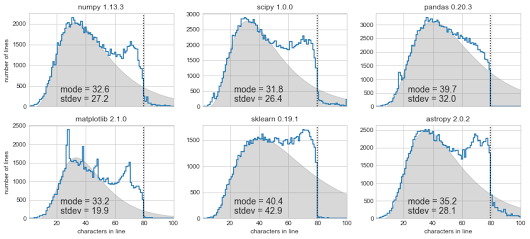
[Archive.is] Exploring Line Lengths in Python Packages is an interesting read.

It explores the relation between actual and “maximum” line lengths in Python in related to the prior 140 Twitter character limit.

via [Archive.is] Exploring Line Lengths in Python Packages – ThisIsWhyICode – Google+

–jeroen

Read the rest of this entry »

Posted in Development, Python, Scripting, Software Development, Static Code Analysis | Leave a Comment »

Passing multiple parameters to a Python method: the * tag

Posted by jpluimers on 2019/08/28

I had to pass parameters to a method so they became a list:

    threadManager.append(
        UrlMonitorThread(monitor, "http://%s" % targetHost),
        SmtpMonitorThread(monitor, targetHost, 25),
        SmtpMonitorThread(monitor, targetHost, 587),
        SshMonitorThread(monitor, targetHost, 22))

This appeared much easier than I anticipated:

    def append(self, *threads):
        for thread in threads:
            self.threads.append(thread)

It uses the * tag which is explained here:

–jeroen

Posted in Development, Python, Scripting, Software Development | Leave a Comment »

How to Update All Your Ruby Gems At Once | Life, the Universe, and Everything

Posted by jpluimers on 2019/08/26

This looks smart

gem update `gem list | cut -d ' ' -f 1`

From: [WayBack] How to Update All Your Ruby Gems At Once | Life, the Universe, and Everything

Though on the bash prompt, it works fine on Mac OS X / OS X / macOS / …, it does not work nice as an alias.

You can get it to work with difficult escaping (or nesting).

But it is easier to escape this:

gem update $(gem list | cut -d ' ' -f 1)

Escaped, it comes down to:

alias "gem-update-all=gem update \$(gem list | cut -d ' ' -f 1)"

Based on:

–jeroen

Posted in Apple, bash, bash, Development, Mac OS X / OS X / MacOS, Power User, Scripting, Software Development | Leave a Comment »

Python line continuation: only use backslash if it gives cleaner code

Posted by jpluimers on 2019/08/20

Since Python is a [WayBack] line-oriented programming language, sometimes you want to wrap longer lines into more readable shorter ones.

Many people struggle with this, see for instance these questions (and excellent answers!):

This struggle is likely why it made it to the [WayBack] style guide. Relevant sections are below.

I had this struggle wile passing multiple parameters to a method creating a very long line, but found I did not need a line continuation as the Python language understands this construct perfectly fine:

    threadManager.append(
        UrlMonitorThread(monitor, "http://%s" % targetHost),
        SmtpMonitorThread(monitor, targetHost, 25),
        SmtpMonitorThread(monitor, targetHost, 587),
        SshMonitorThread(monitor, targetHost, 22))

You could use the line continuation backslash to do this, but often that is not needed or a better way exists (for instance wrapping an expression in parentheses), so here are are the relevant style guide sections:

Code lay-out

Indentation

Use 4 spaces per indentation level.

Continuation lines should align wrapped elements either vertically using Python’s implicit line joining inside parentheses, brackets and braces, or using a hanging indent[7]. When using a hanging indent the following should be considered; there should be no arguments on the first line and further indentation should be used to clearly distinguish itself as a continuation line.

Maximum Line Length

Limit all lines to a maximum of 79 characters.

For flowing long blocks of text with fewer structural restrictions (docstrings or comments), the line length should be limited to 72 characters.

Limiting the required editor window width makes it possible to have several files open side-by-side, and works well when using code review tools that present the two versions in adjacent columns.

The preferred way of wrapping long lines is by using Python’s implied line continuation inside parentheses, brackets and braces. Long lines can be broken over multiple lines by wrapping expressions in parentheses. These should be used in preference to using a backslash for line continuation.

Backslashes may still be appropriate at times. For example, long, multiple with-statements cannot use implicit continuation, so backslashes are acceptable:

with open('/path/to/some/file/you/want/to/read') as file_1, \
     open('/path/to/some/file/being/written', 'w') as file_2:
    file_2.write(file_1.read())

Make sure to indent the continued line appropriately.

Should a line break before or after a binary operator?

For decades the recommended style was to break after binary operators. But this can hurt readability in two ways: the operators tend to get scattered across different columns on the screen, and each operator is moved away from its operand and onto the previous line. Here, the eye has to do extra work to tell which items are added and which are subtracted:


To solve this readability problem, mathematicians and their publishers follow the opposite convention. Donald Knuth explains the traditional rule in his Computers and Typesetting series: “Although formulas within a paragraph always break after binary operations and relations, displayed formulas always break before binary operations” [3].

Following the tradition from mathematics usually results in more readable code:

# Yes: easy to match operators with operands
income = (gross_wages
          + taxable_interest
          + (dividends - qualified_dividends)
          - ira_deduction
          - student_loan_interest)

In Python code, it is permissible to break before or after a binary operator, as long as the convention is consistent locally. For new code Knuth’s style is suggested.

–jeroen

Posted in Development, Python, Scripting, Software Development | Leave a Comment »

… compare two JSON structures and pin-point … the differences – – Nicholas Ring – Google+

Posted by jpluimers on 2019/08/20

I’ve added a few WayBack/Archive.is links to the interesting comments by Zoë Peterson from Scooter Software (of Beyond Compare fame) at [WayBack] … compare two JSON structures and pin-point … the differences – – Nicholas Ring – Google+:

Beyond Compare 4 has an optional “JSON sorted” file format that uses jq to pretty print and sort JSON data before comparing it. It’s not included out of the box yet, but you can get a copy here:

If you’re interested in an actual algorithm and not just an app, I don’t have a suggestion handy, but could dig one up. Tree alignment is more complicated than sequence alignment and we did do research into it, but it was quite a few years ago and didn’t get incorporated into BC. XML alignment algorithms were being actively researched back in the aughts and they should trivially transfer to JSON.

It looks like our research mostly ended around 2002, and I wasn’t personally involved in it, so I don’t know how helpful this will be, but here’s what I have:

The general idea in the thread is that JSON – though not as formalised as XML – does have structure, so if you can normalise it, then XML ways of differencing should work.

Normalisation also means that you need to normalise any floating point, date time, escaping, quoting, etc. Maybe not for the faint of heart.

–jeroen

Posted in *nix, *nix-tools, Beyond Compare, Development, diff, JavaScript/ECMAScript, jq, JSON, Power User, Scripting, Software Development, XML, XML/XSD | Leave a Comment »

When Powershell function won’t work: you define them with commas and parentheses, but call them with spaces and no parentheses

Posted by jpluimers on 2019/08/15

The function or command was called as if it were a method. 
Parameters should be separated by spaces. For information about 
parameters, see the about_Parameters Help topic.

Every now and then I bump into the above error. The reason is this:

  1. Functions are defined with commas between parameters and parentheses around them
  2. One-parameter functions can be called with one parameter surrounded by parentheses
  3. Multi-parameter functions need to be called with spaces between parameters and no parentheses surrounding them

Confused? #MeToo

The problem: [WayBackabout_Parameters_Default_Values | Microsoft Docs

Based on [WayBack] Powershell function won’t work.

–jeroen

Posted in CommandLine, Development, PowerShell, PowerShell, Scripting, Software Development | Leave a Comment »