Archive for the ‘Scripting’ Category
Posted by jpluimers on 2019/08/20
I’ve added a few WayBack/Archive.is links to the interesting comments by Zoë Peterson from Scooter Software (of Beyond Compare fame) at [WayBack] … compare two JSON structures and pin-point … the differences – – Nicholas Ring – Google+:
Beyond Compare 4 has an optional “JSON sorted” file format that uses jq to pretty print and sort JSON data before comparing it. It’s not included out of the box yet, but you can get a copy here:
If you’re interested in an actual algorithm and not just an app, I don’t have a suggestion handy, but could dig one up. Tree alignment is more complicated than sequence alignment and we did do research into it, but it was quite a few years ago and didn’t get incorporated into BC. XML alignment algorithms were being actively researched back in the aughts and they should trivially transfer to JSON.
…
It looks like our research mostly ended around 2002, and I wasn’t personally involved in it, so I don’t know how helpful this will be, but here’s what I have:
The general idea in the thread is that JSON – though not as formalised as XML – does have structure, so if you can normalise it, then XML ways of differencing should work.
Normalisation also means that you need to normalise any floating point, date time, escaping, quoting, etc. Maybe not for the faint of heart.
–jeroen
Posted in *nix, *nix-tools, Beyond Compare, Development, diff, JavaScript/ECMAScript, jq, JSON, Power User, Scripting, Software Development, XML, XML/XSD | Leave a Comment »
Posted by jpluimers on 2019/08/15
The function or command was called as if it were a method.
Parameters should be separated by spaces. For information about
parameters, see the about_Parameters Help topic.
Every now and then I bump into the above error. The reason is this:
- Functions are defined with commas between parameters and parentheses around them
- One-parameter functions can be called with one parameter surrounded by parentheses
- Multi-parameter functions need to be called with spaces between parameters and no parentheses surrounding them
Confused? #MeToo
The problem: [WayBack] about_Parameters_Default_Values | Microsoft Docs
Based on [WayBack] Powershell function won’t work.
–jeroen
Posted in CommandLine, Development, PowerShell, PowerShell, Scripting, Software Development | Leave a Comment »
Posted by jpluimers on 2019/08/14
I learned this the hard way: [WayBack] Different result when using -ReadCount with Get-Content: because -ReadCount delivers data in chunks, the filter after [WayBack] Get-Content (Microsoft.PowerShell.Management) it will only filter on those chunks. If the filter isn’t prepared for that, it might only filter the last chunk.
So do not use for instance [WayBack] Select-String (Microsoft.PowerShell.Utility) on it, but perform your own [WayBack] ForEach-Object (Microsoft.PowerShell.Core) aliased as foreach like in [WayBack] Get all lines containing a string in a huge text file – as fast as possible?:
Get-Content myfile.txt -ReadCount 1000 |
  foreach { $_ -match "my_string" }
A more elaborate example is at [WayBack] How can I make this PowerShell script parse large files faster?.
–jeroen
Posted in CommandLine, Development, PowerShell, PowerShell, Scripting, Software Development | Leave a Comment »
Posted by jpluimers on 2019/08/14
One of the things when I learned Python was that in some scripts I found a block starting with a statement like this:
if __name__ == '__main__':
It looked like an idiom to me, and indeed it is: [WayBack] What is ‘if name == “main“‘ for?.
It allows a file to be both used as “main” standalone program file and a module. That section of code will not be executed if it is loaded as a module.
Part of the idiom is also to put your code in a separate method so this block is as short as possible.
if __name__ == '__main__':

main()
Via: [WayBack] Why is Python running my module when I import it, and how do I stop it? (thanks user166390 and Jeremy Banks for the answers there)
–jeroen
Posted in Development, Python, Scripting, Software Development | Leave a Comment »
Posted by jpluimers on 2019/08/13
[WayBack] In Powershell, what kind of data type is [string[]] and when would you use it? (thanks cignul9 and arco444!): basically it forces an array of string.
It defines an array of strings. Consider the following ways of initialising an array:
[PS] > [string[]]$s1 = "foo","bar","one","two",3,4
[PS] > $s2 = "foo","bar","one","two",3,4

[PS] > $s1.gettype()

IsPublic IsSerial Name                                     BaseType
-------- -------- ----                                     --------
True     True     String[]                                 System.Array

[PS] > $s2.gettype()

IsPublic IsSerial Name                                     BaseType
-------- -------- ----                                     --------
True     True     Object[]                                 System.Array
By default, a powershell array is an array of objects that it will cast to a particular type if necessary. Look at how it’s decided what types the 5th element of each of these are:
[PS] > $s1[4].gettype()

IsPublic IsSerial Name                                     BaseType
-------- -------- ----                                     --------
True     True     String                                   System.Object


[PS] > $s2[4].gettype()

IsPublic IsSerial Name                                     BaseType
-------- -------- ----                                     --------
True     True     Int32                                    System.ValueType


[PS] > $s1[4]
3
[PS] > $s2[4]
3
The use of [string[]] when creating $s1 has meant that a raw 3 passed to the array has been converted to a String type in contrast to an Int32 when stored in an Object array.
–jeroen
Posted in CommandLine, Development, PowerShell, PowerShell, Scripting, Software Development | Leave a Comment »
Posted by jpluimers on 2019/08/12
Via [WayBack] Anyone with a hint on how to work around this: … “Please re-run this installer as a normal user instead of”… – Jeroen Wiert Pluimers – Google+
This happened for instance when trying to install Source Tree 2.x on Windows (1.9.x works fine):
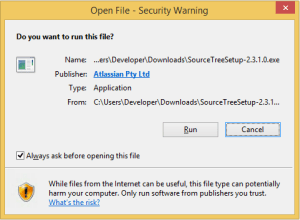
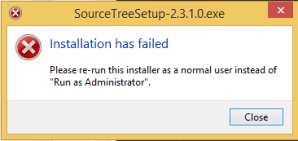
[Window Title]
SourceTreeSetup-2.3.1.0.exe
[Main Instruction]
Installation has failed
[Content]
Please re-run this installer as a normal user instead of “Run as Administrator”.
[Close]
The problem was by accident the machine got in a state to run commands without UAC approval, so the run dialog would already look have “This task will be created with administrative privileges”:

It was odd, as the machine didn’t have it enabled in the security policy (secpo.msc):

So I did a bit more digging, bumped into [WayBack] Why does my Run dialog say that tasks will created with administrative privileges? – The Old New Thing and had one of those #facepalm moments: Explorer had crashed, and I had started it from Process Explorer, forgetting Process Explorer had an UAC token.
The solution is easy:
- Logoff / Logon
- Verify the Windows-R shows a “normal” run:

Then you can just run the installer:
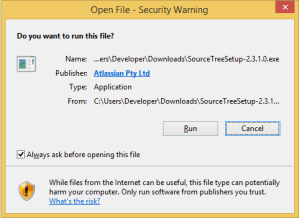
–jeroen
Posted in Batch-Files, Console (command prompt window), Development, Power User, Scripting, Software Development, The Old New Thing, Windows, Windows Development | Leave a Comment »
Posted by jpluimers on 2019/08/01
I’ve learned the hard way that both .NET and PowerShell version information isn’t always accurate or usable for two reasons which I later found in various other blog and forum posts:
The easiest is to use these numbers to create a [WayBack] Version Class (System) instance using the [WayBack] Version Constructor (Int32, Int32, Int32, Int32) constructor. This has the added benefit that you directly compare versions with each other.
Sometimes it makes even sense to take the highest version from Product and File.
In PowerShell, this is the way to do that, assuming $imagePath points to a [WayBack] Portable Executable:
try {
  $VersionInfo = (Get-Item $imagePath).VersionInfo
  $FileVersion = [version]("{0}.{1}.{2}.{3}" -f $VersionInfo.FileMajorPart, $VersionInfo.FileMinorPart, $VersionInfo.FileBuildPart, $VersionInfo.FilePrivatePart)
  $ProductVersion = [version]("{0}.{1}.{2}.{3}" -f $VersionInfo.ProductMajorPart, $VersionInfo.ProductMinorPart, $VersionInfo.ProductBuildPart, $VersionInfo.ProductPrivatePart)
  $ActualVersion = $(if ($ProductVersion -gt $FileVersion) { $ProductVersion } else { $FileVersion })
}
catch {
  $ActualVersion = [version]("0.0.0.0")
}
Background information:
–jeroen
Posted in CommandLine, Development, PowerShell, PowerShell, Scripting, Software Development | Leave a Comment »
Posted by jpluimers on 2019/07/31
I like this built-in construct by fbehrens most:
$result = If ($condition) {"true"} Else {"false"}
Everything else is incidental complexity and thus to be avoided.
For use in or as an expression, not just an assignment, wrap it in $(), thus:
write-host $(If ($condition) {"true"} Else {"false"})
There are even more elegant constructs, but those require setting up an alias before using them.
Source: [WayBack] Ternary operator in PowerShell – Stack Overflow
–jeroen
Posted in CommandLine, Development, PowerShell, PowerShell, Scripting, Software Development | Leave a Comment »
Posted by jpluimers on 2019/07/30
Cool tip by mjolinor to execute the scripts 1.ps1, 2.ps1 and 3.ps1 from a master.ps1 script in the same directory:
&"$PSScriptroot\1.ps1"

&"$PSScriptroot\2.ps1"

&"$PSScriptroot\3.ps1"
Source: [WayBack] scripting – Run Multiple Powershell Scripts Sequentially – on a Folder – Combine Scripts into a Master Script – Stack Overflow.
It uses $PSScriptroot which got introduced in PowerShell 2 in modules and extended in PowerShell 3 to be available in all scripts. More information in [WayBack] about_Automatic_Variables | Microsoft Docs
–jeroen
Posted in CommandLine, Development, PowerShell, PowerShell, Scripting, Software Development | Leave a Comment »


 The Wiert Corner - irregular stream of stuff