The CSS from [WayBack/Archive.is] Naughty naughty no alt that shows the below red moving rendering of images that do not have an alt-text is simple:
Archive for the ‘CSS’ Category
Naughty naughty no alt: CSS style to clearly show which images lack an alt-text
Posted by jpluimers on 2021/10/05
Posted in Bookmarklet, CSS, Development, HTML, HTML5, Power User, Software Development, Web Browsers, Web Development | Leave a Comment »
html – How can I scale the content of an iframe? – Stack Overflow
Posted by jpluimers on 2021/08/19
I used [WayBack] html – How can I scale the content of an iframe? – Stack Overflow as starting point to scale some iframes.
In my case, I had to scale up (by a 25% so a factor 1.25) instead of scale down.
What I observed so far in recent Chrome versions is:
- The wrapping
divis still needed, otherwise the outer size and inner size of the frame mismatches - The wrapping
divand the wrappediframeneed to have the same dimensions (so unlike the Stack Overflow answers, no need to scale thewidth/heightof thediv; keep the same values as theiframe)
The div uses class calendar_wrap.
The iframe uses class calendar_iframe.
This is part of my CSS:
body { margin: 0; /* override browser setting for body `margin: 8px;` */ overflow: hidden; /* remove scroll bars; does not work for iframes */ } /* ... */ iframe { border-width: 0; /* override browser setting for iframe `border-width: 2px; */ height: 100vh; width: 50vw; overflow: hidden; /* remove scroll bars; does not work for iframes */ } /* wrap and iframe zoom as per https://stackoverflow.com/questions/166160/how-can-i-scale-the-content-of-an-iframe */ .calendar_wrap { float: left; height: 70vh; width: 35vw; /* calc(35vw / 1.25); */ padding: 0; background-color: blue; } .calendar_iframe { float: left; width: 35vw; -ms-transform: scale(1.25); -moz-transform: scale(1.25); -o-transform: scale(1.25); -webkit-transform: scale(1.25); transform: scale(1.25); -ms-transform-origin: 0 0; -moz-transform-origin: 0 0; -o-transform-origin: 0 0; -webkit-transform-origin: 0 0; transform-origin: 0 0; } /* ... */
–jeroen
Posted in Chrome, CSS, Development, HTML, Power User, Software Development, Web Browsers, Web Development | Leave a Comment »
css color picker – Google Search
Posted by jpluimers on 2021/08/12
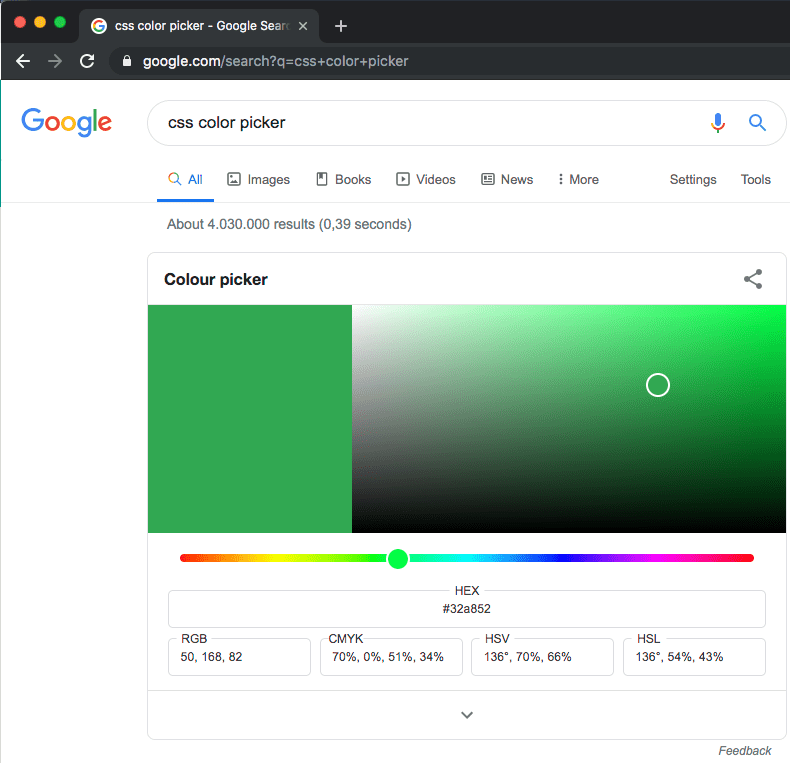
Probably old, but there is an embedded [WayBack] css color picker – Google Search that on each refresh switches colours:
–jeroen
Posted in Color (software development), CSS, Development, Google, GoogleSearch, HTML, Power User, Software Development, Web Development | Leave a Comment »
Simple iframe clock via Free Clocks for Your Website
Posted by jpluimers on 2021/08/11
Using [WayBack] Free Clocks for Your Website, I created this clock for a 1920×1080 web dashboard which is a web page hosted on [WayBack] raw.githack.com with an iframe hosted at www.timeanddate.com
I know that is a risk, but that is OK for now: that site has existed for a very long time and probably will last a while.
There is a truckload of options you can use, despite the clock being simple. Luckily the [WayBack] FAQ: Free Clocks for Your Website explains these options.
This is the gist of the above “this clock” page:
This file contains hidden or bidirectional Unicode text that may be interpreted or compiled differently than what appears below. To review, open the file in an editor that reveals hidden Unicode characters.
Learn more about bidirectional Unicode characters
| <!DOCTYPE html> | |
| <html> | |
| <head> | |
| <meta charset="UTF-8"> | |
| <meta http-equiv="content-type" content="text/html; charset=UTF-8"> | |
| <meta name="robots" content="noindex, nofollow"> | |
| <meta name="googlebot" content="noindex, nofollow"> | |
| <style type="text/css"> | |
| body { | |
| margin: 0; /* override browser setting for body `margin: 8px;` */ | |
| overflow: hidden; /* remove scroll bars; does not work for iframes */ | |
| } | |
| .box { | |
| float: left; | |
| width: 100vw; /* Firefox/Chrome outside Mac OS X: force viewport-width */ | |
| overflow: hidden; /* remove scroll bars; does not work for iframes */ | |
| background-color: azure; | |
| } | |
| iframe { | |
| border-width: 0; /* override browser setting for iframe `border-width: 2px; */ | |
| height: 100vh; | |
| width: 50vw; | |
| } | |
| .clock_iframe { | |
| float: right; | |
| height: 30vh; | |
| width: 16vw; | |
| } | |
| </style> | |
| <title>Clock in frame</title> | |
| </head> | |
| <body> | |
| <div class="box"> | |
| <iframe class="clock_iframe" src="https://freesecure.timeanddate.com/clock/i6xvy9ve/n16/szw300/szh300/hoc000/cf100/hgr0/fiv0/fas34/fdi74/mqv0/mhc000/mhs3/mhl20/mhw1/mhd84/mmv0/hhs1/hms1/hsc000/hss1" frameborder="0" width="300" height="300"> | |
| <!– https://www.timeanddate.com/clocks/free.html –> | |
| </iframe> | |
| </div | |
| </body> | |
| </html> |
–jeroen
Posted in CSS, Development, HTML, Power User, Software Development, Web Development | Leave a Comment »
HTML table border styles
Posted by jpluimers on 2021/01/20
I always get confused when I see this kind of HTML:
<td style="border: 1px black; border-style: none solid solid;">
This raises questions like:
- When less than 4 borders are mentioned, which borders are solid, and which borders are none?
- What is the order of 0…4 borders?
Luckily these links helped me:
- [WayBack] w3schools: CSS border-style property
- [WayBack] w3schools: CSS Borders
- [WayBack] border-style – CSS: Cascading Style Sheets | MDNThe border-style CSS property is a shorthand property that sets the line style for all four sides of an element’s border.
The first two made me find the last one, which is best as it has a CSS demo button (that also works on the WayBack link), a list of examples, and even better, answers the above questions with the “border-style” list below.
I rephrased their list into a table emphasising the clock-wise order:
The number of values determine the sides affected; thinking clock-wise is easiest to get it:
# values affected sides example top right bottom left 1 all: top, right, bottom, left solid solid solid solid solid 2 top & bottom, right & left none solid none solid none solid 3 top, right & left, bttom dotted none solid dotted none solid none 4 top, right, bottom, left double dotted solid none double dotted solid none
Their list:
The
border-styleproperty may be specified using one, two, three, or four values.
- When one value is specified, it applies the same style to all four sides.
- When two values are specified, the first style applies to the top and bottom, the second to the left and right.
- When three values are specified, the first style applies to the top, the second to the left and right, the third to the bottom.
- When four values are specified, the styles apply to the top, right, bottom, and left in that order (clockwise).
Each value is a keyword chosen from the list below.
then it continues with a table showing the outcome of the various line style values you can put in:
<line-style>- Describes the style of the border. It can have the following values:
noneLike the hiddenkeyword, displays no border. Unless abackground-imageis set, the calculated value ofborder-top-widthwill be0, even if the specified value is something else. In the case of table cell and border collapsing, thenonevalue has the lowest priority: if any other conflicting border is set, it will be displayed.hiddenLike the nonekeyword, displays no border. Unless abackground-imageis set, the calculated value ofborder-top-widthwill be0, even if the specified value is something else. In the case of table cell and border collapsing, thehiddenvalue has the highestpriority: if any other conflicting border is set, it won’t be displayed.dottedDisplays a series of rounded dots. The spacing of the dots is not defined by the specification and is implementation-specific. The radius of the dots is half the calculated border-top-width.dashedDisplays a series of short square-ended dashes or line segments. The exact size and length of the segments are not defined by the specification and are implementation-specific. solidDisplays a single, straight, solid line. doubleDisplays two straight lines that add up to the pixel size defined by border-widthorborder-top-width.grooveDisplays a border with a carved appearance. It is the opposite of ridge.ridgeDisplays a border with an extruded appearance. It is the opposite of groove.insetDisplays a border that makes the element appear embedded. It is the opposite of outset. When applied to a table cell withborder-collapseset tocollapsed, this value behaves likegroove.outsetDisplays a border that makes the element appear embossed. It is the opposite of inset. When applied to a table cell withborder-collapseset tocollapsed, this value behaves likeridge.
–jeroen
Posted in CSS, Development, HTML, HTML5, Software Development, Web Development | Leave a Comment »
Peeking under the hood of redesigned Gmail – Boris – Medium
Posted by jpluimers on 2020/06/25
From a while back, but still relevant as the speed of the GMail web-UI still has not improved.
[WayBack/Archive.is] Peeking under the hood of redesigned Gmail – Boris – Medium
Via:
- [WayBack] Craig Buckler on Twitter: “The new Gmail scores 2 out of 100 in Google’s Lighthouse audit and it’s essentially a CSS update to old legacy codebase. I really hope Google are working on a new version; performance and reliability is woeful.… “
- [WayBack] just-boris on Twitter: “I just published “Peeking under the hood of redesigned Gmail” …”
–jeroen
Posted in CSS, Development, GMail, Google, HTML, JavaScript/ECMAScript, Power User, Scripting, Software Development, Web Development | Leave a Comment »
108 byte CSS Layout Debugger · GitHub
Posted by jpluimers on 2020/05/13
A cool [WayBack] 108 byte CSS Layout Debugger · GitHub (and sligtly different versions) that makes your page look like this:
[].forEach.call($$("*"),function(a){a.style.outline="1px solid #"+(~~(Math.random()*(1<<24))).toString(16)})
–jeroen
Posted in CSS, Development, JavaScript/ECMAScript, Scripting, Software Development, Web Development | Leave a Comment »
CSS Animation How To Tutorial – Dev Tuts
Posted by jpluimers on 2020/01/22
So as the author of CSS3 Animate It I have a good background in CSS animation. Before CSS3 was released you would have to resort to using JS for animation…
Even after CSS3 got introduced, I’m still not sure I’d use animation: [WayBack] CSS Animation How To Tutorial – Dev Tuts
Via:
- [WayBack] CSS Animation – Lars Fosdal – Google+
- [WayBack] http://devtuts.online/css-animation-tutorial/ – Jack McCourt – Google+
–jeroen
Posted in CSS, Development, Software Development, Web Development | Leave a Comment »
CSS flex-box layout – Wikipedia
Posted by jpluimers on 2019/09/02
Being a back-end and library person by heart, I am always late in the web-UI game, so this is on my list of things to try: CSS flex-box layout – Wikipedia.
I saw it being used by [WayBack] markdownlint demo: Demo for markdownlint, a Node.js style checker and lint tool for Markdown/CommonMark files.
Some links that should me help further:
- [WayBack] A Complete Guide to Flexbox | CSS-Tricks (of which I borrowed the images below)
- [WayBack] CSS Flexbox (Flexible Box)
- [WayBack] Basic concepts of flexbox – CSS: Cascading Style Sheets | MDN
- [WayBack] CSS Flexible Box Layout – CSS: Cascading Style Sheets | MDN
- [WayBack] Flexbox Cheatsheet
–jeroen
Posted in CSS, Development, HTML, HTML5, Software Development, Web Development | Leave a Comment »