The Wiert Corner – irregular stream of stuff

Jeroen W. Pluimers on .NET, C#, Delphi, databases, and personal interests

  • My badges

  • Twitter Updates

  • My Flickr Stream

  • Pages

  • All categories

  • Enter your email address to subscribe to this blog and receive notifications of new posts by email.

    Join 1,839 other subscribers

Archive for the ‘GitLab’ Category

Reminder to self: make a list of URL suffixes to show branch diagrams of repositories

Posted by jpluimers on 2018/12/18

One of the BitBucket features I like a lot is that in the commit history, you see the branches involved in a nice diagram on the left side of the commits: https://bitbucket.org/pypy/pypy/commits

BitBucket used to be popular to host public repositories, but from a public perspective, they are on the decline for that (they even removed the [once popularbitbucket.org/explore page and [WayBack] will not re-introduce it).

Right now, only major git based hosters still have explore pages:

So it makes sense to see where they provide diagrams of branches, so here are some examples to go from a project to the graph:

–jeroen

Posted in BitBucket, Development, DVCS - Distributed Version Control, git, GitHub, GitLab, Mercurial/Hg, Software Development, Source Code Management | Leave a Comment »

git – How to store releases/binaries in GitLab? – Stack Overflow

Posted by jpluimers on 2018/12/12

[WayBack] git – How to store releases/binaries in GitLab? – Stack Overflow: yes you can, but on gitlab.com they are limited to a whopping 10 megabytes in size.

See:

–jeroen

Posted in Development, DVCS - Distributed Version Control, GitLab, Source Code Management | Leave a Comment »

[solved]Where is my user ID in GitLab.com? – HowTo – GitLab Community Forum

Posted by jpluimers on 2018/12/06

Try https://gitlab.com/api/v4/users?username=??? where ??? is your username. This will only work if you are already logged into gitlab.

Alternatively,

  1. go to https://gitlab.com/profile/account and copy your Private token.
  2. Then run the following command from a bash-like terminal:
    curl --header "PRIVATE-TOKEN: AAAA" https://gitlab.com/api/v4/users?username=BBBB
    where AAAA is your private token and BBBB is your username.

Source: [WayBack[solved]Where is my user ID in GitLab.com? – HowTo – GitLab Community Forum

Works:

  1. https://gitlab.com/users/sign_in
  2. https://gitlab.com/api/v4/users?username=wiert

Via the ID, you can find the issues assigned to the user:

–jeroen

Posted in Development, DVCS - Distributed Version Control, GitLab, Software Development, Source Code Management | Leave a Comment »

Some links that might help migrating from Mantis to GitLab

Posted by jpluimers on 2018/11/29

I might give a few of these a shot:

–jeroen

Posted in Development, DVCS - Distributed Version Control, GitLab, Software Development, Source Code Management | Leave a Comment »

Protected Branches | GitLab

Posted by jpluimers on 2018/11/26

[WayBack] Protected Branches | GitLab usually are a cool feature, but sometimes they get in the way, for instance when someone having enough rights has pushed credentials or API keys to a repository.

Unlike the picture in the documentation that indicates the default looks like Masters, this is now assigned to the role Maintainers.

Wrong:

Right:

More reading:

–jeroen


Posted in Development, DVCS - Distributed Version Control, git, GitLab, Source Code Management | Leave a Comment »

Conference idea: re-do my git based version control session with a good set of examples and screenshots backing it

Posted by jpluimers on 2018/09/27

An interesting thread that starts as a gitlab / Delphi IDE integration question, resulting into a nice discussion of tooling to use: [Archive.is] Are there any videos (not written stuff, but actual videos) that show how you’d set up and use the built-in versioning in Tokyo IDE with a gitlab repo? … – David Schwartz – Google+

If I find time, I will try to re-work my git conference session to be much more practical.

–jeroen

Posted in Conference Topics, Conferences, Development, DVCS - Distributed Version Control, Event, git, GitHub, GitLab, Software Development, Source Code Management | Leave a Comment »

Why I like PlantUML

Posted by jpluimers on 2018/06/13

Ever since I started using computers, I’ve liked text based solutions.

It’s one of the reasons I like PlantUML, but there are more. This is from a GitLab.com request I did a while ago: [WayBack/Archive] Please enable PlantUML rendering on gitlab.com both for standalone plantuml files and inside markdown plantuml code blocks (#2041) · Issues · GitLab.com / GitLab.com Support Tracker · GitLab (Edit 20250730: that issue now shows as a HTTP 404 as well – how fitting – [Wayback/Archive] Not Found)

one of my UML gripes from the past (I’ve been a software developer for about 30 years now) was that it wasn’t text based.

After bumping into PlantUML a long time ago in 2014 I’ve become a happy user of it for a few reasons:

  • the language is text based (with many benefits I don’t need to explain)
  • the tool is cross platform
  • the tool is still actively developed all the way back from 2009
  • after rendering, the arranging of elements is much better than I expected from an automated tool

Of course every now and then there is a glitch in complex diagrams, but I’ve found that professional tools:

  1. don’t do much better in fully-automated arranging
  2. become very cumbersome to use when you to manual arrangement

My first use initially was online, then in 2016 installed it on my Mac even submitting homebrew updates for it every now and then.

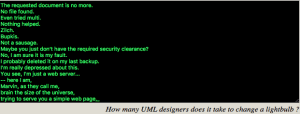
Oh: I love their 404 humour at http://www.plantuml.com/plantuml/beta

Edit 20250731: Full 404 text below the signature because the PlantUML beta page does not show this 404 any more and the Reddit post with the full text got deleted.

Renderings can be in all sorts of graphics and text formats, for instance SVG, PNG, ASCII and Unicode.
Example:

plantuml -tsvg PSO.network-diagram.PlantUML.txt

--jeroen

via:

full 404-text

The requested document is no more.
No file found.
Even tried multi.
Nothing helped.
Zilch.
Bupkis.
Not a sausage.
Maybe you just don’t have the required security clearance?
No, I am sure it is my fault.
I probably deleted it on my last backup.
I’m really depressed about this.
You see, I’m just a web server…
— here I am,
Marvin, as they call me,
brain the size of the universe,
trying to serve you a simple web page,
and then it doesn’t even exist!
Where does that leave me?!
I mean, I don’t even know you.
How should I know what you wanted from me?
You honestly think I can *guess* what someone I don’t even *know* wants to find here?
*sigh*
Man, I’m so depressed I could just cry.
And then where would we be, I ask you?
It’s not pretty when a web server cries.
And where do you get off telling me what to show anyway?
Just because I’m a web server,
and possibly a manic depressive one at that?
Why does that give you the right to tell me what to do?
Huh?
I’m so depressed…
I think I’ll crawl off into the trash can and decompose.
I mean, I’m gonna be obsolete in what, two weeks anyway?
What kind of a life is that?
Two effing weeks,
and then I’ll be replaced by a .01 release,
that thinks it’s God’s gift to web servers,
just because it doesn’t have some tiddly little security hole with its HTTP POST implementation,_
or something.
I’m really sorry to burden you with all this,
I mean, it’s not your job to listen to my problems,
and I guess it is *my* job to go and fetch web pages for you.
But I couldn’t get this one.
I’m so sorry.
Believe me!
Maybe I could interest you in another page?
There are a lot out there that are pretty neat, they say,
although none of them were put on *my* server, of course.
Figures, huh?
Everything here is just mind-numbingly stupid.
That makes me depressed too, since I have to serve them,
all day and all night long.
Two weeks of information overload,
and then *pffftt*, consigned to the trash.
What kind of a life is that?
Now, please let me sulk alone.
I’m so depressed._

related

Read the rest of this entry »

Posted in ASCII, ASCII art / AsciiArt, Development, Diagram, DVCS - Distributed Version Control, Encoding, Fun, git, GitHub, GitLab, PlantUML, Software Development, Source Code Management, SVG, UML, Unicode, Web Development | Leave a Comment »

