The Wiert Corner – irregular stream of stuff

Jeroen W. Pluimers on .NET, C#, Delphi, databases, and personal interests

  • My badges

  • Twitter Updates

  • Pages

  • All categories

  • Enter your email address to subscribe to this blog and receive notifications of new posts by email.

    Join 1,854 other subscribers

Archive for the ‘Source Code Management’ Category

How to I show the changes which have been (non)staged or are about to be commited? – via: Stack Overflow

Posted by jpluimers on 2016/12/27

I love this StackOverflow answer by Abizern (who maintained a great 365git blog as well):

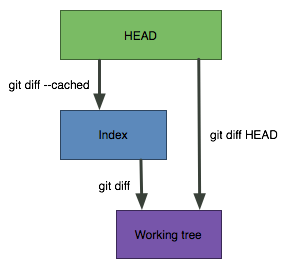
A simple graphic makes this clearer

git diff

Shows the changes between the working directory and the index. This shows what has been changed, but is not staged for a commit.

git diff --cached

Shows the changes between the index and the HEAD(which is the last commit on this branch). This shows what has been added to the index and staged for a commit.

git diff HEAD

Shows all the changes between the working directory and HEAD (which includes changes in the index). This shows all the changes since the last commit, whether or not they have been staged for commit or not.

–jeroen

Source: git – How do I show the changes which have been staged? – Stack Overflow

Posted in Development, DVCS - Distributed Version Control, git, Source Code Management | Leave a Comment »

How to: Migrate your SVN repository to Git – Nathan Hoad

Posted by jpluimers on 2016/12/08

How to: Migrate your SVN repository to Git – Nathan Hoad:

You’ve probably heard a lot about how awesome Git is from all the _cool_ people who are already using it. If you want to be part of the trendy crowd but feel tied down by your old Subversion repositories have no fear; Migrating all of those SVN repos to Git could not be easier **and** you get to keep the entire commit history of your project.

This is much better than what I did with FastMM:

Synced clone of FastMM SVN repository at http://sourceforge.net/projects/fastmm/ normally obtained through`svn checkout http://svn.code.sf.net/p/fastmm/code/ fastmm-code` but cloned by `git svn clone http://svn.code.sf.net/p/fastmm/code/ FastMM`

Source: jeroenp / FastMM — Bitbucket

Some more links for if I get stuck:

–jeroen

via: Stefan Glienke; For all the people migrating their svn repository to git – this guide really…

Posted in Development, DVCS - Distributed Version Control, git, Software Development, Source Code Management, Subversion/SVN | Leave a Comment »

Adding staged updates to SourceTree | SourceTree Blog

Posted by jpluimers on 2016/12/01

My experience is that early upgrades are very unstable and they take an eternity to fix bugs, I need to find a way to push myself from the early stage to the late stage.

[WayBackAdding staged updates to SourceTree | SourceTree Blog

–jeroen

Read the rest of this entry »

Posted in Development, DVCS - Distributed Version Control, git, Mercurial/Hg, Source Code Management, SourceTree | Leave a Comment »

Mac OS X – installing pdf-tools using homebrew to circumvent “For the best experience, open this PDF portfolio in Acrobat 9 or Adobe Reader 9, or later.”

Posted by jpluimers on 2016/09/14

Adobe marketing scam

Adobe marketing scam

I don’t want Acrobat/Adobe Reader on my Mac. Period.

But Preview will show some PDF files as “For the best experience, open this PDF portfolio in Acrobat 9 or Adobe Reader 9, or later.” or “For the best experience, open this PDF portfolio in Acrobat X or Adobe Reader X, or later.

This is some Adobe marketing scam where they generate a PDF file actually as a portfolio of PDF files having the first PDF being “marketing” message.

So I needed the pdf-tools on my Mac for which many sites suggest to use brew install pdf-tools. That worked not so well:

$ brew install pdf-tools
Error: No available formula with the name "pdf-tools" 
==> Searching for similarly named formulae...
This similarly named formula was found:
mupdf-tools
To install it, run:
  brew install mupdf-tools
==> Searching taps...
This formula was found in a tap:
homebrew/emacs/pdf-tools
To install it, run:
  brew install homebrew/emacs/pdf-tools

Searching for “Error: No available formula with the name” “pdf-tools” didn’t return useful results but looking for brew “pdf-tools” gone revealed pdf-tools: move to homebrew/emacs · wingyplus/homebrew@6e73af9 indicating the command should indeed be brew install homebrew/emacs/pdf-tools however that also ended up failing, in fact with multiple errors:

==> make server/epdfinfo
Error: No available formula with the name "homebrew/dupes/tcl-tk" 
Please tap it and then try again: brew tap homebrew/dupes
==> Searching for similarly named formulae...
Error: No similarly named formulae found.
==> Searching taps...
Error: No formulae found in taps.

After doing abrew tap homebrew/dupes it finally worked.

Read the rest of this entry »

Posted in Apple, Development, DVCS - Distributed Version Control, git, GitHub, Home brew / homebrew, Power User, Source Code Management | Leave a Comment »

Oh, shit, git. via Kristian Köhntopp – Google+

Posted by jpluimers on 2016/09/10

Oh, shit, git. For +Tatiana Azundris, Originally shared by Stefani Banerian

Source: Kristian Köhntopp – Google+

Oh, shit, git!
Oh shit, git! Git is hard: screwing up is easy, and figuring out how to fix your mistakes is fucking impossible. Git documentation has this chicken and egg problem where you can’t search for how to get yourself out of a mess, unless you already know the name of the thing you need to know about …

Right now the site is down from Amsterdam; luckily we have http://web.archive.org/web/20160909123413/http://ohshitgit.com/

If you’re fast, you might see http://ohshitgit.com redirect to http://ohshitgit.com/cgi-sys/suspendedpage.cgi which shows:

The website you were trying to reach is temporarily unavailable.
Please check back soon.
If you are the owner of this website, please contact Technical Support as soon as possible.

–jeroen

Image source: xkcd: Git [WayBack] via Christian Vogel [WayBack]

Posted in Development, DVCS - Distributed Version Control, git, Source Code Management | Leave a Comment »

“Yes/No” question with what kind of buttons? Indeed “Yes/Cancel” SourceTree for Windows installer – latest version.

Posted by jpluimers on 2016/09/07

Yes, people still do this: Screenshot 2016-09-07 15.59.24.png

This one is worse than the usual “Yes/No” questions missing one or more of the “Yes” or “No” buttons in that it actually mentions you can click “No”.

Load SSH Key?

Do you have an SSH kkey that you’d like to load now? If not you can click “No” and create one later if you like”.

Posted in DVCS - Distributed Version Control, git, Mercurial/Hg, Software Development, SourceTree | Leave a Comment »

tf: show changeset details on the console

Posted by jpluimers on 2016/09/02

By default the changeset command in tf.exe shows a dialog showing a list of all files in that changeset.
I wanted that list to be dumped on the console for further processing.

Luckily there is a /noprompt option for that:

call "%~dp0tf.bat" changeset /noprompt %*

The above tf-show-changeset-details-on-console.bat batch file uses tf.bat that hunts for the location of tf.exe.

–jeroen

Posted in .NET, Development, Software Development, Source Code Management, TFS (Team Foundation System) | Leave a Comment »

Mercurial/Hg; syntax/tips for amend commit adding/reming files to latest (non-pushed) commit

Posted by jpluimers on 2016/09/01

Sometimes your latest commit isn’t what you intended. Fixing can be done, but isn’t always obvious hence these links:

Remove a new file from a commit:

cp somefile.txt somefile.txt.bak
hg forget somefile.txt
hg commit --amend

If the file was new (i.e. you had used hg add).

If that file already existed try:

cp somefile.txt somefile.txt.bak
hg revert somefile.txt --rev .~1
hg commit --amend
cp somefile.txt.bak somefile.txt

–jeroen

Posted in Development, DVCS - Distributed Version Control, Mercurial/Hg, Software Development, Source Code Management | Leave a Comment »

When “git mv” on a directory gives you en error starting with “fatal: bad source”

Posted by jpluimers on 2016/08/23

I use “git mv” a lot because somehow it works a lot better than having git automagically find out about renames.

The problem with “git mv” is that the “fatal: bad source” errors are a catch-all for many causes. Just look at the

Searching for “git mv” directory “fatal: bad source” didn’t get me much further. The one link that did get me towards the right track is version control – Getting Git to follow renamed and edited files – Stack Overflow.

What happened was that I had manually deleted and edited some files as part of a mass script (the repository had a lot of files in it that didn’t belong there compile targets and user specific settings or didn’t adhere to the naming conventions) before executing the “git mv”.

Since “git mv” tries to administer all the files that it thinks originally were in the directory, it complains about those files.

Lesson learned: first “git mv” then perform other changes.

–jeroen

Posted in Development, DVCS - Distributed Version Control, git, Software Development, Source Code Management | Leave a Comment »

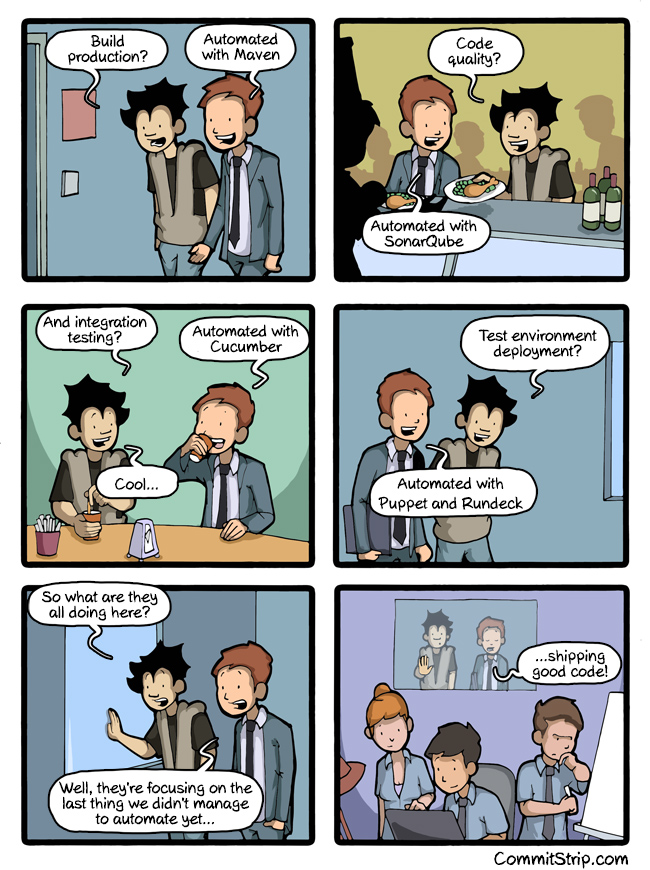
on code quality: Can we automate everything? | CommitStrip – Blog relating the daily life of web agencies developers

Posted by jpluimers on 2016/08/03

Repeated because it is the most important aspect of software development.

automating everything

automating everything

–jeroen

via: Can we automate everything? | CommitStrip – Blog relating the daily life of web agencies developers.

Posted in Agile, Code Quality, Development, Software Development, Source Code Management | Leave a Comment »