The Wiert Corner – irregular stream of stuff

Jeroen W. Pluimers on .NET, C#, Delphi, databases, and personal interests

  • My badges

  • Twitter Updates

  • My Flickr Stream

  • Pages

  • All categories

  • Enter your email address to subscribe to this blog and receive notifications of new posts by email.

    Join 1,862 other subscribers

Archive for the ‘Testing’ Category

Counting bugs versus talking about them: a learning opportunity

Posted by jpluimers on 2021/07/07

Counting bugs (or issues for that matter) tells you exactly nothing. Numbers need context, so you need to discuss context. If there the number feels large, you do not even need an exact number: you already are in trouble.

More about this in this excellent twitter thread:

[WayBack] Thread by @michaelbolton: “1) Thinking about counting things to measure quality? You might be able to measure some things that bear on quality. By contrast, you ca […]”

  1. 1) Thinking about counting things to measure quality? You might be able to measure *some things* *that bear on* quality. By contrast, you can’t measure quality itself (as @jamesmarcusbach has said), but you can discuss it.Consider this: s/how many/let’s talk about each/g/
  2. When you suggest “let’s talk about each bug”, you might hear (or think) “No way! We have too many bugs to talk about each one! Let’s just count them instead!” If so, you can already infer some crucial things about the product and project, with no need to bother counting. /
  3. Of course, those inferences are only inferences, not facts. So investigate. When you do, you might be tempted to start counting bugs. But you’ll probably want to make sure that your count is appropriately accurate, precise, valid, reliable… So you need to examine each one. /
  4. Examining and evaluating each bug sounds like a pain. It is, to a degree. Few people like washing or repairing dirty linen in public. Yet a bug is not just a problem; it’s also an opportunity to learn some things. When you count instead of study, you lose that opportunity. /
  5. I love studying bugs. When I study bugs, I can become aware of certain things that go wrong, and some of those things get embedded into tacit knowledge. I can apply that knowledge, maybe consciously, maybe sub-, while testing, pairing with a developer, or coding myself. /
  6. In Rapid Software Testing, we suggest this: when someone asks for a number or a measurement, avoid misleading them by giving them a scalar. Consider offering a description, an assessment, a report, or a list. If you can describe and summarize, you might not NEED a number. /
  7. When you *are* offering a number, it had better be a valid number. When you count items, each item being counted had better be /commensurate/. That is, you must know the difference between “one of these” and “NOT one of these”. You must know how to count to one. /
  8. For a count to make sense, items must be commensurate—of describable size, weight, duration, significance, value, etc. etc., on a scale that people agree upon, accept, *and understand*. Otherwise communication will go pear-shaped in no time. /
  9. To go seriously about the business of getting a *valid* count, you’ll need to examine every bug. To do good analysis work, there’s no getting out of that. The same general principle applies to counting test cases, or “defect escapes”, or “invalid bug reports”. All of them. /
  10. “But management wants numbers!” I doubt that. Management almost certainly wants *to know things*—and from testers, knowledge about the status of the product and problems that threaten its value. Numbers might help to illustrate a story. They don’t, can’t TELL it. Words can. /
  11. Don’t be cowed into giving numbers without context. When asked for them, consider replying “misleading you is not a service that I offer,” and immediately offering a summarized, meaningful description of the state of factors that matter to people who are important. /
  12. All this applies to reports about the status or quality of the product, of the testing, of the project. And it applies to the work of individual testers, too. As an alternative to *measuring* something, analyze it, describe it, assess it, discuss it. Don’t just keep score. /
  13. What might we evaluate a tester’s work? Here’s an example set of elements of excellent testing:

    . It may not be complete, comprehensive, or tailored to your context. If it isn’t, revise it; fix it to fit. /

  14. Evaluating testers’ work? Go through the list and ask “are we happy with the tester’s work with respect to this element?” If Yes, great. If it’s outstanding, considering analyzing and then sharing that tester’s approaches with others; point out positive deviance from norms. /
  15. Unhappy with some element of the tester’s work? Talk about it. Discuss it. Maybe the tester needs to improve it through focus and deliberate practice; maybe the tester needs pairing and collaboration; or maybe others on the team can handle that element just fine. /
  16. As testers, we (supposedly) specialize in evaluating the quality of things via interaction, observation, experience with them. We consider quality criteria: capability, reliability, usability, charisma, security, scalability, compatibility, performance,… /
  17. People aren’t products, of course. And there are patterns common to evaluating the quality of anything: factors that make people happy or bring them value, or that in their absence trigger disappointment, loss, harm, or diminished value. But “Capability: 6” tells us little. /
  18. I was a program manager for a best-selling product. I would never have conceived of shipping a product (or not) by reading a scoring table. I didn’t care about metrics, test case counts, or bug counts. I needed relevant, concise stories about testing and bugs. /
  19. So: avoid agonizing about “measuring quality”. Consider instead learning to tell the product story, the testing story, and the quality-of-testing story. Talk about what’s OK, and move quickly to problem that threaten the product or project. [WayBack] developsense.com/blog/2018/02/h…
Postscript to this thread: in the middle of my writing it, the Twitter client on my iPad got into a state where it was accepting additions to the thread, but when it came time to send them out, the “Tweet All” button was greyed out. Anticipating a problem, I took screen shots. /

Predictably, the active “Cancel” button DID work, and the text was all lost. But, thanks to screen shots, for once I had a backup and was able to recover my work. It took time, but at least I could do it.

A user in this position doesn’t care about bug COUNTS. Only about the bug.

–jeroen

Read the rest of this entry »

Posted in Development, Software Development, Testing | Leave a Comment »

Solved: Very slow speed on SSD |VMware Communities (via “Building a lab with ESXI and Vagrant – DarthSidious”)

Posted by jpluimers on 2021/05/11

Via [WayBack] Building a lab with ESXI and Vagrant – DarthSidious while researching the possibility of running Vagrant (software) – Wikipedia on VMware ESXi – Wikipedia for building and distributing development environments:

[WayBack] Solved: Very slow speed on SSD |VMware Communities “solution” that seems to work for ESXi 6.5 and 6.7:

ESXi 6.5 includes a new native driver (vmw_ahci) for SATA AHCI controllers, but that introduces performance problems with a lot of controllers and/or disks.

Try to disable the native driver and revert to the older sata-ahci driver by running

esxcli system module set --enabled=false --module=vmw_ahci

in an ESXi shell.

Reboot the host to make the change effective.

which solves it for some who now get much faster results:

Your suggestion worked for me, now i am getting avg speed 250Mbps from SATA III SSD .

ssd.jpg

Hope will get the full I/Ops from SSD.

However:

One issue I still have is that my 4 port Syba PCIe controller card now vanishes after disabling vmw_ahci and I am restricted to using the SATA ports on the motherboard.

and you need backups:

WARNING: Doing this at least for me erases all the VMs on the aforementioned drive. Migrate as needed.

There was no response for a more permanent fix:

What is the permanent fix for this issue, should we expect a corrected native driver from VMware, or will this require a firmware upgrade on the part of the drive vendors?

and there seem to be other bottle-necks:

tried the command on a 6.7.

Deploying an OVA and I am getting 22.82….

I have a Samsung 860 EVO mSATA 1Tb SSD.

i re-enabled it, I got max 11.81.

Kind of crappy either way. Not SSD speeds IMO.

–jeroen


Posted in Development, ESXi6.5, ESXi6.7, Power User, Software Development, Testing, Virtualization, VMware, VMware ESXi | Leave a Comment »

Why a study with only 7 respondents can be good – from Dutch paper “De Volkskrant”

Posted by jpluimers on 2021/01/07

[Archive.is] Waarom een onderzoek met maar 7 respondenten toch goed kan zijn | De Volkskrant: Denkfouten in het hedendaags ontwerp gefileerd door innovatie-expert (en cabaretier) Jasper van Kuijk. Deze week: gebruikstest.

Google translated in English.

TL;DR

Quantitative studies often require large numbers of respondents, but quantitative studies can be done with a very small group.

While quantitative studies often will get you just one result (I rate this application a 7 out of 10, or with this A/B change, click through increases by 5%), qualitative studies will get you much more specific comments like “the main menu is cluttered”, or “the design is slick” (translated from the Image in the article).

Extensive research was done for a 2003 published paper [Archive.is] Beyond the five-user assumption: Benefits of increased sample sizes in usability testing which you can read as PDF [WayBack].

Via

[WayBack] Jasper van Kuijk on Twitter: “Mijn ‘Hoe moeilijk kan het zijn?’ van vandaag. Waarom voor gebruiksgemak een gebruikstest met 7 participanten nuttiger is dan een enquête met 1500 respondenten. #HMKHZ via de @volkskrant”

Related

[WayBack] Ionica Smeets on Twitter: “Hear, hear! Aldus een wiskundige die heel wat jaren nodig had om waarde van kwalitatief onderzoek in te zien…”

and

and

–jeroen

Read the rest of this entry »

Posted in Development, Software Development, Testing, Usability, User Experience (ux) | Leave a Comment »

GitHub – DevExpress/testcafe: A Node.js tool to automate end-to-end web testing.

Posted by jpluimers on 2020/12/09

In my list of things to play with: [WayBack] GitHub – DevExpress/testcafe: A Node.js tool to automate end-to-end web testing.:

A Node.js tool to automate end-to-end web testing.
Write tests in JS or TypeScript, run them and view results.

https://devexpress.github.io/testcafe


  • Works on all popular environments: TestCafe runs on Windows, MacOS, and Linux. It supports desktop, mobile, remote and cloud browsers (UI or headless).
  • 1 minute to set up: You do not need WebDriver or any other testing software. Install TestCafe with one command, and you are ready to test: npm install -g testcafe
  • Free and open source: TestCafe is free to use under the MIT licensePlugins provide custom reports, integration with other tools, launching tests from IDE, etc. You can use the plugins made by the GitHub community or make your own.

Related:

  • [WayBack] A node.js tool to automate end-to-end web testing | TestCafe:

    Use TestCafe to write tests in JS or TypeScript, run them and view results. TestCafe runs on Windows, MacOS, and Linux and takes 1 minute to set up.

  • [WayBack] TestCafe: Web Testing Framework | DevExpress

    100% web-based functional testing framework with integrated visual test recorder, remote device testing, and natural JavaScript API

    • From download to recording your first test in less than 5 minutes — installer automatically configures your environment.
    • With TestCafe, you can run tests in any browser that supports HTML5 (including IE9+, Chrome, Firefox, Safari, Opera).
    • TestCafe is operating system agnostic so you can run tests on Windows, Mac or Linux machines.
    • Run tests on remote computers and mobile devices.
    • Run tests in multiple browsers and on multiple machines in parallel.
    • Run tests in the background on any machine.
    • TestCafe allows you to test web pages that require Basic and Windows HTTP Authentication.

Via:

Screen materials below the fold.

–jeroen

Read the rest of this entry »

Posted in Development, JavaScript/ECMAScript, LifeHacker, Power User, Scripting, Software Development, Testing, Web Development | Leave a Comment »

Some links on assembling a proper Katalon .gitignore file

Posted by jpluimers on 2020/10/29

I used these links to find out what entries a Katalon .gitignore file should contain:

Combining the above, the .gitignore file needs to at least contain:

/.classpath
/.project
/.settings
bin/lib/
Libs/
/bin
/Libs
.settings
.classpath
settings/internal
/.svn
/bin/lib/Temp*.class
Reports/
.project
/libs/Temp*.groovy
bin/lib/
bin/keyword/

(funny that .svn should be in a .gitignore file and that various combinations of casing are used)

–jeroen

Posted in Development, DVCS - Distributed Version Control, git, Katalon, Software Development, Source Code Management, Testing | Leave a Comment »

Enable your device for development – UWP app developer | Microsoft Docs

Posted by jpluimers on 2020/10/20

From [WayBack] Enable your device for development – UWP app developer | Microsoft Docs:

Run these as administrator on the command prompt to:

Enable Sideloading

reg add "HKEY_LOCAL_MACHINE\SOFTWARE\Microsoft\Windows\CurrentVersion\AppModelUnlock" /t REG_DWORD /f /v "AllowAllTrustedApps" /d "1"

Enable Developer Mode

reg add "HKEY_LOCAL_MACHINE\SOFTWARE\Microsoft\Windows\CurrentVersion\AppModelUnlock" /t REG_DWORD /f /v "AllowDevelopmentWithoutDevLicense" /d "1"

Needed for WinAppDriver to test applications from Selenium or Katalon

When you run WinAppDriver without it, you get this:

C:\Users>"C:\Program Files (x86)\Windows Application Driver\WinAppDriver.exe"
Failed to initialize: 0x80004005
Despite WinAppDriver running fine as non-administrative user, the reason was given that it requires administrative privileges: [WayBack] Why does WinAppDriver.exe require developer mode? · Issue #165 · Microsoft/WinAppDriver · GitHub.

SetCapabilities name parameters and values

Various searches for what to pass as parameters to SetCapabilities failed, but the list is right at the README, but without any mention SetCapabilities, so search engines miss it with for instance “SetCapabilities” “WinAppDriver” – Google Search that only returned these links:

Supported Capabilities

Below are the capabilities that can be used to create Windows Application Driver session.

Capabilities Descriptions Example
app Application identifier or executable full path Microsoft.MicrosoftEdge_8wekyb3d8bbwe!MicrosoftEdge
appArguments Application launch arguments https://github.com/Microsoft/WinAppDriver
appTopLevelWindow Existing application top level window to attach to 0xB822E2
appWorkingDir Application working directory (Classic apps only) C:\Temp
platformName Target platform name Windows
platformVersion Target platform version 1.0

–jeroen

Posted in Conference Topics, Conferences, Development, Event, Katalon, Software Development, Testing | Leave a Comment »

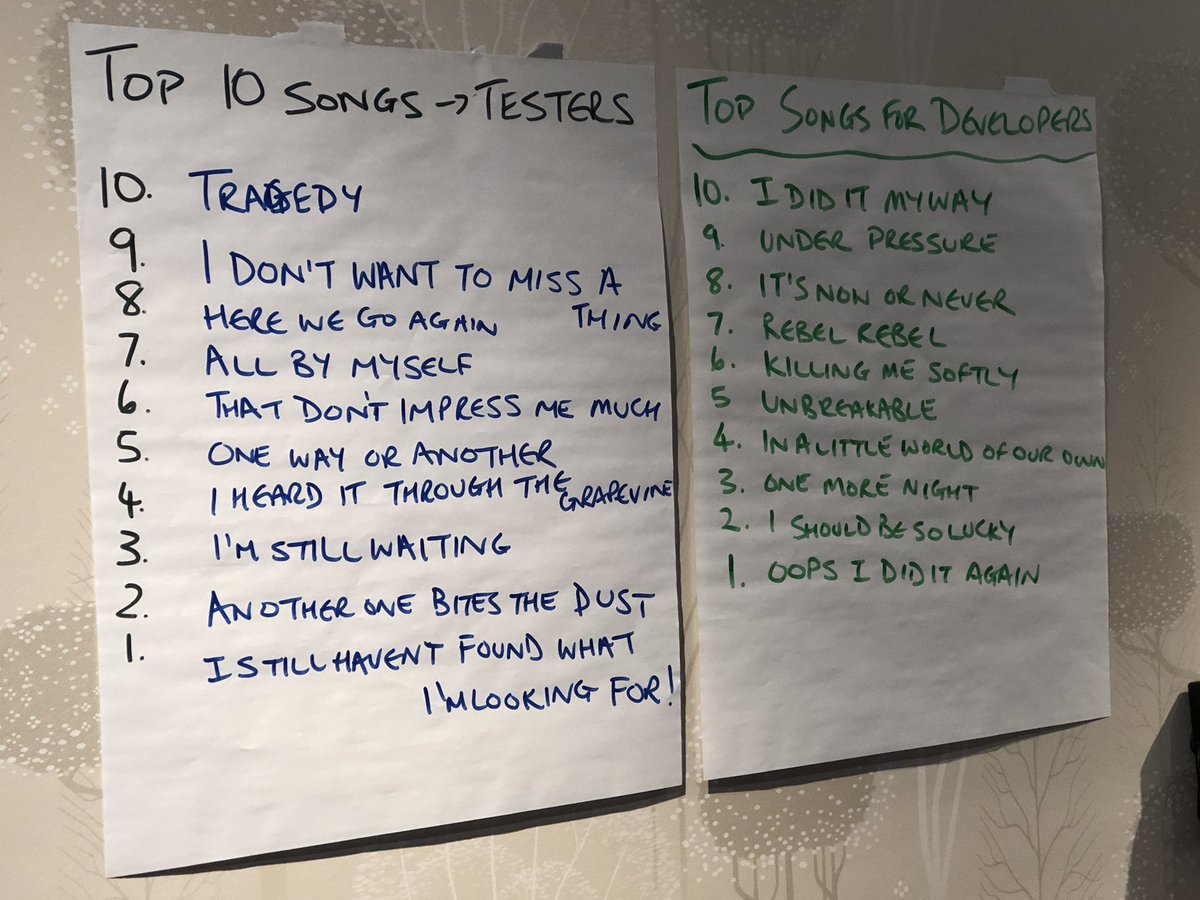
Ingo Philipp on Twitter: “Top ten songs for #testers and #developers at #StarWest. I suggest “I see fire” (Ed Sheeran).… “

Posted by jpluimers on 2019/12/04

[WayBack] Ingo Philipp on Twitter: “Top ten songs for #testers and #developers at #StarWest. I suggest “I see fire” (Ed Sheeran).… “

Top 10 songs for testers Top songs for developers
  1. Tragedy
  2. I don’t want to miss a thing
  3. Here we go again
  4. All by myself
  5. That don’t impress me much
  6. One way or another
  7. I heard it through the grapevine
  8. I’m still waiting
  9. Another one bites the dust
  10. I still haven’t found what I’m looking for
  1. I did it my way
  2. Under pressure
  3. It’s now or never
  4. Rebel rebel
  5. Killing me softly
  6. Unbreakable
  7. In a little world of our own
  8. One more night
  9. I should be so lucky
  10. Oops I did it again

Via [WayBack] Top ten songs for #testers and #developers at #StarWest. I suggest “I see fire” (Ed Sheeran). – Kristian Köhntopp – Google+

–jeroen

Posted in Agile, Development, Software Development, Testing | Leave a Comment »

The Myth of Advanced TDD

Posted by jpluimers on 2019/10/02

[WayBack] The Myth of Advanced TDD

People frequently ask me for “advanced TDD”. I have good news and bad news.

TL;DR:

if you think you need to to “advanced TDD”, then you don’t do TDD.

If TDD hurts, then you need to improve your design or code. It’s like going to the gym: it’s not the exercise that causes the hurt, but the lack of physical condition.

via: [WayBack] “If you want advanced testing techniques, then you’re probably looking for techniques that will make your code worse, not better.” – J.B. Rainsberger @j… – Marjan Venema – Google+

–jeroen

Posted in Development, Software Development, TDD, Testing | Leave a Comment »

We are searching for some Automation Testing Framework, different from Test Complete…

Posted by jpluimers on 2019/02/27

For my link archive: [WayBack] We are searching for some Automation Testing Framework, different from Test Complate… Any ideas? We are trying to select a tool for automating an ap… – Avatarx – Google+

–jeroen

Posted in Development, Software Development, Testing | Leave a Comment »

Twitter so: Testing in Production – The Isoblog.

Posted by jpluimers on 2019/01/29

From 2017, a still relevant edited twitter conversation on testing in production, why you need it: [WayBackTwitter so: Testing in Production – The Isoblog.

–jeroen

Posted in Development, Testing | Leave a Comment »