The Wiert Corner – irregular stream of stuff

Jeroen W. Pluimers on .NET, C#, Delphi, databases, and personal interests

  • My badges

  • Twitter Updates

  • My Flickr Stream

  • Pages

  • All categories

  • Enter your email address to subscribe to this blog and receive notifications of new posts by email.

    Join 1,860 other subscribers

Archive for the ‘Usability’ Category

Rephrasing error messages into heulpful messages

Posted by jpluimers on 2025/04/15

The problem with error messages is that they just displays errors as a fact without providing the user of future steps.

Offer them with a helpful, actionable message instead.

Not just for people with a visual impairment, I added readable text to the image below.

Read the rest of this entry »

Posted in accessibility (a11y), Conference Topics, Conferences, Development, Event, Software Development, Usability, User Experience (ux) | Tagged: | Leave a Comment »

On accessibility (thanks Bianca Prins!) and archivability.

Posted by jpluimers on 2025/02/27

A long while ago, I participated in a Twitter thread that started with a translation of some important accessibility posts by Bianca Prins, then extended it to the concept to archivability:

[WayBack] Thread by @jpluimers: “I am going to first translate this, then extend this to archivability…. @jpluimers […]” #UXdesign #accessibility.

TL;DR

  1. make sure what you create is accessible
  2. ensure your (online) content is archivable
  3. help archiving content

Let’s go

Read the rest of this entry »

Posted in ArchiveTeamWarrior, Conference Topics, Conferences, Development, Event, Internet, InternetArchive, Power User, Software Development, Usability, User Experience (ux), WayBack machine | Tagged: , , | Leave a Comment »

Public traffic ticked vending machines can have good user experience.

Posted by jpluimers on 2021/06/29

At the bottom a few examples on on how not do do user experience.

Most of them are related to public traffic ticket vending machines, which seem to have a common pattern of having very low usability.

Good UX is possible

There is one example I know that has quite a good user experience, because taking usability into account aspart of the design was done at the start of the project.

This is contrary to most machines: they are built by engineers just taking into account their needs and challenges: build from existing parts, allowing for easier serviceability, aiming for ease of manufacturing.

Dutch GVB did it differently: they hired Dutch design agency [WayBack] Fabrique to design and test the user experience before the whole machine went into production.

This resulted in a machine that combines easy usability, good servicing, and straightforward manufacturing process. In addition, an “extended” version that allows for non-electronic payment was designed and manufactured in the same go.

[WayBack] Fabrique

Fabrique is a strategic design agency, specialised in service design, app development, e-commerce and website design. Discover Fabrique!

(Note I am not affiliated, nor endorsed by Fabrique. I just think they did a very good job)

Here are some pictures of the designed and manufactured machines; the vertical stripes light up the place where the next user interaction takes place:

Read the rest of this entry »

Posted in Development, Software Development, Usability, User Experience (ux) | Leave a Comment »

Thread by BiancaPrins: 8 simple steps to improve your site accessibility

Posted by jpluimers on 2021/06/03

[WayBack] Thread by @BiancaPrins: “@jpluimers @rulesbyrosita in begint met simpele dingen: 1) plaats alternatieve tekst bij foto’s (of duidelijke omschri […]” #toegankelijkheid #IT #a11y.

I need to translate it:

#toegankelijkheid in #IT begint met simpele dingen:

1) plaats alternatieve tekst bij foto’s (of duidelijke omschrijving eronder)
2) Voorzie filmpjes van ondertiteling en audiodiscriptie
3) gebruik standaard headers altijd in de juiste volgorde

#a11y 1/2

4) bij laag contrast ‘merk kleuren’ groter lettertype en bold font
5) bij voorkeur geen Italic font gebruiken
6) zorg dat alleen links underlined zijn en hyperlink met ‘weer te geven tekst’
7) duidelijke structuur
8) ‘knoppen’ voorzien van label

Via: [WayBack] Jeroen Pluimers on Twitter: “Wat kan ik beter doen op https://wiert.me ? Hoewel eigenlijk bedoeld voor mezelf als offline geheugen, trekt het dagelijks een berg bezoekers, dus het kan vast beter toegankelijk worden…”

Related:

–jeroen

Posted in accessibility (a11y), Development, Software Development, Usability, User Experience (ux) | Leave a Comment »

Common UX ant-pattern: “you have Tea and No Tea”

Posted by jpluimers on 2021/03/03

I see this pattern in a lot of user interfaces, especially on web-sites: “you have Tea and No Tea”.

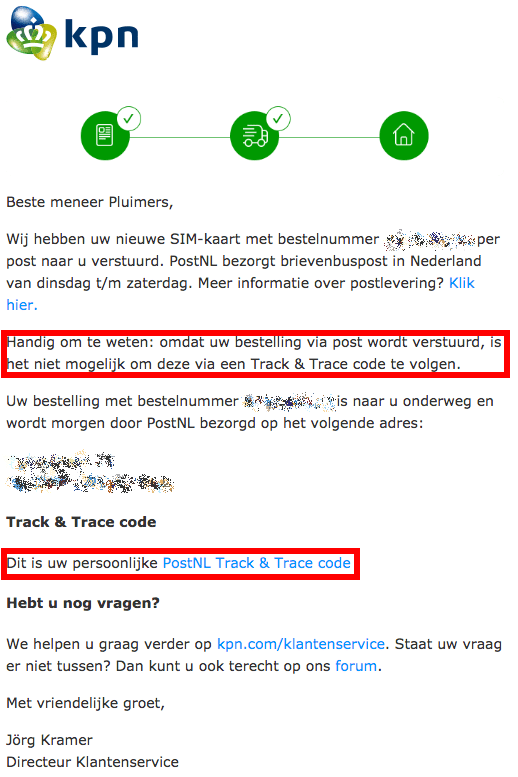
For instance the example from the web site on the right: it indicates in Dutch you are getting a postal package. In the body text it says “because we send it as a letter, you do not get a tracking code” followed by a headed section containing a link to an invalid tracking code.

There was only one historic case where the condition “you have Tea and No Tea” opened doors.

Nowadays you should just put a user story on your front-end team back-log that prevents displaying a tracking code when there is none.

Maybe file an issue for the back-end team as well, to distinguish the cases where you can or cannot track shipments.

If you fix it, then an important to remember that often multiple front-ends share the same code.

In the case of the screen shot on the right, the email system showed the same issue; a strong indication either part of the code, or the design steps have been shared.

For such cases, it helps tracking back where the root of the shared design or code came started, then ensure everything stemming from that root is re-checked to ensure altered copies are inspected for the need of modification.

Background

[WayBack] Thread by @jpluimers: “Er gaat iets mis met @KPNwebcare PostNL tracking codes voor prepaid SIM kaarten vanaf mijnbestelling.kpn.com : de “PostNL Track & Trace […]”

Er gaat iets mis met @KPNwebcare PostNL tracking codes voor prepaid SIM kaarten vanaf mijnbestelling.kpn.com : de “PostNL Track & Trace code” link mist de 3S en ziet er nu uit als jouw.postnl.nl/#!/track-en-tr… waarbij op * 20 cijfers staan zonder 3S erin.

Hoe krijg ik de goede code?

Ah, een typisch geval van “you have Tea and No Tea” waarbij “Tea” de aandacht trekt, maar “No Tea” niet.

Mooie user story voor een backlog item van jullie front-end scrum teams (;

Applaus als jullie trouwens laten zien deze klassieker te kennen (;

and [WayBack] Thread by @jpluimers: “@KPNwebcare Doe ik. Zowel site als email hebben hetzelfde probleem. @KPNwebcare Daar zitten deze twee zinnen in: “Handig om te weten: omdat […]”

Doe ik. Zowel site als email hebben hetzelfde probleem.
mentions Daar zitten deze twee zinnen in:

“Handig om te weten: omdat uw bestelling via post wordt verstuurd, is het niet mogelijk om deze via een Track & Trace code te volgen”

en

“Track & Trace code
Dit is uw persoonlijke PostNL Track & Trace code”

Met daarin dezelfde foutieve link.

–jeroen

Read the rest of this entry »

Posted in Development, Software Development, Usability, User Experience (ux) | Leave a Comment »

Why a study with only 7 respondents can be good – from Dutch paper “De Volkskrant”

Posted by jpluimers on 2021/01/07

[Archive.is] Waarom een onderzoek met maar 7 respondenten toch goed kan zijn | De Volkskrant: Denkfouten in het hedendaags ontwerp gefileerd door innovatie-expert (en cabaretier) Jasper van Kuijk. Deze week: gebruikstest.

Google translated in English.

TL;DR

Quantitative studies often require large numbers of respondents, but quantitative studies can be done with a very small group.

While quantitative studies often will get you just one result (I rate this application a 7 out of 10, or with this A/B change, click through increases by 5%), qualitative studies will get you much more specific comments like “the main menu is cluttered”, or “the design is slick” (translated from the Image in the article).

Extensive research was done for a 2003 published paper [Archive.is] Beyond the five-user assumption: Benefits of increased sample sizes in usability testing which you can read as PDF [WayBack].

Via

[WayBack] Jasper van Kuijk on Twitter: “Mijn ‘Hoe moeilijk kan het zijn?’ van vandaag. Waarom voor gebruiksgemak een gebruikstest met 7 participanten nuttiger is dan een enquête met 1500 respondenten. #HMKHZ via de @volkskrant”

Related

[WayBack] Ionica Smeets on Twitter: “Hear, hear! Aldus een wiskundige die heel wat jaren nodig had om waarde van kwalitatief onderzoek in te zien…”

and

and

–jeroen

Read the rest of this entry »

Posted in Development, Software Development, Testing, Usability, User Experience (ux) | Leave a Comment »

960 Grid System

Posted by jpluimers on 2020/11/19

Would this be the reason that so many web-sites still use less than half of my screen width?

The 960 Grid System is an effort to streamline web development workflow.

Source: [WayBack] 960 Grid System

Via: [WayBack] windows – What minimum screen size should I assume? – Stack Overflow (where in 2010 for some types of software you had to go for 640×480, many things were still 800×600, but 1024×768 for desktop users was the norm; on the one hand times have changed, but on the other hand not a lot).

Code: [WayBack] GitHub – nathansmith/960-Grid-System: The 960 Grid System is an effort to streamline web development workflow.

Related:

–jeroen

Posted in Development, Software Development, Usability, User Experience (ux), Web Development | Leave a Comment »

Great tool: the Toptal Colorblind Web Page Filter

Posted by jpluimers on 2020/08/06

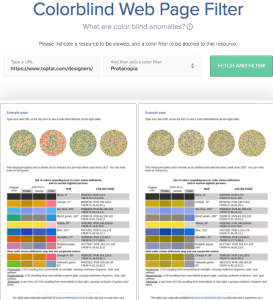
Colorblind Web Page Filter

Colorblind Web Page Filter

A great tool I found out about a while ago [Archive.is] Toptal Color Blind Filter.

It shows the original web page and the rendering for various types of color blindness:

  • protan -> Protanopia: red/green color blindness; anomalous red cones
  • deutan -> Deutanopia: red/green color blindness; anomalous green cones
  • tritan -> Tritanopia: blue/yellow color blindness; anomalous blue cones
  • grey -> Greyscale/achromatopsia: quick check for all forms of colorblindness

Because of a comment at [WayBack] Forums… https://embarcaderomonitoring.wiert.me/ – JWP – Google+, I used Toptal to notify Uptime robot that their status pages are hard for color blind people: [WayBackJeroen Pluimers on Twitter: “Some color blind people indicated to me that @uptimerobot status pages are hard for them to read. Examples are for @EmbarcaderoTech as they have subdomains being offline often: …”, so lets look at how people with various types of color blindness see embarcaderomonitoring.wiert.me :

Read the rest of this entry »

Posted in *nix, Color (science), Color (software development), Development, Monitoring, Power User, science, Software Development, Uptimerobot, Usability, User Experience (ux), Web Development | Leave a Comment »

Web accessibility is hard, so please let your sites not become worse over time

Posted by jpluimers on 2020/05/11

Despite clear guidelines (European level since 2016, W3C level since 2018), web accessibility is still hard, both for web site developers and their users.

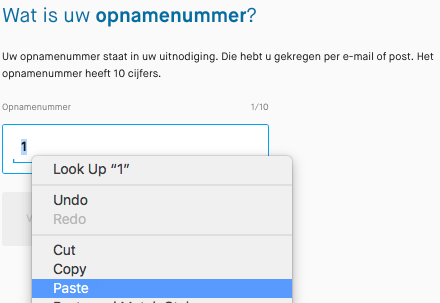
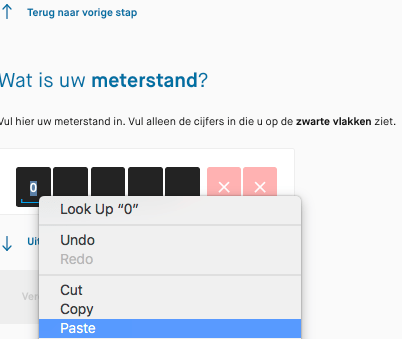
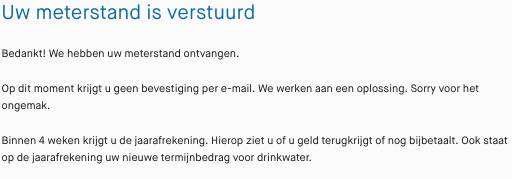
Two years ago, bumped into a Dutch government web site that had become worse over time: they disabled keyboard paste for numeric fields, only would paste 1 digit at a time, and managed to have the delete button delete the current digit (like what the backspace does and should do) instead of the next.

Please do not do that!

Here are the guidelines: [WayBack] Web Content Accessibility Guidelines (WCAG) 2.1

This is the (Dutch) story:

 [WayBack] Thread by @jpluimers: “Beste @Waternet, waarom kan ik niet meer het hele opnamenummer in 1 keer plakken? Cijfertje voor cijfertje uit de gescippen plakken is nogal veel werk. Vroeger ging dit wel goed. plakken werkt niet met het toetsenbord: alleen m […]”

[WayBack] Jeroen Pluimers on Twitter: “Beste @Waternet, waarom kan ik niet meer het hele opnamenummer in 1 keer plakken? Cijfertje voor cijfertje uit de gescande brief knippen plakken is nogal veel werk. Vroeger ging dit wel goed.… “

[WayBack] Jeroen Pluimers on Twitter: “plakken werkt niet met het toetsenbord: alleen maar met de muis, dus onhandig voor mensen met een beperking. Als je in het veld staat werken alleen de numerieke toetsen en pijltjes van je toetsenbord, en de delete knop haalt het verkeerde karakter weg. Wie verzint die ongein?”

[WayBack] Jeroen Pluimers Twitterissä: “Bij postcode werkt plakken weer wel (en de rest van het toetsenbord ook helemaal), maar bij meterstand weer niet. Hoe maak je je site onhandig voor mensen met een beperking les 1: het is helemaal gelukt. Jammer! Lees eens … en … “

[WayBackJeroen Pluimers Twitterissä: “Bij email adres werkt plakken weer wel (gelukkig, het zijn maar 40 karakters), maar er mist een cruciale stap: meternummer. Die controle is voor adressen met meerdere meters ontzettend belangrijk. Vroeger werd dat wel gecontroleerd. Het invoerproces is dus een achteruitgang.”

[WayBackJeroen Pluimers on Twitter: “Laatste probleem is een waarschuwing *achteraf* dat jullie geen email bevestiging kunnen sturen. Super onhandig, omdat je op dat moment de stand ook niet meer kunt afdrukken. Er is veel werk voor jullie aan de winkel. Hou me gaarne op de hoogte van de vorderingen. CC @matijn”

[WayBackJeroen Pluimers on Twitter: “Bij dit soort problemen denk ik altijd aan @matijn en anderen waar toegankelijkheid van onschatbaar belang is. Zo zonde dat organisaties het voor elkaar krijgen om dit te verslechteren in plaats van de verbeteren, ondanks de Europese richtlijnen uit 2016 “

–jeroen

Read the rest of this entry »

Posted in Development, Internet, Software Development, Usability, User Experience (ux), Web Development | Leave a Comment »

I am in love with colors and design – UX Planet

Posted by jpluimers on 2020/04/14

Really cool not too long read: [WayBack] I am in love with colors and design – UX Planet:

How to improve human experience through color

[WayBack] “I’m in love with color” – No Google designer currently working at the company ever. Interesting read, btw. Some great examples, too. – Roderick Gadellaa – Google+

–jeroen

Posted in Color (software development), Development, Software Development, Usability, User Experience (ux) | Leave a Comment »