The Wiert Corner – irregular stream of stuff

Jeroen W. Pluimers on .NET, C#, Delphi, databases, and personal interests

  • My badges

  • Twitter Updates

  • My Flickr Stream

  • Pages

  • All categories

  • Enter your email address to subscribe to this blog and receive notifications of new posts by email.

    Join 1,862 other subscribers

Archive for the ‘Conferences’ Category

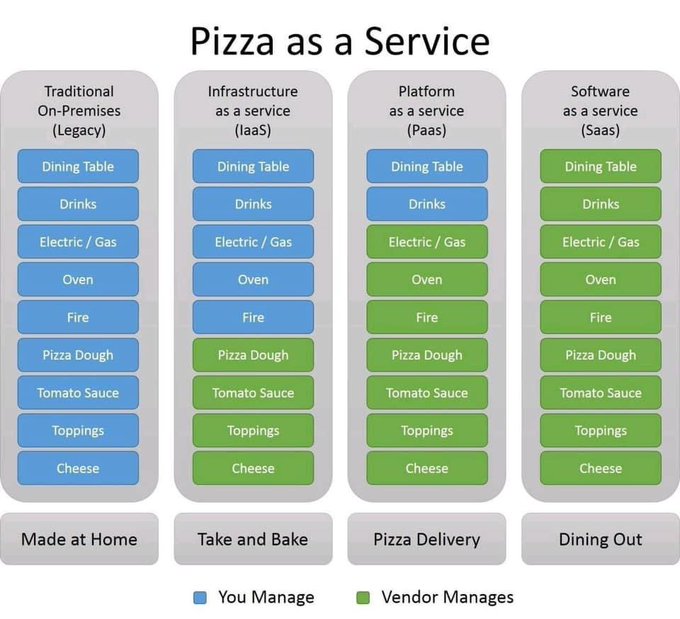
Katie Anderson on Twitter: “Saw this on Facebook and it’s my new favorite PaaS (Pizza as a Service) breakdown”

Posted by jpluimers on 2021/11/30

Legacy/IaaS/PaaS/SaaS explained by “Pizza as a service”: from home made, take and bake, pizza delivery to full dining out.

[Archive.is] Katie Anderson on Twitter: “Saw this on Facebook and it’s my new favorite PaaS (Pizza as a Service) breakdown https://t.co/INKKG9UOAK” / Twitter

–jeroen

Read the rest of this entry »

Posted in Cloud, Conference Topics, Conferences, Development, Event, Infrastructure, Software Development, Systems Architecture | Leave a Comment »

AgileTD Keynote | Happiness is Quality

Posted by jpluimers on 2021/09/16

Hopefully this becomes available on-line, as this will be a great talk, but Potsdam is out of my reach in my current physical condition.

[Wayback] AgileTD Keynote | Happiness is Quality

In Gwen Diagram’s keynote go on a journey of looking at how to improve happiness in teams for the goal of building quality systems.


How can we build teams that strive to build quality systems? By building in happiness early and often.

Each organisation has a culture which directly affects the quality of their work. Organisations with a lower level of quality; that is, systems that fail more often, longer times to fix and longer times to build often have a few things in common; frustration, apathy and cynicism.

On the other side of the coin, teams with slack, time to learn and time to reflect also have the space to improve their systems. Quality is everyone’s responsibility is an oft quoted phrase. But, how do you actually engage people to build quality systems?

Improving quality should not weigh heavy on the shoulders of the test specialist. Their main role should not be attempting to convince people that unit tests should exist, that systems should be testable and observable or that automated tests will speed up development. Instead, we should be building teams that want to find out together how to build a system that breathes quality.

The way to do this is by improving the happiness of the engineers on the team with learning, autonomy and coaching. So, how can we build teams that strive to build quality systems? By building in happiness early and often. In this talk, we will go on a journey of looking at how to improve happiness in teams for the end goal of building quality systems.

Via: [Wayback] Agile Testing Days on Twitter: “☀️ Here comes the happiness! ☀️ @gwendiagram will take us on a journey of looking at how to improve happiness in teams for the end goal of building quality systems. ➡️ Learn more about the keynote and the speaker: … “

–jeroen

Posted in Agile, Conferences, Development, Event, Power User, Software Development, Testing | Leave a Comment »

DUnit with FastMM: Detecting memory leaks in individual tests.

Posted by jpluimers on 2021/08/05

Steps:

  1. Add the conditional define FASTMM to your project
  2. Ensure you have $(BDS)\source\DUnit\src  in your search path in your project (as otherwise Delphi will pick the pre-built TestFramework.dcu file which was compiled without the FASTMM conditional define)
  3. Inside a test method, or the SetUp method of a class, set FailsOnMemoryLeak to True
  4. If the SetUp method of the class allocates memory, ensure the TearDown de-allocates it. Otherwise you will have leaks:
    • DUnit will check memory differences from the start of the SetUp until the end of the TearDown
    • DUnit will not take into account what is freed in the destructor or by automatic finalization after the destructor!
  5. Re-build your application (otherwise the DUnit TestFramework unit will not take into account the FASTMM conditional define)

Depending in your test framework, FailsOnMemoryLeak might be by default be False or True:

  • TestInsight by default has FailsIfMemoryLeaked set to True for the root test suite (which is then applied to FailsOnMemoryLeak of any test method).
    procedure RunRegisteredTests(const baseUrl: string);
    var
      suite: ITestSuite;
      result: TTestResult;
      listener: ITestListener;
    begin
      suite := RegisteredTests;
      if not Assigned(suite) then Exit;
      result := TTestResult.Create;
      result.FailsIfNoChecksExecuted := True;
      result.FailsIfMemoryLeaked := True;
      listener := TTestInsightListener.Create(baseUrl, suite.CountEnabledTestCases);
      result.AddListener(listener);
      try
        suite.Run(result);
      finally
        result.Free;
      end;
    end;
  • Console DUnit runners (Text, or XML) by default have FailsIfMemoryLeaked set to False.
  • GUI DUnit runner has FailsIfMemoryLeaked depending on the options:

DUnit source differences

Note that recent Delphi versions (I think XE and up) ship with almost the same sources as https://sourceforge.net/code-snapshots/svn/d/du/dunit/svn/dunit-svn-r44-trunk.zip, with these Embarcadero changes:

  • all SVN timestamps are based on time zone -0400 instead of +0000:
    • $Date: 2008-04-24 07:59:47 -0400 (Thu, 24 Apr 2008) $
    • $Date: 2008-04-24 11:59:47 +0000 (Thu, 24 Apr 2008) $
  • Embarcadero removed:
    • all comment lines having TODO in them
    • all files of types .dof, .cfg, and.wmz
    • the files NGUITestRunner.nfm and NGUITestRunner.pas
    • the file /etc/usermap
    • the directory trees /private and /projects
  • Embarcadero changed
    • file /src/versioninfo.res from 9.3.0 to 9.2.1 (which is odd, as all files are from 9.3.0)
    • unit TextTestRunner to support:
      • CLR (used last in Delphi 2007)
      • FailureCount
      • ErrorCount
      • IndentLevel
      • PrefixChars
      • conditional defines ADDITIONAL_INFO, BASIC_INFO
      • output of UnitName
    • unit TestExtensions to support:
      • CLR (used last in Delphi 2007)
      • conditional defines ANDROID_FIXME and LINUX
      • compiler directive LEGACYIFEND
    • GUITestRunner.dfm to have ResultsView: TListView property Height value 45 instead of 39
    • the below methods to use ReturnAddress in stead of CallerAddr:
      • TGUITestCase.FindControl
      • TGUITestCase.Click
      • TGUITestCase.EnterKeyInto
      • TGUITestCase.EnterTextInto
      • TGUITestCase.Show
      • TGUITestCase.CheckTabTo overloads
      • TGUITestCase.CheckFocused overloads
      • TGUITestCase.CheckEnabled overloads
      • TGUITestCase.SetFocus overloads
      • TGUITestCase.CheckVisible overloads
    • method TGUITestRunner.RunTest
      • from
        class procedure TGUITestRunner.RunTest(test: ITest);
        begin
          with TGUITestRunner.Create(nil) do
          begin
           try
            suite := test;
            ShowModal;
           finally
            Free;
           end;
          end;
        end;
      • to
        class procedure TGUITestRunner.RunTest(test: ITest);
        var
          GUI :TGUITestRunner;
        begin
          Application.CreateForm(TGUITestRunner, GUI);
          with GUI do
          begin
           try
            suite := test;
            ShowModal;
           finally
            Free;
           end;
          end;
        end;
    • unit GUITestRunner:
      • from
        procedure RunTest(test: ITest);
        begin
          with TGUITestRunner.Create(nil) do
          begin
            try
              Suite := test;
              ShowModal;
            finally
              Free;
            end;
          end;
        end;
      • to
        procedure RunTest(test: ITest);
        var
          GUI :TGUITestRunner;
        begin
          Application.CreateForm(TGUITestRunner, GUI);
          with GUI do
          begin
            try
              Suite := test;
              if Suite <> nil then
                ShowModal;
            finally
              Free;
            end;
          end;
        end;
      • method TGUITestRunner.SetUp not to set SubItems[0] := ''; when there is no test suite.
      • method TGUITestRunner.FormCreate to use FormatSettings.TimeSeparator instead of TimeSeparator.
  • unit TestFramework to support:
    • HPPEMIT
    • LEGACYIFEND
    • CLR and _USE_SYSDEBUG_
    • AUTOREFCOUNT
    • NEXTGEN
    • ANDROID
    • the RunCountAttribute and RunCount support
    • a CheckEquals overload for uint64
    • a CheckNotEquals overload for TCharArray
    • CheckCircularRef
    • CompareFloatRelative
    • NotSameErrorMessage with WideString arguments instead of string
    • a TestDataDir function
    • ReturnAddress for older compilers
  • a new unit DUnitTestRunner
  • a new Makefile file
  • a new UnitTests.log file

–jeroen

Posted in Conference Topics, Conferences, Delphi, Development, DUnit, Event, FastMM, Software Development, TestInsight | 1 Comment »

“Unexpected Memory Leak” after “MyTestApplication.exe: Memory Leak Detected”

Posted by jpluimers on 2021/07/28

Sometimes after a regular FastMM memory leak test report you get a dialog like this:

---------------------------
Unexpected Memory Leak
---------------------------
An unexpected memory leak has occurred. The unexpected small block leaks are:

61 - 68 bytes: Unknown x 1
---------------------------
OK   
---------------------------

The normal FastMM memory leak reporting dialog looks like this:

---------------------------
MyTestApplication.exe: Memory Leak Detected
---------------------------
...
Note: Memory leak detail is logged to a text file in the same folder as this application. To disable this memory leak check, undefine "EnableMemoryLeakReporting".
---------------------------
OK   
---------------------------

Searching for “Unexpected Memory Leak” in RTL or FastMM code did not reveal results, but that might be me not doing a proper search.

One big problem is that the regular memory leak dialog is being suppressed by setting SuppressMessageBoxes to True (see for instance my blog post Application shutdown: wait for all threads to terminate or not? or [WayBack] delphi – Generating a FASTMM report WITHOUT the shutdown dialog – Stack Overflow).

However the “Unexpected Memory Leak” message box is always shown.

Research

Location of the error message caption

  • GETMEM.INC has an identifier LeakMessageTitle:
    LeakMessageTitle: _PAnsiChr = 'Unexpected Memory Leak';
  • Unlike FastMM4.pas, GETMEM.INC does not take into account SuppressMessageBoxes.
  • Like FastMM4.pas, GETMEM.INC does take into account ReportMemoryLeaksOnShutdown.

More on GETMEM.INC: [WayBack] delphi – Reporting memory leaks on shutdown with a console application – Stack Overflow

Versioned FastMM4.pas.

Complicating the hunt

Not all allocations go via the memory manager. A complicating factor is that:

  • ALL TMonitor.Create allocations go through SysAllocMem:
class function TMonitor.Create: PMonitor;
begin
  if CacheLineSize = 0 then
    AtomicExchange(CacheLineSize, GetCacheLineSize);
  if (CPUCount > 1) and (FDefaultSpinCount = 0) then
    AtomicExchange(FDefaultSpinCount, 1000);
  if CacheLineSize > SizeOf(Result^) then
    Result := SysAllocMem(CacheLineSize)
  else
    Result := SysAllocMem(SizeOf(Result^));
  Result.FSpinCount := FDefaultSpinCount;
end;
  • ALL TMonitor.Destroy deallocations go through SysFreeMem:
procedure TMonitor.Destroy;
begin
  if (MonitorSupport <> nil) and (FLockEvent <> nil) then
    MonitorSupport.FreeSyncObject(FLockEvent);
  SysFreeMem(@Self);
end;

Debugging this is easiest to set a breakpoint in the FastMM4.pas finalization section enabling a breakpoint group that has breakpoints on these methods inside GETMEM.INC:

  • function SysGetMem(Size: NativeInt): Pointer;
  • function SysFreeMem(P: Pointer): Integer;
  • function SysReallocMem(P: Pointer; Size: NativeInt): Pointer;
  • function SysAllocMem(Size: NativeInt): Pointer;

For inspecting for instance an asm construct like TSmallPoolBlockPoolHeader[edx], use a conversion PSmallBlockPoolHeader(Pointer(EDX))^,r

Poor mans shotgun approach

This will hide all the SysAllocMem related leaks:

unit FastMM4WrapperUnit;

interface

{$ifdef UseFastMM4}
uses
  FastMM4,
  FastMM4Messages;
{$endif UseFastMM4}

implementation

initialization
//
finalization
// Disable GETMEM.INC reports that neglect SuppressMessageBoxes and NoErrMsg; this will effectively hide the leak as GETMEM.INC also does not write the leaks to a log file
{$ifdef UseFastMM4}
  if SuppressMessageBoxes then
  begin
    {$WARN SYMBOL_PLATFORM OFF} NoErrMsg := True {$WARN SYMBOL_PLATFORM ON}; // no ShowMessage from the RTL (except for memory leaks)
    ReportMemoryLeaksOnShutdown := False; // No ShowMessage from the RTL in the GETMEM.INC teardown
  end;
{$endif UseFastMM4}
end.

IsConsole: needs linker option

Note that I tried embedding this in the then portion, but enabling IsConsole fails:

    IsConsole := True; // can only force run-time error messages to be written to the console if the "Project/Options/Linking/Generate console application" is set.

The reason is that this does not allocate a console handle, so you really need to ensure the linker has allocated a console for you by enabling Project/Options/Linking/Generate console application (or option DCC_ConsoleTarget in the .dproj file)

For more details, see my post console – When is System.IsConsole true in Delphi? – Stack Overflow.

–jeroen

Posted in Conference Topics, Conferences, Delphi, Development, Event, FastMM, Software Development | Leave a Comment »

console – When is System.IsConsole true in Delphi? – Stack Overflow

Posted by jpluimers on 2021/07/22

Some highlights from [WayBack] console – When is System.IsConsole true in Delphi? – Stack Overflow:

  • Project/Options/Linking/Generate console application and {$APPTYPE CONSOLE} are two separate things. – [WayBack] Andreas Rejbrand.
  • The -cc commandline parameter for dcc32.exe (which could be in your ProjectX.cfg file!) is equivalent to “Generate console application):

    Found it: the executable has been created using dcc32.exe and the dpr / cfg file, the cfg contains a line

    -cc

    which creates a console application. – [WayBack] mjn

  • Note that in Delphi XE2, OSX applications can not use this variable as it is always true. See QC Entry 98956 and Why Does My OSX FireMonkey App Think It Is a Console App ? – [WayBack] mjn

A few notes I have found out myself

The linker option Project/Options/Linking/Generate console application” is the same as “DCC_ConsoleTarget” in the .dproj file:

    <PropertyGroup Condition="'$(Base_Win32)'!=''">
        <DCC_ConsoleTarget>true</DCC_ConsoleTarget>
    </PropertyGroup>

Even setting IsConsole to True does not allocate a new console, so the STD_OUTPUT_HANDLE handle does not work!

The below method in the System unit, then does not show output:

procedure WriteErrorMessage;
{$IFDEF MSWINDOWS}
var
  Dummy: Cardinal;
begin
  if IsConsole then
  begin
    with TTextRec(Output) do
    begin
      if (Mode = fmOutput) and (BufPos > 0) then
        TTextIOFunc(InOutFunc)(TTextRec(Output));  // flush out text buffer
    end;
    // Leave #0 off end of runErrMsg
    WriteFile(GetStdHandle(STD_OUTPUT_HANDLE), @runErrMsg, Sizeof(runErrMsg) - 1, Dummy, nil);
    WriteFile(GetStdHandle(STD_OUTPUT_HANDLE), @sLineBreak[1], 2, Dummy, nil);
  end
  else if not NoErrMsg then
    MessageBoxA(0, runErrMsg, errCaption, 0);
end;

For console output, you have to enable the linker option DCC_ConsoleTarget allocates a console (if not yet allocated), enables the “STD_OUTPUT_HANDLE” handle, and sets IsConsole to True.

–jeroen

Posted in Conference Topics, Conferences, Delphi, Development, Event, Software Development | Leave a Comment »

Filezilla: figuring out the cause of “Connection timed out after 20 seconds of inactivity”

Posted by jpluimers on 2021/07/21

On one of my Raspberry Pi boxes, somehow I could not access files over SFTP (SSH File Transfer Protocol) via FileZilla.

I would consistently get this error:

"Connection timed out after 20 seconds of inactivity"

Figuring the exact cause took a while.

TL;DR: SFTP uses an interactive non-login shell, then interprets the output from that shell. For that kind of shell, ensure few or none scripts run that output text.

These links finally got me to the cause

Read the rest of this entry »

Posted in *nix, *nix-tools, bash, bash, Communications Development, Conference Topics, Conferences, Development, Event, Internet protocol suite, Power User, Scripting, SFTP, Software Development, SSH, TCP | Leave a Comment »

Some links for detecting memory leaks from individual DUnit test methods

Posted by jpluimers on 2021/07/20

–jeroen

Posted in Conference Topics, Conferences, Delphi, Development, DUnit, Event, FastMM, Software Development | Leave a Comment »

inheritance – Delphi: How to call inherited inherited ancestor? – Stack Overflow

Posted by jpluimers on 2021/07/15

Officially, the answer to [WayBack] inheritance – Delphi: How to call inherited inherited ancestor? – Stack Overflow is that you can’t on the language level as I explained in my answer

You can’t in a regular language way, as this would break the object oriented aspects of the language.

You can fiddle around with pointers and clever casts to do this, but before even starting to answer that: is this really what you want?

As others mentioned: your need sounds like a serious “design smell” (which is similar to code smell, but more severe.

Edit:

Going down the pointer fiddling road might save you work in the short term, and cost you weeks of work in the long term.
This makes for some good reading on that: Upstream decisions, downstream costs.

If you really want, then there is a clever hack around this by [WayBack] User kludg – Stack Overflow.

His hack is centered around understanding what what the [WayBack] System.TMethod Record essentially is:

Read the rest of this entry »

Posted in Conference Topics, Conferences, Delphi, Development, Event, Software Development | Leave a Comment »

Delphi interface generic function – Is there a work around? – Stack Overflow

Posted by jpluimers on 2021/06/30

The documentation simply states “no”, without explaining why.

Luckily, there is [WayBack] David Heffernan at [WayBack] Delphi interface generic function – Is there a work around? – Stack Overflow

Interfaces do not support generic parameterized methods, as the compiler says.

There is no workaround because it’s a fundamental limitation. Parameterized methods in classes are implemented by adding one method per instantiation to the class. That works for classes since they are concrete, but is not viable for interfaces. That’s because interfaces are a table of functions and the size of that table cannot vary depending on which generic method instantiations happen to be present elsewhere in the code. For similar reasons, generic methods cannot be virtual or dynamic.

In any case, it’s not possible. One option is to use a class instead. I agree that this is a bind.

If you want to do it in an interface, the best you can do is:

function CastAs(const IID: TGUID): IInterface;

But you’d have to call it like this:

MyIntf := ProxyIntf.CastAs(IMyIntf) as IMyIntf;

which feels somewhat foul.

Choose your poison!

In the background, for every distinct use of generic method parameters, the compiler generates an overloaded concrete version of the method. That is possible for classes and records, but not for interfaces.

In practice, I either go for the last option, or have the interface expose a record or class type that can have the required generic method (so the compiler can generate the overloads at run-time).

All options feel somewhat ugly, so I like the comment by [WayBack] Jason:

Wish I could “Program into Your Language, Not in it” programmers.stackexchange.com/questions/2777/…

Which leads to Code Complete

[WayBack] What are the key points of Code Complete? – Software Engineering Stack Exchange answer by [WayBack] limist:

Code Complete is about software craftsmanship; it is an advanced-beginner/intermediate-level book, written for the working programmer, but it would still be very useful to someone who’s been programming for at least a year.

Thus the key points of Code Complete (2nd ed.) are nicely summarized in its Chapter 34, Themes in Software Craftsmanship. As paraphrased from my notes:

  1. Conquer Complexity: reduce the cognitive load on your mind via discipline, conventions, and abstraction.
  2. Pick Your Process: be conscious of quality from start (requirements) to finish (deployment) and beyond (maintenance).
  3. Write Programs for People First, Computers Second: code readability is hugely important for comprehensibility, review-ability, error-rate, error-correction, modifiability, and the consequent development time and quality.
  4. Program into Your Language, Not in it: think of the What? and Why? before the How?
  5. Focus Your Attention with the Help of Conventions: conventions manage complexity by providing structure where it’s needed, so that the ultimate resource – your attention – can be effectively used.
  6. Program in Terms of the Problem Domain: work at the highest level of abstraction possible; top-level code should describe the problem being solved. Distinguish OS level, programming language level, low-level implementation structures, low-level problem domain terms, and finally, high-level problem-domain terms that would make total sense to the (non-coder) user.
  7. Watch for Falling Rocks: as programming merges art and science, good judgement is vital, including heeding warning signs.
  8. Iterate, Repeatedly, Again and Again: iterate requirements, design, estimates, code, code tuning.
  9. Thou Shalt Render Software and Religion Asunder: be eclectic and willing to experiment. Don’t be an inflexible zealot, it precludes curiosity and learning. Go beyond having just a hammer in your toolbox.

But the most important take-aways are in Chapter 33, Personal Character: once you consciously seek to improve as a coder, you can and will. The fastest way to do so is to take on the the attitudes of master coders(humility, curiosity, intellectual honesty, discipline, creativity), while also practicing their habits (many good habits are listed in the book, e.g. choosing good variable/value names).

Also, the book makes clear that the gap between average and excellent in software is immense; that fact alone should drive the conscientious coder to better himself.

That’s the short of it; the long version is in the book. :) I can also send you my not-so-long, not-so-short notes if you want more details. But the book is certainly money and time well-spent, even if the writing style is tiresome at times.

Beyond Code Complete, I’d highly recommend The Pragmatic Programmer. It’s for intermediate-level programmers, nicely-written and a great mix of high, medium, and low-level advice.

There are more limitations on generics in Delphi

The documentation on limitations has not changed much since Delphi 2009.

Delphi 2009

[WayBack] Overview of Generics: Platform Requirements and Differences

Generics are supported by the Delphi for Win32 compiler.

Runtime type identification (RTTI)

In Win32, generics and methods do not have RTTI, but instantiated types do have RTTI. An instantiated type is the combination of a generic with a set of parameters.

Interface GUID

In Win32, an instantiated interface type does not have an interface GUID.

Parameterized method in interface

A parameterized method (method declared with type parameters) cannot be declared in an interface.

Instantiation timing

Instantiation is processed by the compiler. All instantiated objects are emitted into .obj files.

Dynamic instantiation

Dynamic instantiation at runtime is not supported.

Interface constraints

The Win32 interface is not a “light” interface. This means all type parameters with interface constraints always support the COM IUnknown methods _AddRef_Release and QueryInterface or inherit from TInterfacedObject. Record types cannot specify an interface constraint parameter.

Delphi 10.3 Rio

[WayBack] Overview of Generics – RAD Studio: Platform Requirements and Differences

Generics are supported by the Delphi compilers.

Run-time type identification

In Win32, generics and methods do not have run-time type information (RTTI), but instantiated types do have RTTI. An instantiated type is the combination of a generic with a set of parameters. The RTTI for methods of a class is a subset of the RTTI for that class as a whole. If a non-generic class has a generic method, that method will not be included in the RTTI generated for the class because generics are instantiated at compile time, not at run time.

Interface GUID

In Win32, an instantiated interface type does not have an interface GUID.

Parameterized method in interface

A parameterized method (method declared with type parameters) cannot be declared in an interface.

Instantiation timing

Generic types are instantiated at compile time and emitted into executables and relocatable files. Instance variables of a generic type are instantiated at run time for classes and at compile time for generic records. The RTTI for generic classes is only generated when the classes are instantiated. RTTI for instantiated classes follows just as for non-generic classes. If the generic class has a generic method, then the instantiated generic class will not have RTTI for that generic method.

Dynamic instantiation

Dynamic instantiation at run time is not supported.

Interface constraints

The Win32 interface is not a “light” interface. This means all type parameters with interface constraints always support the COM IUnknown methods _AddRef_Release, and QueryInterface or inherit from TInterfacedObject. Record types cannot specify an interface constraint parameter.

–jeroen

Posted in Conference Topics, Conferences, Delphi, Development, Event, Software Development | Leave a Comment »

Delphi: .dproj TargetedPlatforms bit flags in main PropertyGroup, and Platform values in other elements/attributes

Posted by jpluimers on 2021/06/09

For cleanup of .dproj files, I want to know the bit flags that TargetPlatforms can have.

TL;DR: .dproj content management in Delphi is a mess

For future reference empiric values for the flags that build the TargetedPlatforms (not to be confused with PlatformTargets) element content in the main PropertyGroup of a .dproj file in a table.

This might help creating an XSD for a .dproj file (Source: Reminder to self: make a start for an XSD that validates Delphi dproj files).

Absent cells means I have no idea if the values are relevant or what they could be.

Input for those is more than welcome.

Bit# TargetedPlatforms bit flag value Platform and $(Platform)value Meaning (dropdown value of “Select Platform” dialog)
0 1 Win32 32-bit Windows
1 2 Win64 64-bit Windows
2 4
3 8
4 16
5 32
6 64
7 128
8 256
9 512
10 1024 iOSDevice64 iOS Device 64-bit
11 2048
12 4096

($Platform) values still to cover:

  • Android
  • Linux64
  • OSX32
  • iOSDevice32
  • iOSSimulator

There is only one place for TargetedPlatforms in the .dproj file: at the XPath /Project/PropertyGroup/TargetedPlatforms.

For getting the XPath, I used Notepad++ as described in my earlier blog post Getting the path of an XML node in your code editor.

It has the combined flags, so:

  • 3 means Win32 and Win64 are enabled
  • 1025 means Win32 and iOSDevice64 are enabled

The Platform value (and thus $(Platform) value) is the one used in for example these elements or attributes:

  • /Project/PropertyGroup/Platform as currently selected platform
  • /Project/PropertyGroup/@Condition as selectivity expression, for instance
    •  <PropertyGroup Condition="('$(Platform)'=='Win64' and '$(Cfg_1)'=='true') or '$(Cfg_1_Win64)'!=''">
    • <PropertyGroup Condition="('$(Platform)'=='Win64' and '$(Base)'=='true') or '$(Base_Win64)'!=''">
  • /Project/ProjectExtensions/BorlandProject/Platforms/Platform (all having for the value property with the Platform value) having a content of either True or False.
    • This allows a .dproj file to contain information for platforms that are not visible yet.

The actual values of Platform also play a role in these places:

  • /Project/PropertyGroup/Base_Win64 containing the base settings for the Win64 platform so they can be derived for the Debug or Release builds.
  • /Project/PropertyGroup/@Condition for instance <PropertyGroup Condition="'$(Base_Win64)'!=''">
  • /Project/ProjectExtensions/BorlandProject/Deployment/DeployFile/Platform/@Name for instance <Platform Name="iOSSimulator">

Even worse: there are unneeded  nodes present for bits in TargetPlatforms and /Project/ProjectExtensions/BorlandProject/Platforms/Platform being absent or having a content False for /Project/ProjectExtensions/BorlandProject/Platforms/Platform/@value other than the enabled bits in TargetPlatforms, for instance:

  • nodes matched by /Project/ProjectExtensions/BorlandProject/Deployment/DeployFile/Platform
  • nodes matched by /Project/ProjectExtensions/BorlandProject/Deployment/ProjectRoot/@Platform
  • nodes matched by /Project/ProjectExtensions/BorlandProject/Deployment/DeployClass/Platform/@Name (and the parent DeployClass subtrees)
  • nodes matched by /Project/ProjectExtensions/BorlandProject/Platforms/Platform@value

Some examples of superfluous nodes when TargetPlarforms has a value of 1 (corresponding to Platform having a value of Win32:

<ProjectRoot Platform="Android" Name="$(PROJECTNAME)"/>
<ProjectRoot Platform="Linux64" Name="$(PROJECTNAME)"/>
<ProjectRoot Platform="OSX32" Name="$(PROJECTNAME).app"/>
<ProjectRoot Platform="Win32" Name="$(PROJECTNAME)"/>
<ProjectRoot Platform="Win64" Name="$(PROJECTNAME)"/>
<ProjectRoot Platform="iOSDevice32" Name="$(PROJECTNAME).app"/>
<ProjectRoot Platform="iOSDevice64" Name="$(PROJECTNAME).app"/>
<ProjectRoot Platform="iOSSimulator" Name="$(PROJECTNAME).app"/>

Also, non relevant platforms are included in this node:

<Platforms>
    <Platform value="Win32">True</Platform>
    <Platform value="Win64">False</Platform>
</Platforms>

The Deployment section is even worse; see for instance [WayBack] delphi – How manage or clean deploy section in dproj files? – Stack Overflow.

–jeroen

Posted in Conference Topics, Conferences, Delphi, Development, Event, Software Development | 1 Comment »