The Wiert Corner – irregular stream of stuff

Jeroen W. Pluimers on .NET, C#, Delphi, databases, and personal interests

  • My badges

  • Twitter Updates

  • My Flickr Stream

  • Pages

  • All categories

  • Enter your email address to subscribe to this blog and receive notifications of new posts by email.

    Join 1,860 other subscribers

Archive for the ‘Amazon.com/.de/.fr/.uk/…’ Category

Does it still hold: “Never keep anything important on AWS in US-EAST-1”?

Posted by jpluimers on 2023/01/31

Reminder to self to check if this still holds: [Archive] Varun Krishnan on Twitter: “Never keep anything important on AWS in US-EAST-1” / Twitter

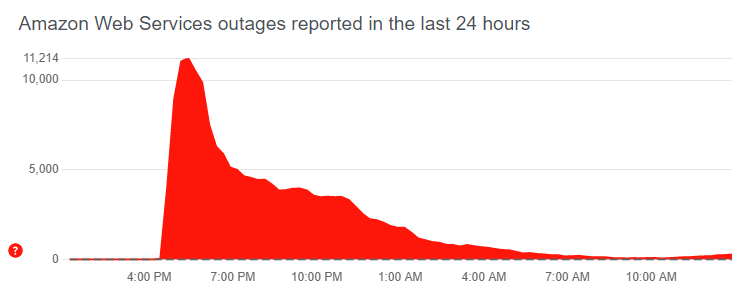
Slightly more than a year ago, the Amawon Web Services region US-EAST-1 collapsed with world-wide downtime consequences for many AWS services. It took some 8 hours to recover most of the services.

Before that, it was plagued with outages, maybe because it was their first ever region:

The outage was covered many times. I have included this El Reg link, as I like their tone of voice: [Wayback/Archive] AWS technical woes in US East region cause widespread outage • The Register.

Basically, any cloud stack is founded on these three layers:

  • Storage (S3 or Simple Storage Service in AWS speak)
  • Compute (EC2 or Elastic Compute Cloud in AWS speak)
  • Authentication and Authorisation (IAM or Identity and Access Management in AWS speak)

On top of that, any other services are implemented. And for Amazon Web Services, many of these have become available over the last two decades.

Indeed Anders Borum was right in his tweet: US-EAST-1 is the first ever AWS EC2 region and started in 2006, more than 15 years ago. It is also the region with the largest capacity. Likely both play a role in US-EAST-1 being part or initiating factor in many of the major AWS outages. If you look in all AWS outages, US-EAST-1 plays a role in most if not all outages since 2017,

So for now, if hosting at AWS, I would host outside of US-EAST-1.

Depending on the kind of application and money involved, I would consider hosting in multiple regions, and if a truckload of money was involved: hosting on multiple clouds.

I fully agree with [Archive] Gergely Orosz on Twitter: “If you were impacted by the recent AWS outage, the decision to invest in multi-cloud / multi-datacenter is simple: How much did this outage cost you vs the cost of adding a (lot) more complexity & maintenance with multi-cloud/DC? If outage cost >> this, only then do it.” / Twitter

Some more insight on multi-cloud hosting is via [Archive] Redmond on Twitter: “New feature from @jdanton: A full post-mortem from AWS is still to come, but in the meantime, IT pros should start bolstering their cloud disaster recovery strategies now — before the next outage. https://t.co/ios5Re5ZCs” / Twitter at [Wayback/Archive] AWS Outage Fallout: What Lessons You Should Learn — Redmondmag.com

Is It Time to Go Multicloud?

No. Well…if you are running a major property with a big customer-facing presence, it can be a good strategy to have static Web and app content hosted in a second cloud. In the case of an outage like yesterday’s, you’d have the option to direct traffic to the static presence, which can supply some level of experience for your users.

A good example of how this approach can be useful is an outage dashboard. Whenever a cloud provider has an outage, they are notoriously bad at properly reporting ongoing status. This is because they have hosted their dashboards in their own clouds using their own APIs — and when these APIs go down, they take the monitoring with them. Using DNS, you can quickly redirect traffic to this static site, where your engineers can update the page with status updates.

Related

–jeroen

Read the rest of this entry »

Posted in AWS Amazon Web Services, Cloud, Cloud Development, Deployment, Development, DevOps, Infrastructure, Power User, Software Development | Leave a Comment »

I won a “The Cloud Resume Challenge Guidebook” bundle: Thanks Forrest Brazeal for writing it and Lightspin for the prize (:

Posted by jpluimers on 2022/12/03

Since all three editions of [Wayback/Archive] The Cloud Resume Challenge Guidebook were on my wish list as I wanted to practice more cloud computing skills in a structured way during my reintegration after the long series of procedures that (hopefully for a long time) got rid of my metastasised rectum cancer, I was really happy to win the bundle late 2022:

Read the rest of this entry »

Posted in Amazon.com/.de/.fr/.uk/..., AWS Amazon Web Services, Azure Cloud, Cloud, Cloud Development, Development, GCP Google Cloud Platform, Infrastructure, Software Development | Leave a Comment »

Links to learn more about infrastructure.

Posted by jpluimers on 2021/10/14

For my link archive; [Archive.is] .DS_Storoz on Twitter: “Alright, I’m rage-quitting the frontend, moving into infrastructure. (Seriously.) Where is my community for this? Who do I follow? What conferences do I go to? Please and thanks and RT!”

Keywords:

  • Terraform, Docker, Kubernetes, AWS!
  • Systems Performance, Google SRE book, DDIA
  • the DORA report
  • b0rk

–jeroen

Posted in Amazon S3, Amazon SES, Amazon.com/.de/.fr/.uk/..., AWS Amazon Web Services, Cloud, Containers, Docker, Infrastructure, Kubernetes (k8n), Power User | Leave a Comment »

On my list of things to try: Amazon SES for outbound/inbound email handling

Posted by jpluimers on 2021/08/10

SES mail servers at the time of writing

*n*x:

# nslookup -type=TXT amazonses.com | grep "v=spf1"
amazonses.com   text = "v=spf1 ip4:199.255.192.0/22 ip4:199.127.232.0/22 ip4:54.240.0.0/18 ip4:69.169.224.0/20 ip4:76.223.180.0/23 ip4:76.223.188.0/24 ip4:76.223.189.0/24 ip4:76.223.190.0/24 -all"I

Windows

C:\>nslookup -type=TXT amazonses.com | find "v=spf1"
Non-authoritative answer:
        "v=spf1 ip4:199.255.192.0/22 ip4:199.127.232.0/22 ip4:54.240.0.0/18 ip4:69.169.224.0/20 ip4:76.223.180.0/23 ip4:76.223.188.0/24 ip4:76.223.189.0/24 ip4:76.223.190.0/24 -all"

These addresses use a compact CIDR notation to denote ranges of networks containing ranges of network IPv4 addresses.

CIRD processing to sendmail access file

(this is linux sendmail only)

Converting the nslookup outout to a CIDR based sendmail /etc/mail/access excerpt goes via a pipe sequence of multiple sed commands:

# nslookup -type=TXT amazonses.com | grep "v=spf1" | sed 's/\(^.*"v=spf1 ip4:\| -all"$\)//g' | sed 's/\ ip4:/\n/g' | xargs -I {} sh -c "prips {} | sed 's/$/\tRELAY/g'"
199.255.192.0   RELAY
199.255.192.1   RELAY
...
76.223.190.254  RELAY
76.223.190.255  RELAY

What happens here is this:

  1. Filter out only spf1 records using grep.
  2. Remove the head (.*v=spf1 ip4:) and tail ( -all") of the output, see [WayBack] use of alternation “|” in sed’s regex – Super User.
  3. Replaces all ip4: with newlines (so the output get split over multiple lines), see [WayBack] linux – splitting single line into multiple line in numbering format using awk – Stack Overflow.
  4. Convert the CIDR notation to individual IP addresses (as sendmail cannot handle CIDR),
    1. This uses a combination of xargs with the  sh trick to split the CIDR list into separate arguments, and prips (which prints the IP addresses for a CIDR); see:
    2. Alternatively, use
  5. Replaces all end-of-line anchor ($) with a tab followed by RELAY, see

You can append the output of this command to /etc/mail/access, then re-generate /etc/mail/access.db and restart sendmail; see for instance [WayBack] sendmail access.db by example | LinuxWebLog.com.

Without the xargs, the output would look like this:

# nslookup -type=TXT amazonses.com | grep "v=spf1" | sed 's/\(^.*"v=spf1 ip4:\| -all"$\)//g' | sed 's/\ ip4:/\n/g'
199.255.192.0/22
199.127.232.0/22
54.240.0.0/18
69.169.224.0/20
76.223.180.0/23
76.223.188.0/24
76.223.189.0/24
76.223.190.0/24

Via

–jeroen

Posted in *nix, *nix-tools, Amazon SES, Amazon.com/.de/.fr/.uk/..., Cloud, Communications Development, Development, Infrastructure, Internet protocol suite, Power User, sendmail, SMTP, Software Development | Leave a Comment »

Getting to the Amazon.de chat

Posted by jpluimers on 2021/07/26

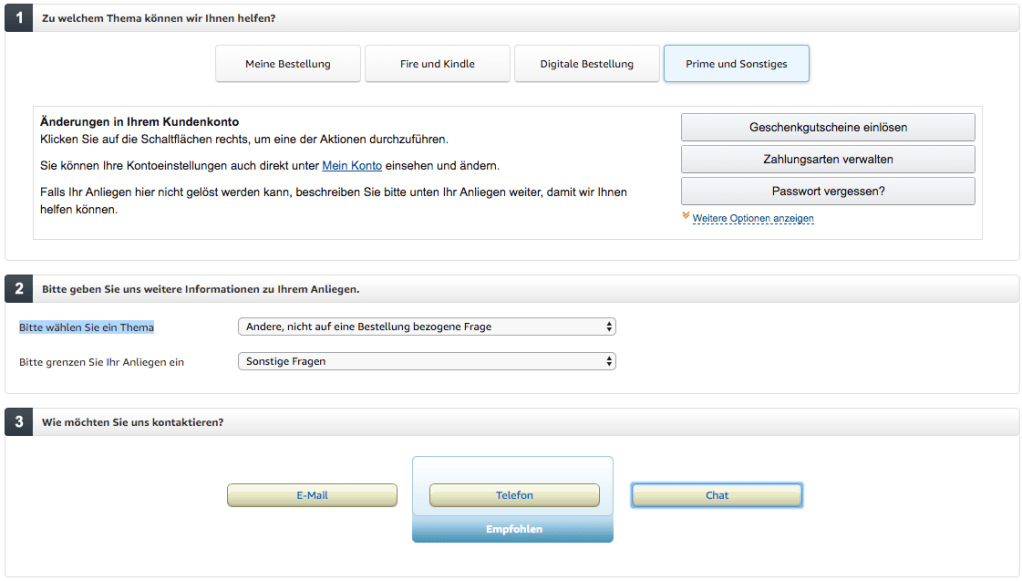
  1. Visit https://smile.amazon.de/gp/help/customer/contact-us/ref=hp_abgt_cu_cu?nodeId=508510
  2. Click “Prime und Sonstiges”
  3. In the “Bitte wählen Sie ein Thema” selector, choose “Andere, nicht auf eine Bestellung bezogene Frage”
  4. In the “Bitte grenzen Sie Ihr Anliegen ein” selector, choose “Sonstige Fragen”
  5. Now a “Chat” button appears:

–jeroen

Posted in Amazon.com/.de/.fr/.uk/..., Cloud, Infrastructure, Power User | Leave a Comment »

GitHub – Nike-Inc/gimme-aws-creds: A CLI that utilizes Okta IdP via SAML to acquire temporary AWS credentials

Posted by jpluimers on 2020/01/27

Since I will likely need something like this one day: [WayBackGitHub – Nike-Inc/gimme-aws-creds: A CLI that utilizes Okta IdP via SAML to acquire temporary AWS credentials

I think I got this via Kristian Köhntopp a while ago.

–jeroen

Posted in Amazon.com/.de/.fr/.uk/..., Cloud, Cloud Development, Infrastructure, Power User, Software Development | Leave a Comment »

The Ridiculous Bandwidth Costs of Amazon, Google and Microsoft Cloud Computing – Arador

Posted by jpluimers on 2018/10/26

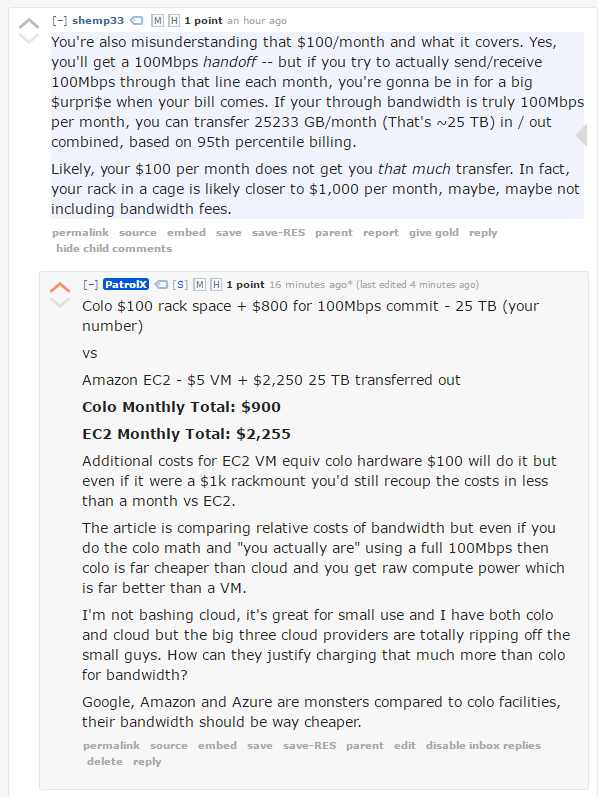
In this article I compare the costs of network bandwidth transferred out of Amazon EC2, Google Cloud Platform, Microsoft Azure and Amazon Lightsail.

Bandwidth costs are one of the most ridiculously expensive components of cloud computing, and there are some serious inconsistencies in the industry, especially with Amazon.

[…]

If you move a significant amount of data you should think twice before moving to the cloud, these bandwidth prices are truly ridiculous and there’s no way they can be justified when compared to colocation facilities.

Source: [Archive.isThe Ridiculous Bandwidth Costs of Amazon, Google and Microsoft Cloud Computing – Arador

–jeroen

Posted in Amazon.com/.de/.fr/.uk/..., Cloud, Containers, Infrastructure, Power User | Leave a Comment »

Amazon 2FA Account Recovery HOWTO I had enabled 2FA on my amazon.de account,…

Posted by jpluimers on 2016/11/25

[WayBackAmazon 2FA Account Recovery HOWTO I had enabled 2FA on my amazon.de account,… – Kristian Köhntopp – Google+

Quoted in full as it is too important to forget where I put this:

Amazon 2FA Account Recovery HOWTO

I had enabled 2FA on my amazon.de account, and the device running the only copy of the TOTP seed has been destroyed. I wanted to disable 2FA on my account in order to be able to access the account until a replacement phone was available.

To enable 2FA on an amazon.de account, you have to login to amazon.com using your amazon.de credentials and then go through the 2FA procedure.

Calling the german hotline for help did not work. They did not know about 2FA disablement and were unable to help me. They did know about 2FA in general, have been able to verify and validate my identity and were generally friendly. They have been calling me back repeatedly.

I later remembered how I enabled the 2FA and did try to login to amazon.com, giving my german credentials and ended up on the “Enter 2FA code” screen. There is a link at the bottom, “Did not receive code”.

Clicking that link takes you to a screen where you can choose between Google Authenticator and SMS identification.

I chose SMS auth, did receive a 6 digit code, entered that and was able to auth. I then was able to temporarily disable 2FA and regain control of my US account. This also disabled 2FA for my german account, and I now have my German account back.

–jeroen


Posted in Amazon.com/.de/.fr/.uk/..., Cloud, Infrastructure, Power User | Leave a Comment »