[WayBack] List of Android Secret Codes – I’m programmer
Lots of *# codes for stuff like IMEI, firmware version, etc.
Via:
–jeroen
Posted by jpluimers on 2019/10/11
[WayBack] List of Android Secret Codes – I’m programmer
Lots of *# codes for stuff like IMEI, firmware version, etc.
Via:
–jeroen
Posted in Android Devices, Power User | Leave a Comment »
Posted by jpluimers on 2019/09/13
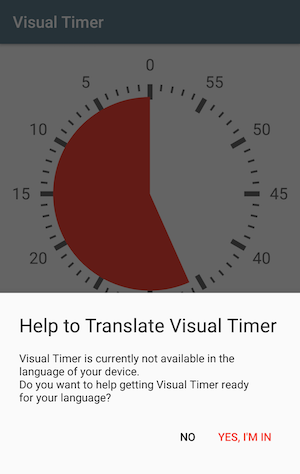
Interesting approach on how a free app got itself free translations: Case Study on engaging users to become app translators
Source: [WayBack] Crowdsourcing App-Translation with in-app message – Christoph Wiesner – Medium
The app: Visual Timer – Countdown
Platforms used:
Via:
–jeroen
Posted in Android Devices, Development, internatiolanization (i18n) and localization (l10), Power User, Software Development | Leave a Comment »
Posted by jpluimers on 2019/09/11
Bouncer gives you the ability to grant permissions temporarily.
Want to tag a location or take a photo, but don’t want that app to be able to use the camera or get your location whenever it wants?
Bouncer gives you exactly that.As soon as you exit the app,
Bouncer will automatically remove the permission for you in an instant so you can get back to doing what you do best, without having to worry about apps invading your privacy and wasting your battery.
- Increased security, privacy and battery life
- Never have to worry what apps are doing in the background
- No complicated setup needed (no root or adb)
…
Get it at [WayBack] Bouncer – Temporary App Permissions (Beta) – Apps on Google Play
Via:
–jeroen
Posted in Android Devices, Power User | Leave a Comment »
Posted by jpluimers on 2019/08/30
In case it still doesn’t work when I’ve been in the USA (or/and back), then I need to try the things below.
It used to work both in the USA and in The Netherlands.
What I’ve tried so far is this:
So far still very few surveys.
–jeroen
Posted in Android Devices, OnePlus Five, OnePlus One, OnePlus Two, Power User | Leave a Comment »
Posted by jpluimers on 2019/08/23
I forgot about the announcement that Signal had also become available on the Desktop, but it is via [WayBack] https://signal.org/download/:
$ curl -s https://updates.signal.org/desktop/apt/keys.asc | sudo apt-key add -
$ echo "deb [arch=amd64] https://updates.signal.org/desktop/apt xenial main" | sudo tee -a /etc/apt/sources.list.d/signal-xenial.list
$ sudo apt update && sudo apt install signal-desktop
I like the mix of echo and tee to update the [WayBack] /etc/apt/sources.list.d folder with the signal-xenial.list file.
These links will always give you the latest download filename:
The files you get there will be relative to the path https://updates.signal.org/desktop/ so will be similar to:
Signal-win-1.0.36.exe -> https://updates.signal.org/desktop/Signal-win-1.0.36.exeSignal-mac-1.0.36.zip -> https://updates.signal.org/desktop/Signal-mac-1.0.36.zipYou can get the sources at https://github.com/WhisperSystems/Signal-Desktop/releases
Via:
–jeroen
Posted in *nix, Android Devices, Apple, Debian, iMac, iOS, iPhone, Linux, Mac, Mac OS X / OS X / MacOS, MacBook, MacBook Retina, MacBook-Air, MacBook-Pro, MacMini, macOS 10.12 Sierra, Power User, Windows | Leave a Comment »
Posted by jpluimers on 2019/04/05
The quoted link wasn’t in the end what I used to get my config from a OnePlus 2 to a OnePlus 5
This is what I had to do instead:
Relevant links:
–jeroen
Posted in Android Devices, Helium, OnePlus Five, OnePlus Two, Power User | Leave a Comment »
Posted by jpluimers on 2019/03/29
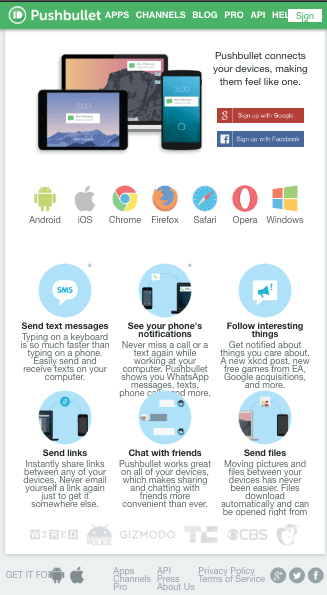
I have been a long-time PushBullet user, but I bumped into an alternative if you just want to send SMS from a PC using a web browser through your Android Phone.
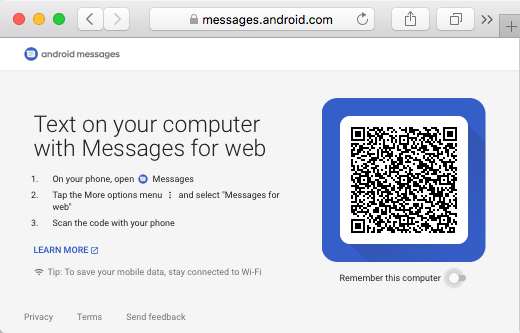
You will miss out all the other neat PushBullet features (like clipboard support), but it does work:

There is even a Mac warpper for it:
–jeroen
Posted in Android Devices, Power User | Leave a Comment »
Posted by jpluimers on 2019/03/08
I agree: [WayBack] It’s so obvious I hadn’t thought about this.. – Roderick Gadellaa – Google+.
[WayBack] Reminder tip: Disable Wi-Fi during sleep to dramatically increase idle battery life on tablets and devices you don’t often use
–jeroen
Posted in Android Devices, LifeHacker, Power User | Leave a Comment »
Posted by jpluimers on 2019/01/30
Hopefully by now the Google Assistant and Google Home have made their way into the Dutch language. If so, then it’s time for me
[WayBack] Quick Intro Into Actions on Google | Grokking Android: Find out which options exist to develop apps for the Google Assistant with Actions on Google and to bring the Assistant to devices with the Assistant SDK.
–jeroen
Posted in Android, Android Devices, Development, Google, Google AI, Google Assistant, GoogleHome, Mobile Development, Software Development | Leave a Comment »