Archive for the ‘Android Devices’ Category
Posted by jpluimers on 2019/01/30
Hopefully by now the Google Assistant and Google Home have made their way into the Dutch language. If so, then it’s time for me
[WayBack] Quick Intro Into Actions on Google | Grokking Android: Find out which options exist to develop apps for the Google Assistant with Actions on Google and to bring the Assistant to devices with the Assistant SDK.
–jeroen
Posted in Android, Android Devices, Development, Google, Google AI, Google Assistant, GoogleHome, Mobile Development, Software Development | Leave a Comment »
Posted by jpluimers on 2019/01/18
Somehow I managed to get a OnePlus phone to have the read data limit line stuck at ~5 gigabyte whereas the warning was at ~15 gigabyte.
This caused all sorts of havoc when I passed the 5 gigabyte mark: cellular data would turn off, I would get all sorts of warnings and – worst of all – I could not reset the red line.
The solution was at [WayBack] Unable to remove “Cellular data limit exceeded” notification even after changing the data limit on OnePlus 2’s OOS 3.5.5:
There are numerous discussions offering a solution to this:
- Goto
Settings > Backup & reset > Network settings reset.
- Now select the affected SIM card
- Now click
Reset Settings.
–jeroen
Read the rest of this entry »
Posted in Android Devices, OnePlus Two, Power User | Leave a Comment »
Posted by jpluimers on 2018/12/21
I missed this earlier this year, but while switching phones found out: Google Now is not available for most devices any more.
So I’ am looking for a replacement that has:
- 5×5 application/group icons on each home screen page
- 4 application/group icons on the bottom static row
- support for Google Search
- support for Google Assistant voice control
This I totally missed:
–jeroen
Read the rest of this entry »
Posted in Android Devices, LifeHacker, Power User | Leave a Comment »
Posted by jpluimers on 2018/12/11
Not sure when this happened but the CIDR list is no more [WayBack] https://www.whatsapp.com/cidr.txt:
Dear partners,
Please note that we have migrated the latest IP pools of WhatsApp to Facebook Mobile Partner Portal. Feel free to browse to the Settings page of the portal and download the latest WhatsApp IP pool: https://fb.me/mpp_support
Further IP pool updates are also done through the portal and are no longer distributed via email or through WhatsApp web site.
If you have not yet registered on the Mobile Partner Portal or have difficulties accessing it - please request access through the following form and we'll be happy to assist: https://fb.me/mpp_access
For any technical requests please contact us through the Support section of the portal: https://fb.me/mpp_support
WhatsApp team
In the past it was the place to get the CIDR so you could either block or allow WhatsApp traffic: [earlier WayBack]
It is still widely cited as way to regulate WhatsApp traffic, for instance at these places:
Time to find an automated way to get the replacement list. Maybe the below helps (via [WayBack] Block facebook messenger and whatsApp on Dlink router – Super User)
whois -h whois.radb.net '!gAS32934'
–jeroen
Posted in Android Devices, Development, Internet, Network-and-equipment, Power User, routers, SocialMedia, Software Development, Ubiquiti, WhatsApp, WhatsApp for Android, WiFi | Leave a Comment »
Posted by jpluimers on 2018/10/15
Try this fix first:
For many, this issue goes away by simply reinstalling our Android app on your phone. We suggest giving this a try first.
That didn’t work, but this did:
Check that the correct device is selected in the top left of the SMS interface.
You may have an old device selected, which is preventing SMS from working correctly. Check that the correct device is selected in the drop down. You can remove old devices here.
It looks like all my old smartphones were still there despite not being a SIM card in them. Removing all but my active phone solved the problem.
Source: [WayBack] Why Are My Text Messages Stuck Pending | Pushbullet Help Central
–jeroen
Posted in Android Devices, Chrome, Google, Power User | Leave a Comment »
Posted by jpluimers on 2018/09/19
I wrote about Vysor before, but totally forgot to mention that for like 2 years there have been (initially beta) standalone versions of Vysor based on the Electron framework that is also used by the Atom.io editor and Visual Studio code.
So here they are (:
Over time, these have been updated with new versions.
Web site source: https://github.com/koush/vysor.io
–jeroen
History:
Related:
Posted in Android, Android Devices, Development, Mobile Development, Power User, Vysor | Leave a Comment »
Posted by jpluimers on 2018/01/26
Oh cool:
Formatting your messages –
WhatsApp allows you to format selected text inside your messages.
Italic
To italicize your message, place an underscore on both sides of the text, like so: _text_
Bold
To bold your message, place an asterisk on both sides of the text, like so: *text*
Strikethrough
To strikethrough your message, place a tilde on both sides of the text, like so: ~text~
Monospace
To monospace your message, place three backticks on both sides of the text, like so: ```text```
Alternatively: On Android, you can tap and hold the text you’re typing > More …
Source: [WayBack] WhatsApp FAQ – Formatting your messages
–jeroen
Posted in Android Devices, Power User, SocialMedia, WhatsApp, WhatsApp for Android | Leave a Comment »
Posted by jpluimers on 2017/10/30
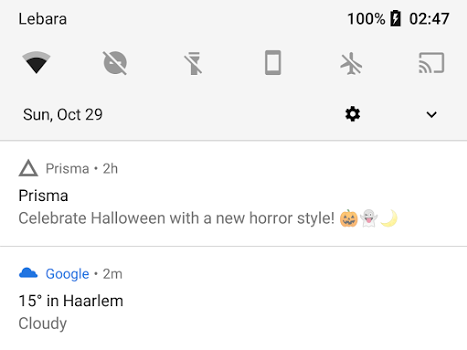
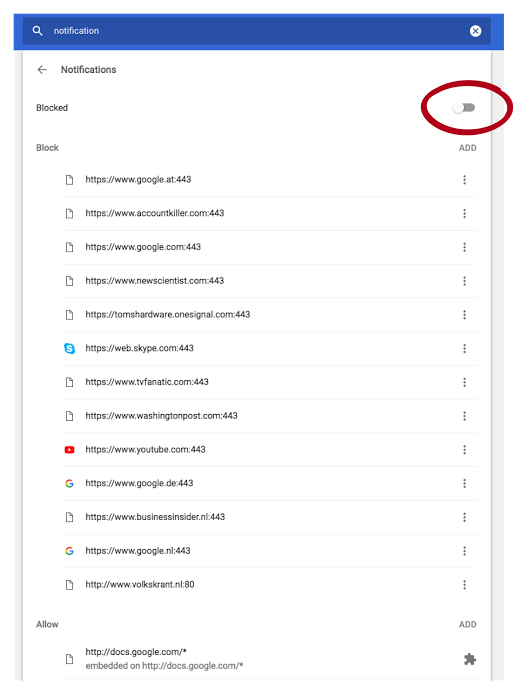
Android apps make sounds when posting notifications. So adding useless gets you on the blacklist quickly thereby disallowing your app for posting any notifications at all.
Kristian shows how and why at
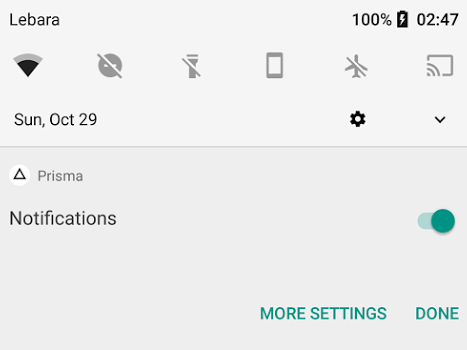
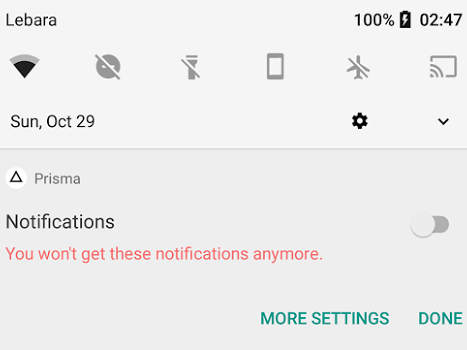
How to lose notification privilege:
- Use notification for marketing.
- Long press.
- Disable.
It’s that easy. You never force grab my attention for marketing a second time, especially since Android notifications by default come with sound now. This one woke me up.
–jeroen
Posted in Android Devices, Google, Power User | Leave a Comment »


 The Wiert Corner - irregular stream of stuff