Archive for the ‘OS X 10.8 Mountain Lion’ Category
Posted by jpluimers on 2021/07/02
Based on:
Via macos “keep both” versus “skip” – Google Search
When copying or moving files on MacOS using the Finder, sometimes you get a popup with chooses “Skip”, “Stop”, “Replace”, but at other times “Keep Both”, “Stop”, “Replace”.
Empirically:
- “Keep Both” happens with less than 5 duplicate file names
- “Skip” happens with 5 or more 5 duplicate file names
- The “Alt” or “Option” key toggles between “Keep Both” and “Skip”
- This was introduced around OS X 10.8 Mountain Lion, as it used to be always “Keep Both” in all Mac OS X versions up to and including Mac OS X 10.7 Lion. The new behaviour has stayed in all OS X and macOS versions since.
–jeroen
Posted in Apple, Mac OS X / OS X / MacOS, Mac OS X 10.7 Lion, macOS 10.12 Sierra, macOS 10.13 High Sierra, OS X 10.10 Yosemite, OS X 10.11 El Capitan, OS X 10.8 Mountain Lion, OS X 10.9 Mavericks, Power User | Leave a Comment »
Posted by jpluimers on 2020/01/03
 Based on [WayBack] macOS – Wikipedia and follow-up of OS X – the versions and their names – as I always forget them and osx – How to find out Mac OS X version from Terminal? (via: Super User)
Release history (with release dates):
The graph with Apple Mac OS X / OS X / Mac OS versions cannot do without a graph showing the BSD and Unix inheritance.
Graph origins:
More complete Mac OS X / OS X / Mac OS and Unix timelines are below from macOS version history – Wikipedia.
–jeroen
Read the rest of this entry »
Posted in Apple, Mac OS X / OS X / MacOS, Mac OS X 10.4 Tiger, Mac OS X 10.5 Leopard, Mac OS X 10.6 Snow Leopard, Mac OS X 10.7 Lion, macOS 10.12 Sierra, macOS 10.13 High Sierra, OS X 10.10 Yosemite, OS X 10.11 El Capitan, OS X 10.8 Mountain Lion, OS X 10.9 Mavericks, Power User | Leave a Comment »
Posted by jpluimers on 2019/10/07
Posted in Apple, iMac, Mac, Mac OS X / OS X / MacOS, Mac OS X 10.4 Tiger, Mac OS X 10.5 Leopard, Mac OS X 10.6 Snow Leopard, Mac OS X 10.7 Lion, MacBook, MacBook Retina, MacBook-Air, MacBook-Pro, MacMini, macOS 10.12 Sierra, OS X 10.10 Yosemite, OS X 10.11 El Capitan, OS X 10.8 Mountain Lion, OS X 10.9 Mavericks, Power User | Leave a Comment »
Posted by jpluimers on 2019/07/29
logging – Where is “/var/log/messages” on mac-osx? – Server Fault
TL;DR: because most of it is in /var/log/system.log which is configured in /etc/asl.conf, but the documentation example about syslog.conf never got updated.
Long read
The example in syslog.conf is wrong at WayBack: Mac OS X Manual Page For syslog.conf(5) and man syslog.conf:
EXAMPLES
     A configuration file might appear as follows:
...
     # Log anything (except mail) of level info or higher.
     # Don't log private authentication messages!
     *.info;mail.none;authpriv.none          /var/log/messages
...
FILES
     /etc/syslog.conf  The syslogd(8) configuration file.
It still is when writing this [WayBack]syslog.conf(5) Mac OS X Manual Page, so you have to look at /etc/syslog.conf on a live system:
# Note that flat file logs are now configured in /etc/asl.conf

install.*                       @127.0.0.1:32376
which means the actual configuration is in /etc/asl.conf:
# Rules for /var/log/system.log
> system.log mode=0640 format=bsd rotate=seq compress file_max=5M all_max=50M
? [= Sender kernel] file system.log
? [<= Level notice] file system.log
? [= Facility auth] [<= Level info] file system.log
? [= Facility authpriv] [<= Level info] file system.log
Documentation at [WayBack] asl.conf(5) Mac OS X Manual Page indicates this:
NAME
     asl.conf -- configuration file for syslogd(8) and aslmanager(8)

DESCRIPTION
     The syslogd(8) server reads the /etc/asl.conf file at startup, and re-reads the file when it receives a HUP signal.  The aslmanager(8) daemon reads the file when it starts.  See the
     ASLMANAGER PARAMETER SETTINGS section for details on aslmanager-specific parameters.
Source
Based on [WayBack] logging – Where is “/var/log/messages” on mac-osx? – Server Fault:
Q:
When you read the man pages on Mac OS X, there are references to /var/log/messages, but if you look for the file, it doesn’t exist:
$ ls -l /var/log/messages

ls: /var/log/messages: No such file or directory
A:
2009 era: If you look at the actual /etc/syslog.conf instead of the man page, you see *.notice;authpriv,remoteauth,ftp,install.none;kern.debug;mail.crit /var/log/system.log
–jeroen
Posted in Apple, Mac OS X / OS X / MacOS, Mac OS X 10.4 Tiger, Mac OS X 10.5 Leopard, Mac OS X 10.6 Snow Leopard, Mac OS X 10.7 Lion, macOS 10.12 Sierra, OS X 10.10 Yosemite, OS X 10.11 El Capitan, OS X 10.8 Mountain Lion, OS X 10.9 Mavericks, Power User | Leave a Comment »
Posted by jpluimers on 2019/03/29
When connecting from my Mac to my ESXi rig, some commands (especially less) show this output:
WARNING: terminal is not fully functional
So I created this alias to connect from my Mac to the internal address of my ESXi rig:
alias ssh-esxi-X10SRH-CF-internal='TERM=xterm ssh -p 22 root@192.168.71.91'
The trick is the bold part: TERM=xterm (which you can also replace by export TERM=xterm; if you want future ssh sessions to use the same [wayback] TERM setting).
The reason is that the Mac defines the TERM variable as containing xterm-256 which is defined on the Mac itself, but ESXi has a hard time coping with it.
Some Mac OS and Xcode combinations had a problem with xterm-256 not being present ([WayBack] macos – Terminal strangeness after installing Xcode on Lion – Super User), but this isn’t the case on my system:
$ ls -alh `find /usr/share/terminfo | grep 'xterm-256color'`

-rw-r--r-- 1 root wheel 3.2K Jul 30 2016 /usr/share/terminfo/78/xterm-256color
On the Mac you really want to use xterm-256color as it looks way better than xterm-color or xterm: [WayBack] linux – What is the difference between xterm-color & xterm-256color? – Stack Overflow (thanks [WayBack] Chris Page!)
It seems I already did something similar on ESXi itself to get esxtop working: ESXi: when esxtop shows garbage. That was on the ESXi side and works as well for this problem too.
However, it is a bit harder to have a script run during ESXi boot time that sets this, so it is easier to fix this on the Mac side.
It works for all OS X and ESXi versions I’ve tested so far.
–jeroen
Posted in *nix, Apple, ESXi5.1, ESXi5.5, ESXi6, ESXi6.5, iMac, Mac, Mac OS X / OS X / MacOS, Mac OS X 10.4 Tiger, Mac OS X 10.5 Leopard, Mac OS X 10.6 Snow Leopard, Mac OS X 10.7 Lion, MacBook, MacBook Retina, MacBook-Air, MacBook-Pro, MacMini, macOS 10.12 Sierra, OS X 10.10 Yosemite, OS X 10.11 El Capitan, OS X 10.8 Mountain Lion, OS X 10.9 Mavericks, Power User, Virtualization, VMware, VMware ESXi | Leave a Comment »
Posted by jpluimers on 2019/01/18
Two installation options for TigerVNC:
The [WayBack] TigerVNC viewer gives a bit more details on failing VNC connections than the stock OSX Screen Sharing.app does: after performing the logon, the connection would just stall, but TigerVNC would should “write broken pipe (32)” after the logon. Most of the linked search results indicated the VNC server was having a state problem.
So I restarted the VNC server, after which connections could be made again in both tools.
I actually prefer the stock Screen Sharing.app as:
–jeroen
Posted in Apple, Mac OS X / OS X / MacOS, Mac OS X 10.4 Tiger, Mac OS X 10.5 Leopard, Mac OS X 10.6 Snow Leopard, Mac OS X 10.7 Lion, macOS 10.12 Sierra, OS X 10.10 Yosemite, OS X 10.11 El Capitan, OS X 10.8 Mountain Lion, OS X 10.9 Mavericks, Power User, VNC/Virtual_Network_Computing | 2 Comments »
Posted by jpluimers on 2018/12/07
A long time ago, I bumped into [WayBack] Mac Photo/Slideshow Viewer that supports recursion: Phoenix Slides, but only recently I discovered it has made it to GitHub as well, so now you can download it from two places:
Despite the Phoenix Slides product name, the repository is at https://github.com/gobbledegook/creevey
–jeroen
Posted in Apple, Mac OS X / OS X / MacOS, macOS 10.12 Sierra, OS X 10.10 Yosemite, OS X 10.8 Mountain Lion, OS X 10.9 Mavericks, Power User | Leave a Comment »
Posted by jpluimers on 2018/06/11
- Connect the volume you want excluded to the Mac, even if Spotlight is currently indexing
- Launch “System Preferences” and click on “Spotlight” followed by the ‘Privacy’ tab
- Drag the drives icon into the Privacy window
Source and more information (including how to do this from the terminal): [WayBack] Stop Spotlight from Indexing Time Machine Backup Volumes & External Drives
–jeroen
Posted in Apple, iMac, Mac, Mac OS X / OS X / MacOS, MacBook, MacBook Retina, MacBook-Air, MacBook-Pro, MacMini, macOS 10.12 Sierra, OS X 10.10 Yosemite, OS X 10.11 El Capitan, OS X 10.8 Mountain Lion, OS X 10.9 Mavericks, Power User | Leave a Comment »
Posted by jpluimers on 2017/12/01
cd /Volumes/Backup/Backups.backupdb/Joshua\ Priddle’s\ MacBook\ Pro/Latest/Macintosh\ HD/Users/priddle
tmutil restore -v secret_docs.txt ~/
Learned from [WayBack] Restoring files from OS X Time Machine with Terminal.app:
- do not use
cp as it will give you wrong permissions
- do use
tmutil
More elaborate steps (including finding the backup in the first place) is at [WayBack] Commandline restoration of a file in Time Machine on OS X | Hacks for Macs
–jeroen
Posted in Apple, iMac, Mac, Mac OS X / OS X / MacOS, Mac OS X 10.4 Tiger, Mac OS X 10.5 Leopard, Mac OS X 10.6 Snow Leopard, Mac OS X 10.7 Lion, MacBook, MacBook Retina, MacBook-Air, MacBook-Pro, MacMini, macOS 10.12 Sierra, OS X 10.10 Yosemite, OS X 10.11 El Capitan, OS X 10.8 Mountain Lion, OS X 10.9 Mavericks, Power User | Leave a Comment »
Posted by jpluimers on 2017/10/27
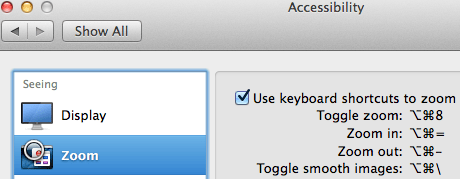
Accessibiity -> Zoom -> enable checkbox” class=”size-medium” /> Preferences -> Accessibiity -> Zoom -> enable checkbox
I didn’t know this was built-in since Mountain Lion and up, but it is, is startable from the keyboard and it’s tremendously convenient when presenting: [WayBack]: OS X Mountain Lion: Zoom content on the screen.
TL;DR:
- System Prefrecences
- Accesibility
- Zoom
- Checkbox
–jeroen
Posted in Apple, iMac, Keyboards and Keyboard Shortcuts, Mac, Mac OS X / OS X / MacOS, MacBook, MacBook Retina, MacBook-Air, MacBook-Pro, MacMini, macOS 10.12 Sierra, OS X 10.10 Yosemite, OS X 10.11 El Capitan, OS X 10.8 Mountain Lion, OS X 10.9 Mavericks, Power User | Leave a Comment »


 The Wiert Corner - irregular stream of stuff


