Archive for the ‘OS X 10.9 Mavericks’ Category
Posted by jpluimers on 2018/08/03
Somewhere after Yosemite, braindead Mac OS X forcibly maps “Ctrl+Click” to right-click. In past versions, you could disable but those days have gone.
This means that inside Windows on VMware Fusion, you cannot add/remove items to/from a selection any more (for instance in the Windows Explorer).
Various workarounds turned up in my Google Search, but only this one works:
Holding down CTRL + OPTION together and LEFT CLICKING will do this.
Source: [WayBack] vmware fusion – How to use the control key in VM Ware? – Super User
–jeroen
via:
Posted in Apple, Fusion, Mac, Mac OS X / OS X / MacOS, MacBook, MacBook Retina, MacBook-Air, MacBook-Pro, MacMini, macOS 10.12 Sierra, OS X 10.10 Yosemite, OS X 10.11 El Capitan, OS X 10.9 Mavericks, Power User, Virtualization, VMware | Leave a Comment »
Posted by jpluimers on 2018/06/11
- Connect the volume you want excluded to the Mac, even if Spotlight is currently indexing
- Launch “System Preferences” and click on “Spotlight” followed by the ‘Privacy’ tab
- Drag the drives icon into the Privacy window
Source and more information (including how to do this from the terminal): [WayBack] Stop Spotlight from Indexing Time Machine Backup Volumes & External Drives
–jeroen
Posted in Apple, iMac, Mac, Mac OS X / OS X / MacOS, MacBook, MacBook Retina, MacBook-Air, MacBook-Pro, MacMini, macOS 10.12 Sierra, OS X 10.10 Yosemite, OS X 10.11 El Capitan, OS X 10.8 Mountain Lion, OS X 10.9 Mavericks, Power User | Leave a Comment »
Posted by jpluimers on 2018/04/16
Learn one way to change Excel’s Control-U shortcut to the easier-to-use F2 (which also matches the Windows’ shortcut).
Ah, so Ctrl-U is the shortcut to edit a cell on Mac OS X with Microsoft Office Excel (:
Source: [WayBack] Change Excel’s ‘edit in cell’ keyboard shortcut | Macworld
–jeroen
Posted in Apple, Mac, Mac OS X / OS X / MacOS, MacBook, MacBook Retina, MacBook-Air, MacBook-Pro, OS X 10.9 Mavericks, Power User | Leave a Comment »
Posted by jpluimers on 2018/03/19
With system account starting with underscore:
dscl . list /Users
Without underscore, so only regular accounts:
dscl . list /Users | grep -v ^_.*
Source: [WayBack] macos – How can I list all user accounts in the terminal? – Ask Different
–jeroen
Posted in Apple, iMac, Mac, Mac OS X / OS X / MacOS, MacBook, MacBook Retina, MacBook-Air, MacBook-Pro, MacMini, macOS 10.12 Sierra, OS X 10.10 Yosemite, OS X 10.11 El Capitan, OS X 10.9 Mavericks, Power User | Leave a Comment »
Posted by jpluimers on 2018/02/14
There still is no ps xf on Mac OS X.
You need brew install pstree for that. Then you can excute pstree which gives you a treeview of the processes running.
via: [WayBack] command line – Linux’ ps f (tree view) equivalent on OSX? – Ask Different
–jeroen
Posted in *nix, *nix-tools, Apple, Home brew / homebrew, iMac, Mac, Mac OS X / OS X / MacOS, MacBook, MacBook Retina, MacBook-Air, MacBook-Pro, MacMini, macOS 10.12 Sierra, OS X 10.10 Yosemite, OS X 10.11 El Capitan, OS X 10.9 Mavericks, Power User, ps | Leave a Comment »
Posted by jpluimers on 2018/02/14
I’m still amazed this is not in stock Mac OS X:
In Finder > Select a folder > Right click, we get a popup with an option to create a new folder:Is there a way to add menu item New Textfile for adding a new text file?
[WayBack] macos – Right-click, create a new text file. How? – Ask Different
One way is to use Automator scripts, but: scripting…
–jeroen
Posted in Apple, Automator scripts, Development, iMac, Mac, Mac OS X / OS X / MacOS, MacBook, MacBook Retina, MacBook-Air, MacBook-Pro, MacMini, macOS 10.12 Sierra, OS X 10.10 Yosemite, OS X 10.11 El Capitan, OS X 10.9 Mavericks, Power User, Scripting, Software Development | Leave a Comment »
Posted by jpluimers on 2018/01/30
Most sites explaining how to decompress an xz file mention you should use unxz from the xz utils toolbox.
Running unzx on Msc OS X requires the xz formula from homebrew:
$ brew install xz
==> Downloading https://homebrew.bintray.com/bottles/xz-5.2.2.mavericks.bottle.tar.gz
######################################################################## 100.0%
==> Pouring xz-5.2.2.mavericks.bottle.tar.gz
🍺  /usr/local/Cellar/xz/5.2.2: 91 files, 1.4M
–jeroen
Posted in Apple, Home brew / homebrew, Mac OS X / OS X / MacOS, macOS 10.12 Sierra, OS X 10.10 Yosemite, OS X 10.9 Mavericks, Power User | Leave a Comment »
Posted by jpluimers on 2018/01/12
It looks like when syncing folders between Mac OS X (MacOS X?) and Windows, many directories get empty Icon? files have a size of 0 bytes.
None of these directories had custom icons, so I’m inclined to remove them all from the Google Drive folder:
find . -name 'Icon*' -size 0 -print0 | xargs -0 rm
as [WayBack] Didier Trosset answered at [WayBack] How to delete many 0 byte files in linux? – Stack Overflow
Before I do that, I need to read these in more detail:
–jeroen
Posted in Apple, Google, GoogleDrive, iMac, Mac, Mac OS X / OS X / MacOS, MacBook, MacBook Retina, MacBook-Air, MacBook-Pro, MacMini, OS X 10.10 Yosemite, OS X 10.11 El Capitan, OS X 10.9 Mavericks, Power User | Leave a Comment »
Posted by jpluimers on 2017/12/25
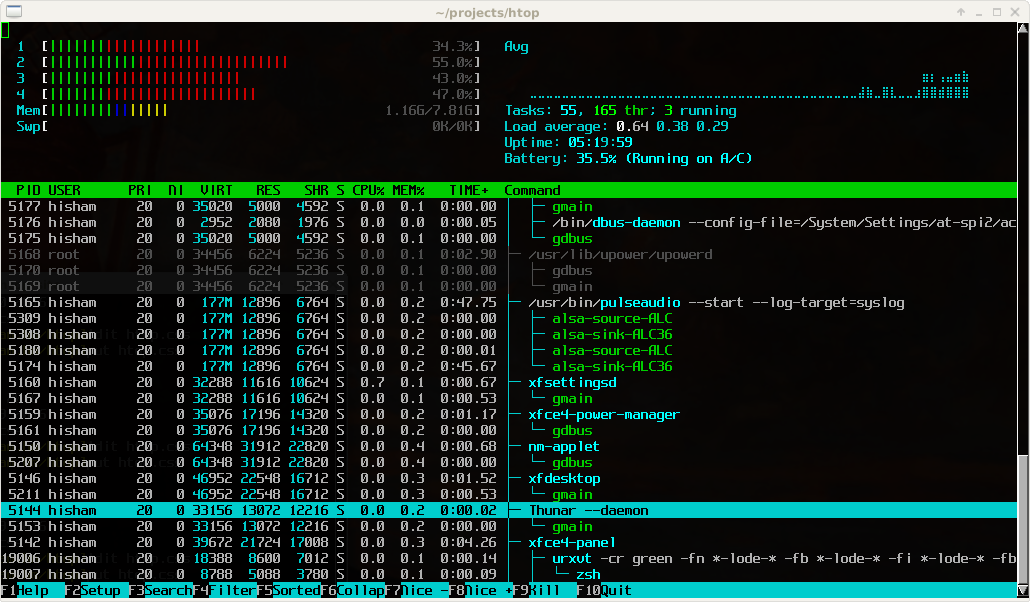
Great tool: [WayBack] htop – an interactive process viewer for Unix because it’s both interactive and supports a wide range of OSes: Linux, FreeBSD, OpenBSD and Mac OS X.
Thanks to Warren Postma who suggested it in his comment at [WayBack] 18 Useful Commands to Get Hardware Information on Linux – Linuxslaves.
Note that on OS X you get this warning after brew install htop :
htop requires root privileges to correctly display all running processes,

so you will need to run `sudo htop`.

You should be certain that you trust any software you grant root privileges.
On Linux you don’t get this message as there you have the /proc file system providing enough information as explained at [WayBack] osx – Why does htop on Mac OS X require root privileges to see data for all processes, but on Linux it runs without root – Super User.
A workaround (involving the setuid bit) is at [WayBack] Running htop on Mac OS X needs root. Why?! | Blog | JoeNyland.me or by running visudo ensuring you don’t need a password for it at [WayBack] osx – htop isn’t returning CPU or memory usage!? – Super User
–jeroen
Posted in *nix, *nix-tools, Apple, BSD, Linux, Mac OS X / OS X / MacOS, macOS 10.12 Sierra, OS X 10.11 El Capitan, OS X 10.9 Mavericks, Power User | Leave a Comment »
Posted by jpluimers on 2017/12/01
Free and – unlike the also free [WayBack] dupeGuru – finds duplicate files – hasn’t crashed on my system yet or fails to add folders:
Read reviews, compare customer ratings, see screenshots, and learn more about Duplicate File Finder for files & folders. Download Duplicate File Finder for files & folders for Mac OS X 10.9 or later and enjoy it on your Mac.
[WayBack] Duplicate File Finder for files & folders on the Mac App Store
–jeroen
Posted in Apple, iMac, Mac, Mac OS X / OS X / MacOS, MacBook, MacBook Retina, MacBook-Air, MacBook-Pro, MacMini, OS X 10.10 Yosemite, OS X 10.11 El Capitan, OS X 10.9 Mavericks, Power User | Leave a Comment »


 The Wiert Corner - irregular stream of stuff