Archive for the ‘OS X 10.9 Mavericks’ Category
Posted by jpluimers on 2017/01/10
Getting the local IP (actually IPs, but most hosts only have a single IP):
# OS X:

alias whatismylocalip='ifconfig | sed -En '\''s/127.0.0.1//;s/.*inet (addr:)?(([0-9]*\.){3}[0-9]*).*/\2/p'\'''

# Linux:

alias whatismylocalip='ip a | sed -En '\''s/127.0.0.1//;s/.*inet (addr:)?(([0-9]*\.){3}[0-9]*).*/\2/p'\'''
I got them via bash – How to I get the primary IP address of the local machine on Linux and OS X? – Stack Overflow
Mac OS X and BSD have ifconfig, but most Linux distributions don’t use ifconfig any more in favour of iproute2, so you use ip a (which is shorthand for ip address show) there.
Their output is similar enough for the sed to work, though. Which surprised be because I didn’t know about the -E option (it lacks in the manual Linux page but it is in the Mac OS X one) which enables POSIX extended regular expressions. In Linux this is documented as -r, but -E also works.
I learned this through the Sed – An Introduction and Tutorial which compares the various versions of sed which also explains about the -n doing no printing.
–jeroen
Posted in *nix, *nix-tools, Apple, bash, bash, Development, Linux, Mac, Mac OS X / OS X / MacOS, Mac OS X 10.4 Tiger, Mac OS X 10.5 Leopard, Mac OS X 10.6 Snow Leopard, Mac OS X 10.7 Lion, MacBook, MacBook Retina, MacBook-Air, MacBook-Pro, MacMini, openSuSE, OS X 10.10 Yosemite, OS X 10.8 Mountain Lion, OS X 10.9 Mavericks, Power User, Scripting, Software Development, SuSE Linux, Tumbleweed | Leave a Comment »
Posted by jpluimers on 2016/12/23
Interesting: diskutil secureErase freespace LEVEL /Volumes/DRIVENAME
–jeroen
Source: How to securely delete files in OS X 10.11 ‘El Capitan’ | MacIssues
Posted in Apple, Mac, Mac OS X / OS X / MacOS, Mac OS X 10.4 Tiger, Mac OS X 10.5 Leopard, Mac OS X 10.6 Snow Leopard, Mac OS X 10.7 Lion, MacBook, MacBook Retina, MacBook-Air, MacBook-Pro, MacMini, OS X 10.10 Yosemite, OS X 10.8 Mountain Lion, OS X 10.9 Mavericks, Power User | Leave a Comment »
Posted by jpluimers on 2016/11/18
You need this statement to unpack an rpm file on Mac OS X without having rpm installed:
rpm2cpio ##filename.rpm## | cpio -idmv
This will make rpm2cpio unpack the rpm file in the current directory using these cpio options:
- i – use the rpm2cpoio as unput
- d – created directories when needed
- m – set modification timestamps from the archive
- v – verbose filenames to
stderr
cpio is already part of the Mac OS X system.
You can get rpm2cpio through homebrew by typing brew install rpm2cpio which will likely also download he xz dependency.
–jeroen
via: rhel – Open a RPM on a Mac? – Unix & Linux Stack Exchange
Posted in *nix, *nix-tools, Apple, iMac, Linux, Mac, Mac OS X / OS X / MacOS, MacBook, MacBook Retina, MacBook-Air, MacBook-Pro, MacMini, OS X 10.10 Yosemite, OS X 10.11 El Capitan, OS X 10.9 Mavericks, Power User, rpm | Leave a Comment »
Posted by jpluimers on 2016/11/04
Skip the built-in curl and directly go to the homebrew one:
$ brew update

$ brew upgrade

$ brew install curl --with-nghttp2
Source: How to use curl command with http/2 on MacOS X [WayBack]
via: Using cURL with HTTP/2 on Mac OS X #sysadmin #unix #apple #macos – Joe C. Hecht – Google+ [WayBack]
–jeroen
Posted in Apple, Home brew / homebrew, Mac, Mac OS X / OS X / MacOS, MacBook, MacBook Retina, MacBook-Air, MacBook-Pro, MacMini, macOS 10.12 Sierra, OS X 10.9 Mavericks, Power User | Leave a Comment »
Posted by jpluimers on 2016/10/21
display – How can I move spaces between external monitors in Mavericks? – Ask Different [WayBack]
You can only move spaces which are non-active.
For example, lets say you have spaces 1 and 2. If space 1 is active, you can not move it. You first have to select space 2 then you can move space 1 to a different monitor.
This helped me work around version 8.35 of Microsoft Remote Desktop for OS X breaks second monitor usage [WayBack]:
- Double click a connection so it goes to a new space on the primary display
- Make the normal space active (by three finger swiping on the primary display)
- Go to mission control
- Move the non-active RDP space to the secondary monitor
Sometimes the primary monitor doesn’t have a non-active space any more so you have to create a new one in the top right of Mission Control [WayBack].
–jeroen
Posted in Apple, Mac, Mac OS X / OS X / MacOS, MacBook, MacBook Retina, MacBook-Pro, OS X 10.9 Mavericks, Power User, Remote Desktop Protocol/MSTSC/Terminal Services, Windows | Leave a Comment »
Posted by jpluimers on 2016/10/19
One of the nitpicks in VMware Fusion is that it has no keyboard shortcut for Resume or Suspend. I was trying to add Command-R and Command-S for those but that didn’t work out.
Since the links below seem to work for some other applications, I’ve kept them:
–jeroen
Posted in Apple, Development, Keyboards and Keyboard Shortcuts, Mac, Mac OS X / OS X / MacOS, MacBook, MacBook Retina, MacBook-Air, MacBook-Pro, MacMini, OS X 10.10 Yosemite, OS X 10.11 El Capitan, OS X 10.9 Mavericks, Power User, Software Development | Leave a Comment »
Posted by jpluimers on 2016/10/07
The most recent versions of Joe don’t even build from stock in OS X any more and there are no direct installers for them.
But there are two most recent older versions that have installers, and a formula recent brew based HomeBrew installation:
- joe-3.7-0.pkg – rudix-snowleopard – JOE – Rudix: The hassle-free way to get Unix programs on Mac OS X – Google Project Hosting.
- PROJECT DETAIL for Joe’s Own Editor.
- Homebrew Formulas – Joe.
After experimenting for a while without brew preferring the first over second, I’ve installed the the third as:
- The first actually installs version 3.6, but has the syntax highlighting files installed in the correct place, so you get syntax highlighting.
- The second does install version 3.7, but since the syntax highlighting files are in the wrong place: you get no syntax highlighting.
- The brew formula has an up to date joe version 4.0 and installs the syntax highlighting in the right place: you get syntax highlighting.
Before making a choice, you might want to consider reading about joe versions in JOE – Joe’s own editor / … /NEWS.md.
Having a background partially in the Linux world, I tried building joe from source on my Mac following the steps at JOE – Joe’s own editor / Discussion / joe-editor-general:Mac binary for 3.3 does not run on OS/X 10.8. It failed because the Mercurial 3.8 branch required automake and autoconf which are not available on just a Mac + Xcode. So I’m happy that others have bit the bullet and make a good HomeBrew build.
What makes HomeBrew so great is that it is based on a fully versioned git/ruby combination, allows for multiple Python versions, allows for binaries through bintray served bottles and has zillions (well, thousands) of installable formulae, all versioned.
–jeroen
Posted in *nix, *nix-tools, Apple, joe, Mac OS X / OS X / MacOS, Mac OS X 10.4 Tiger, Mac OS X 10.5 Leopard, Mac OS X 10.6 Snow Leopard, Mac OS X 10.7 Lion, MacBook, MacBook Retina, MacBook-Air, MacBook-Pro, MacMini, OS X 10.10 Yosemite, OS X 10.8 Mountain Lion, OS X 10.9 Mavericks, Power User | Leave a Comment »
Posted by jpluimers on 2016/09/26
Posted in Apple, Mac, Mac OS X / OS X / MacOS, MacBook, MacBook Retina, MacBook-Air, MacBook-Pro, MacMini, OS X 10.10 Yosemite, OS X 10.11 El Capitan, OS X 10.9 Mavericks, Power User | Leave a Comment »
Posted by jpluimers on 2016/09/23
I was looking for some PDF files that I knew for sure were on my SSD but Spotlight would not find them. Looking for more obvious files I noticed Spotlight was returning hardly any files at all: somehow the index was messed up.
Years ago I also had Spotlight issues; then it would find nothing (now it did find some files) which was solved by a reboot: Spotlight refuses to be enabled on Lion: reboot helped.
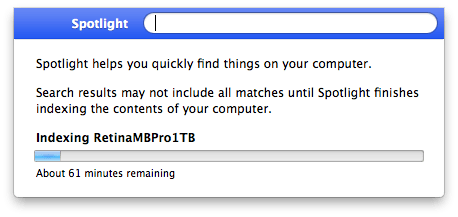
Screenshot 2016-06-29 12.57.34
Now this was right after a reboot, and because Spotlight did find some files I know Spotlight was turned on (no need for mdutil tricks mentioned in After restoring fresh HDD from Time Machine Backup: No results from Spotlight).
So I dug a bit deeper and decided to try [WayBack] Rebuild the Spotlight index on your Mac – Apple Support with these steps:
- Search for something that returns few results (in my case Xyzzy)
- Click
Spotlight Preferences...
- Go to the
Privacy tab
- From the
Finder, drag your disk(s) to the Prevent Spotlight from searching these locations list.
- Remove your disk(s) from that lists using the minus (-) button.
- Wait for re-indexing to complete
That worked like a charm to refresh the index: it started indexing again which took about one hour.
After a few minutes though, I found back the 32pfl7404h_12_dfu_nld.pdf I was looking for.
A second time, it had lost the index to iTunes, and found it back in about 2 hours (as the SSD was much more full).
A third time, this trick from [WayBack/Archive.is] Re-Index Spotlight from the Terminal, Re-Gain Valuable Time for Life [OS X Tips] | Cult of Mac worked:
sudo mdutil -E /
This basically re-indexes from the root (/) folder.
I find it easier than the above 6 steps (which are also on [WayBack/Archive.is] Make Spotlight Work Again [OS X Tips] | Cult of Mac).
–jeroen
Posted in Apple, Mac, Mac OS X / OS X / MacOS, MacBook, MacBook Retina, MacBook-Pro, OS X 10.10 Yosemite, OS X 10.11 El Capitan, OS X 10.9 Mavericks, Power User, SpotLight | Leave a Comment »


 The Wiert Corner - irregular stream of stuff