


[WayBack] macos – El Capitan /private/var/folders cache files consuming 30–40 GB – Ask Different
TL;DR: a reboot will usually clean up most of the chaches and yes you can remove those caches by hand after closing the applications involved.
–jeroen
Posted by jpluimers on 2018/12/14
[WayBack] macos – El Capitan /private/var/folders cache files consuming 30–40 GB – Ask Different
TL;DR: a reboot will usually clean up most of the chaches and yes you can remove those caches by hand after closing the applications involved.
–jeroen

Posted in Apple, Mac OS X / OS X / MacOS, Power User | Leave a Comment »
Posted by jpluimers on 2018/12/07
A long time ago, I bumped into [WayBack] Mac Photo/Slideshow Viewer that supports recursion: Phoenix Slides, but only recently I discovered it has made it to GitHub as well, so now you can download it from two places:
Despite the Phoenix Slides product name, the repository is at https://github.com/gobbledegook/creevey
–jeroen
Posted in Apple, Mac OS X / OS X / MacOS, macOS 10.12 Sierra, OS X 10.10 Yosemite, OS X 10.8 Mountain Lion, OS X 10.9 Mavericks, Power User | Leave a Comment »
Posted by jpluimers on 2018/12/04
Quite a while back I wrote [WayBack] Viewing an USB camera on Mac OS X without mirroring.
I still use the solution Quick Camera mentioned there, but also found a solution that works with the Photo Booth application:
Just made a QTZ to counteract the annoying mirror-image which is considered “normal” in Photo Booth. I borrowed a patch from the “Effect.qtz” which is located inside the Photo Booth.app, and I edited it in Quartz Composer . Please note that this will NOT affect the mirror-image which occurs using other effects; they will STILL be mirror images of your subject.
…
This patch fixes the preview, photos AND video. This patch fixes the SOURCE of the video, not the resulting output images.
[WayBack] UN-MIRROR yourself in Photo Booth – patch | MacRumors Forums
Steps to manually create the Quartz file are at [WayBack] Camera question: Why is the camera a mirror effect? | Mac Forums
So I learned about Quarts Composer and composition plugins which are basically a visual programming language:
This is unlike another QC that got killed.
–jeroen
[WayBack] picture-2-png.195665 (1314×897)
Posted in Apple, Mac OS X / OS X / MacOS, Power User | Leave a Comment »
Posted by jpluimers on 2018/10/15
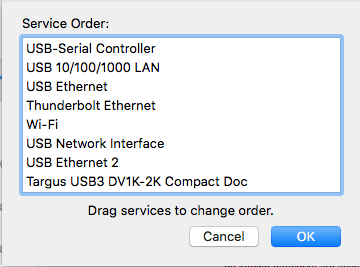
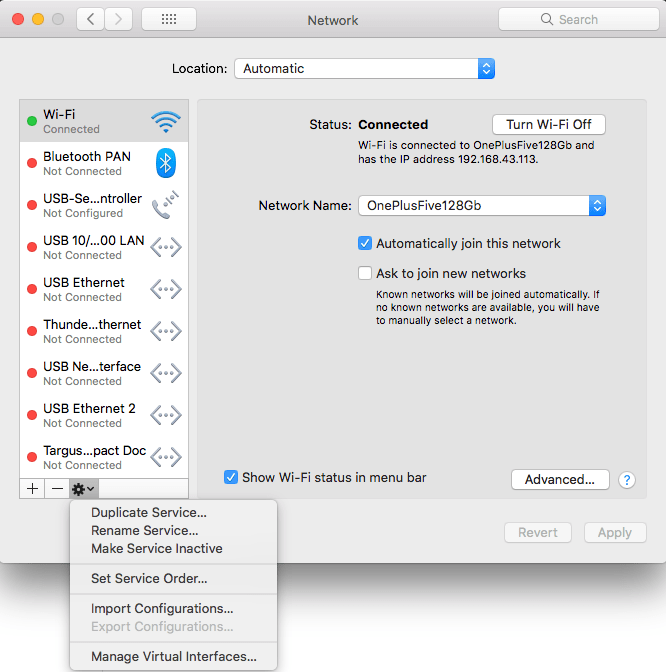 Very useful when you want to give your WiFi less priority than an USB or Thunderbolt network adapter: [WayBack] macOS Sierra: Change the order of the network ports your computer uses to connect.
It is not just that the topmost adapter gets more priority: it also determines the DNS search!
Anyway: after choosing “Set Service Order” on the right, choose the order as seen below.
–jeroen
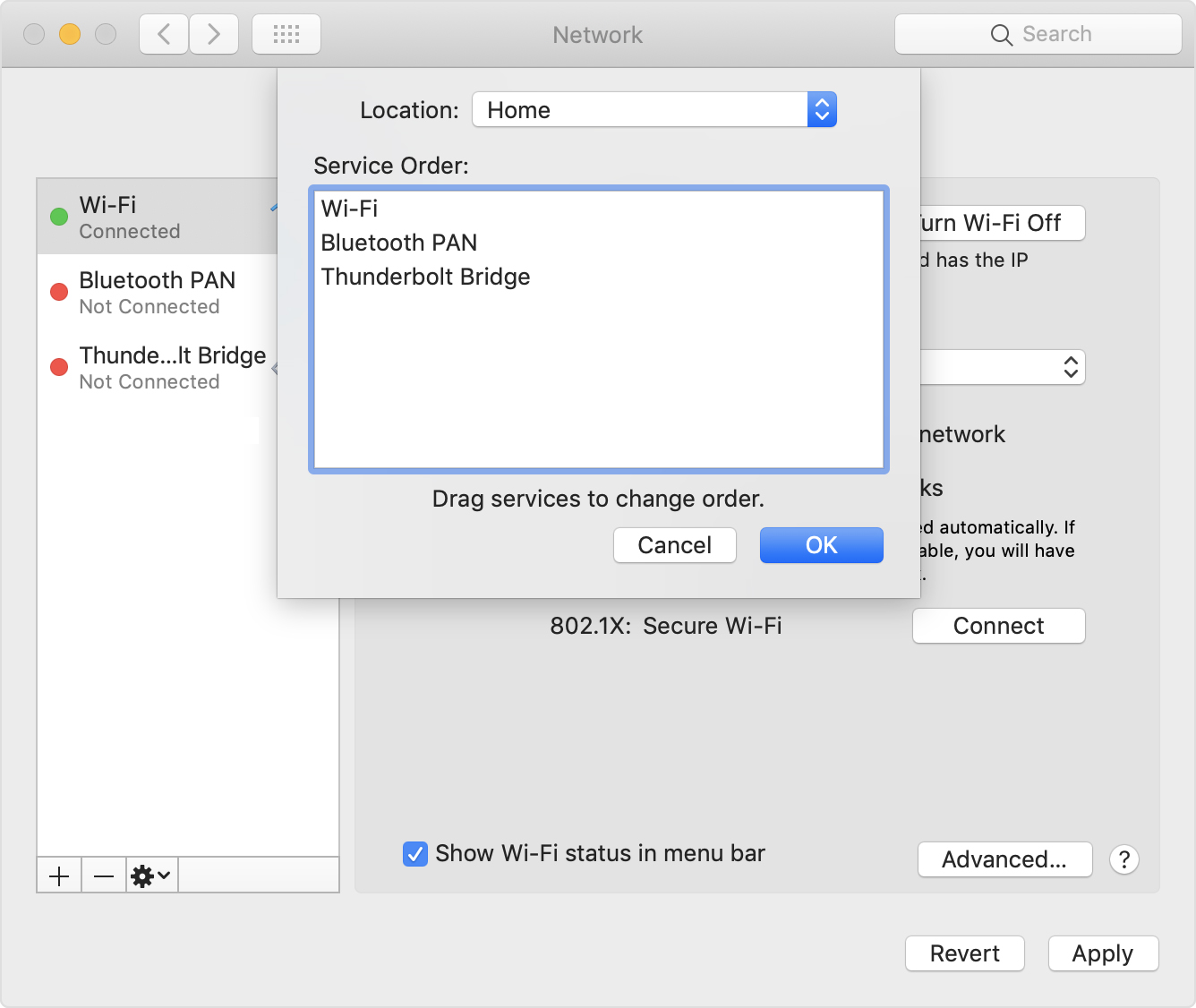
PS: Since Apple is cleaning up their site, only the above WayBack works, but luckily the below link explains it in a very similar way when using Locations:
[WayBack] How to use network locations on your Mac – Apple Support

Posted in Apple, iMac, Mac, Mac OS X / OS X / MacOS, MacBook, Power User | Leave a Comment »
Posted by jpluimers on 2018/10/05
If you suffer from [WayBack] macos – Excessive CPU usage from sysmond – Ask Different, then it could be Activity Monitor itself using that CPU.
If you suffer from high CPU usage in mds, then it is likely the Spotlight search indexer acting up: [WayBack] mds – what MDS process is and why it uses CPU on the Mac
–jeroen
Posted in Apple, Mac, Mac OS X / OS X / MacOS, Power User, SpotLight | Leave a Comment »
Posted by jpluimers on 2018/08/03
Somewhere after Yosemite, braindead Mac OS X forcibly maps “Ctrl+Click” to right-click. In past versions, you could disable but those days have gone.
This means that inside Windows on VMware Fusion, you cannot add/remove items to/from a selection any more (for instance in the Windows Explorer).
Various workarounds turned up in my Google Search, but only this one works:
Holding down CTRL + OPTION together and LEFT CLICKING will do this.
Source: [WayBack] vmware fusion – How to use the control key in VM Ware? – Super User
–jeroen
via:
Posted in Apple, Fusion, Mac, Mac OS X / OS X / MacOS, MacBook, MacBook Retina, MacBook-Air, MacBook-Pro, MacMini, macOS 10.12 Sierra, OS X 10.10 Yosemite, OS X 10.11 El Capitan, OS X 10.9 Mavericks, Power User, Virtualization, VMware | Leave a Comment »
Posted by jpluimers on 2018/07/17
I wasn’t expecting it to be so easy to install PowerShell on Mac OS X:
brew install Caskroom/cask/powershell
In the background it executes this script: https://github.com/caskroom/homebrew-cask/blob/master/Casks/powershell.rb. which indirectly goes through the URL template https://github.com/PowerShell/PowerShell/releases/download/v#{version}/powershell-#{version}.pkg.
On other non-Windows systems, you have to go through GitHub yourself: https://github.com/powershell/PowerShell. The PowerShell team at Microsoft has many more repositories including the Win32-OpenSSH port which you can find through https://github.com/PowerShell.
At the time of writing, PowerShell was available for these platforms:
Platform Downloads How to Install Windows 10 / Server 2016 (x64) .msi Instructions Windows 8.1 / Server 2012 R2 (x64) .msi Instructions Windows 7 (x64) .msi Instructions Windows 7 (x86) .msi Instructions Ubuntu 16.04 .deb Instructions Ubuntu 14.04 .deb Instructions CentOS 7 .rpm Instructions OpenSUSE 42.1 .rpm Instructions Arch Linux Instructions Many Linux distributions .AppImage Instructions macOS 10.11 .pkg Instructions Docker Instructions
The first version I installed on Mac OS X was this: ==> Downloading https://github.com/PowerShell/PowerShell/releases/download/v6.0.0-alpha.17/powershell-6.0.0-alpha.17.pkg
By now I really hope it is out of Alpha state.
–jeroen
via:
Posted in *nix, Apple, CommandLine, Development, iMac, Linux, Mac, Mac OS X / OS X / MacOS, MacBook, MacBook Retina, MacBook-Air, MacBook-Pro, MacMini, openSuSE, Power User, PowerShell, PowerShell, Scripting, Software Development, SuSE Linux, Ubuntu | Leave a Comment »
Posted by jpluimers on 2018/06/11
- Connect the volume you want excluded to the Mac, even if Spotlight is currently indexing
- Launch “System Preferences” and click on “Spotlight” followed by the ‘Privacy’ tab
- Drag the drives icon into the Privacy window
Source and more information (including how to do this from the terminal): [WayBack] Stop Spotlight from Indexing Time Machine Backup Volumes & External Drives
–jeroen
Posted in Apple, iMac, Mac, Mac OS X / OS X / MacOS, MacBook, MacBook Retina, MacBook-Air, MacBook-Pro, MacMini, macOS 10.12 Sierra, OS X 10.10 Yosemite, OS X 10.11 El Capitan, OS X 10.8 Mountain Lion, OS X 10.9 Mavericks, Power User | Leave a Comment »
Posted by jpluimers on 2018/04/30
For my link archive: [WayBack] Chris Bensen: Make Bootable macOS Sierra USB Install Drive
–jeroen
Posted in Apple, Mac OS X / OS X / MacOS, macOS 10.12 Sierra, Power User | Leave a Comment »
Posted by jpluimers on 2018/04/16
Learn one way to change Excel’s Control-U shortcut to the easier-to-use F2 (which also matches the Windows’ shortcut).
Ah, so Ctrl-U is the shortcut to edit a cell on Mac OS X with Microsoft Office Excel (:
Source: [WayBack] Change Excel’s ‘edit in cell’ keyboard shortcut | Macworld
–jeroen
Posted in Apple, Mac, Mac OS X / OS X / MacOS, MacBook, MacBook Retina, MacBook-Air, MacBook-Pro, OS X 10.9 Mavericks, Power User | Leave a Comment »
 The Wiert Corner - irregular stream of stuff