Archive for the ‘Mac OS X / OS X / MacOS’ Category
Posted by jpluimers on 2018/03/26
It should be all automagic as soon as I format an SD card as journaled HFS, but in case it isn’t, here are some links:
–jeroen
Posted in Apple, iMac, Mac, Mac OS X / OS X / MacOS, MacBook, MacBook Retina, MacBook-Air, MacBook-Pro, MacMini, macOS 10.12 Sierra, Power User | Leave a Comment »
Posted by jpluimers on 2018/03/23
This worked for me as suddenly – after upgrading to Sierra – the App Store was all Dutch where previously it was English:
After I fought with the issue for a few hours, I found the solution.
- Open Mac App Store and log out of the account.
- Restart your Mac.
- Log in to the account again.
Thanks [WayBack] Blaszard for the above answer at [WayBack] macos – How to change the language used on Mac App Store? – Ask Different
Note that this syncs the language in the App Store with the one you’ve set on the OS X level; for changing that, see [WayBack] macOS Sierra: Change the language your Mac uses
–jeroen
Posted in Apple, Mac OS X / OS X / MacOS, macOS 10.12 Sierra, Power User | Leave a Comment »
Posted by jpluimers on 2018/03/23
For me the easiest is on a sudo terminal (so I can omit the sudo part in the below commands), but if you’d do it “rather safe then sorry”, you can go from the fine-grained individual backup level:
sudo tmutil delete /Volumes/drive_name/Backups.backupdb/mac_name/YYYY-MM-DD-hhmmss
step by step
sudo tmutil delete /Volumes/drive_name/Backups.backupdb/mac_name
all the way back to
sudo tmutil delete /Volumes/drive_name/Backups.backupdb
Incidentally, the tmutil documentation is now regarded as legacy (I’m not sure why) so before it goes away, I’ve archived it:
[Archive.is] https://developer.apple.com/legacy/library/documentation/Darwin/Reference/ManPages/man8/tmutil.8.html
It’s not at http://developer.apple.com/library/mac/#documentation/Darwin/Reference/Manpages/man8/tmutil.8.html as for instance [WayBack] man tmutil … – Kristian Köhntopp – Google+ referred to a few years back.
Anyway:
–jeroen
–jeroen
via [WayBack] macos – How can I manually delete old backups to free space for Time Machine? – Ask Different
Posted in Apple, Mac OS X / OS X / MacOS, macOS 10.12 Sierra, OS X 10.10 Yosemite, OS X 10.11 El Capitan, Power User | Leave a Comment »
Posted by jpluimers on 2018/03/19
With system account starting with underscore:
dscl . list /Users
Without underscore, so only regular accounts:
dscl . list /Users | grep -v ^_.*
Source: [WayBack] macos – How can I list all user accounts in the terminal? – Ask Different
–jeroen
Posted in Apple, iMac, Mac, Mac OS X / OS X / MacOS, MacBook, MacBook Retina, MacBook-Air, MacBook-Pro, MacMini, macOS 10.12 Sierra, OS X 10.10 Yosemite, OS X 10.11 El Capitan, OS X 10.9 Mavericks, Power User | Leave a Comment »
Posted by jpluimers on 2018/02/14
There still is no ps xf on Mac OS X.
You need brew install pstree for that. Then you can excute pstree which gives you a treeview of the processes running.
via: [WayBack] command line – Linux’ ps f (tree view) equivalent on OSX? – Ask Different
–jeroen
Posted in *nix, *nix-tools, Apple, Home brew / homebrew, iMac, Mac, Mac OS X / OS X / MacOS, MacBook, MacBook Retina, MacBook-Air, MacBook-Pro, MacMini, macOS 10.12 Sierra, OS X 10.10 Yosemite, OS X 10.11 El Capitan, OS X 10.9 Mavericks, Power User, ps | Leave a Comment »
Posted by jpluimers on 2018/02/14
I’m still amazed this is not in stock Mac OS X:
In Finder > Select a folder > Right click, we get a popup with an option to create a new folder:Is there a way to add menu item New Textfile for adding a new text file?
[WayBack] macos – Right-click, create a new text file. How? – Ask Different
One way is to use Automator scripts, but: scripting…
–jeroen
Posted in Apple, Automator scripts, Development, iMac, Mac, Mac OS X / OS X / MacOS, MacBook, MacBook Retina, MacBook-Air, MacBook-Pro, MacMini, macOS 10.12 Sierra, OS X 10.10 Yosemite, OS X 10.11 El Capitan, OS X 10.9 Mavericks, Power User, Scripting, Software Development | Leave a Comment »
Posted by jpluimers on 2018/01/30
Most sites explaining how to decompress an xz file mention you should use unxz from the xz utils toolbox.
Running unzx on Msc OS X requires the xz formula from homebrew:
$ brew install xz
==> Downloading https://homebrew.bintray.com/bottles/xz-5.2.2.mavericks.bottle.tar.gz
######################################################################## 100.0%
==> Pouring xz-5.2.2.mavericks.bottle.tar.gz
🍺  /usr/local/Cellar/xz/5.2.2: 91 files, 1.4M
–jeroen
Posted in Apple, Home brew / homebrew, Mac OS X / OS X / MacOS, macOS 10.12 Sierra, OS X 10.10 Yosemite, OS X 10.9 Mavericks, Power User | Leave a Comment »
Posted by jpluimers on 2018/01/12
It looks like when syncing folders between Mac OS X (MacOS X?) and Windows, many directories get empty Icon? files have a size of 0 bytes.
None of these directories had custom icons, so I’m inclined to remove them all from the Google Drive folder:
find . -name 'Icon*' -size 0 -print0 | xargs -0 rm
as [WayBack] Didier Trosset answered at [WayBack] How to delete many 0 byte files in linux? – Stack Overflow
Before I do that, I need to read these in more detail:
–jeroen
Posted in Apple, Google, GoogleDrive, iMac, Mac, Mac OS X / OS X / MacOS, MacBook, MacBook Retina, MacBook-Air, MacBook-Pro, MacMini, OS X 10.10 Yosemite, OS X 10.11 El Capitan, OS X 10.9 Mavericks, Power User | Leave a Comment »
Posted by jpluimers on 2017/12/25
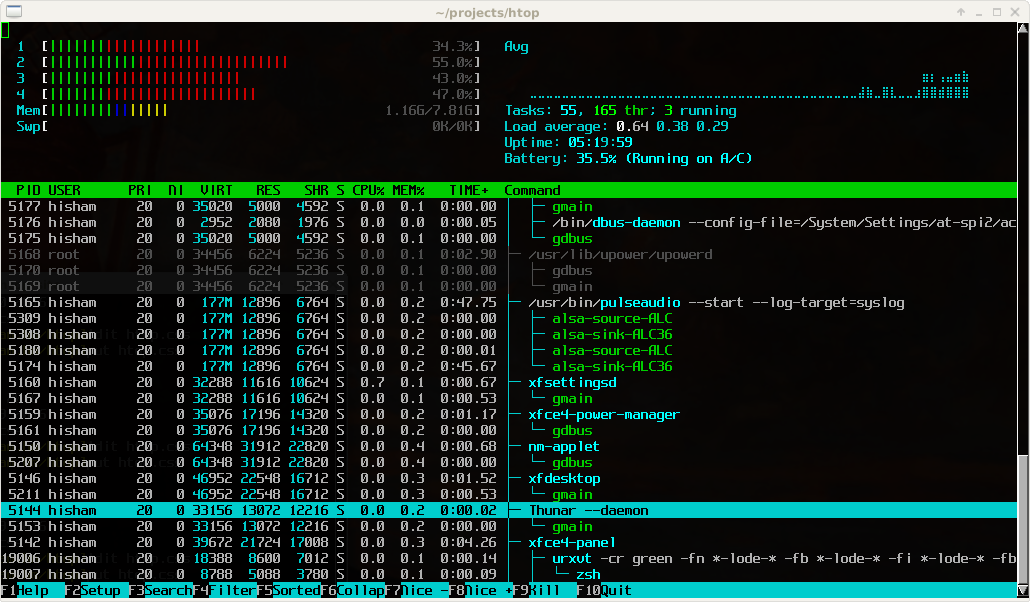
Great tool: [WayBack] htop – an interactive process viewer for Unix because it’s both interactive and supports a wide range of OSes: Linux, FreeBSD, OpenBSD and Mac OS X.
Thanks to Warren Postma who suggested it in his comment at [WayBack] 18 Useful Commands to Get Hardware Information on Linux – Linuxslaves.
Note that on OS X you get this warning after brew install htop :
htop requires root privileges to correctly display all running processes,

so you will need to run `sudo htop`.

You should be certain that you trust any software you grant root privileges.
On Linux you don’t get this message as there you have the /proc file system providing enough information as explained at [WayBack] osx – Why does htop on Mac OS X require root privileges to see data for all processes, but on Linux it runs without root – Super User.
A workaround (involving the setuid bit) is at [WayBack] Running htop on Mac OS X needs root. Why?! | Blog | JoeNyland.me or by running visudo ensuring you don’t need a password for it at [WayBack] osx – htop isn’t returning CPU or memory usage!? – Super User
–jeroen
Posted in *nix, *nix-tools, Apple, BSD, Linux, Mac OS X / OS X / MacOS, macOS 10.12 Sierra, OS X 10.11 El Capitan, OS X 10.9 Mavericks, Power User | Leave a Comment »


 The Wiert Corner - irregular stream of stuff