Archive for the ‘MacMini’ Category
Posted by jpluimers on 2017/12/01
cd /Volumes/Backup/Backups.backupdb/Joshua\ Priddle’s\ MacBook\ Pro/Latest/Macintosh\ HD/Users/priddle
tmutil restore -v secret_docs.txt ~/
Learned from [WayBack] Restoring files from OS X Time Machine with Terminal.app:
- do not use
cp as it will give you wrong permissions
- do use
tmutil
More elaborate steps (including finding the backup in the first place) is at [WayBack] Commandline restoration of a file in Time Machine on OS X | Hacks for Macs
–jeroen
Posted in Apple, iMac, Mac, Mac OS X / OS X / MacOS, Mac OS X 10.4 Tiger, Mac OS X 10.5 Leopard, Mac OS X 10.6 Snow Leopard, Mac OS X 10.7 Lion, MacBook, MacBook Retina, MacBook-Air, MacBook-Pro, MacMini, macOS 10.12 Sierra, OS X 10.10 Yosemite, OS X 10.11 El Capitan, OS X 10.8 Mountain Lion, OS X 10.9 Mavericks, Power User | Leave a Comment »
Posted by jpluimers on 2017/11/17
The first trick works for WinBox 3.7 on Mac [download], the second doesn’t.
First trick:
To override your security settings and open the app anyway:
-
In the Finder, locate the app you want to open.
Don’t use Launchpad to do this. Launchpad doesn’t allow you to access the shortcut menu.
-
Press the Control key and click the app icon, then choose Open from the shortcut menu.
-
Click Open.
The app is saved as an exception to your security settings, and you can open it in the future by double-clicking it just as you can any registered app.
Second trick:
Note: Another way to grant an exception for a blocked app is to click the “Open Anyway” button on the Security pane of System Preferences. This button is available for about an hour after you try to open the app.
To open this pane, choose Apple menu > System Preferences, then click Security & Privacy.
Both from [WayBack] OS X El Capitan: Open an app from an unidentified developer
–jeroen
Posted in Apple, iMac, Mac, Mac OS X / OS X / MacOS, MacBook, MacBook Retina, MacBook-Air, MacBook-Pro, MacMini, OS X 10.11 El Capitan, Power User | Leave a Comment »
Posted by jpluimers on 2017/11/17
I have the Atom editor and was wondering how you can open a file or folder from the terminal in Atom. I am using a Mac. I am looking for a way to do this: atom . (opens folder) atom file.js (
The answer to it isn’t any good any more (since then, Atom has evolved), but this comment works splendid:
I solved the issue by choosing “Install Shell Commands” under the “Atom” menu.
It will add a script in /usr/local/bin/atom that starts Atom with the parameters you entered.
Thanks [WayBack] rxgx!
[WayBack] github – Open Atom editor from command line – Stack Overflow
–jeroen
PS: Reminder to self to add a screenshot.
Posted in Apple, atom editor, Mac, Mac OS X / OS X / MacOS, MacBook, MacBook Retina, MacBook-Air, MacBook-Pro, MacMini, macOS 10.12 Sierra, OS X 10.11 El Capitan, Power User, Text Editors | Leave a Comment »
Posted by jpluimers on 2017/10/27
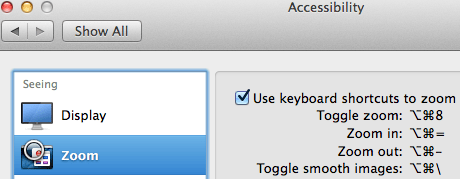
Accessibiity -> Zoom -> enable checkbox” class=”size-medium” /> Preferences -> Accessibiity -> Zoom -> enable checkbox
I didn’t know this was built-in since Mountain Lion and up, but it is, is startable from the keyboard and it’s tremendously convenient when presenting: [WayBack]: OS X Mountain Lion: Zoom content on the screen.
TL;DR:
- System Prefrecences
- Accesibility
- Zoom
- Checkbox
–jeroen
Posted in Apple, iMac, Keyboards and Keyboard Shortcuts, Mac, Mac OS X / OS X / MacOS, MacBook, MacBook Retina, MacBook-Air, MacBook-Pro, MacMini, macOS 10.12 Sierra, OS X 10.10 Yosemite, OS X 10.11 El Capitan, OS X 10.8 Mountain Lion, OS X 10.9 Mavericks, Power User | Leave a Comment »
Posted by jpluimers on 2017/08/28

CompuLab 4K Display Emulator (fit-Headless 4K)
The MacMini is a bit dumb as it won’t enable the GPU when there is no display attached. Which means headless operation is cumbersome as display rendering is very slow.
There are a few tricks of which the off-the-shelve HDMI solutions work best.
You can buy them at Amazon:

CompuLab Display Emulator (fit-Headless)
Sources:
Basically the trick to simulate a monitor with a dummy load works for other display connectors as well (most of them work fine with 75 ohm resistors, usually a bit lower or higher works just as well):
Read the rest of this entry »
Posted in Apple, Mac, Mac OS X / OS X / MacOS, MacMini, OS X 10.10 Yosemite, OS X 10.11 El Capitan, OS X 10.9 Mavericks, Power User | Leave a Comment »
Posted by jpluimers on 2017/08/11
Posted in Apple, iMac, Mac, Mac OS X / OS X / MacOS, Mac OS X 10.5 Leopard, Mac OS X 10.6 Snow Leopard, Mac OS X 10.7 Lion, MacBook, MacBook Retina, MacBook-Air, MacBook-Pro, MacMini, OS X 10.10 Yosemite, OS X 10.11 El Capitan, OS X 10.8 Mountain Lion, OS X 10.9 Mavericks | Leave a Comment »
Posted by jpluimers on 2017/06/12
You can use this package to install OS X on an empty partition, but perhaps more interestingly, you can also use it to upgrade existing OS X installations to a newer version of the OS X. There are many tools and workflows that support the installation of Apple packages; you can use these together with an OS X installation package to upgrade machines to the latest version of OS X.This is especially interesting when used with tools like Munki — you can automate the upgrade of a group of machines while still preserving user data, or offer an upgrade as a “Self-Service”-type option where a user can initiate an OS X upgrade themselves without needing to have administrative rights.
I will probably need this one day.
Source: munki/createOSXinstallPkg: Tools for packaging OS X installers
–jeroen
Posted in Apple, iMac, Mac, Mac OS X / OS X / MacOS, MacBook, MacBook Retina, MacBook-Air, MacBook-Pro, MacMini, OS X 10.10 Yosemite, OS X 10.11 El Capitan, OS X 10.9 Mavericks, Power User | Leave a Comment »
Posted by jpluimers on 2017/03/31
In addition to my post about Mac OS X: restarting Google Drive when it shows a spinning wheel, restarting a hanging Tunnelblick is even easier:
killall Tunnelblick

open -a Tunnelblick
–jeroen
Posted in Apple, bash, Development, iMac, Mac, Mac OS X / OS X / MacOS, MacBook, MacBook Retina, MacBook-Air, MacBook-Pro, MacMini, OS X 10.10 Yosemite, OS X 10.11 El Capitan, OS X 10.9 Mavericks, Power User, Scripting, Software Development | Leave a Comment »
Posted by jpluimers on 2017/03/30
Some links that helped me getting FTDI USB serial communication to Raspberry Pi systems going:
–jeroen
Posted in Apple, Communications Development, Development, Hardware Development, Hardware Interfacing, iMac, Legacy Ports: COM, Mac, Mac OS X / OS X / MacOS, MacBook, MacBook Retina, MacBook-Air, MacBook-Pro, MacMini, OS X 10.10 Yosemite, OS X 10.9 Mavericks, Power User, Raspberry Pi, USB | Leave a Comment »
Posted by jpluimers on 2017/03/29
 Every now and then, Google Drive on Mac OS X gets confused and starts showing the spinning wheel when hovering over the menu bar icon similar to for instance DropBox does every once in a while.
This is how to terminate and restart Google Drive from the terminal (no need for su):
killall -v -SIGKILL Google\ Drive

open -a Google\ Drive
Alternatively you can start Google Drive using this:
/Applications/Google\ Drive.app/Contents/MacOS/Google\ Drive &
I found this executable through osx – Find all executable files within a folder in terminal – Ask Different
Note that this won’t kill Google Drive as it sends the TERM signal (SIGTERM):
killall -v Google\ Drive
–jeroen
Posted in Apple, bash, Development, Google, GoogleDrive, iMac, Mac, Mac OS X / OS X / MacOS, MacBook, MacBook Retina, MacBook-Air, MacBook-Pro, MacMini, OS X 10.10 Yosemite, OS X 10.11 El Capitan, OS X 10.8 Mountain Lion, OS X 10.9 Mavericks, Power User, Scripting, Software Development | 1 Comment »


 The Wiert Corner - irregular stream of stuff