The Wiert Corner – irregular stream of stuff

Jeroen W. Pluimers on .NET, C#, Delphi, databases, and personal interests

  • My badges

  • Twitter Updates

  • My Flickr Stream

  • Pages

  • All categories

  • Enter your email address to subscribe to this blog and receive notifications of new posts by email.

    Join 1,860 other subscribers

Archive for the ‘Apple’ Category

MacOS “mds_stores” high CPU usage

Posted by jpluimers on 2021/03/15

I notices a high CPU usage, so searched for [Wayback] “mds_stores” – Google Search.

There I quickly found out this is the Spotlight indexer using a lot of CPU.

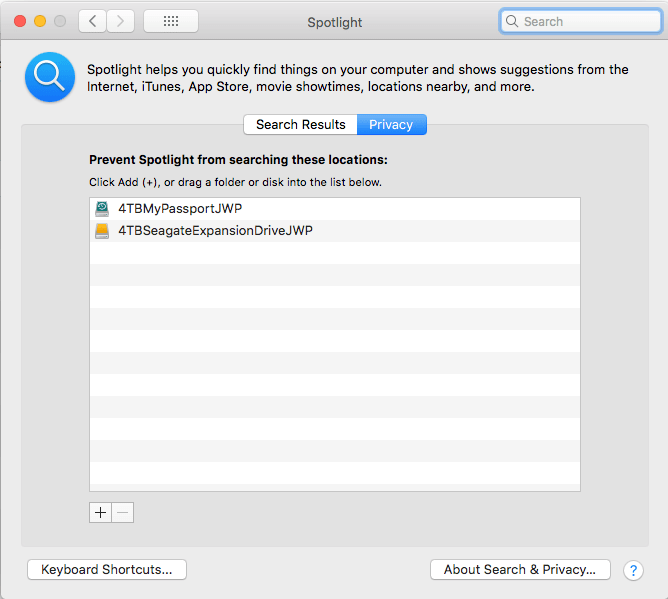
From that, it was easy to track down: I had added a second 4TB backup disk, but forgot to add it to the Spotlight indexing exclusion list, where you get by following these steps:

  1. Open “Preferences”
  2. Search for “Spotlight”
  3. Click on the “Privacy” button
  4. Click on the “+” button to add a new folder
  5. Browse to the top of the list inside your computer to find the volumes to exclude

Now it is on it:

Related: [WayBack] [FIXED] mds_stores Process Consuming High CPU Usage – MacMetric

–jeroen

Posted in Apple, Mac OS X / OS X / MacOS, Power User, SpotLight | Leave a Comment »

Redux: Mac OS X – Spotlight not finding many files: force a rescan solved it

Posted by jpluimers on 2021/02/22

I bumped into a case where none of the steps in Mac OS X – Spotlight not finding many files: force a rescan solved it helped.

The problem was that my SD card at  /Volumes/SanDisk400GB/ was not indexed any more, but the SSD was.

These steps solved it:

$ sudo mdutil -i off /Volumes/SanDisk400GB/
2019-02-25 16:32:47.097 mdutil[14810:3728038] mdutil disabling Spotlight: /Volumes/SanDisk400GB -> kMDConfigSearchLevelFSSearchOnly
    Indexing disabled.
$ sudo mdutil -i on /Volumes/SanDisk400GB/
/Volumes/SanDisk400GB:
    Indexing enabled. 
$ sudo mdutil -E /Volumes/SanDisk400GB/
/Volumes/SanDisk400GB:
    Indexing enabled. 
$ sudo mdutil -E /
/:
    Indexing enabled. 
$ sudo mdutil -p

I am not sure if any of these can be omitted.

An odd thing: sudo mdutil -s does not show any output on progress. It is too late now, but I suspect it requires a volume parameter, just like -i and -E require.

–jeroen

Posted in Apple, Mac OS X / OS X / MacOS, Power User | Leave a Comment »

Still looking for base64url decoding tools, both on-line and for MacOS homebrew

Posted by jpluimers on 2021/02/11

Remember the screenshot on the right from yesterdays post Kristian Köhntopp explaining theories?

In the end, I:

  1. saved that tweet
  2. in archive.is
  3. then took the screenshot image from there (see below)
  4. cut out the grey parts, then posted the middle part

I much more would have used the screenshot functionality of Google as described here by Terence Eden:

[WayBack] twitter – How to convert a tweet to image – Stack Overflow

Google has a secret screenshot API

For example, you can use it to get a screenshot of a tweet like this

https://www.googleapis.com/pagespeedonline/v1/runPagespeed?screenshot=true&strategy=mobile&url=https%3a%2f%2ftwitter.com%2fedent%2fstatus%2f661570680253755392

At the bottom of that JSON response, you’ll see

"screenshot": {
     "data": "_9j_4AAQSkZJRgAB.....=",
     "height": 569,
     "mime_type": "image/jpeg",
     "width": 320
 }

You will need to Base64 decode it using the URL and Filename safe alphabet.

That will give you a JPG screenshot of the Tweet.

I was hoping for an on-line way, so I followed [WayBack] Google’s Secret Screenshot API – Terence Eden’s Blog.

The blog post pointed me to a Python based script ([WayBack] Python-Twitter-Hacks/websiteScreenshot.py at master · edent/Python-Twitter-Hacks · GitHub) but had no online way.

So I tried out a few on-line things myself that failed:

Then I found out the script was just a proof of concept with hard coded URL and filename.

So I forked the repository, and fixed the script basing it on Python 3.

More on that next week.

Related:

  • [WayBack] RFC 4648 – The Base16, Base32, and Base64 Data Encodings: Base 64 Encoding with URL and Filename Safe Alphabet:
       The Base 64 encoding with an URL and filename safe alphabet has been
       used in [12].
    ...
       An alternative alphabet has been suggested that would use "~" as the
       63rd character.  Since the "~" character has special meaning in some
       file system environments, the encoding described in this section is
       recommended instead.
    ...
       This encoding may be referred to as "base64url".  This encoding
       should not be regarded as the same as the "base64" encoding and
       should not be referred to as only "base64". 
    ...
       This encoding is technically identical to the previous one, except
       for the 62:nd and 63:rd alphabet character, as indicated in Table 2.
    ...
             Table 2: The "URL and Filename safe" Base 64 Alphabet
    
         Value Encoding  Value Encoding  Value Encoding  Value Encoding
             0 A            17 R            34 i            51 z
             1 B            18 S            35 j            52 0
             2 C            19 T            36 k            53 1
             3 D            20 U            37 l            54 2
             4 E            21 V            38 m            55 3
             5 F            22 W            39 n            56 4
             6 G            23 X            40 o            57 5
             7 H            24 Y            41 p            58 6
             8 I            25 Z            42 q            59 7
             9 J            26 a            43 r            60 8
            10 K            27 b            44 s            61 9
            11 L            28 c            45 t            62 - (minus)
            12 M            29 d            46 u            63 _
            13 N            30 e            47 v           (underline)
            14 O            31 f            48 w
            15 P            32 g            49 x
            16 Q            33 h            50 y         (pad) =
    

–jeroen

Read the rest of this entry »

Posted in Apple, Development, Encoding, Home brew / homebrew, Mac OS X / OS X / MacOS, Power User, Software Development, Web Browsers | Leave a Comment »

bash – How to get the primary IP address of the local machine on Linux and OS X? – Stack Overflow

Posted by jpluimers on 2021/02/05

[WayBack] bash – How to get the primary IP address of the local machine on Linux and OS X? – Stack Overflow (thanks [WayBackCollin Anderson!):

I tried on OS X 10.13.6 (macOS High Sierra) and these two work fine:

ip route get 1 | awk '{print $NF;exit}'

and

ip route get 8.8.8.8 | head -1 | cut -d' ' -f8

The first one needs the $ back-slash escaped as bash alias; the second does not need that.

Related:

–jeroen

Posted in *nix, *nix-tools, Apple, bash, Mac OS X / OS X / MacOS, macOS 10.13 High Sierra, Power User | Leave a Comment »

Cool: Apple mini-assembler found inside Woz’ monitor inside Apple II Integer Basic

Posted by jpluimers on 2021/01/18

From a while back: [WayBack] This week, a mini-demo of the mini-assembler found inside Woz’ monitor inside Apple II Integer Basic. CALL –151 F666G … – mos6502 – Google+

This week, a mini-demo of the mini-assembler found inside Woz’ monitor inside Apple II Integer Basic.
CALL –151
F666G
You can find reconstructed sources in Jeff Tranter’s repo here:
https://github.com/jefftranter/6502/tree/master/asm/Apple%5D%5BMonitor
where we see credits to Steve Wozniak and Allen Baum. But in this oral history it seems the assembler was Baum’s work:
“Baum: So it was brute force, very simple and fit into 256 bytes if you already had the 256-byte disassembler.”
https://youtu.be/wN02z1KbFmY?t=3941
Anyhow, one page of code – or two – is very impressive!

For more info, try searching for F666G! (We wonder at this memorable address – the Apple I price was $666.)

Related:

–jeroen

Read the rest of this entry »

Posted in 6502, Apple, Apple I, Apple ][, History | Leave a Comment »

Interesting pieces of RetroMacCast : RMC Episode 433: Clamshell G4 iBook – first virus and Apple ][ forever

Posted by jpluimers on 2021/01/04

From the [WayBackRetroMacCast : RMC Episode 433: Clamshell G4 iBook the most interesting pieces to me were these:

–jeroen

Posted in 6502, Apple, Apple ][, History, Power User | Leave a Comment »

mkcert: valid HTTPS certificates for localhost (Windows/Mac/Linux) — a short blog post about it, by FiloSottile

Posted by jpluimers on 2020/12/21

Cool: [WayBack] Filippo Valsorda on Twitter: “mkcert: valid HTTPS certificates for localhost — a short blog post mkcert now that it’s almost done 🔒 “

Blog post: [WayBackmkcert: valid HTTPS certificates for localhost:

The web is moving to HTTPS, preventing network attackers from observing or injecting page contents. But HTTPS needs TLS certificates, and while deployment is increasingly a solved issue thanks to the ACME protocol and Let’s Encrypt, development still mostly ends up happening over HTTP because no one can get an…

Code: [WayBack] GitHub – FiloSottile/mkcert: A simple zero-config tool to make locally trusted development certificates with any names you’d like.

It is cross platform and works way better than good old Windows makecert (which is from the 2000’s era: [Archive.is] Public Key Infrastructure: Second European PKI Workshop: Research and … – David Chadwick, Greece) European PKI Workshop: Research and Applications (1st : 2004 : Samos Island – Google Books).

Related:

–jeroen

Read the rest of this entry »

Posted in *nix, Apple, Encryption, HTTPS/TLS security, Linux, Mac OS X / OS X / MacOS, Power User, Security, Windows | Leave a Comment »

high sierra – Remote Desktop 10.2.3 Database Creation Error; 10.2.1 runs fine; 10.2.2 crashes: how to find actual cause(s)? – Ask Different

Posted by jpluimers on 2020/12/21

From a while back:

What would be good steps to find the cause of the below errors?

I get this error when running Microsoft Remote Desktop 10.2.3 or higher on MacOS High Sierra:

Database Creation Error

"An error occurred during persistent store migration.

[Domain: NSCocoaErrorDomain, Code: 134110]"

[WayBack] high sierra – Remote Desktop 10.2.3 Database Creation Error; 10.2.1 runs fine; 10.2.2 crashes: how to find actual cause(s)? – Ask Different

Related Twitter thread: [WayBackJeroen Pluimers on Twitter: “Help! Stuck at @msremotedesktop 10.2.1 (that cannot add new users) on High Sierra because 10.2.2 keeps crashing, and both 10.2.3 and 10.2.4 cannot migrate: “An error occurred during persistent store migration. [Domain: NSCocoaErrorDomain, Code: 134110]””

Tried beta: 10.2.6 (1529) at [WayBackMicrosoft_Remote_Desktop_Beta.app.zip from [WayBack] Microsoft Remote Desktop for Mac – HockeyApp

--jeroen

Read the rest of this entry »

Posted in Apple, Mac OS X / OS X / MacOS, macOS 10.13 High Sierra, Power User, Remote Desktop Protocol/MSTSC/Terminal Services, Windows | Leave a Comment »

Copy files on Mac OS X using drag-and-drop | alvinalexander.com: secret is to hold the Option key

Posted by jpluimers on 2020/12/14

The Finder pure keyboard way of file copy+paste is using CommandC at the source position followed by CtrlCommandV in the destination position (in the destination position,  CommandV will do only a cut+paste) as the paste/copy decision is determined in the final stage.

This is unlike Windows, where CtrlC means copy, CtrlX means cut, and CtrlV finishes the initial action to copy+paste or cut+paste

If you combine mouse dragging, on the Mac it becomes Optiondrag, whereas on Windows it still is Ctrldrag.

I think the Windows ones are more consistent, especially when looking at them in table form:

Action Windows Mac
Keyboard-Only Mouse-drag Keyboard-Only Mouse-drag
copy+paste CtrlC; CtrlV Ctrldrag CommandC; Ctrl+CommandV Optiondrag
cut+paste (or move) CtrlX; CtrlV drag CommandC; CommandV drag

(table with help of HTML Table generator – TablesGenerator.com)

Mac shortcuts via:

–jeroen

Posted in Apple, Mac, Mac OS X / OS X / MacOS, Power User, Windows | Leave a Comment »

Keep alive SSH connection with server in MacOs Mojave – Ask Different

Posted by jpluimers on 2020/11/30

Reminder to self: check if this has been worked-around yet: [WayBack] Keep alive SSH connection with server in MacOs Mojave – Ask Different

In El Captain, to maintain active a SSH connection you should edit ~/.ssh/config file to add your additional rules.

nano ~/.ssh/config

To maintain active for 1 hour you should add:

Host *
   ServerAliveInterval 3600

I cannot recreate the same situation is MacOS Mojave, it continue to close connections after some minutes. Any suggestions about this?

Via: [WayBackAsk Different on Twitter: “Can you answer this? Keep alive SSH connection with server in MacOs Mojave #ssh”

–jeroen


Posted in Apple, Mac OS X / OS X / MacOS, Power User | Leave a Comment »