The Wiert Corner – irregular stream of stuff

Jeroen W. Pluimers on .NET, C#, Delphi, databases, and personal interests

  • My badges

  • Twitter Updates

  • My Flickr Stream

  • Pages

  • All categories

  • Enter your email address to subscribe to this blog and receive notifications of new posts by email.

    Join 1,839 other subscribers

Archive for the ‘Apple’ Category

FileZilla not available as homebrew cask any more

Posted by jpluimers on 2019/01/07

After an outrage about AdWare mid last year on the Windows side of things, a new outrage on the Mac side of things at the end of last year caused FileZilla to be removed from the homebrew cask repository.

They do not care that there is a non-bundle version that (right now) does not have adware, as FileZilla could put AdWare in that version at any moment in time.

After trying to update, it will disappear, and you might get an error like this (a full log is below the fold):

"Error: Cask 'filezilla' is unavailable: No Cask with this name exists."

Too bad, as FileZilla was fun while it lasted.

For the dare devils, you might want to try the non-bundled version at fosshub, but please run it through at least VirusTotal before installing, and remember: you have to trust yet another man-in-the-middle!

Uninstalling now that the cask has been removed is described in:

Related:


–jeroen

Read the rest of this entry »

Posted in Apple, Power User, Windows | Leave a Comment »

brew update reminder

Posted by jpluimers on 2019/01/01

Reminder to self:

==> Caveats
==> nss
nss is keg-only, which means it was not symlinked into /usr/local,
because Firefox can pick this up instead of the built-in library, resulting in
random crashes without meaningful explanation.

Please see https://bugzilla.mozilla.org/show_bug.cgi?id=1142646 for details.

If you need to have nss first in your PATH run:
echo ‘export PATH=”/usr/local/opt/nss/bin:$PATH”‘ >> ~/.bash_profile

For compilers to find nss you may need to set:
export LDFLAGS=”-L/usr/local/opt/nss/lib”
export CPPFLAGS=”-I/usr/local/opt/nss/include”

For pkg-config to find nss you may need to set:
export PKG_CONFIG_PATH=”/usr/local/opt/nss/lib/pkgconfig”

==> sphinx-doc
sphinx-doc is keg-only, which means it was not symlinked into /usr/local,
because this formula is mainly used internally by other formulae.
Users are advised to use `pip` to install sphinx-doc.

If you need to have sphinx-doc first in your PATH run:
echo ‘export PATH=”/usr/local/opt/sphinx-doc/bin:$PATH”‘ >> ~/.bash_profile

==> sqlite
sqlite is keg-only, which means it was not symlinked into /usr/local,
because macOS provides an older sqlite3.

If you need to have sqlite first in your PATH run:
echo ‘export PATH=”/usr/local/opt/sqlite/bin:$PATH”‘ >> ~/.bash_profile

For compilers to find sqlite you may need to set:
export LDFLAGS=”-L/usr/local/opt/sqlite/lib”
export CPPFLAGS=”-I/usr/local/opt/sqlite/include”

For pkg-config to find sqlite you may need to set:
export PKG_CONFIG_PATH=”/usr/local/opt/sqlite/lib/pkgconfig”

==> openssl
A CA file has been bootstrapped using certificates from the SystemRoots
keychain. To add additional certificates (e.g. the certificates added in
the System keychain), place .pem files in
/usr/local/etc/openssl/certs

and run
/usr/local/opt/openssl/bin/c_rehash

openssl is keg-only, which means it was not symlinked into /usr/local,
because Apple has deprecated use of OpenSSL in favor of its own TLS and crypto libraries.

If you need to have openssl first in your PATH run:
echo ‘export PATH=”/usr/local/opt/openssl/bin:$PATH”‘ >> ~/.bash_profile

For compilers to find openssl you may need to set:
export LDFLAGS=”-L/usr/local/opt/openssl/lib”
export CPPFLAGS=”-I/usr/local/opt/openssl/include”

For pkg-config to find openssl you may need to set:
export PKG_CONFIG_PATH=”/usr/local/opt/openssl/lib/pkgconfig”

==> openssl@1.1
A CA file has been bootstrapped using certificates from the system
keychain. To add additional certificates, place .pem files in
/usr/local/etc/openssl@1.1/certs

and run
/usr/local/opt/openssl@1.1/bin/c_rehash

openssl@1.1 is keg-only, which means it was not symlinked into /usr/local,
because openssl/libressl is provided by macOS so don’t link an incompatible version.

If you need to have openssl@1.1 first in your PATH run:
echo ‘export PATH=”/usr/local/opt/openssl@1.1/bin:$PATH”‘ >> ~/.bash_profile

For compilers to find openssl@1.1 you may need to set:
export LDFLAGS=”-L/usr/local/opt/openssl@1.1/lib”
export CPPFLAGS=”-I/usr/local/opt/openssl@1.1/include”

For pkg-config to find openssl@1.1 you may need to set:
export PKG_CONFIG_PATH=”/usr/local/opt/openssl@1.1/lib/pkgconfig”

==> icu4c
icu4c is keg-only, which means it was not symlinked into /usr/local,
because macOS provides libicucore.dylib (but nothing else).

If you need to have icu4c first in your PATH run:
echo ‘export PATH=”/usr/local/opt/icu4c/bin:$PATH”‘ >> ~/.bash_profile
echo ‘export PATH=”/usr/local/opt/icu4c/sbin:$PATH”‘ >> ~/.bash_profile

For compilers to find icu4c you may need to set:
export LDFLAGS=”-L/usr/local/opt/icu4c/lib”
export CPPFLAGS=”-I/usr/local/opt/icu4c/include”

For pkg-config to find icu4c you may need to set:
export PKG_CONFIG_PATH=”/usr/local/opt/icu4c/lib/pkgconfig”

==> ruby
By default, binaries installed by gem will be placed into:
/usr/local/lib/ruby/gems/2.6.0/bin

You may want to add this to your PATH.

ruby is keg-only, which means it was not symlinked into /usr/local,
because macOS already provides this software and installing another version in
parallel can cause all kinds of trouble.

If you need to have ruby first in your PATH run:
echo ‘export PATH=”/usr/local/opt/ruby/bin:$PATH”‘ >> ~/.bash_profile

For compilers to find ruby you may need to set:
export LDFLAGS=”-L/usr/local/opt/ruby/lib”
export CPPFLAGS=”-I/usr/local/opt/ruby/include”

For pkg-config to find ruby you may need to set:
export PKG_CONFIG_PATH=”/usr/local/opt/ruby/lib/pkgconfig”

==> qt
We agreed to the Qt open source license for you.
If this is unacceptable you should uninstall.

qt is keg-only, which means it was not symlinked into /usr/local,
because Qt 5 has CMake issues when linked.

If you need to have qt first in your PATH run:
echo ‘export PATH=”/usr/local/opt/qt/bin:$PATH”‘ >> ~/.bash_profile

For compilers to find qt you may need to set:
export LDFLAGS=”-L/usr/local/opt/qt/lib”
export CPPFLAGS=”-I/usr/local/opt/qt/include”

For pkg-config to find qt you may need to set:
export PKG_CONFIG_PATH=”/usr/local/opt/qt/lib/pkgconfig”

==> python
Python has been installed as
/usr/local/bin/python3

Unversioned symlinks `python`, `python-config`, `pip` etc. pointing to
`python3`, `python3-config`, `pip3` etc., respectively, have been installed into
/usr/local/opt/python/libexec/bin

If you need Homebrew’s Python 2.7 run
brew install python@2

You can install Python packages with
pip3 install <package>
They will install into the site-package directory
/usr/local/lib/python3.7/site-packages

See: https://docs.brew.sh/Homebrew-and-Python
==> youtube-dl
Bash completion has been installed to:
/usr/local/etc/bash_completion.d

zsh completions have been installed to:
/usr/local/share/zsh/site-functions
==> cabal-install
Bash completion has been installed to:
/usr/local/etc/bash_completion.d
==> node
Bash completion has been installed to:
/usr/local/etc/bash_completion.d
==> hub
Bash completion has been installed to:
/usr/local/etc/bash_completion.d

zsh completions have been installed to:
/usr/local/share/zsh/site-functions
==> gnupg
Once you run this version of gpg you may find it difficult to return to using
a prior 1.4.x or 2.0.x. Most notably the prior versions will not automatically
know about new secret keys created or imported by this version. We recommend
creating a backup of your `~/.gnupg` prior to first use.

For full details on each change and how it could impact you please see
https://www.gnupg.org/faq/whats-new-in-2.1.html
==> mas
Bash completion has been installed to:
/usr/local/etc/bash_completion.d
==> pandoc
Bash completion has been installed to:
/usr/local/etc/bash_completion.d
==> go
A valid GOPATH is required to use the `go get` command.
If $GOPATH is not specified, $HOME/go will be used by default:
https://golang.org/doc/code.html#GOPATH

You may wish to add the GOROOT-based install location to your PATH:
export PATH=$PATH:/usr/local/opt/go/libexec/bin

–jeroen

Posted in Apple, LifeHacker, Mac, Mac OS X / OS X / MacOS, macOS 10.13 High Sierra, Power User | Leave a Comment »

macos – El Capitan /private/var/folders cache files consuming 30–40 GB – Ask Different

Posted by jpluimers on 2018/12/14

[WayBackmacos – El Capitan /private/var/folders cache files consuming 30–40 GB – Ask Different

TL;DR: a reboot will usually clean up most of the chaches and yes you can remove those caches by hand after closing the applications involved.

–jeroen

Posted in Apple, Mac OS X / OS X / MacOS, Power User | Leave a Comment »

Mac OS Phonenix Slides is on GitHub

Posted by jpluimers on 2018/12/07

A long time ago, I bumped into [WayBackMac Photo/Slideshow Viewer that supports recursion: Phoenix Slides, but only recently I discovered it has made it to GitHub as well, so now you can download it from two places:

Despite the Phoenix Slides product name, the repository is at https://github.com/gobbledegook/creevey

–jeroen

Posted in Apple, Mac OS X / OS X / MacOS, macOS 10.12 Sierra, OS X 10.10 Yosemite, OS X 10.8 Mountain Lion, OS X 10.9 Mavericks, Power User | Leave a Comment »

Mac OS X/MacOS: Capturing yourself in Photo Booth without being mirrored

Posted by jpluimers on 2018/12/04

Quite a while back I wrote [WayBackViewing an USB camera on Mac OS X without mirroring.

I still use the solution Quick Camera mentioned there, but also found a solution that works with the Photo Booth application:

Just made a QTZ to counteract the annoying mirror-image which is considered “normal” in Photo Booth. I borrowed a patch from the “Effect.qtz” which is located inside the Photo Booth.app, and I edited it in Quartz Composer . Please note that this will NOT affect the mirror-image which occurs using other effects; they will STILL be mirror images of your subject.

This patch fixes the preview, photos AND video. This patch fixes the SOURCE of the video, not the resulting output images.

[WayBackUN-MIRROR yourself in Photo Booth – patch | MacRumors Forums

Steps to manually create the Quartz file are at [WayBackCamera question: Why is the camera a mirror effect? | Mac Forums

So I learned about Quarts Composer and composition plugins which are basically a visual programming language:

This is unlike another QC that got killed.

–jeroen

[WayBackpicture-2-png.195665 (1314×897)

Read the rest of this entry »

Posted in Apple, Mac OS X / OS X / MacOS, Power User | Leave a Comment »

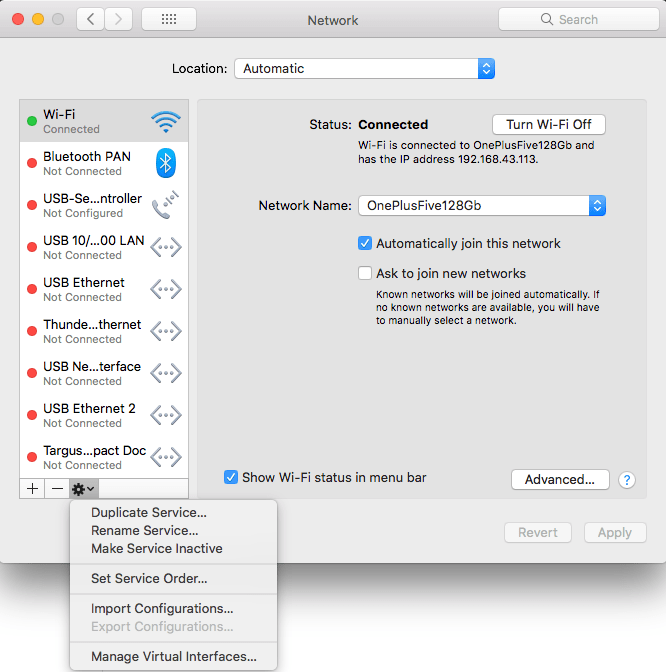
macOS Sierra: Change the order of the network ports your computer uses to connect

Posted by jpluimers on 2018/10/15

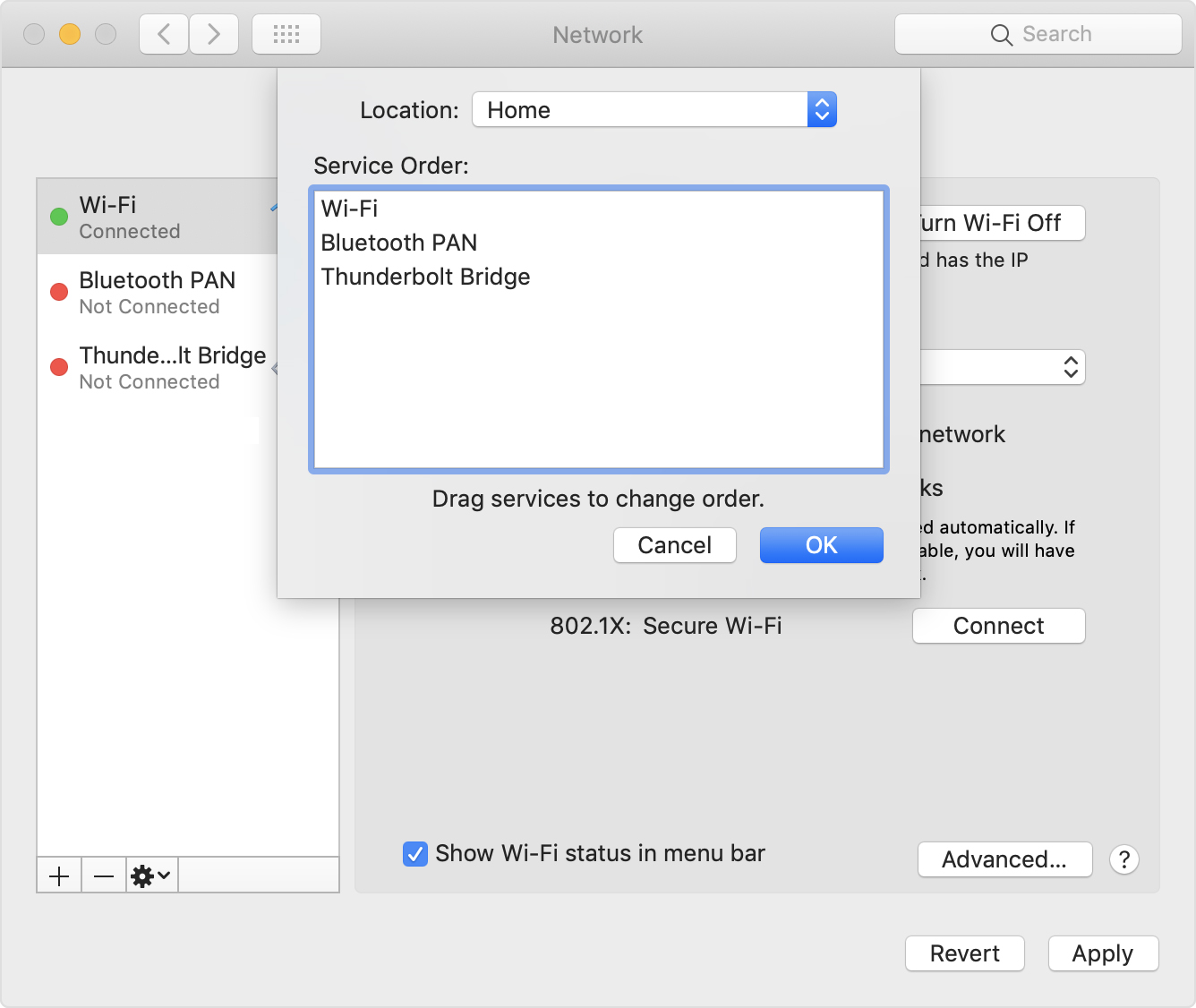
Very useful when you want to give your WiFi less priority than an USB or Thunderbolt network adapter: [WayBack] macOS Sierra: Change the order of the network ports your computer uses to connect.
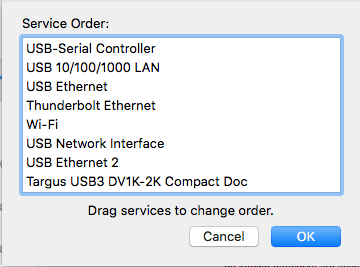
It is not just that the topmost adapter gets more priority: it also determines the DNS search!

Anyway: after choosing “Set Service Order” on the right, choose the order as seen below.

–jeroen

PS: Since Apple is cleaning up their site, only the above WayBack works, but luckily the below link explains it in a very similar way when using Locations:

[WayBack] How to use network locations on your Mac – Apple Support


Posted in Apple, iMac, Mac, Mac OS X / OS X / MacOS, MacBook, Power User | Leave a Comment »

macOS / OS X / Mac OS X: excessive sysmond or mds CPU usage – via Ask Different and osXdaily

Posted by jpluimers on 2018/10/05

If you suffer from [WayBack] macos – Excessive CPU usage from sysmond – Ask Different, then it could be Activity Monitor itself using that CPU.

If you suffer from high CPU usage in mds, then it is likely the Spotlight search indexer acting up: [WayBack] mds – what MDS process is and why it uses CPU on the Mac

–jeroen

Posted in Apple, Mac, Mac OS X / OS X / MacOS, Power User, SpotLight | Leave a Comment »

I am on a Mac that is bound to an AD Domain. The AD Domain has a 90 days pass…

Posted by jpluimers on 2018/08/27

[WayBack] I am on a Mac that is bound to an AD Domain. The AD Domain has a 90 days password expiration policy. When will my password expire? $ cat bin/is-passwor… – Kristian Köhntopp – Google+

For my link archive:


#! /bin/bash —
validFor=$(( 90 * 86400 ))
domainPrefix='/Active Directory/DOMAIN/doma.in/"
lastPW=$(dscl "/$domainPrefix" -read /Users/$USER | awk '/SMBPasswordLastSet/ { print $NF }')
unixPW=$(($lastPW / 10000000 – 11644473600 + $validFor))
expireDate=$(date -r $unixPW)
echo "Password expires $expireDate"

Script copied to [WayBack] Kristian Köhntopp: I am on a Mac that is bound to an AD Domain. The AD Domain has a 90 days password expiration policy. When will my password expire?  · GitHub

–jeroen

Posted in *nix, Apple, bash, Development, Mac, MacBook, MacBook Retina, MacBook-Air, MacBook-Pro, MacMini, Power User, Scripting, Software Development | Leave a Comment »

Upgrade to ‎Microsoft Remote Desktop 10 on the Mac App Store

Posted by jpluimers on 2018/08/17

If you are still on version 8, then note this version will be deprecated at 20180901, so it is time to upgrade to [Archive.is‎Microsoft Remote Desktop 10 on the Mac App Store

[Archive.is] ‎Microsoft Remote Desktop 8 on the Mac App Store is now at version 8.0.44, which changed one thing:

This update adds a dismissible banner to the app UI to message the fact that the client will be deprecated soon. You can start using the new version of Remote Desktop today by downloading Microsoft Remote Desktop 10 from the App Store.

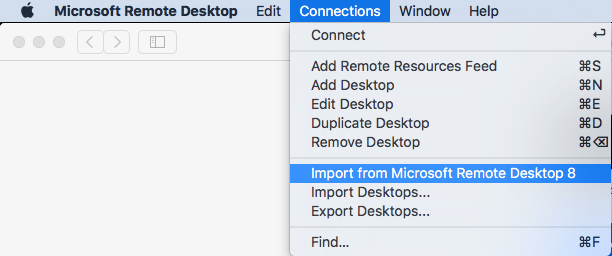
It is easy to import your RDP desktops from version 8 into version 18: in the menu, select Connections, then Import from Microsoft Remote Desktop 8, then enter your credentials so the saved logon passwords can be imported from the [WayBack] KeyChain.

A few things to note:

  • importing the Microsoft Remote Desktop 8 fails to import the Local Resource bindings
  • in Microsoft Remote Desktop 10, editing Local Resource binding right after adding them will crash

Background reading:

The full version histories of both:

Read the rest of this entry »

Posted in Apple, Power User, Remote Desktop Protocol/MSTSC/Terminal Services, Windows | Leave a Comment »

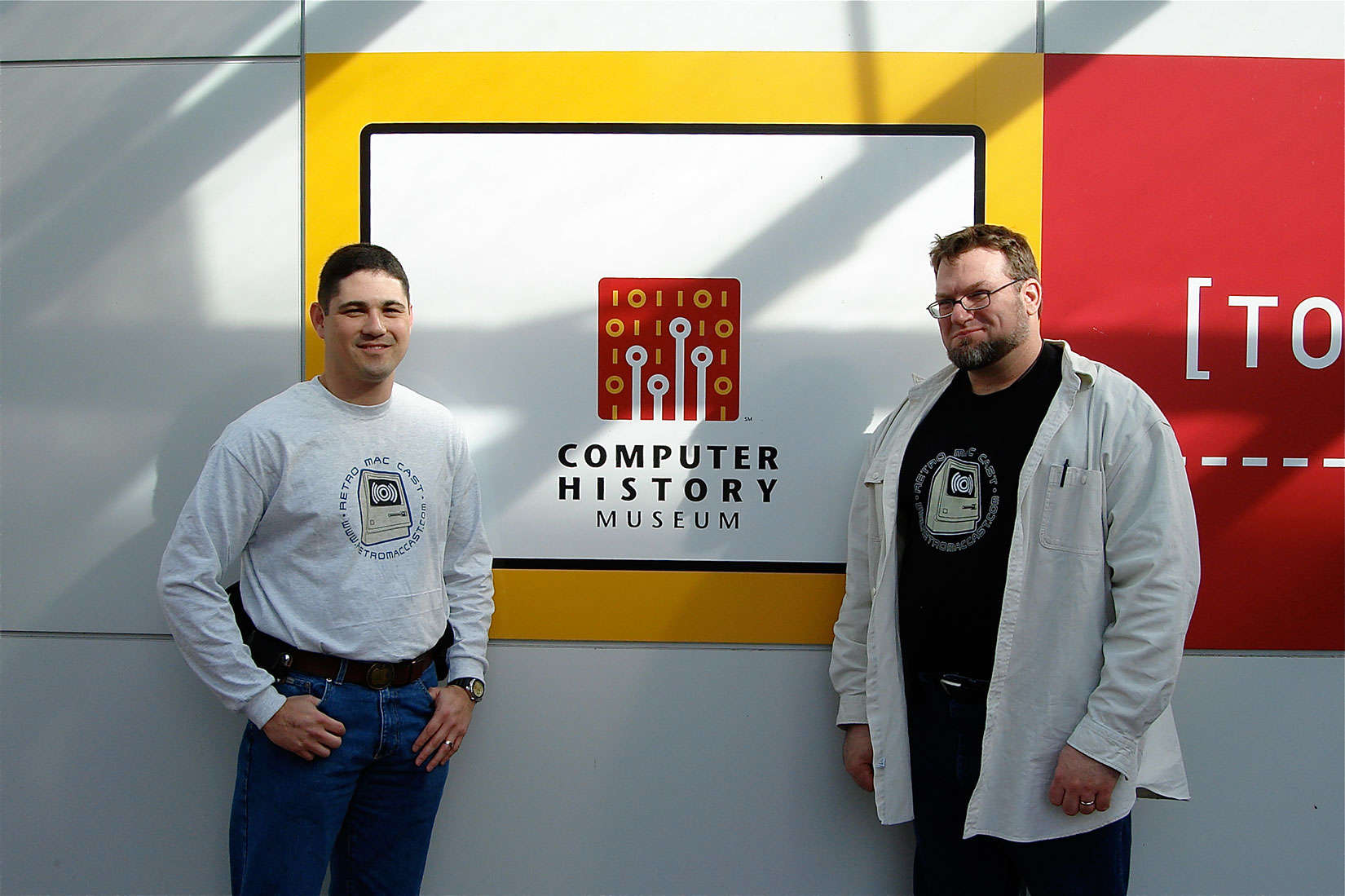
Two fans were podcasting at RetroMacCast before it was cool

Posted by jpluimers on 2018/08/07

Around this time, episode 500 of RetroMacCast should be out.

It’s an “about weekly” podcast centered around classic Apple computers, mainly of the Macintosh kind but occasionally also on the Apple I, ][, //e, //c and ///, IIgs and Lisa kinds.

After all these years since they started in 2006, It’s still fun to listen to.

Occasionally they do a vodcast on YouTube, for instance their 100th show below.

New episodes are announced here:

Source: [WayBackTwo fans were podcasting at RetroMacCast before it was cool

–jeroen

Read the rest of this entry »

Posted in //e, Apple, Apple ][, Classic Macintosh, History, Macintosh SE/30, Power User | Leave a Comment »