The Wiert Corner – irregular stream of stuff

Jeroen W. Pluimers on .NET, C#, Delphi, databases, and personal interests

  • My badges

  • Twitter Updates

  • Pages

  • All categories

  • Enter your email address to subscribe to this blog and receive notifications of new posts by email.

    Join 1,839 other subscribers

Archive for the ‘Apple’ Category

PowerShell on Mac OS X and other non-Windows systems

Posted by jpluimers on 2018/07/17

I wasn’t expecting it to be so easy to install PowerShell on Mac OS X:

brew install Caskroom/cask/powershell

In the background it executes this script: https://github.com/caskroom/homebrew-cask/blob/master/Casks/powershell.rb. which indirectly goes through the URL template https://github.com/PowerShell/PowerShell/releases/download/v#{version}/powershell-#{version}.pkg.

On other non-Windows systems, you have to go through GitHub yourself: https://github.com/powershell/PowerShell. The PowerShell team at Microsoft has many more repositories including the Win32-OpenSSH port which you can find through https://github.com/PowerShell.

At the time of writing, PowerShell was available for these platforms:

Platform Downloads How to Install
Windows 10 / Server 2016 (x64) .msi Instructions
Windows 8.1 / Server 2012 R2 (x64) .msi Instructions
Windows 7 (x64) .msi Instructions
Windows 7 (x86) .msi Instructions
Ubuntu 16.04 .deb Instructions
Ubuntu 14.04 .deb Instructions
CentOS 7 .rpm Instructions
OpenSUSE 42.1 .rpm Instructions
Arch Linux Instructions
Many Linux distributions .AppImage Instructions
macOS 10.11 .pkg Instructions
Docker Instructions

The first version I installed on Mac OS X was this: ==> Downloading https://github.com/PowerShell/PowerShell/releases/download/v6.0.0-alpha.17/powershell-6.0.0-alpha.17.pkg

By now I really hope it is out of Alpha state.

–jeroen

via:

Posted in *nix, Apple, CommandLine, Development, iMac, Linux, Mac, Mac OS X / OS X / MacOS, MacBook, MacBook Retina, MacBook-Air, MacBook-Pro, MacMini, openSuSE, Power User, PowerShell, PowerShell, Scripting, Software Development, SuSE Linux, Ubuntu | Leave a Comment »

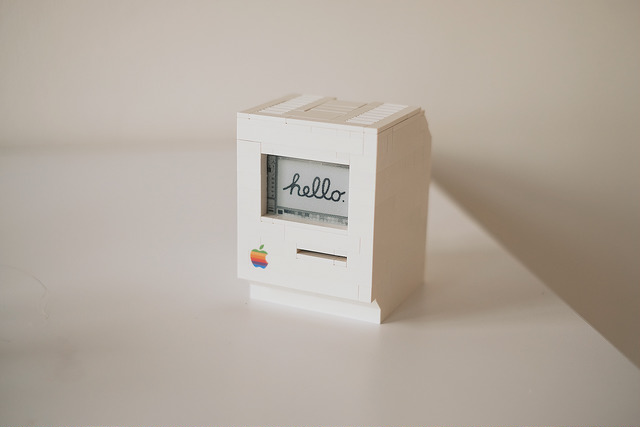
LEGO Macintosh classic with Wi-Fi and e‑paper display running docker

Posted by jpluimers on 2018/07/06

A Wi-Fi enabled 1990 Macintosh Classic built with LEGO, powered by a Raspberry Pi Zero running docker and a 2.7″ e-paper display by EmbeddedArtists.

Cool stuff!

Source: [Archive.isLEGO Macintosh classic with Wi-Fi and e‑paper display running docker

Via: [WayBack] This guy built a (kind of) working Lego Macintosh, and now you can too … | 9to5Mac

This should run well with a Classic Color Macintosh System 7 emulated on Raspberry Pi: [WayBack] On this tutorial I show you how to run Mac II OS color on your Raspberry PI, I have also included a compiled version for Windows. Running Mac OS 7 on Raspberry Pi with Color – Novaspirit

via:

ROM images: [WayBackIndex of /pub/software/ROM/Macintosh 68K

–jeroen

Read the rest of this entry »

Posted in Apple, Classic Macintosh, Development, Hardware Development, History, Macintosh SE/30, Power User, Raspberry Pi | Leave a Comment »

Apple Extends Free Repairs of Anti-Reflective Coating on Select MacBook and MacBook Pro Models – Mac Rumors

Posted by jpluimers on 2018/07/02

I hear stories of people having their replacement screens stain as well, some of them get a renewed free repair. [WayBackApple Extends Free Repairs of Anti-Reflective Coating on Select MacBook and MacBook Pro Models – Mac Rumors.

Affected models for an initial repair:

  • MacBook Pro (13-inch, Early 2013)
  • MacBook Pro (15-inch, Early 2013)
  • MacBook Pro (13-inch, Late 2013)
  • MacBook Pro (15-inch, Late 2013)
  • MacBook Pro (13-inch, Mid 2014)
  • MacBook Pro (15-inch, Mid 2014)
  • MacBook Pro (13-inch, Early 2015)
  • MacBook Pro (15-inch, Mid 2015)
  • MacBook Pro (13-inch, 2016)
  • MacBook Pro (15-inch, 2016)
  • MacBook Pro (13-inch, 2017)
  • MacBook Pro (15-inch, 2017)
  • MacBook (12-inch, Early 2015)
  • MacBook (12-inch, Early 2016)
  • MacBook (12-inch, Early 2017)

–jeroen

Read the rest of this entry »

Posted in Apple, Mac, MacBook, MacBook Retina, MacBook-Pro, Power User | Leave a Comment »

SD cards solutions to add 256 gigabyte to your non USB-C Retina MacBook

Posted by jpluimers on 2018/06/12

I was asked what I used to extend my Retina Macbook storage. Mine still has an SD-card slot so the sit flush solutions below work fine.

I could have used USB-3 to micro-SD card adapters that sit flush.

There are no USB-C to micro-SD adapters that sit flush, so they do not work for more modern Retina MacBook devices.

Via: [WayBack] Haha wow. Apple announced new Macbook Pro’s just little over 6 months after they did the last models. And now you do get all the stuff you wanted back then… – Jeroen Wiert Pluimers – Google+ (except 32 gigabyte RAM, that’s for later).

Either [WayBackTranscend 256GB JetDrive Lite 360 Storage Expansion Card for 15-Inch MacBook Pro with Retina Display (TS256GJDL360)

Or the adapter [WayBack] BASEQI aluminum microSD Adapter for MacBook Pro 15″ Retina (Late 2013 onwards) and one of:

–jeroen

Read the rest of this entry »

Posted in Apple, LifeHacker, Mac, MacBook, MacBook Retina, MacBook-Air, MacBook-Pro, Power User | Leave a Comment »

Stop Spotlight from Indexing Time Machine Backup Volumes & External Drives

Posted by jpluimers on 2018/06/11

  1. Connect the volume you want excluded to the Mac, even if Spotlight is currently indexing
  2. Launch “System Preferences” and click on “Spotlight” followed by the ‘Privacy’ tab
  3. Drag the drives icon into the Privacy window

Source and more information (including how to do this from the terminal): [WayBackStop Spotlight from Indexing Time Machine Backup Volumes & External Drives

–jeroen

Posted in Apple, iMac, Mac, Mac OS X / OS X / MacOS, MacBook, MacBook Retina, MacBook-Air, MacBook-Pro, MacMini, macOS 10.12 Sierra, OS X 10.10 Yosemite, OS X 10.11 El Capitan, OS X 10.8 Mountain Lion, OS X 10.9 Mavericks, Power User | Leave a Comment »

Apple II Ethernet Module – a2RetroSystems

Posted by jpluimers on 2018/05/25

Reminder to self: see if I can order this:

Apple II Ethernet Module – This product is based on the Wiznet W5100 chip. It has an embedded hardware IP stack. Contiki, IP65, Marinetti and ADTPro have been updated to work with the new card.

We will be using Itead as our current PCB supplier.
The card will be assembled by Circuits Central

Source: [WayBackWelcome to a2RetroSystems

Other links:

–jeroen

Read the rest of this entry »

Posted in //e, 6502, Apple, Apple ][, History, Power User | Leave a Comment »

Open Apple #66 (December 2016) : Glenda “The Atom” Adams | Open Apple

Posted by jpluimers on 2018/05/21

From a while back: [WayBack] Open Apple #66 (December 2016) : Glenda “The Atom” Adams | Open Apple

This month on Open Apple, we sit down with Glenda Adams, better known on the Apple II as The Atom. She was a cracker of some note back in the 1980s, and she shares great stories with us…

It reminded me of the days I started to learn programming. Good memories. @glenda_atom was way ahead of me (:

–jeroen

Posted in //e, 6502, Apple, Apple ][, Classic Macintosh, History, Macintosh SE/30, Power User | Leave a Comment »

Chris Bensen: Make Bootable macOS Sierra USB Install Drive

Posted by jpluimers on 2018/04/30

For my link archive: [WayBackChris Bensen: Make Bootable macOS Sierra USB Install Drive

–jeroen

Posted in Apple, Mac OS X / OS X / MacOS, macOS 10.12 Sierra, Power User | Leave a Comment »

More old Apple documentation

Posted by jpluimers on 2018/04/27

It’s been a while back, but these are part of bitsavers.org:

  1. [WayBack] http://bitsavers.trailing-edge.com/pdf/apple/service/PN_072-0213F_Apple_Service_Technical_Procedures_Peripheral_Interface_Guide-Jan_1991.pdf
  2. [WayBack] http://bitsavers.trailing-edge.com/pdf/apple/service/Apple_Service_Source_LaserWriter_Pro.pdf

I expect few people to still have a functioning Apple LaserWriter Pro as – despite them bing very solid devices – having them last for almost 25 years is quite a feat.

But I do know many people have machines from the Apple II through Macintosh II era, and that’s what the first manual is about. Some of the contents:

Peripheral Interface Guide rev. Jan 91

Macintosh Family Computers

  • Introduction 3
  • Computer Port Locations 4
  • Computer Ports 6
    • Modem and Printer Connectors – DE-9 6
    • Modem and Printer Connectors – Mini DIN-8 7
    • SCSI Connector (Pins 1-12) 8
    • SCSI Connector (Pins 13-25) 9
    • Apple Desktop Bus Connector 10
    • Keyboard Connector 11
    • Mouse Connector 11
    • Audio Input Connector 12
    • Audio Output Connector – Monaural 12
    • Audio Output Connector – Stereo 12
    • External Disk Drive Connector 13
    • External Video Connector 14
    • External Video Connector – Macintosh Portable 14
  • Interface Cards 16
    • Macintosh Display Cards 4/8, 8/24, 16 and 8/24-GC
    • Macintosh II High-Resolution and I-bit Monochrome Video Cards 17
    • Macintosh II Portrait Display and Two-Page Monochrome Monitor Video Cards (Current Version) 18
    • Macintosh II Portrait Display and TWO-Page Monochrome Monitor Video Cards (Obsolete Version) 19
    • EtherTalk Interface and EtherTalk NB Cards 20
    • TokenTalk NB Interface Card 20
    • Coax/fwinax Interface Card – Coax Connector 21
    • Coax/fwinax Interface Card – Twinax Connector 21
    • Serial NB Interface Card (Pins 1-20) 22
    • Serial NB Interface Card (Pins 21-40) 23
    • Serial NB Interface Card (Pins 41-62) 24

Apple II Family Computers

  • Introduction 3
  • Computer Port Locations 4
  • Apple IIGS Computer Ports 5
    • Sound Input/Output Connector 5
    • Audio Connector 5
    • Composite Video Connector 5
    • Modem and Printer Connectors 6
    • Apple Desktop Bus Connector 6
    • Disk Drive Connector 7
    • RGB Video Connector 8
    • Joystick/Hand Controller Connector 9
  • Apple lIc/IIc plus Computer Ports 10
    • Modem and Printer Connectors – Mini DIN-5 10
    • Modem and Printer Connectors – Mini DIN-8 11
    • Joystick/Hand Controller/Mouse Connector 12
    • Video Expansion Connector 13
    • External Disk Drive Connector 14
    • Composite Video Connector 15
    • Audio Connector 15
    • Power Adapter Connector 15
  • Apple II/II Plus/lIe Computer Ports 16
    • Cassette Input Connector 16
    • Cassette Output Connector 16
    • Composite Video Connector 17
    • Auxiliary Video Connector 17
    • Game Controller Connector 18
    • Joystick/Hand Controller Connector 19
    • Apple II Interface Cards 20
    • Communications Card Pin-outs 20
    • Super Serial Card Pin-outs 21
    • Super Serial Card Printer Mode – Switch SW1 22
    • Super Serial Card Printer Mode – Switch SW2 23
    • Super Serial Card Communication Mode – Switch SWI 24
    • Super Serial Card Communication Mode – Switch SW2 25
    • Serial Interface Card Pin-outs 26
    • Serial Interface Card Switch Settings 27
    • Parallel Printer and Centronics Printer Interface Card Pin-outs 28
    • IEEE-488 Interface Pin-outs 29
    • Parallel Interface Card Pin-outs 30
    • Parallel Interface Card Switch Settings 31
    • Apple II Video Overlay Card Pin-outs 32
    • Apple II SCSI and High-Speed SCSI Cards Pin-outs 33
    • Graphics Tablet Interface Pin-outs – Pen 34
    • Graphics Tablet Interface Pin-outs – Tablet 34
    • Peripheral Connections 35
    • Apple II/II Plus/IIe Peripheral Connections 35
    • Apple lIe Peripheral Connections 36
    • Apple IIGS and lIe Plus Peripheral Connections 37
Apple III & Lisa/Mac XL Computers
  • Introduction 3
  • Computer Port Locations 4
  • Apple III/III Plus Computer Ports 5
    • Audio Connector 5
    • Monochrome Video Connector 5
    • Serial Connector 5
    • External Disk Drive Connector 6
    • Color Video Connector 7
    • Joystick A Connector 8
    • Joystick B Connector 9
  • Apple ill/III Plus Interface Cards 10
    • Universal Parallel Interface Card Pin-outs 10 (Pins 1-20)
    • Universal Parallel Interface Card Pin-outs 11 (Pins 21-40)
    • Serial Card III Pin-outs 12
  • Peripheral Connections 13
    • Apple III and III Plus Peripheral Connections 13
  • Lisa/Macintosh XL Computer Ports 14
    • Serial A Connector 14
    • Serial B Connector 15
    • Mouse Connector 16
    • Composite Video Connector 16
    • Parallel Connector 17
  • Lisa/Macintosh XL Interface Cards 18
    • Two-Port Parallel Card Pin-outs 18
  • Peripheral Connections 19

Peripherals

  • Introduction 3
  • Laser Printers 4
    • Personal LaserWriter NT, LaserWriter II NT and NTX Pin-outs – RS-422 4
    • Personal LaserWriter NT – Thumbwheel Switch 6
    • Personal LaserWriter NT, LaserWriter II NT and NTX Pin-outs – RS-232 4
    • LaserWriter II NTX – Switch 1 5
    • LaserWriterIINl-Switch1 5
    • LaserWriter II SC and Personal LaserWriter SC 7
    • Pin-outs LaserWriter and LaserWriter Plus Pin-outs AppleTalk 8
    • LaserWriter and LaserWriter Plus Pin-outs – RS-232 8
  • Non-Laser Printers
    • ImageWriter II and II/L Pin-outs 9
    • ImageWriter II and II/L – Switch 1 10
    • ImageWriter 11 and II/L – Switch 2 11
    • ImageWriter LQ Pin-outs 12
    • ImageWriter LQ – Switch 1 13
    • ImageWriter LQ – Switch 2 14
    • ImageWriter LQ – Switch 3 15
    • ImageWriter and ImageWriter 15-Inch Pin-outs 16
    • ImageWriter and ImageWriter 15-Inch – Switch 2 16
    • ImageWriter and ImageWriter 15-Inch – Switch 1 17
    • Daisy Wheel Printer Pin-outs 18
    • Daisy Wheel Printer – Inside Front Panel Switch 19
    • Daisy Wheel Printer – Rear Panel Switch 1 20
    • Daisy Wheel Printer – Rear Panel Switch 2 21
    • Scribe Pin-outs 22 Scribe – Switch 1 23
    • Dot Matrix Printer Pin-outs 24
    • Dot Matrix Printer – Switch 1 25
    • Dot Matrix Printer – Switch 2 26
    • Color Plotter Pin-outs
    • Color Plotter – Switch 1 27 28
  • Modems and Communication Devices 29
    • Apple Personal Modem Pin-outs 29
    • AppleFax Modem and Apple Data Modem 2400 – Pin-outs 29
    • Modem 300/1200 Pin-outs 30
    • Modem 300 – Switches 30
    • Modem 1200 – Switches 31
    • AppleLine Pin-outs 32
    • Cluster Controller Pin-outs – Asynchronous Direct Port 33
    • Cluster Controller Pin-outs — Modem Port 33
  • Monitors 34
    • AppleColor High-Resolution RGB Monitor Pin-outs 34
    • Apple High-Resolution Monochrome Monitor Pin-outs 35
    • Macintosh Portrait Display and Two-Page Monochrome Monitor Pin-outs 36
    • AppleColor RGB and Color Monitor 100 Pin-outs 37
  • Miscellaneous
    • Apple Scanner, CD SC, HD SC, and Tape Backup 40 SC Pin-outs 38
    • Apple MIDI Interface Pin-outs 39

Cables


–jeroen

Posted in //e, 6502, 68k, Apple, Apple ][, Classic Macintosh, History, Macintosh SE/30, Power User | Leave a Comment »

Change Excel’s ‘edit in cell’ keyboard shortcut | Macworld

Posted by jpluimers on 2018/04/16

Learn one way to change Excel’s Control-U shortcut to the easier-to-use F2 (which also matches the Windows’ shortcut).

Ah, so Ctrl-U is the shortcut to edit a cell on Mac OS X with Microsoft Office Excel (:

Source: [WayBackChange Excel’s ‘edit in cell’ keyboard shortcut | Macworld

–jeroen

Posted in Apple, Mac, Mac OS X / OS X / MacOS, MacBook, MacBook Retina, MacBook-Air, MacBook-Pro, OS X 10.9 Mavericks, Power User | Leave a Comment »