


Reminder to self: how to decrease vmdk disk size of guest OS (check if it works with Windows guests) using VMware Fusion on Mac OS X.
–jeroen
via: Reduce size of guest vmdk disks with VMware Fusion 4.1.3 on OS X 10.8 | aitrusblog.
Posted by jpluimers on 2014/05/16
Reminder to self: how to decrease vmdk disk size of guest OS (check if it works with Windows guests) using VMware Fusion on Mac OS X.
–jeroen
via: Reduce size of guest vmdk disks with VMware Fusion 4.1.3 on OS X 10.8 | aitrusblog.

Posted in Apple, Fusion, Mac, Mac OS X / OS X / MacOS, Mac OS X 10.7 Lion, MacBook, MacBook Retina, MacBook-Air, OS X 10.8 Mountain Lion, Power User, VMware | Leave a Comment »
Posted by jpluimers on 2014/05/12
Recent Retina and MacBook Air’s do not have an optical drive, so they do without the Eject button on the keyboard.
The quick keyboard shortcut Control+Shift+Eject is not directly available, so what is the replacement?
A few people that answered this are jr00ck and Evil Rob:
For newer Retina and MacBook Air’s,
control+shift+fn+powerbutton replacescontrol+shift+eject.
In fact you can even press Fn+Power and get a small dialog that lets you choose what to do and offers a “Reopen windows when logging back in” checkbox:
Read the rest of this entry »

Posted in Apple, Mac, Mac OS X / OS X / MacOS, Mac OS X 10.7 Lion, MacBook, MacBook Retina, MacBook-Air, OS X 10.8 Mountain Lion, Power User | Leave a Comment »
Posted by jpluimers on 2014/05/06
Copying the path from the Finder to the clipboard is a bit cumbersome.
A simple way contains a bit of repetitive steps, and to read Mac OS X: Open a Terminal at Folder from Finder:
This simple way was suggested my User Kyle Cronin, thanks!
Some notes:
Another way is using Automator. It is a bit more complex to setup, but the actual usage is easier:
Setting this up is a bit more complex and requires the first 5 steps from Copy file or folder path to the clipboard in Mac OS X Lion | MacYourself:
I’ve skipped the other steps, as I don’t need a keyboard shortcut for this.
–jeroen
via: Copy file or folder path to the clipboard in Mac OS X Lion | MacYourself.
Posted in Apple, Development, Mac, Mac OS X / OS X / MacOS, Mac OS X 10.7 Lion, MacBook, MacBook Retina, MacBook-Air, MacBook-Pro, OS X 10.8 Mountain Lion, Power User, Scripting, Software Development | 3 Comments »
Posted by jpluimers on 2014/05/05
Fun project with potential: pickhardt/betty that was pointed to me by Ilya Grigorik – Google+.
Betty is a natural language (for now: English based) front end for tools like curl, find, wc, whoami, find, etc.
It requires ruby, and runs on *nix or Mac OS X (where it uses osascript for iTunes).
–jeroen
via: Ilya Grigorik – Google+ – Betty is an english-like interface for your command line:….
Posted in *nix, Apple, Development, Mac, Mac OS X / OS X / MacOS, MacBook, MacBook Retina, MacBook-Air, MacBook-Pro, OS X 10.8 Mountain Lion, OS X 10.9 Mavericks, Power User, Ruby, Software Development | Leave a Comment »
Posted by jpluimers on 2014/05/02
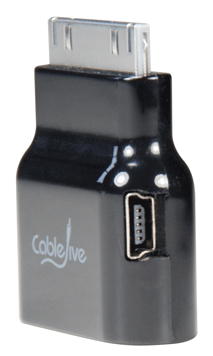
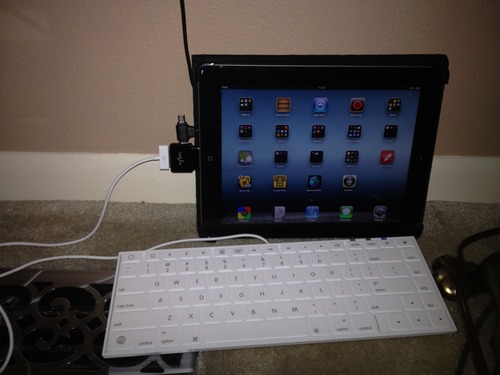
Interesting device I want to try out (probably from Amazon.com: CableJive dockStubz+).
It is a 30-pin Pass-Through adapter for iPod/iPhone/iPad (lets call them iDevice).
Reasons to get one (or more depending on the number of devices/chargers you use regularly):
A few pictures showing their use are below.
Basically, there are two verions of charging circuitry: USB based and FireWire based.
I will make sure to get the + version, as it combines these two:
dockStubz+ model includes charge conversion circuitry for those older docks and accessories that don’t charge while they are connected. Safely connect your mobile device to any dock and get the charging you need.
–jeroen
via: dockStubz Charge Converter and 30-pin Pass-Through Adapter.

Posted in Apple, iOS, iPad, iPhone, iPod, iPod touch, Power User | Leave a Comment »
Posted by jpluimers on 2014/04/27
At USD 50, this seems like a bargain for Apple I / Apple II lovers.
From the The WOZPAK Special Edition – Overview page:
In 1978, The WOZPAK was a 300 page technical manual produced by Apple Pugetsound Program Library Exchange. The poor resolution of copy machines and fax machines of the era made The WOZPAK an illegible and challenging to use collection of handwritten and typed notes. This collection as a whole was provided to the A.P.P.L.E. by Apple Computer, Inc. co-founder Steve Wozniak and then company president Mike Scott.
…
Thanks to the encouragement of a number of computer industry legends, and the efforts of Apple historians, Brian Wiser and Bill Martens, we now have a completely refurbished and dramatically enhanced version of The WOZPAK. The WOZPAK Special Edition comes complete with the original materials from The WOZPAK and The WOZPAK II as well as some new materials provided by Apple legends from their personal libraries.
–jeroen
via: The WOZPAK Special Edition – Overview.
Posted in //e, 6502, Apple, Apple Pascal, Apple ][, Assembly Language, Development, History, Pascal, Power User, Software Development | Leave a Comment »
Posted by jpluimers on 2014/04/19
Reaver-WPS is an excellent tool to test the security of your WPA/WPA2 secured network against the WPS vulnerability.
Getting Reaver 1.4 (which contains wash to scan WiFi networks) to compile out of the box on OS X Mavericks (which is 10.9; why can’t they keep a successive version number in the product name?) didn’t work.
So I downloaded the adapted source pack from one of the comments in Issue 245 – reaver-wps – Support for Mac OS X? – Brute force attack against Wifi Protected Setup – Google Project Hosting (as the diff still not has been applied to the codebase)..
wash will detect most, but not all networks. I’ve net yet tried WireShark, wpscan and wspy yet (they re supposed to get all of them).
To speed up the checking process I tried on install aircrack-ng to associate a Mac with the target network. Compiling aircrack-ng on a Mac from source didn’t work at all. But after installing MacPorts, I could get the MacPorts version of aircrack-ng to work. The bad news: I could not get aircrack-ng to associate to the network.
So these were the commands I used: Read the rest of this entry »
Posted in *nix, *nix-tools, Apple, Mac, Mac OS X / OS X / MacOS, MacBook, MacBook Retina, MacBook-Air, MacBook-Pro, Monitoring, OS X 10.9 Mavericks, Power User | Leave a Comment »
Posted by jpluimers on 2014/04/18
Boy, I wish I had found this far earlier:
Posted in Apple, Keyboards and Keyboard Shortcuts, Mac, Mac OS X / OS X / MacOS, Mac OS X 10.7 Lion, MacBook, OS X 10.8 Mountain Lion, Power User | 3 Comments »
Posted by jpluimers on 2014/04/11
I know that Apple likes “design”, but boy their desing resulted into Mac OS X having lots of Fn/Option/Ctrl/Shift keyboard shortcuts.
Being a keyboard person (before the DOS era), I love to learn new keyboard shortcuts to make my life easier, while vendors are step by step hiding information about them.
I will update this table over time to reflect even better the ones I use most regularly.
Posted in Apple, Keyboards and Keyboard Shortcuts, Mac, Mac OS X / OS X / MacOS, Mac OS X 10.4 Tiger, Mac OS X 10.5 Leopard, Mac OS X 10.6 Snow Leopard, Mac OS X 10.7 Lion, MacBook, MacBook-Air, MacBook-Pro, OS X 10.8 Mountain Lion, Power User, SpotLight | Leave a Comment »
Posted by jpluimers on 2014/04/10
One of the frustrating things about using a Mac, is the pain to find keyboard shortcuts for everyday tasks.
Having had RSI in the early 1990s, I’ve learned to use the keyboard for virtually everything. So I’m used to find keyboard shortcuts on most operating systems, or write scripts to make common tasks easier.
On most *nix or Windows systems, those shortcuts are either there, easy to enable or tools are there to enable them.
For OS X, somehow this seems much harder, so I’m always glad to bumped into answers to questions like
Is there a keyboard shortcut to move a window from one monitor to another? – OSX/Ask Different.
From the answers in that question it is clear this is not built-in behaviour in OS X.
Also the answers show a few tools that can (some free, some paid). So those are on my research list.
But I’m already glad to know that these tools are available.
I’m also going to dig a bit more into Hands-on with OS X Mavericks: Multiple-display support | Macworld, as I’m sure there are some subtle things with multi-monitor setups that I’ve not yet found myself.
–jeroen
via: osx – Is there a keyboard shortcut to move a window from one monitor to another? – Ask Different.
Posted in Apple, Keyboards and Keyboard Shortcuts, Mac, Mac OS X / OS X / MacOS, Mac OS X 10.7 Lion, MacBook, MacBook Retina, MacBook-Air, MacBook-Pro, OS X 10.8 Mountain Lion, OS X 10.9 Mavericks, Power User | 3 Comments »

 The Wiert Corner - irregular stream of stuff