Archive for the ‘Chrome’ Category
Posted by jpluimers on 2016/06/21
I’m using these Chrome Extensions for most of the http / https call mockups, and after that put them in SoapUI (which despite the name also does REST and has come a long way sinceSource: SoupUI – as sometimes that is the only thing that works):
You can get both Postman versions through GetPostman.com as well.
–jeroen
Posted in .NET, .NET 2.0, .NET 3.0, .NET 3.5, .NET 4.0, .NET 4.5, ASP.NET, C#, C# 3.0, C# 4.0, C# 5.0, Chrome, Communications Development, Development, Google, HTTP, Internet protocol suite, Power User, REST, Software Development, TCP | 1 Comment »
Posted by jpluimers on 2016/02/19
Just updated Cool: Vysor screen sharing by Koush with this:
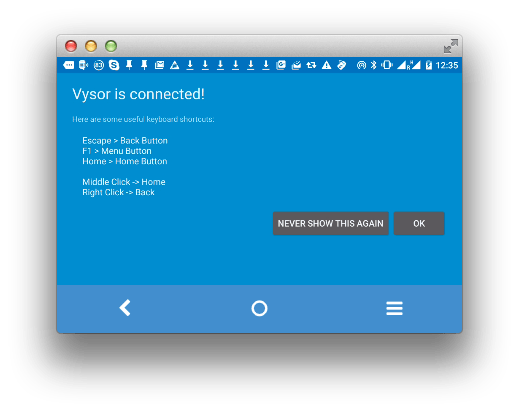
Edit 20160217: new keyboard/mouse shortcuts
- Old: keyboard shortcuts
Escape -> Back Button;F1 -> Menu Button;Home -> Home Button;
- New: mouse shortcuts
Middle Click -> Home;Right Click -> Back
Now hopefully the screen resolution thing will be fixed: [Wayback/Archive] github.com/koush/vysor.io/issues/68
–jeroen
Posted in Android, Android Devices, Chrome, Development, Google, Keyboards and Keyboard Shortcuts, KVM keyboard/video/mouse, Mobile Development, Power User, Vysor | Leave a Comment »
Posted by jpluimers on 2016/01/29
I’m not the only one with a Mac having issues with Google Chrome Helper CPU usage, but most of the entries are for older Chrome versions. So below are the steps I performed. There are also pros and cons are after the steps.
In chrome://settings/content, under “Plugins”, I ticked “Let me choose when to run plugin content” (it was at “Detect and run important plugin content (recommended)”. That dialog doesn’t allow you to copy it’s content, so no HTML, just this screenshot:

In chrome://plugins/ I disabled this one:
Adobe Flash Player – Version: 20.0.0.267 (Disabled)
Shockwave Flash 20.0 r0
| Description: |
Shockwave Flash 20.0 r0 |
| Location: |
/Users/jeroenp/Library/Application Support/Google/Chrome/PepperFlash/20.0.0.267/PepperFlashPlayer.plugin |
| Type: |
PPAPI (out-of-process) |
| MIME types: |
| application/x-shockwave-flash |
Shockwave Flash |
|
| application/futuresplash |
Shockwave Flash |
|
|
|
Pros of these settings:
- If you have a lot of tabs open (many of them suspended using The Great Suspender), then Google Chrome Helper uses far less CPU.
- Youtube doesn’t use the Flash Player any more. It now uses HTML5 which seems far more battery friendly and more responsive.
Cons of these settings:
- PDFs don’t automatically open any more, nor auto-download. You get something like this:
.
–jeroen
Posted in Apple, Chrome, Google, Mac, MacBook, MacBook Retina, PDF, Power User | Leave a Comment »
Posted by jpluimers on 2015/11/13
I know, friday 13, bla, bla, but this works great! VidCast: Chromecast for the rest of the web.
It works with: Vimeo, TED, and tons of other sites.
The first I tried is was a great half hour Devopsdays Amsterdam 2015 session “Leslie Hawthorn – Fear of Failing Fast: How to Avoid Sabotaging Your Success”
The easiest way is to drag the VidCast bookmarklet button to your bookmarks bar once, then for videos you want to watch:
Read the rest of this entry »
Posted in Bookmarklet, Chrome, Chromecast, Google, Power User, Web Browsers | Leave a Comment »
Posted by jpluimers on 2015/08/25

Esc: Back button; F1: Menu button; Home: Home button.
Really really cool!
Vysor (by Koushik Dutta aka Koush) lets you not only share and control your Android device screen from your local Chrome browser, but also remotely to others having a Chrome browser with Vysor installed. And Vysor gives you full ADB access to your Android device.
Some links to get started:
To get started:
- Enable ADB on your Android phone.
- Connect your Android phone over USB to your computer.
- Start Vysor.
- Connect.
- Enjoy.
After connecting over ADB, Vysor sideloads the Android code to share both screen and input. So besides viewing your screen, you can then control it.
Of course your mouse works, including scrolling. And the keyboard for entering text.
There are also some special keys:
- Esc: Back button;
- F1: Menu button;
- Home: Home button.
Read the rest of this entry »
Posted in Android Devices, Chrome, Google, Power User, Vysor | 1 Comment »
Posted by jpluimers on 2015/08/22
This was a search for ISDN S0 bus: https://www.google.com/search?q=ISDN+S0+bus
Google thinks it is in German, but it is in English: even the html tag indicates it is in English:
<!doctype html><html itemscope="" itemtype="http://schema.org/SearchResultsPage" lang="en"><head><meta content="/images/google_favicon_128.png" itemprop="image"><meta content="origin" id="mref" name="referrer">
I cannot change the page so nothing I can use from the suggestions in html – Why does Chrome incorrectly determine page is in a different language and offer to translate? – Stack Overflow.
Anybody knows what can I do to prevent this wrong guess?
Can anyone from +GoogleTranslate please step in?
Read the rest of this entry »
Posted in Chrome, Google, GoogleSearch, GoogleTranslate, Power User | Leave a Comment »
Posted by jpluimers on 2015/08/21
I like this: the plug-up affordable FIDO U2F Security Key by HAPPLINK.
You could already use it for Google 2nd factor authentication (2FA) through Chrome. You can do this from your own applications for instance through the U2F reference implementation.
Now you can also as 2FA to DropBox, also through Chrome. And it is easy with the plug-up key (Thanks Kristian):
Uuuund… umgestellt. Das war ja einfach.
http://www.amazon.de/dp/B00OGPO3ZS
Es gibt andere Fido Token, die können mehr. Ich nehme dieses, das kostet fast nix und man kann die kaufen und verteilen wie Konfetti.
Or inside the Europe mainland, for instance in:
–jeroen
via: Dropbox adds u2f support … if you connect to it via Chrome. If I’m not….
Posted in Chrome, DropBox, Google, GoogleAuthenticator, LifeHacker, Power User, Security, SocialMedia, U2F FIDO Security Keys | Leave a Comment »
Posted by jpluimers on 2015/06/06
Note you need to scroll quite a bit down in chrome://settings/content to enable this. In the man time, nothing beats The Great Suspender: a plugin that just suspends inactive tabs to they do not use any CPU or memory at all.
Chrome will pause plugin content (e.g. Flash animations) to improve battery life: http://bit.ly/1dQj2o9 – give it a try!
“This feature will be enabled by default on Chrome’s latest desktop Beta channel release starting today, and will be rolling out soon to everyone else on Chrome desktop. If you need to manually enable it, just head to Chrome’s content settings and select ‘Detect and run important plugin content’.”
–jeroen
via: Chrome will pause plugin content (e.g. Flash animations) to improve battery….
Posted in Chrome, Google, Power User | Leave a Comment »


 The Wiert Corner - irregular stream of stuff