The Wiert Corner – irregular stream of stuff

Jeroen W. Pluimers on .NET, C#, Delphi, databases, and personal interests

  • My badges

  • Twitter Updates

  • Pages

  • All categories

  • Enter your email address to subscribe to this blog and receive notifications of new posts by email.

    Join 1,854 other subscribers

Archive for the ‘Google’ Category

Mac: when “Save time with right-click sharing from your Google Drive folder” fails…

Posted by jpluimers on 2018/07/09

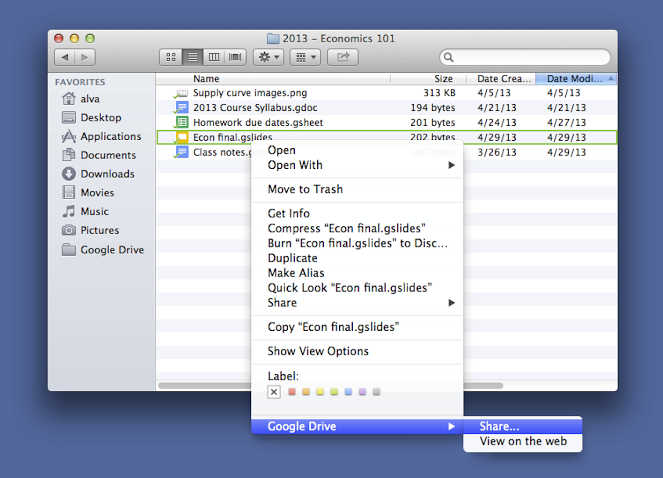
A few years ago, Google Drive introduced this:

For those looking to share files more quickly, listen up. You can now share with others directly from the Google Drive folder on your Mac or PC. To share a file while inside your Google Drive folder, simply right click the file, select “Google Drive” and then click “Share.” This new feature is rolling out over the next few days.

Source: [WayBackSave time with right-click sharing from your Google Drive folder…

However, sometimes it fails. And the menu has changed as well.

By now the menu looks like this:

  • “View with Google Drive”
  • “Share using Google Drive”

If those do not appear, then:

Try to stop, then start Google Drive.

If that fails:

Read the rest of this entry »

Posted in Google, GoogleDrive, LifeHacker, Power User | Leave a Comment »

Check if a domain is services by GMail for Business (former Google Mail for your domain)

Posted by jpluimers on 2018/06/15

Google can service mail for a domain. Alphabet has renamed this service over time:

Anyway: at the time of writing it is at https://gsuite.google.com/products/gmail/.

If you send mail to such a domain and the user doesn’t exist, you get a confusing error message like this:

<<< 550 5.1.1 https://support.google.com/mail/?p=NoSuchUser [^] j191si981824wmd.134 - gsmtp

So I wanted to test if a domain is being services by gmail and found this StackExchange question:

Basically you can test it in two ways:

dig takeheart.com mx
takeheart.com. 86399 IN MX 20 ALT1.ASPMX.L.GOOGLE.com.
takeheart.com. 86399 IN MX 30 ALT2.ASPMX.L.GOOGLE.com.
takeheart.com. 86399 IN MX 10 ASPMX.L.GOOGLE.com.
takeheart.com. 86399 IN MX 40 ASPMX2.GOOGLEMAIL.com.
takeheart.com. 86399 IN MX 50 ASPMX3.GOOGLEMAIL.com.

–jeroen

Puns:

–jeroen


Posted in Google, Google Apps, Power User | Leave a Comment »

gmail – Way to automatically download or print attachments or URLs from emails with specific labels – Web Applications Stack Exchange

Posted by jpluimers on 2018/06/15

Seems that IFTTT might be able to help me out here: [WayBack] gmail – Way to automatically download or print attachments or URLs from emails with specific labels – Web Applications Stack Exchange

[WayBackCreate a new document in GDrive when you receive a digital receipt in your Gmail. #drive #gmail #rec – IFTTT

–jeroen

Posted in GMail, Google, Power User | Leave a Comment »

Google verlaagt prijzen opslagdienst Drive en komt met familieabonnement – Computer – Nieuws – Tweakers

Posted by jpluimers on 2018/05/28

Google heeft de prijzen voor veel abonnementen op de betaalde opslagdienst Drive verlaagd. Ook komt er een optie om verschillende betaalde abonnementen onder te brengen op een rekening. De gratis optie om 15GB op te slaan blijft bestaan.

[WayBack] Google verlaagt prijzen opslagdienst Drive en komt met familieabonnement – Computer – Nieuws – Tweakers

Quotes:

Daarboven komt nog de onzekerheid dat als je “per ongeluk” de voorwaarden van google schendt in één van hun diensten, ze je gehele account kunnen blokkeren zonder wederwoord. Je zou niet de eerste zijn die zich in de haren krabt en zich afvraagt waarom je in godsnaam van de ene op de andere dag geblokkeerd bent zonder dat je iemand kan contacteren om te vragen waarom.
Om deze reden doe ik regelmatig een sync met een andere clouddienst. Je betaalt dan wel wat meer maar dan heb je tenminste de zekerheid beschermt te zijn tegen zulke willekeur


Niemand hier die G Suite van Google gebruikt? Ik heb daar het business abonnement en betaal iets van 8 euro in de maand voor onbeperkte opslag. Er zit dan wel een 1TB limiet aan als je minder dan 5 accounts op je domeinnaam hebt staan, maar dat hanteren ze niet en ik denk na deze verandering bij Drive al helemaal niet.

Ik zet werkelijk alles op dat G Suite account, gewoon omdat het kan. Echter ben ik wel huiverig over het feit dat Google zomaar je account zou kunnen aflsuiten als je een bestand op je Drive hebt staan met copyright en macht met een hash die bij hun bekend is. Ik sla hele belangrijke bestanden dan ook altijd nog op, op mijn lokale NAS, thuis.


Ik gebruik hetzelfde al sinds oktober 2017 en heb er ondertussen 20TB op staan. Kan ook bevestigen dat ze de 5 gebruiker regel niet toepassen in de praktijk.

Persoonlijk raad ik wel aan om alles lokaal te encrypten/decrypten en dan naar drive uploaden. Dit kan makkelijk met de crypt module van rclone https://rclone.org/crypt/

Heb al screenshots van mensen gezien die er 200TB hebben op staan.

Zeker als hoge upload snelheid (zelf heb ik 1gbit) hebt is dit een goede oplossing voor offsite replicatie / cold storage voor je lokale backups.

Overigens is er wel een 10TB download en 750GB upload limiet per dag. Ben zelf al een paar keer tegen het upload limiet aangelopen maar denk dat dit voor de meeste gebruikers geen probleem is.

Als backup tool gebruik ik op dit moment https://duplicacy.com/


Zoiets heb ik inderdaad ook al eens gehoord, tevens heb ik een meerdere chats van Google vernomen dat er niets mee aan de hand is als je dat doet, de medewerker zelf had ook meerdere bestanden met copyright op zijn Drive staan.

De key lijkt dus dat je het gewoon niet deelt, want dan is het natuurlijk mogelijk dat de link op internet verschijnt en je in feite materiaal met copyright verspreid en dan wordt het natuurlijk een ander verhaal.

Heb ook nog met de woordvoerder op Twitter een chat gehad (Rachid Finge) en die heeft aangegeven ook G Suite te gebruiken voor persoonlijk gebruik. Screenshot

Ik denk dat we dus redelijk veilig zitten met het gebruik van G Suite voor persoonlijk gebruik, ik kan het dus iedereen aanraden, zeker als je meer dan 2TB denk te gaan gebruiken!


Posted in Google, GoogleDrive, LifeHacker, Power User | Leave a Comment »

Local Guides Connect – Big news about reviews: now they’re worth 10 point… – Local Guides Connect

Posted by jpluimers on 2018/05/18

Reminder to check if it already rolled out on my smartphone: [WayBackLocal Guides Connect – Big news about reviews: now they’re worth 10 point… – Local Guides Connect .

It seems to work both on mobile and on maps.google.com/localguides/home

–jeroen

Read the rest of this entry »

Posted in Google, GoogleMaps, Local Guides, Power User | Leave a Comment »

When you loose your Google Guides level, still can post reviews, but do not have access to the forums any more…

Posted by jpluimers on 2018/05/11

Via a private share: If you ever loose your Google Guides level for no apparent reason, still can post reviews, but cannot post to the Google Guides forums, then just mail Google. They can usually fix the situation.

–jeroen

Posted in Google, GoogleMaps, Local Guides, Power User | Leave a Comment »

How to Add Your Gmail Account to Outlook 2013 and 2016 Using IMAP

Posted by jpluimers on 2018/05/11

If you use Outlook to check and manage your email, you can easily use it to check your Gmail account as well. You can set up your Gmail account to allow you to synchronize email across multiple machines using email clients instead of a browser.

Oh: you need to lower your Gmail security for Outlook 2013 as the latter isn’t up to par on security. For that, follow similar steps like in “the user name or password for imap.gmail is incorrect” – iPad, iPod or iPhone with iOS < 7.

–jeroen

Posted in GMail, Google, Office, Office 2013, Office 2016, Outlook, Power User | Leave a Comment »

How to move Gmail sub-label out of hiearchy – Web Applications Stack Exchange

Posted by jpluimers on 2018/05/04

Source: [WayBack] How to move Gmail sub-label out of hiearchy – Web Applications Stack Exchange

  1. Hover over the label
  2. Click the down error
  3. Choose Edit
  4. Change the nesting

–jeroen

Posted in GMail, Google, Power User | Leave a Comment »

Old Google+ versions and photo backup may stop working on May 20, 2018 – Google+ Help

Posted by jpluimers on 2018/05/04

This message was sent because you may have an older version of the Google+ app installed on one of your mobile devices.

Now if the message would tell on which device, I could find it….

Source: [WayBackOld Google+ versions and photo backup may stop working on May 20, 2018 – Google+ Help

–jeroen

Posted in G+: GooglePlus, Google, Power User | Leave a Comment »

Backup & Sync: The ridiculous steps you need to move the Google Drive from the C: drive to the D: drive

Posted by jpluimers on 2018/04/27

Unlike for instance DropBox, Google Backup & Sync does not allow you do move the Google Drive location in a one-step way. You have to go through below ridiculous steps to move it around yourself.

A comment on G+ indicated I should try Insync. Not free, but way more stable and more features.

[WayBack] Insync: A Mini Desktop File Manager For Your Google Drive

Insync adds Google Drive functionality to your Windows, Linux and mac OS desktop. Sync, backup, edit and share files easily with one or multiple accounts. Team Drives syncing for G Suite accounts now available! Try Insync free, no credit card needed.

[WayBack] Unlike for instance DropBox, Google Backup & Sync does not allow you do move … – Jeroen Wiert Pluimers – G+

I got them via [Archive.is] Change default location of Backup and Sync Folder on disk. – Google Product Forums, rephrased and added screenshots:

Read the rest of this entry »

Posted in Fujitsu ScanSnap, Google, GoogleBackupAndSync, GoogleDrive, Hardware, ix500, Power User, Scanners | Leave a Comment »