The Wiert Corner – irregular stream of stuff

Jeroen W. Pluimers on .NET, C#, Delphi, databases, and personal interests

  • My badges

  • Twitter Updates

  • My Flickr Stream

  • Pages

  • All categories

  • Enter your email address to subscribe to this blog and receive notifications of new posts by email.

    Join 1,861 other subscribers

Archive for the ‘Internet’ Category

Microsoft Azure: Storage certificate expired?

Posted by jpluimers on 2013/02/23

Reasons like this is why I distrust the cloud: Storage certificate expired?.

From Windows Azure Status: Service Dashboard | Technical Support:

Beginning Friday, February 22 at 12:44 PM PST, Storage experienced a worldwide outage impacting HTTPS operations (SSL traffic) due to an expired certificate. HTTP traffic was not impacted. We executed repair steps to update the SSL certificate and expect HTTPS traffic to notice gradual recovery in many sub-regions. Further updates will be published to keep you apprised of the situation. We apologize for any inconvenience this causes our customers. Status of affected services will be updated in  the table below.

–jeroen

via: Windows Azure Status: Service Dashboard | Technical Support.

Posted in Cloud Apps, Internet, Power User | Tagged: , , , | Leave a Comment »

Wil je snel en betrouwbaar Glasvezel internet in De Aker? Meld je dan nu aan!

Posted by jpluimers on 2013/02/01

Gebied voor Glasvezel in de Aker

Gebied voor Glasvezel in de Aker

Op dit moment loopt er een inventarisatie of er Glasvezel internet in De Aker kan komen.
Zie deze kaart met het gebied.

Heb je interesse, meld je dan nu aan: De grens ligt bij 30% van de huishoudens op 21 April.
Word voor 21 April die grens niet gehaald, dan kan het jaren duren voor deze kans zich opnieuw voordoet.

Gaat het door, dan wordt de aanmelding omgezet in een contract.
Aanmelden gaat als volgt:

  1. Volg deze link Eindelijk. Amsterdam De Aker krijgt glasvezel – Reggefiber
    (
    Reggefiber is het bedrijf dat fysiek de glasvezel aanlegt, de provider is degene waar je abonnement loopt)
  2. Tik rechtsboven op de pagina je postcode, huisnummer en toevoeging in
  3. Bekijk de beschikbare providers en abonnementen
  4. Kies een provider en abonnement dat bij je bevest
  5. Vul de aanvullende gegevens in
  6. Bevestig je aanmelding

Wil je meer informatie van mensen die al Glasvezel in Amsterdam gebruiken? Bekijk dan dit forumonderwerp: Het grote Glasvezel in Amsterdam Topic – Internetproviders en Hosting – GoT.

Waarom internet via Glasvezel en geen ADSL of Kabel?

  • snel voor zowel uploaden als downloaden
    (kabel en ADSL hebben altijd een lagere upload dan download snelheid)
  • mogelijkheid om van provider te wisselen
    (kan met kabel niet)
  • eigen servers bij de meeste providers toegestaan
    (bij ADSL en kabel mag het alleen bij een zakelijk abonnement)
  • veel goedkoper dan zakelijk ADSL
    (zakelijk: hoge up-time, meer IP-adressen, dure kanaalbundeling voor hogere snelheden)

Waarom is en grote upload snelheid belangrijk?

  • online backup diensten worden steeds belangrijker
  • bedrijven met een eigen server thuis
  • even snel een groot bestand naar een klant uploaden

Naast alleen internet, is het ook mogelijk om andere diensten over Glasvezel te krijgen, net als bij kabel of ADSL.
Op dit moment zijn deze keuzes zijn mogelijk

  • Internet
  • Internet, TV en bellen
  • Internet en TV
  • Internet en bellen
  • TV
  • TV en bellen

–jeroen

via:

Posted in Internet, Opinions, Power User | Leave a Comment »

“Holland versus The Netherlands” a new video by C.G.P Grey – @cgpgrey

Posted by jpluimers on 2012/12/23

C.G.P. Grey just released a new video: Holland versus The Netherlands:

I love almost all hist videos at

my first encounter to his work was a similar video about the U.K., G.B, England, and a whole lot more:

While watching that I thought “someone should make a video about Holland, The Netherlands and the Dutch Kingdom”. Good to see he just did (:

Still on my wish list: a video on Europe, Schengen, The European Union and the Euro.

–jeroen

via ROFLMAO.. Thank you…

Posted in About, Internet, Personal, Power User | Leave a Comment »

So I won’t forget: IPv4 private networks 10/8 (10.x.y.z), 172/12 (172.16-31.y.z), 192.168/16 (192.168.y.z) and 169.254/16 (169.254.y.z) (via: Private network – Wikipedia, the free encyclopedia)

Posted by jpluimers on 2012/11/26

So I won’t forget: below are IPv4 private network ranges that you can use behind your router.

Private networks:

  • 10/8
    (10.x.y.z)
  • 172/12
    (172.16-31.y.z)
  • 192.168/16
    (192.168.y.z)

Link-local network:

  • 169.254/16
    (169.254.y.z)

Network you should not configure yourself:

I tried finding statistics on the actual use of private networks, but couldn’t.

This is from my own experience:

  • Link-local is used when DHCP is not available.
  • Lot’s of routers use 10.0.0.x, 192.168.0.0, 192.168.1.0.
  • VMWare Workstation and VMWare Fusnion use 192.168.x.y.

–jeroen

via: Private network – Wikipedia, the free encyclopedia.

Posted in Internet, Power User | Leave a Comment »

Link update because of rot (*nix – Mastering the VI editor)

Posted by jpluimers on 2012/09/17

Link rot stroke again: New link for Mastering the VI editor.

These are useful too:

–jeroen

via *nix – Mastering the VI editor « The Wiert Corner – irregular stream of Wiert stuff.

Posted in *nix, Cygwin, Endian, Internet, link rot, Linux, Power User, vi, WWW - the World Wide Web of information | Leave a Comment »

Creating a blank Visual Studio solution without a directory, and sln Format Version numbers

Posted by jpluimers on 2012/09/06

A while ago, I blew quite a few Visual Studio Solution and Project builds because I was experimenting in a suite of solutions with the Configuration Manager adding other Solution Configurations than Release and Debug, and mixing x86/AnyCPU platforms to facilitate Debug & Continue.

Lesson learned: don’t do that!

Keep it simple:

  1. Keep your Solution Configurations at Release and Debug,
  2. Perform conditional defines in your automated build server,
  3. Limit the mixing your platforms to a minimum.

We noted the anomalies a little late in the process (in retrospect, when taking over the solution suite, we should have started with setting up and Build Automation right at the beginning, then fix all the solutions that came from Visual Source Shredder, but alas: you are never too old to learn from your mistakes).

The anomalies were spurious (and hard to reproduce) build failures at developer workstations, wrong builds of assemblies ending up on the final build directories and more. And best of all: Visual Studio not failing, warning or hinting upon most issues.

Fixing projects and solutions from wrong Solution Configurations

The history in the version control system was not helpful enough to assist in fixing it, so the fix was this:

  1. Manually edit the .csproj files, and remove the PropertyGroup elements other than “Debug|AnyCPU” and “Release”AnyCPU”.
    This is easy to do inside Visual Studio and with automatic checkout from TFS of the project files:

    1. In the Solution Explorer, select all the projects
    2. Right click on a project
    3. Choose “Unload Project”
      (because you selected all the projects, it is the second menu item from the bottom, and way easier to find when you do this per project)
    4. For each project
      1. Right click the project
      2. Choose “Edit ….”
      3. Remove the PropertyGroup elemts you don’t need
      4. Save and close the file
      5. Right click the project
      6. Choose “Reload Project”
  2. Fix the solution files

The last step is a lot more complex, because of a couple of reasons:

My workaround was as follows:

  1. Start with an empty solution in the same directory as the original solution
  2. Add all the Solution Folders, Solution Items, and projects to it that  were in the original solution
    (having two copies of Visual Studio next to each other on a dual monitor setup is of great help)
  3. Compare the .sln files to each other
  4. Check out the original .sln file
  5. Merge any changes into the original .sln file
  6. Build it
  7. Check in
  8. Run a build on the CruiseControl.net automated build server
  9. Fix build errors
  10. Delete the temporary local .sln file

Creating an empty solution in a directory

Finally, I get to the title of this blog entry: Visual Studio will always generate a directory when creating a Blank Solution, and does not support creating an Empty Solution in a directory.

There are many posts describing how to workaround this, but the actual downloads are usually gone because of link rot (Jakob Nielsen’s alert from 1998 still is totally right about it). Thanks to they webarchive.org WayBackMachine though for keeping some of them alive.

So I went with Peter Provost’s solution, and amended it from Visual Studio 2005 to all Visual Studio versions that support .NET that I have used or still use: 2002, 2003, 2005, 2008, 2010 and 2012 a.k.a. VS11.

All files are in Change set 89386 on BeSharp.CodePlex.com.

His solution uses the ShellNew command for .sln file extensions that is stored in the registry:

  1. Create an empty solution file for the Visual Studio version you are using
  2. Copy that as a template file to %Windir%\ShellNew
    (you need to be administrator for that)
  3. Import a small .reg file binding that template file to the ShellNew command for .sln files

ShellNew is versatile, so you can also embed the fresh solution file into the .reg file, see this ShellNew article for a few nice examples.

Note that generating a new ShellNew verb for .sln is something other than loading a .sln (loading a .sln is done through VisualStudioLauncher).

Back to the .sln file: this one is different for any version of Visual Studio. Historically, the basic format is the same though (and I think this – in combination with VisualStudioLauncher – is the main reason it is not XML).

An empty solution file looks like this (note the empty line at the beginning), as described in Hack the Project and Solution Files:


Microsoft Visual Studio Solution File, Format Version 12.00
# Visual Studio 11
Global
	GlobalSection(SolutionProperties) = preSolution
		HideSolutionNode = FALSE
	EndGlobalSection
EndGlobal

The accompanying .reg file like this:

Windows Registry Editor Version 5.00

[HKEY_CLASSES_ROOT\.sln\ShellNew]
"FileName"="Visual Studio Solution - VS11.sln"

When you look at the Format Version inside the .sln version, you see that it (12) is one bigger than the internal Visual Studio Version (11).

That is because Microsoft stepped up the internal version from Visual Studio .NET (2002) and Visual Studio 2003 from 7.0 to 7.1, but the solution file format version from 7.00 to 8.00 as the table below shows.

Note that the .NET 1.x versions of Visual Studio (2002 for .NET 1.0, 2003 for .NET 1.1) don’t have the GlobalSection/HideSolutionNode/EndGlobalSection part and the # Visual Studio xx line.

With a little bit of querying, I got at this table:

Visual Studio version Internal version Solution file format version
Visual Studio .NET (2002) 7.0 Microsoft Visual Studio Solution File, Format Version 7.00
Visual Studio 2003 7.1 Microsoft Visual Studio Solution File, Format Version 8.00
Visual Studio 2005 8.0 Microsoft Visual Studio Solution File, Format Version 9.00
Visual Studio 2008 9.0 Microsoft Visual Studio Solution File, Format Version 10.00
Visual Studio 2010 10.0 Microsoft Visual Studio Solution File, Format Version 11.00
Visual Studio 2012 (a.k.a. VS11) 11.0 Microsoft Visual Studio Solution File, Format Version 12.00

All files to get you going are in Change set 89386 on BeSharp.CodePlex.com.

It was a bit hard to get all those version numbers, so here are the sources I used:

–jeroen

Posted in .NET, C#, C# 1.0, C# 2.0, C# 3.0, C# 4.0, C# 5.0, Development, Internet, link rot, Power User, Software Development, Visual Studio 11, Visual Studio 2002, Visual Studio 2003, Visual Studio 2005, Visual Studio 2008, Visual Studio 2010, Visual Studio and tools, WWW - the World Wide Web of information | Leave a Comment »

SSH tricks

Posted by jpluimers on 2012/08/24

SSH tricks

SSH tricks

Recommended reading:  SSH tricks

Quote:

SSH is a protocol for authenticating and encrypting remote shell sessions.

But, using SSH for just remote shell sessions ignores 90% of what it can do.

$ ssh home -L 80:reddit.com:80

This article covers less common SSH use cases, such as:

  • using passwordless, key-based login;
  • setting up local per-host configurations;
  • exporting a local service through a firewall;
  • accessing a remote service through a firewall;
  • executing commands remotely from scripts;
  • transfering files to/from remote machines;
  • mounting a filesystem through SSH; and
  • triggering admin scripts from a phone.

–jeroen

via: SSH tricks.

Posted in *nix, Apple, Cygwin, Endian, Internet, Mac OS X 10.5 Leopard, Mac OS X 10.6 Snow Leopard, Mac OS X 10.7 Lion, MacBook, MacBook-Air, MacBook-Pro, Power User | Leave a Comment »

Solving the “Some projects have been bound to server locations that may be incorrect.” in Visual Studio 2010 when using Team Foundation System 2010 #VS2010 #TFS2010

Posted by jpluimers on 2012/08/23

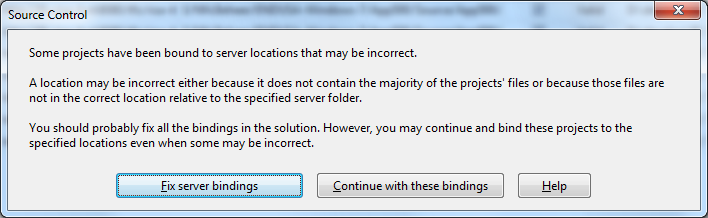
A while ago, I inherited a bunch of C# and VB.NET projects. One of them always generated the below error when including it in Team Foundation System (yes, the original projects were salvaged from Visual Source Shredder version 6.0c):

[Source Control]
Some projects have been bound to server locations that may be incorrect.
A location may be incorrect either because it does not contain the majority of the projects' files or because those files are not in the correct location relative to the specified server folder.
You should probably fix all the bindings in the solution. However, you may continue and bind these projects to the specified locations even when some may be incorrect.
[Fix server bindings] [Continue with these bindings] [Help]

First I tried the Help button: it links to a Help page on MSDN explaining the error can be cause with some statistics on projects not being in the source control system. Since all projects were, there, I looked for more information.

I tried finding a “Fix Server Bindings” or a 2010 “Some projects have been bound to server locations that may be incorrect” link that fitted my use case (getting projects from VSS into TFS), but the solutions I tried eventually all led to the same issue.

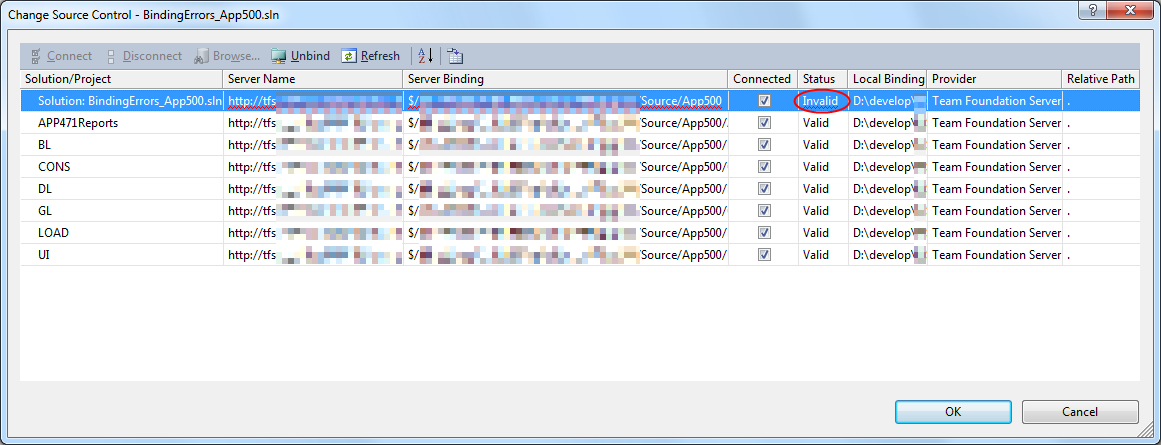
Fixing the server bindings would always fail: the solution (which itself is also a project) would get the status Invalid.

The next steps were these:

  1. add an empty solution in the same directory as the original one,
  2. add that solution to TFS
  3. add the projects from the original solution to this solution one by one
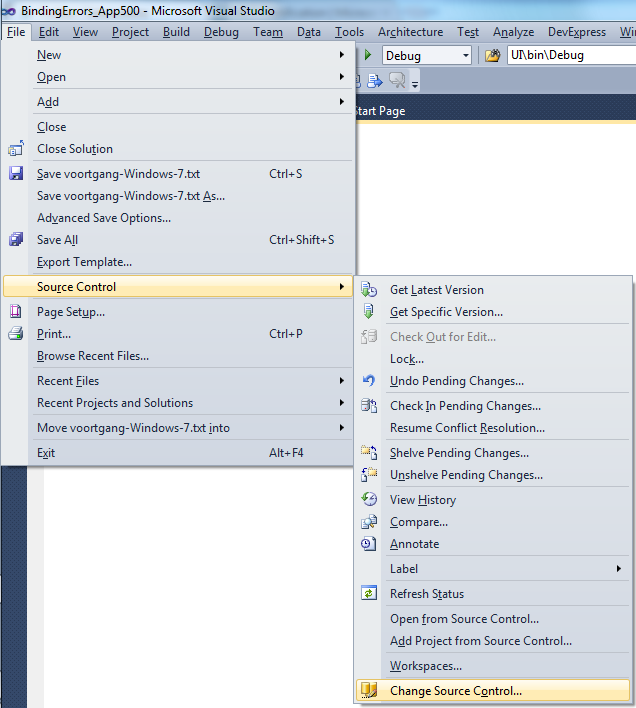
  4. check after each addition of the bindings were still OK using the “File”, “Source Control”, “Change Source Control” sequence on the right.
    (note that you don’t always see “Change Source Control”, if you don’t select the solution in the Solution Explorer before going to the File menu).
  5. text compare both .SLN solution files
  6. observe that “Solution Items” actually is a project just like the others:
    Project("{2150E333-8FDC-42A3-9474-1A3956D46DE8}") = "Solution Items", "Solution Items", "{8D9964D4-6129-4B8F-9238-F9161A02B968}"
    ProjectSection(SolutionItems) = preProject
    ...
    Framework\Config.dll = Framework\Config.dll
    ...
    EndProjectSection
    EndProject
  7. add the existing solution item from the original solution to this solution one by one, check
  8. check after each addition of the bindings were still OK using the “File”, “Source Control”, “Change Source Control” sequence on the right.
    (note that you don’t always see “Change Source Control”, if you don’t select the solution in the Solution Explorer before going to the File menu).
  9. copy the non-existing solution items to the solution one by one using the text compare tool (yes, a lot of the projects are dirty and contain references to files that are not in the version control system)
    save after every copy, then reload the project in Visual Studio
  10. check after each addition of the bindings were still OK using the “File”, “Source Control”, “Change Source Control” sequence on the right.
    (note that you don’t always see “Change Source Control”, if you don’t select the solution in the Solution Explorer before going to the File menu).
  11. after a few files, suddenly the “Invalid” appeared, so the issue has to do with missing files.

Reading the Help more carefully, with in the back of my mind keeping “Solution Items” all as projects, I finally got the cause:

When some percentage of Solution Items cannot be found locally, and are not in the version control system, Visual Studio marks the solution binding to the version control system as “Invalid”.

The temporary solution is to ignore the error, until I have found all the missing files (they are scattered around some network shares), or made sure they are not needed at all.
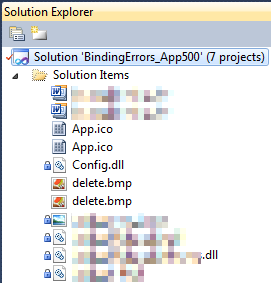
There are many of those (you recognize them from the missing padlock icon in the Solution Explorer).

Version control rot is just like link rot, that’s why one of the high priority action items is to introduce for build automation at this client, then deploy those as clean builds into the Develop and Test stages of the DTAP, then verify if the solutions still work).

–jeroen

Posted in .NET, C#, C# 1.0, C# 2.0, C# 3.0, C# 4.0, C# 5.0, Development, Internet, link rot, Power User, Software Development, Source Code Management, TFS (Team Foundation System), VB.NET, Visual Studio 2010, Visual Studio and tools, WWW - the World Wide Web of information | Leave a Comment »

Afscheid van UUCP | XS4ALL Weblog

Posted by jpluimers on 2012/08/20

No more UUCP at xs4all: Afscheid van UUCP | XS4ALL Weblog.

Boy, the first time I got UUCP working was a hell of a job (:

Back then it was the best way to copy files (including email) in a kind of system independent way.

The end of a remarkable time frame (:

–jeroen

Posted in *nix, Internet, Linux, Power User | Leave a Comment »

ISO-8601: What’s the Current Week Number?

Posted by jpluimers on 2012/08/16

Quick way to get the current ISO-8601 based week number: What’s the Current Week Number?.

–jeroen

Posted in Internet, ISO 8601, Power User | 5 Comments »