The Wiert Corner – irregular stream of stuff

Jeroen W. Pluimers on .NET, C#, Delphi, databases, and personal interests

  • My badges

  • Twitter Updates

  • My Flickr Stream

  • Pages

  • All categories

  • Enter your email address to subscribe to this blog and receive notifications of new posts by email.

    Join 1,862 other subscribers

Archive for the ‘openSuSE’ Category

Some notes on how VMware Workstation/Player “Easy Installs” SUSE Linux

Posted by jpluimers on 2013/08/30

When VMware Workstation/Player does an Easy Install of SUSE Linux (and most other Linuxes), it does this:

  • mount a CD drive with the autoinst.iso image
  • mount a floppy drive with the autoinst.flp image

For Linux, both of them contain autoinst.xml files to automate the boot process.

It has a few drawbacks including a hardcoded boot partition size and unmount problems, so if you don’t want those, follow the guidelines at How to Stop Easy Install in VMware Workstation.

–jeroen

Posted in *nix, Linux, openSuSE, Power User, SuSE Linux, Virtualization, VMware, VMware Workstation | Leave a Comment »

User Manual for Avira AntiVir Server | Unix and Avira AntiVir Professional | Unix

Posted by jpluimers on 2013/08/26

PDF User Manual for Avira AntiVir Server  | Unix and  Avira AntiVir Professional  | Unix.

It is not completely up to date (as most installations are now RPM based), but gives great background information.

If you are using SUSE Linux, then note that as of openSUSE 11.3, there is a glitch when you use the SUSE security repository (see Bug 633771 – antivir cannot be installed because of missing libdazuko.so).

Basically there are two solutions to this:

  1. Ignore the dependency issue;
  2. Use the Avira repository.

The former seems to be a viable solution as per PDF User Manual, the installation proceeds as follows:

linking /usr/lib/AntiVir/guard/libdazuko.so to /usr/lib/AntiVir/guard/
libdazuko3compat2.so...

And indeed it does: these are the steps to follow, first for adding the security repository, then to install the package (click on images to view larger versions): Read the rest of this entry »

Posted in *nix, Linux, openSuSE, Power User, SuSE Linux | Leave a Comment »

Installing SuSE 11.2 or higher: before the first reboot the CLI version of YaST looks horrible. Reboot or second CLI fixes it.

Posted by jpluimers on 2013/08/19

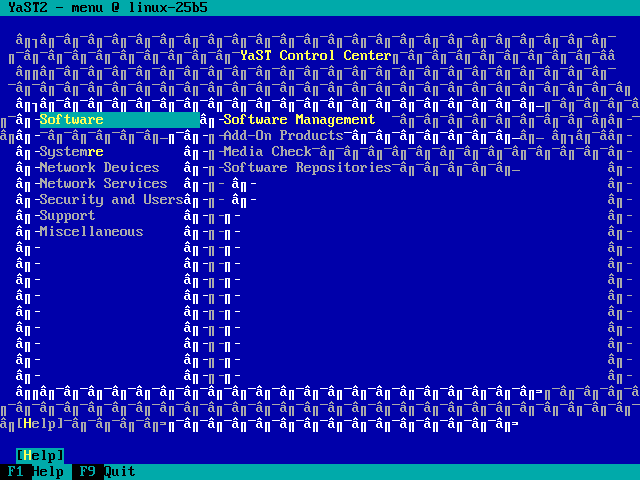
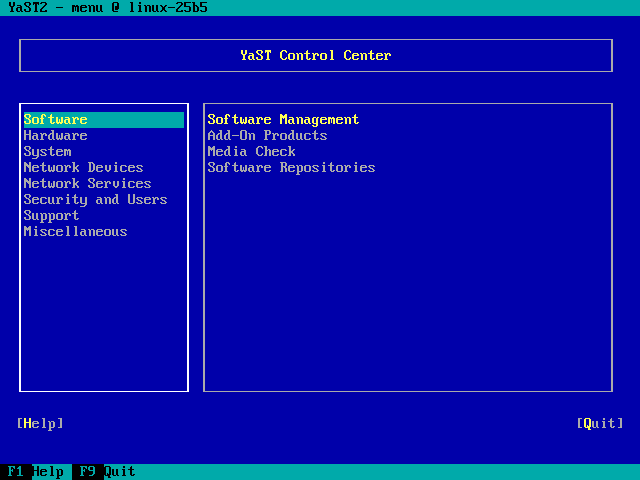
Since SuSE 11.2, when installing then the CLI version of YaST looks horrible on the first (Ctrl-Alt-F1) console before you do your first reboot.

Workarounds:

  1. Try one of the other consoles,
  2. Reboot once.

It still fails at SuSE 12.x.

Before/After (click on the images to enlarge):

YaST before reboot

YaST before reboot

YaST after reboot

YaST after reboot

–jeroen

Posted in *nix, Linux, openSuSE, Power User, SuSE Linux | Leave a Comment »

Reminder to self: 3 months ago “all mine!: openSUSE 12.3 is out!”

Posted by jpluimers on 2013/06/13

Time to try out the 3 months old release and see how much got fixed in the mean time.

–jeroen

via: all mine!: openSUSE 12.3 is out!.

Posted in *nix, Linux, openSuSE, Power User, SuSE Linux | Leave a Comment »

ASUS RT N66U did not update DDNS with changed IP addres

Posted by jpluimers on 2013/06/11

Today my router had an IP-address change, but didn’t update the DynDNS.org information in my My Host Services | My Dyn Account. Which meant I could not “phone home”, as I didn’t know the new IP-address**.

Lesson re-learned:

During initial router configuration, watch the router logs, as you might have accidentally updated the DynDNS.org by hand, not by your router

Had this in the ASUS Wireless Router RT-N66U – General Log:

Jun 11 08:01:53 notify_rc : restart_ddns
Jun 11 08:01:53 ddns: clear ddns cache file for server setting change
Jun 11 08:01:53 ddns update: connected to members.dyndns.org (204.13.248.111) on port 80.
Jun 11 08:01:53 ddns update: server output: HTTP/1.1 200 OK^M Date: Tue, 11 Jun 2013 06:01:53 GMT^M Server: Apache^M X-UpdateCode: X^M Content-Length: 7^M Connection: close^M ^M notfqdn
Jun 11 08:01:53 ddns update: malformed hostname: myhostname

The problem: hostname should not only be the name of the host, but the FQDN of the host. Read the rest of this entry »

Posted in ASUS RT-N66U, Network-and-equipment, openSuSE, Power User, SuSE Linux | Tagged: , , , , | 2 Comments »

openSUSE 12.x: “A plain `halt` will not shutdown the system properly.”

Posted by jpluimers on 2012/12/30

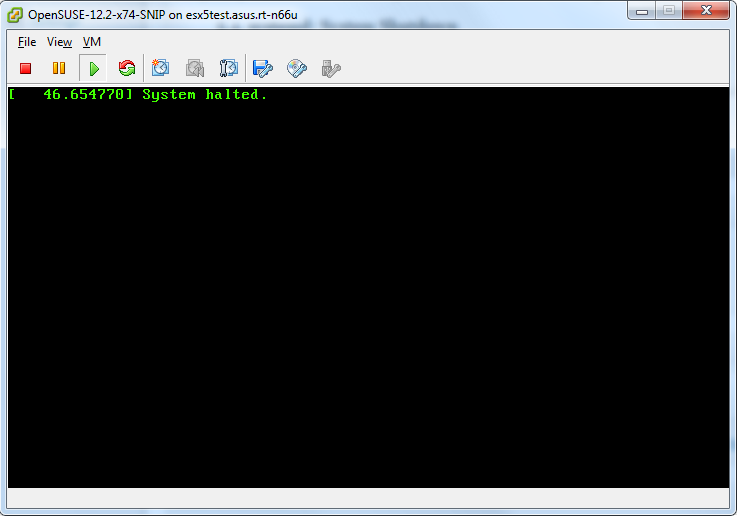
Just noticed that in openSUSE 12.x, A plain halt will not shutdown the system properly.
On my system, it would leave the screen as shown on the right:

Only halt -p works, none of the other hints in the shutdown does not power off thread work, nor the acpi=off or acpi=oldboot settings.

The odd thing: a plain reboot still works properly.

If someone knows a better workaround: please let me know in the comments.

I hope they will fix this in a future openSUSE version; at least for 12.1 they have a “CHECKIT” marker in the documentation, but it has disappeared as of the 2.3 docs, but still fails:

5.4. systemd: System Shutdown

CHECKIT for 12.3. Is this entry still required?

To halt and poweroff the system when using systemd, issue halt -p or shutdown -h now on the command-line or use the shutdown button provided by your desktop environment.

Note: A plain halt will not shutdown the system properly.

Luckily, my openSUSE is a VM, which I can reboot from the ESXi host.
On a physical system, you will end up without any option to resurrect the system.

Later

After installing antivir, a plain halt works sort of: it says it is halted, but ESXi still thinks it is not:

After installing antivir, a plain halt works.

After installing antivir, a plain halt appears to work, but it doesn’t.

ESXi is sure the system didn't actually power down.

ESXi is sure the system didn’t actually power down.

–jeroen

Posted in *nix, Linux, openSuSE, Power User, SuSE Linux | Tagged: , , , , , , , , , , , , , | 4 Comments »