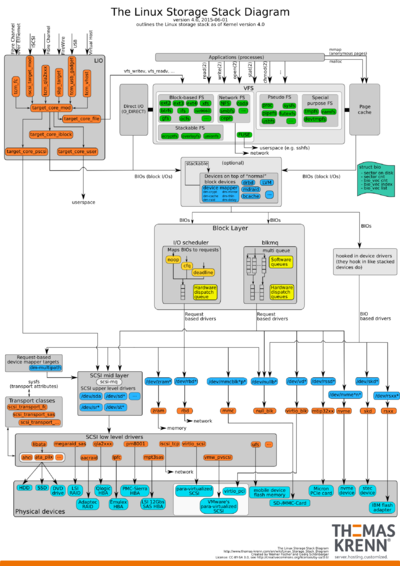
Quick look at commands that can be used to gather hardware information such as cpu, disks, memory, partition, peripherals etc on Linux OS based systems
This file contains hidden or bidirectional Unicode text that may be interpreted or compiled differently than what appears below. To review, open the file in an editor that reveals hidden Unicode characters. Learn more about bidirectional Unicode characters
OCICLI is fully compatible with zypper as OCICLI uses YaST and libzypp as underlying technology and zypper uses libzypp.
The yml files are metadata offering to add one or more repositories and install one or more packets or patterns. OCICLI automates that process.
Another option is to manually add the repository using zypper, then install lnav from zypper. There is no URL to this (again; are these the virtues of Web 2.0?) you have to click a few times:
As currently there is a bug in OCICLI, it will show a warning: Warning: unable to close filehandle properly: Bad file descriptor, <STDIN> line 7 during global destruction (#1)which I reported:
In the 1990s and early 2000s I did a lot of Unix-Like (Minix, SunOS, HP-UX, Xenox) and later Linux (mostly RedHat and SuSE) work. The internet and Linux weren’t as big as they are now and old stuff was still in use including syslogd.
So recently wanting to do more on the Linux side of things using OpenSuSE (as 15+ years ago, I spent most of my time with SuSE Linux) and assumed logging was still done using syslogd like Mac OS X does.
Boy, I was wrong. Like the internet and lots of other things, logging on OpenSuSE has fragmented in at least these three categories of which two syslog implementations (but syslogd is deprecated and – according to the URC #SUSE Channel – unmaintained):
journald (installed by default on my Tumbleweed text-only systems)
rsyslog (which is supposed to be default on modern OpenSuSE installs but somehow isn’t on my Tumbleweed but is on 13.1 and 13.2)
Boy I wish I had known about screen and tmux years ago. Screen is such a generic term that I never bumped into it, but tmux is easier to find and I like it more. When on the road, I regularly loose SSH sessions, so I’ve been starting tmux ever since I discovered it and reattach to it whenever needed thereby getting the same exact she’ll I was connected to. http://unix.stackexchange.com/q/598/69111
To grow you must first change the size of the container: the partition, the LV, or arraydevice. Then you can resize the file system. It’s the same with XFS, and NTFS. I’m only aware of Apple’sdiskutil resizevolume command that resizes the flavors of HFS+ and at the same time sets the new end valuefor the partition entry.
If ever on openSuSE Tumbleweed you get an error ImportError: No module named pkg_resources then check you have the installed the python-setuptools package it is different from python3-setuptools which was installed by default but is not the default python used.
For my home location, this one gives me the most consistent results for my fiber connections (they’re so good and reliable that I don’t have ADSL or cable any more):
speedtest-cli --server 3629
You can get the list of servers ordered by increasing distance using this command:
At first sight I thought I had a damaged partition table on the HDD, but then I realised it was a bogus DVD.
parted -l would give me this:
Error: Can't have a partition outside the disk!
Ignore/Cancel? i
Error: Can't have a partition outside the disk!
Ignore/Cancel? i
Model: NECVMWar VMware IDE CDR10 (scsi)
Disk /dev/sr0: 4647MB
Sector size (logical/physical): 2048B/2048B
Partition Table: msdos
Disk Flags:
Number Start End Size Type File system Flags
1 7340kB 23.9MB 16.5MB primary esp, type=ef
2 23.9MB 18.6GB 18.6GB primary boot, hidden, type=17
A simple eject /dev/sr0 solved the issue.
Too bad there is no way to force parted to ignore errors (or specify a default answer).