The Wiert Corner – irregular stream of stuff

Jeroen W. Pluimers on .NET, C#, Delphi, databases, and personal interests

  • My badges

  • Twitter Updates

  • My Flickr Stream

  • Pages

  • All categories

  • Enter your email address to subscribe to this blog and receive notifications of new posts by email.

    Join 1,854 other subscribers

Archive for the ‘Power User’ Category

Detailed specifications – ThinkPad T510, T510i, W510 – NL

Posted by jpluimers on 2021/07/12

For my link archive: [WayBack] Detailed specifications – ThinkPad T510, T510i, W510 – NL

Related:

Vaguely related:

–jeroen

Posted in Hardware, Power User, T510, ThinkPad | Leave a Comment »

Some notes for future research: ovftool on ESXi

Posted by jpluimers on 2021/07/12

One of the things you cannot do easily is deploy ofv from an ESXi data store to an ESXi data store using ESXi 6.7 or higher using the web client.

Some notes that might help me further on this (for now I have worked around doing this by deploying from a Windows machine)

The ESXi 6.5 non-web client could do this easily [WayBack] ESXi 6.5 Deploy ova from Datastore |VMware Communities

–jeroen

Posted in ESXi6.7, Power User, Virtualization, VMware, VMware ESXi | Leave a Comment »

Automatically shutting down an ESXi 6.7+ server from a CyberPower UPS using the PowerPanel Business Edition 4.x

Posted by jpluimers on 2021/07/09

Unlike the name PowerPanel Business Edition, this is a free tool. It allows you to manage your CyberPower UPS and to shutdown various systems, including an ESXi host.

It took CyberPower from version 3.3 to version 4.0 of the PowerPanel software to support ESXi 6.7. Reason was that VMware ESXi 6.5 was the latest version supporting vMA:

Below the steps to get PowerPanel 4.x up and running on ESXi 6.7+.

First of all, you have to ensure your CyberPower is connected to ESXi via USB.

Then you need to download and install the CyberPower virtual appliance “PowerPanel Business”

When the appliance runs, you have to virtually plugin the USB.

Finally configure the virtual appliance.

Read the rest of this entry »

Posted in CP1500EPFCLCD, CyberPower, ESXi6.5, ESXi6.7, Power User, UPS, Virtualization, VMware, VMware ESXi | Leave a Comment »

If you think everyone has such an organised life, and you feel so lost

Posted by jpluimers on 2021/07/09

Deelnemer in workshop: het lijkt wel alsof iedereen gewoon precies weet waar die mee bezig is en ik doe maar wat.

Ik aan andere deelnemers: wie van jullie klooit ook gewoon maar wat aan???

Iedereen (including me):

It does not translate well into English (though good translations are welcome), but comes down to this:

Workshop participant: it feels like everybody knows what they are doing, and I just try and try and try.

Me to all participants: who is doing trial-and-error?

Everybody (including me): raises hand.

Which basically is my life in one sentence.

I’m autodidact. I have virtually taught myself most things I know to date by just doing them and trying to solve the problems that came on my path, reaching out to the interwebs (and previously: books, magazines, mailing lists, word of mouth) whenever got really stuck.

Via: [WayBack] 𝕋𝕖𝕤𝕤𝕒 = 𝕄𝕒𝕜𝕚𝕟𝕘 𝕊𝕖𝕟𝕤𝕖 on Twitter: “😁 High five!!! Welkom bij de club!… ”.

–jeroen

Read the rest of this entry »

Posted in LifeHacker | Leave a Comment »

Obtaining system information from SMB – Nmap: Network Exploration and Security Auditing Cookbook – Second Edition

Posted by jpluimers on 2021/07/09

Based on

This scans the 192.168.1.0/24 network for SMB capable machines, and extracts information from them:

nmap -p139,445 --script smb-os-discovery 192.168.1.0/24

Note that experimenting this, I found out that nmap is also available on Chocolatey: [WayBack] Chocolatey Gallery | Nmap 7.70 (heck, since 2016, no less!).

I was hoping I wrote a little batch file around this, called find-smb-hosts.on.192.168.1.network.bat, because net view is working not so well on Windows 10 any more, but that failed, so here is the batch file:

@echo off
:: only works from older versions than Windows 10
:: the delay is caused by the "net view" scanning the network
:: the first for calls ping with the hostname
:: the second for gets the IP and hostname without waiting for a ping result
for /f "usebackq tokens=1* delims=\ " %%m in (`net view ^| findstr "\\"`) do (
  for /f "usebackq tokens=2,3 delims=[] " %%h in (`ping -4 %%m -n 1 -w 1 ^| grep Pinging`) do (
    echo %%i    %%h
  )
)
goto :eof

:: output of the first for without filtering (no starting newline):
:: Server Name            Remark
::
:: -------------------------------------------------------------------------------
:: \\REVUE                Samba 4.7.3-git.30.54c196e5d35SUSE-oS15.5-x86_64
:: \\VCS-CI
:: The command completed successfully.

:: output of the second for without filtering (including the starting newline):
::
:: Pinging revue [192.168.1.62] with 32 bytes of data:
:: Reply from 192.168.1.62: bytes=32 time<1ms TTL=64
::
:: Ping statistics for 192.168.1.62:
::     Packets: Sent = 1, Received = 1, Lost = 0 (0% loss),
:: Approximate round trip times in milli-seconds:
::     Minimum = 0ms, Maximum = 0ms, Average = 0ms

The above batch file delivered many more results than this line:

nmap -p139,445 --script smb-os-discovery 192.168.71.1/24 | grep -w "\(report\|Computer name\)"

–jeroen

Posted in *nix, *nix-tools, nmap, Power User | Leave a Comment »

New version Smart Citizen Kit available | Waag

Posted by jpluimers on 2021/07/05

By now it should be able to order them normally, as this link is from early 2019: [WayBack] New version Smart Citizen Kit available | Waag

An improved 2.1 version of the Smart Citizen Kit is now ready for pre-ordering.

What does the 2.1 version measure?

The Smart Citizen Kit focuses on the weather, sound, light and air quality. The following overview shows the different sensors in version 2.1:

  • Temperature (°C) – Sensirion SHT31
  • Relative humidity (% rh) – Sensirion SHT31
  • Noise level (dBA) – Invensense ICS4342
  • Ambient light (lx) – Rohm BH1721FVC
  • Air pressure (barometer, kPa) – NXP MPL3115A2
  • Equivalent carbon dioxide (CO2 in ppm) – AMS CCS811
  • Volatile organic compounds (ppb) – AMS CCS811
  • Particulate matter (PM1/2,5/10 in μg/m3) – Plantower PMS 5003

Our findings in 2014 showed that the housing can be an important factor by influencing the sensors; there must be sufficient air flow, but also a watertight environment. And the placement is important (not in full sun for example).

Some relevant links and information:

Via:

–jeroen

Read the rest of this entry »

Posted in Development, Hardware Interfacing, Power User, Software Development | Leave a Comment »

PLA use outdoors? – 3D Printing Stack Exchange

Posted by jpluimers on 2021/07/05

[WayBack] PLA use outdoors? – 3D Printing Stack Exchange:

TL;DR: though bio-degradable, PLA needs high temperatures (> 50 Celsius) to degrade.

So in European summers, for light weight enclosures (like weather stations or signage), it should be fine.

  • [WayBack] Using PLA for Long-Term Outdoor Applications – IEPAS

    To biodegrade within 90 days, as described, the products have to reach 140 F for 10 consecutive days.  This requires a special facility, which few consumers have access to.  If your PLA products end up at the landfill, they will not degrade any faster than a petroleum-based product.

  • [WayBack] Polylactic acid: Degradation – Wikipedia

    Abiotic PLA degradation is due to 3 mechanisms:[35]

    1. Hydrolysis: The ester groups of the main chain are cleaved, dividing the molecule in two parts, thus reducing molecular weight.
    2. Thermal degradation: A complex phenomenon leading to the appearance of different compounds such as lighter molecules and linear and cyclic oligomers with different Mw, and lactide.
    3. Photodegradation: Sunlight induces degradation due to low-wavelength and high-energy UV radiation. This is a factor mainly where PLA is exposed to sunlight in its applications in plasticulture, packaging containers and films.

    The hydrolytic reaction is:

    {\displaystyle {\ce {-COO + H2O -> – COOH + -OH-}}}

    The degradation rate is very slow in ambient temperatures. A 2017 study found that at 25 °C in seawater, PLA showed no degradation over a year.[36]

    Pure PLA foams undergo selective hydrolysis when placed in an environment of Dulbecco’s modified Eagle’s medium (DMEM) supplemented with fetal bovine serum (FBS) (a solution mimicking body fluid). After 30 days of submersion in DMEM+FBS, a PLLA scaffold lost about 20% of its weight.[37]

    PLA samples of varying molecular weight were degraded into methyl lactate (a green solvent) by using a metal complex catalyst.[38]

    Some bacteria can also degrade PLA, such as Amycolatopsis and Saccharothrix. A purified protease from Amycolatopsis sp., PLA depolymerase, can also degrade PLA. Enzymes such as pronase and most effectively proteinase K from Tritirachium album degrade PLA.[39]

    Degradation is the reverse of the synthesis process in this Wikipedia picture:


For other materials and in-car usage, read:

–jeroen

Posted in 3D printing, Power User | Leave a Comment »

Did not realise that a 2018 Mikrotik vulnerability made it to the top of the CBL (SMTP composite black list) warning page for quite some months as the first ever device

Posted by jpluimers on 2021/07/02

Having it accidentally made it to the CBL (Composite Blocking List – Wikipedia) a long time ago, I discovered the page started with (WayBack link mine):

IMPORTANT: Many CBL/XBL listings are caused by a vulnerability in Mikrotik routers. If you have a Mikrotik router, please check out the [WayBack] Mikrotik blog on this subject and follow the instructions before attempting to remove your CBL listing.

It wasn’t one of my Mikrotik devices, as first of all they had all being patched out of the box from a really empty internal network before being externally exposed to the internet or more busy internal networks, and second because the CBL entry was a one off on one specific day where someone used our guest network.

Some CBL entries in the range where it was displayed, quite a while after CVE-2018-14847 became public:

If you want to try for yourself or harden it: [WayBack] Exploiting Mikrotik for Good ? | Syed Jahanzaib Personal Blog to Share Knowledge !

So I did some more digging.

First of all, it seems that if you ever had an infected Mikrotik system, then you have to factory reset it, then upgrade and configure from scratch. Otherwise at least the SOCKS and Web proxy services can still send out spam: [Archive.is] spammer behind mikrotik or mikrotik is the spammer : sysadmin. There, the best advice was

aliterCogitare, Jr. Sysadmin: 

Your mikrotik has been compromised then, I would suggest either going on site and rebuilding the router from scratch, or looking at a few things:

  1. Check System -> Scheduler for any schedules running( that you haven’t configured yourself)

  2. Check Systems -> scripts for any installed scripts that are running and delete, also look for running jobs and terminate them.

  3. Finally check the file explorer for any suspicious files or scripts, and delete any you find. A default library should look like this: flash (the partition) -pub -skins anything else that you havent put there yourself, Delete.

Anything else that I have mentioned above should be empty. Also you need to re-evaluate the security of your network. If you happen to be on site, reset the router and remove the default configuration on the boot prompt. Create two rules:

  • Allow input chain source IP from your default local network, if i remember correctly its 192.168.88.0/24

  • create an explicit drop rule on input chain for all interfaces and addresses + ports

  • disable IP – services except winbox Finally work your way up on what your network needs step by step by creating rules to accept traffic. And be sure to put your explicit rule on the bottom of the list by drag-and-dropping. That is all I can say, I hope I could be of help.

This means the advice in these two links might not be enough:

Another helpful resource [WayBack] Router Sending Spam – MikroTik which discusses the firewall rules, socks and web proxy services.

Second, there are a truckload of these devices around: [WayBack] Thousands of Compromised MikroTik Routers Send Traffic to Attackers and [WayBack] Thousands of MikroTik routers are snooping on user traffic | ZDNet write that in September 2018, at least 7500 devices were known infected and about 370-thousand endpoints vulnerable.

Third, you should be able to use [WayBack] Manual:Tools/Netwatch – MikroTik Wiki to check if you are on the CBL: [WayBack] Probing CBL blacklist – MikroTik.

Read the rest of this entry »

Posted in Firewall, Internet, MikroTik, Power User, routers, SPAM | Leave a Comment »

How to toggle finder’s “Keep Both” vs. “Skip”, and when copying or moving files – why does the “default” seem to change?

Posted by jpluimers on 2021/07/02

Based on:

Via macos “keep both” versus “skip” – Google Search

When copying or moving files on MacOS using the Finder, sometimes you get a popup with chooses “Skip”, “Stop”, “Replace”, but at other times “Keep Both”, “Stop”, “Replace”.

Empirically:

  • “Keep Both” happens with less than 5 duplicate file names
  • “Skip” happens with 5 or more 5 duplicate file names
  • The “Alt” or “Option” key toggles between “Keep Both” and “Skip”
  • This was introduced around OS X 10.8 Mountain Lion, as it used to be always “Keep Both” in all Mac OS X versions up to and including Mac OS X 10.7 Lion. The new behaviour has stayed in all OS X and macOS versions since.

–jeroen

Posted in Apple, Mac OS X / OS X / MacOS, Mac OS X 10.7 Lion, macOS 10.12 Sierra, macOS 10.13 High Sierra, OS X 10.10 Yosemite, OS X 10.11 El Capitan, OS X 10.8 Mountain Lion, OS X 10.9 Mavericks, Power User | Leave a Comment »

In my research list: reproduce failing ESXi updates.

Posted by jpluimers on 2021/07/02

Whenever I get time to dig into the actual cause (a reboot fixed it; I do not like problems disappearing by themselves).

I got these errors:

  1. cannot be live installed
  2. No space left on device

A reboot resolved the first, which might be caused by the /bootbank pointing to /tmp:

[root@ESXi-X9SRI-F:~] ls -la /bootbank
lrwxrwxrwx    1 root     root             4 May 20 08:44 /bootbank -> /tmp
[root@ESXi-X9SRI-F:~] ls -la /tmp
total 36
drwxrwxrwt    1 root     root           512 Jun 23 06:13 .
drwxr-xr-x    1 root     root           512 Jun 17 13:13 ..
-rw-------    1 root     root            40 Jun 23 06:15 probe.session
-rw-r--r--    1 root     root         14188 Jun 23 06:01 state.tgz
drwx------    1 root     root           512 Jun 23 04:44 vmware-root
[root@ESXi-X9SRI-F:~] ls -la /tmp/vmware-root/
total 8
drwx------    1 root     root           512 Jun 23 04:44 .
drwxrwxrwt    1 root     root           512 Jun 23 06:13 ..
[root@ESXi-X9SRI-F:~] cd ..

Normally, this points to a valid filesystem:

[root@ESXi-X9SRI-F:~] ls -la /bootbank
lrwxrwxrwx    1 root     root            49 Jun 23 06:29 /bootbank -> /vmfs/volumes/69ab34ee-f2e2bd4a-e013-a62e6975b9e7
[root@ESXi-X9SRI-F:~] du -h `readlink /bootbank`
146.7M  /vmfs/volumes/69ab34ee-f2e2bd4a-e013-a62e6975b9e7

Research links

This was while applying patches using the [WayBack] VMware ESXi 6.7.0 Patch History pop-ups:

  • ESXi-6.7.0-20190604001-standard
    # Cut and paste these commands into an ESXi shell to update your host with this Imageprofile
    # See the Help page for more instructions
    #
    esxcli network firewall ruleset set -e true -r httpClient
    esxcli software profile update -p ESXi-6.7.0-20190604001-standard \
    -d https://hostupdate.vmware.com/software/VUM/PRODUCTION/main/vmw-depot-index.xml
    esxcli network firewall ruleset set -e false -r httpClient
    #
    # Reboot to complete the upgrade
  • ESXi-6.7.0-20190504001-standard
    # Cut and paste these commands into an ESXi shell to update your host with this Imageprofile
    # See the Help page for more instructions
    #
    esxcli network firewall ruleset set -e true -r httpClient
    esxcli software profile update -p ESXi-6.7.0-20190504001-standard \
    -d https://hostupdate.vmware.com/software/VUM/PRODUCTION/main/vmw-depot-index.xml
    esxcli network firewall ruleset set -e false -r httpClient
    #
    # Reboot to complete the upgrade

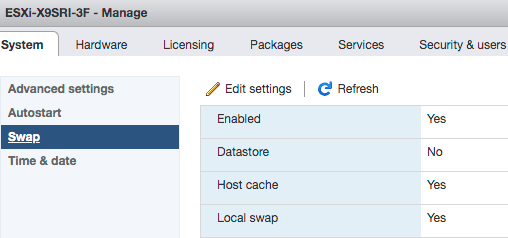
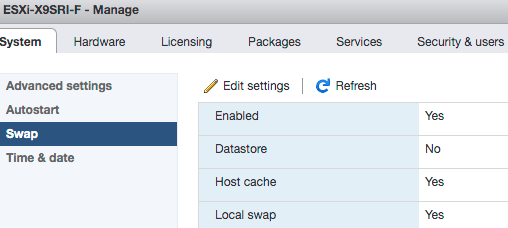
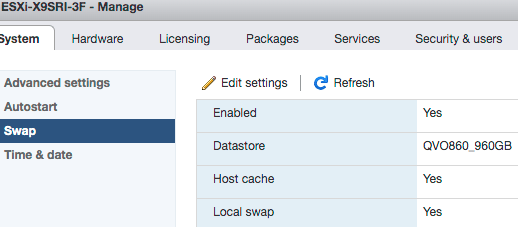
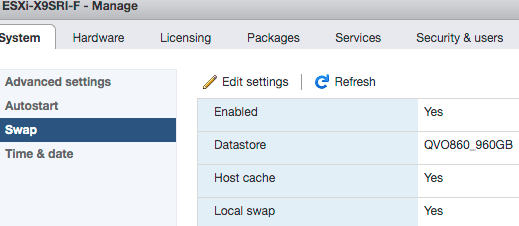
The swap settings were exactly the same:

  • Working

  • Failing

The USB devices were the same too:

  • Working

  • Failing

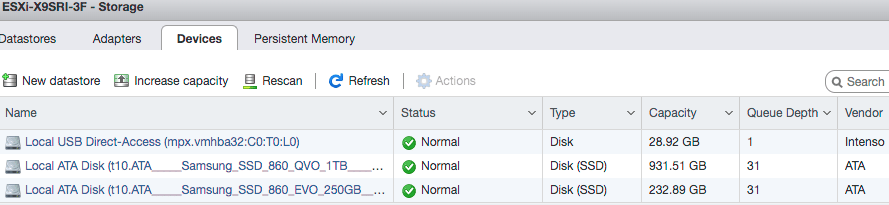
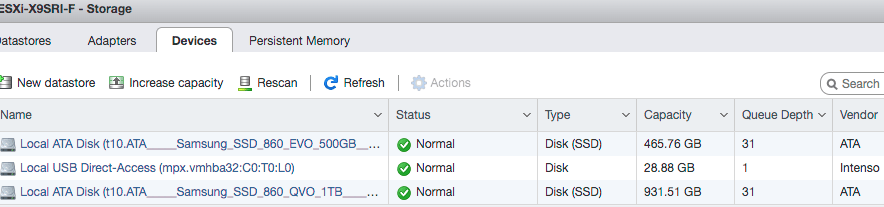
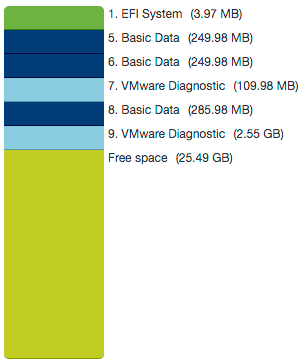
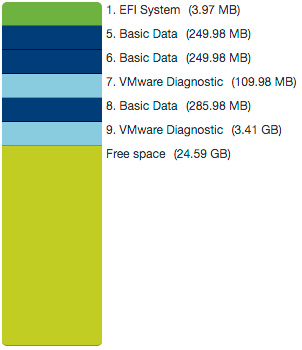
The failing system had even more partition space than the working system:

Working Failing

So was quite baffled that pointing the swap space pointing to a datastore solved the problem:

  • Working

  • Working too

You can also request this from the shell (via [WayBack] VMware vSphere 5.1):

[root@ESXi-X9SRI-F:~] esxcli sched swap system get
Datastore Active: true
Datastore Enabled: true
Datastore Name: QVO860_960GB
Datastore Order: 1
Hostcache Active: false
Hostcache Enabled: true
Hostcache Order: 0
Hostlocalswap Active: false
Hostlocalswap Enabled: true
Hostlocalswap Order: 2

Empty bootbank

Quoted in full as it cannot be archived in the WayBack machine nor Archive.is: Bootbanks mounts to /tmp folder and configuration changes are lost after rebooting of ESXi 6.0 Server (2148321)

Last Updated: 1/31/2019Categories: Troubleshooting

 Symptoms

  • Configuration changes on the ESXi is lost after rebooting the server.
  • Bootbank and altbootbank points to /tmp folder instead of pointing to the ESXi installed partition (this can be confirmed by running ls -l on root (“/”) folder)

 Cause

This issue happens if there is a delay in Fabric Login during the ESXi Boot process. By default, there is 3 Second timeout for Fabric login.
If Fabric Login takes more than 3 seconds, claiming the devices and discovering the LUNs happens parallelly and some LUNs will not be claimed on time during the boot process. If the boot LUN is not claimed before mounting the bootbank, ESXi boot process will mount bootbank and altbootbank to /tmp.

 Resolution

VMware introduced a new boot configuration parameter on ESXi 6.0 Patch 4 to handle the delay in Fabric logins.

To resolve this issue, follow the steps:

  1. To mount the bootbank to proper LUN, run this command on ESXi:
    localcli –plugin-dir=/usr/lib/vmware/esxcli/int/ boot system restore –bootbanks
  2. Upgrade ESXi to Patch 4 (Build number 4600944) available VMware Downloads.
  3. Connect to the Server KVM Console.
  4. During the ESXi boot process, press Shift+O and append the boot parameter devListStabilityCount=10 (its 10 Seconds, can be different value depending on flogi delay in the environment).
  5. After the boot process, append the devListStabilityCount=10 entry in the /bootbank/boot.cfg file.Note: This step is to ensure that change is persistent.

 Related Information

Following log from ESXi boot, HBA Link is UP and it took more than 3 seconds for the Fabric login completion (flogi succeeded) and Claim rules are enabled after 3rd Second :
2016-05-13T11:07:45.610Z cpu24:33363)<7>fnic : 1 :: link up
2016-05-13T11:07:45.610Z cpu24:33363)<6>host1: libfc: Link up on port ( 0)
2016-05-13T11:07:45.752Z cpu15:33365)<7>fnic : 2 :: link up
2016-05-13T11:07:45.752Z cpu15:33365)<6>host2: libfc: Link up on port ( 0)
2016-05-13T11:07:46.754Z cpu0:33369)<6>usb 1-1: suspended
2016-05-13T11:07:48.019Z cpu0:33315)ScsiClaimrule: 2463: Enabling claimrules for MPplugins.
2016-05-13T11:07:49.465Z cpu0:33351)<6>usb usb1: suspended
2016-05-13T11:07:49.620Z cpu26:33353)<6>host1: Assigned Port ID 16369
2016-05-13T11:07:49.620Z cpu26:33353)<7>fnic : 1 :: set port_id 16369 fp 0x439e41ccebc8
2016-05-13T11:07:49.620Z cpu26:33353)<6>host1: fip: received FLOGI LS_ACC using non-FIP mode
2016-05-13T11:07:49.620Z cpu26:33353)<7>fnic : 1 :: update_mac 0x439e41ccec41M
2016-05-13T11:07:49.620Z cpu26:33353)<7>fnic : 1 :: FLOGI reg issued fcid 16369 map 0 dest 0x43915249bcfaM
2016-05-13T11:07:49.622Z cpu11:33158)<7>fnic : 1 :: flog reg succeeded
Note: The preceding log excerpts are only examples. Date, time, and environmental variables may vary depending on your environment.

Build numbers and versions of VMware ESXi/ESX

jeroen

Read the rest of this entry »

Posted in ESXi6.7, Power User, Virtualization, VMware, VMware ESXi | Leave a Comment »