The Wiert Corner – irregular stream of stuff

Jeroen W. Pluimers on .NET, C#, Delphi, databases, and personal interests

  • My badges

  • Twitter Updates

  • Pages

  • All categories

  • Enter your email address to subscribe to this blog and receive notifications of new posts by email.

    Join 1,854 other subscribers

Archive for the ‘Power User’ Category

worksheet function – How to add or subtract to, or increment, column letters in Excel? – Super User

Posted by jpluimers on 2020/03/13

[WayBack] worksheet function – How to add or subtract to, or increment, column letters in Excel? – Super User:

Here’s the best I’ve found so far: =SUBSTITUTE(ADDRESS(1,( COLUMN() + 1 ),4),1,"")The part in the middle marked in bold is the only part that changes. In this example, it’s taking the current column and adding 1, so returning B if it’s in column A and AA if it’s in column Z.

It is related to the question and answer [WayBack] Formula to return just the Column Letter in excel – Super User:

FYI on your original formula you don’t actually need to call the CELL formula to get row and column you can use:

=ADDRESS(ROW(),COLUMN())

Then as an extension of that you can use MID & SEARCH to find the $ and trim down the output so you are just left with the letter:

=MID(ADDRESS(ROW(),COLUMN()),SEARCH("$",ADDRESS(ROW(),COLUMN()))+1,SEARCH("$",ADDRESS(ROW(),COLUMN()),SEARCH("$",ADDRESS(ROW(),COLUMN()))+1)-2)

edit You can even simplify this further:

=MID(ADDRESS(ROW(),COLUMN()),2,SEARCH("$",ADDRESS(ROW(),COLUMN()),2)-2)

And it is part of a much more elaborate answer

Read the rest of this entry »

Posted in Development, Excel, Office, Power User, Software Development | Leave a Comment »

MacOS: Checking a disk for bad blocks

Posted by jpluimers on 2020/03/13

Hardware fails, but most disk tools on MacOS only check logical disk structures, not bad blocks.

Luckily, fsck_hfs can, though Apple is a bit secretive on it: [WayBack] Page Not Found – Apple Developer: ManPages/man8/fsck_hfs.8.html is empty, but there is [WayBack] man page fsck_hfs section 8 and the gist below.

Disk volumes on MacOS use a successor of HFS called HFS Plus – Wikipedia, but the tooling never changed names.

I got at the below parameters through [

This is the disk check command:

# sudo fsck_hfs -dylS /dev/disk3s1
** /dev/rdisk3s1 (NO WRITE)
    Using cacheBlockSize=32K cacheTotalBlock=65536 cacheSize=2097152K.
Scanning entire disk for bad blocks
   Executing fsck_hfs (version hfs-407.50.6).
** Performing live verification.
** Checking Journaled HFS Plus volume.
   The volume name is SanDisk400GB
** Checking extents overflow file.
** Checking catalog file.
** Checking extended attributes file.
** Checking volume bitmap.
** Checking volume information.
** The volume SanDisk400GB appears to be OK.
    CheckHFS returned 0, fsmodified = 0

The italic part is the bad block scanning. The normal part the hfs scanning, which will continue even after finding bad blocks.

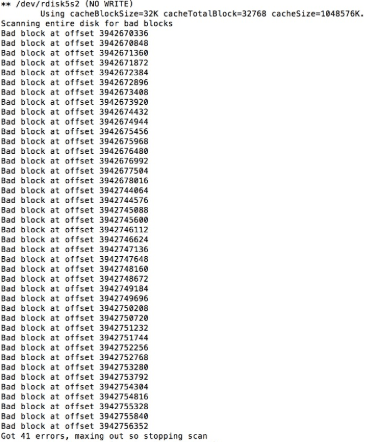
If bad blocks are found, output looks more like on the right. If it looks like that, basically you know a disk is toast.

It can be slow, as I did not specify a cache, so it defaults to 32 Kibibyte. You can increase that by adding for instance -c 512m  for 512 Mebibyte cache, just read the short help or man page below.

This tremendously helps checking volumes containing many files, for instance [WayBack] Checking Very Large Time Machine Volumes – Mac OS X Hints

Read the rest of this entry »

Posted in Apple, Mac, Mac OS X / OS X / MacOS, Power User | 1 Comment »

Some links on bind rndc

Posted by jpluimers on 2020/03/13

No, this is not a random number generator, according to the documentation, bind rndc is the name server control utility. Again very undescriptive; luckily the full name found elsewhere is Remote Name Daemon Control.

Some links for my archive as often there are no man-pages installed on systems with bind:

–jeroen

Posted in *nix, bind-named, Linux, Power User | Leave a Comment »

Show the mmc and USB disks on a Raspberry Pi

Posted by jpluimers on 2020/03/13

Small trick:

find /dev | grep "sd\|mmc" && ls -al /dev/disk/by-id/

–jeroen

Posted in *nix, *nix-tools, Power User | Leave a Comment »

The last thing you need to do when you cause link rot is to list the page as “online banking is down”

Posted by jpluimers on 2020/03/10

Nice example on how not to copy with link rot: as a bank is to indicate “internet banking is unavailable” scares your customers away.

[WayBack] Jeroen Pluimers on Twitter: “dit heet overigens link rot, en gebruiksvriendelijke sites proberen dat te voorkomen; is zeker niet gecompliceerd en eigenlijk ook niet complex: het is een kleine moeite om dat in je ontwerp en onderhoud-proces mee te nemen. 1/2 …

[WayBackJeroen Pluimers on Twitter: “de huidige down-melding zet sowieso je klanten volledig op het verkeerde been, dus daar moet zeker iets aan gebeuren. 2/2 “I.v.m. een storing kunt u geen gebruik maken van Internet Bankieren. Internet Banking is unavailable”…”

–jeroen

ABNAMRO

Posted in Conference Topics, Conferences, Development, Event, LifeHacker, Power User, Software Development, Usability, User Experience (ux), Web Development | Leave a Comment »

ssh – Why OpenSSH deprecated DSA keys – Information Security Stack Exchange

Posted by jpluimers on 2020/03/10

In a lot of ssh-keygen related posts, you still see DSA being mentioned, though that has been deprecated and later removed from OpenSSH.

I wondered why, so I did some digging.

TL;DR: it’s complicated:

  • different standards mandating eventually conflicting parameters,
  • extending the parameters would require protocol extension,
  • a logjam vulnerability for certain combinations of parameters and finally
  • better algorithms having become available.

Some of the related topics cannot be archived in the WayBack machine or refuse being archived at Archive.is, so here is a list of partially archived relevant links:

–jeroen

Posted in Communications Development, Development, Internet protocol suite, Power User, Security, SSH, TCP | Leave a Comment »

MacOS: converting a man page to markdown

Posted by jpluimers on 2020/03/09

Converting a man page to markdown is a three step process:

  1. installing a tool that can convert the source of a man page to markdown
  2. finding the location of the man page source
  3. doing the actual conversion

Tool to convert man to markdown

The source format of man pages is troff, which is usually converted by man using groff, or a set of macros.

My initial thought for the first problem was to use pandoc, but as I found earlier in pandoc oneliner from reStructuredText to html, on MacOS, the pandoc can write groff format, but not read it.

Luckily doing a pandoc from groff to markdown – Google Search, I bumped into [WayBack] Convert groff to markdown · Issue #8 · neomutt/neomutt-docs · GitHub which lead to mandoc – Wikipedia.

Since I already had homebrew installed, getting mandoc was simple: brew install mandoc.

Finding the man page source

Earlier in the process when searching for pandoc based conversions, I found the solution for the second problem too: [WayBack] Man page with preserved text decorations, proportional text and fixed-width code – Unix & Linux Stack Exchange taught me about the -w option, but there is actually a -W option that works better if you have multiple pages for a keyword:

-w or --path
Don’t actually display the man pages, but do print the location(s) of the files that would be formatted or displayed. If no argument is given: display (on stdout) the list of directories that is searched by man for man pages. If manpath is a link to man, then “manpath” is equivalent to “man --path“.

-W Like -w, but print file names one per line, without additional information. This is useful in shell commands like man -aW man | xargs ls -l

Actual conversion for fsck_hfs

It all came down to a one-liner:

mandoc -T markdown `man -w fsck_hfs` > /tmp/fsck_hfs.8.md

Note the order here is important this will fail with an error:

mandoc `man -w fsck_hfs` -T markdown > /tmp/fsck_hfs.8.md

mandoc: -T: ERROR: No such file or directory
mandoc: markdown: ERROR: No such file or directory

–jeroen

Read the rest of this entry »

Posted in Apple, Mac, Mac OS X / OS X / MacOS, Power User | 1 Comment »

command line – Recursive tar compression? – Ask Ubuntu

Posted by jpluimers on 2020/03/09

Since I always forget one-letter command-line options: [WayBack]command line – Recursive tar compression? – Ask Ubuntu (thanks andrew.46 for this very nice answer!):

Try:

tar -czvf directorios.tar.gz folder

A few notes:

  1. Recursion is the default, from the tar man pages:
    -c, --create
        Create a new archive.  Arguments supply the names of the files to be archived.
        Directories  are  archived  recursively,  unless  the --no-recursion option is
        given.
    

    Although this can be turned off by using the --no-recursion option…

  2. You need the archive name immediately after the -f option, the correct sequence being:
    tar -c [-f ARCHIVE] [OPTIONS] [FILE...]
             ^^^^^^^^^^
    
  3. For a more flexible command line (particularly if you wanted to use other compression utilities apart from gzip with tar) you could omit the -z option and use -a option to allow tar to automatically decide which compressor to use based on the archive suffix:
    -a, --auto-compress
        Use archive suffix to determine the compression program.
    

    Recognised suffixes are:

    • .gz : gzip
    • .tgz : gzip
    • .taz : gzip
    • .Z : compress
    • .taZ : compress
    • .bz2 : bzip2
    • .tz2 : bzip2
    • .tbz2 : bzip2
    • .tbz : bzip2
    • .lz : lzip
    • .lzma : lzma
    • .tlz : lzma
    • .lzo : lzop
    • .xz : xz

tar is pretty cool :)

–jeroen

Posted in *nix, *nix-tools, Power User | Leave a Comment »

GitHub – facebook/osquery: SQL powered operating system instrumentation, monitoring, and analytics.

Posted by jpluimers on 2020/03/09

Boy, I wish I had found this years ago: [WayBack] GitHub – facebook/osquery: SQL powered operating system instrumentation, monitoring, and analytics.

No more remembering all those nifty configuration and log file details by heart, just install and query using SQL.

Now you need to learn a “database” schema, however that’s the same for all supported operating systems.

Example installation steps:

Run interactively through osqueryi, then perform .help or .schema to get an impression of what is possible.

There is lots of documentation at [WayBack] osquery.

–jeroen

Posted in *nix, *nix-tools, Apple, Mac, Mac OS X / OS X / MacOS, Power User | Leave a Comment »

🔎Julia Evans🔍 on Twitter: “the ip command… “

Posted by jpluimers on 2020/03/06

[Archive.is] 🔎Julia Evans🔍 on Twitter: “the ip command… “

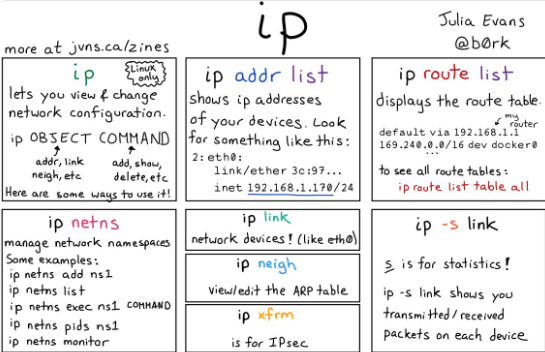
Larger image below the fold; thanks Julia!

Shortened transcript:

  • ip
    • lets you view and change network configuration
    • ip OBJECT COMMAND
    • object: addr, link, neigh, etc
    • command: add, show, delete, etc
  • ip addr list
    • shows IP addresses
  • ip route list
    • displays the route table
    • ip route list table all
  • ip netsh
    • manage network namespaces
  • ip link
    • network devices (like eth0)
  • ip neigh
    • view/edit the ARP table
  • ip xfrm
  • ip -s link
    • s is for statistics
    • shows transmitted/received packets for each device

Lots of additions in the Twitter Thread too, including (and some of them I still need to figure out):

Read the rest of this entry »

Posted in *nix, *nix-tools, Power User | Leave a Comment »