


I came across some 20 year old Unix stuff a while ago, so I needed an historic reference of filenames starting with a dot (like .newsrc).
This is a pretty good one: [WayBack] In Unix, what are some common dot files?
–jeroen
Posted by jpluimers on 2020/03/06
I came across some 20 year old Unix stuff a while ago, so I needed an historic reference of filenames starting with a dot (like .newsrc).
This is a pretty good one: [WayBack] In Unix, what are some common dot files?
–jeroen

Posted in *nix, *nix-tools, History, Power User | Leave a Comment »
Posted by jpluimers on 2020/03/06
I wrote a bit on using screen from my Mac in The woods and trees of OpenSuSE on single-board computers – image abbreviations – and getting it installed using OS X.
The coverage was way too brief and also buried in large post.
Today, I want to focus on some things related to properly terminating a a screen window, session or screen by itself from a Mac which somehow is one of the harder things for me to do.
I’m talking about sessions and windows, because
screenis a terminal multiplexer, which can also put a serial link in a window on a session. So screen is not “just” a serial console terminal application by itself.
Part of being hard is probably that even on for instance 10.12 Sierra, Apple ships a fairly old version: screen --version returns Screen version 4.00.03 (FAU) 23-Oct-06 whereas after 2014 (before that, screen development was pretty stalled) many new versions appeared: [WayBack] screen.git.
It makes it less hard that it hardly reproduces, and seems to reproduce less with the screen version I installed through homebrew: Screen version 4.06.02 (GNU) 23-Oct-17.
Time to make some notes so I can hopefully amend them later with solutions.
screen magic keyWhen screen gives you a session to a terminal, all but one key are being routed through on a 1-on-1 base except for a “magic” key combination: Ctrl–a (which the documentation abbreviates as C-a).
Following the Ctrl–a combination, you can type a character (sometimes that needs Ctrl too) for a lot screen functionality (for a start, see the “Getting help” below).
screen sessions and windowsYou list screen sessions from the command-line. I usually combine the latter with getting a process list as well using this command because the process list will show you parameters passed to screen:
ps -ax | grep screen && screen -list
which gets you output like this:
31992 ttys019    0:00.01 screen
29040 ttys020    0:00.04 screen /dev/cu.usbserial 115200
31898 ttys021    0:00.01 screen
32503 ttys025    0:00.00 grep screen
There are screens on:
    29041.ttys020.RMBPro1TBJWP  (Attached)
    31899.ttys021.RMBPro1TBJWP  (Attached)
    31993.ttys019.RMBPro1TBJWP  (Attached)
3 Sockets in /var/folders/zr/dsp77fhs6zq179n72lykjrjw0000gq/T/.screen.
Many people abbreviate screen -list as screen -ls, but I like descriptive commands over cryptic ones.
What you see is that:
From within each session, you can use the Ctrl–* combination to list the Windows. For the both non-serial sessions – looked like this on my machine:
term-type   size         user interface           window
---------- ------- ---------- ----------------- ----------
xterm-256c  84x28     jeroenp@/dev/ttys019        0(bash)       rwx
and
term-type   size         user interface           window
---------- ------- ---------- ----------------- ----------
xterm-256c  84x28     jeroenp@/dev/ttys021        1(bash)       rwx
The first was for session 31899.ttys021.RMBPro1TBJWP, the second for 31993.ttys019.RMBPro1TBJWP.
The -x parameter can attach to both an Attached or a Detached screen session. This allows for:
terminal tabs to see the same contentDetached sessions keep their windows and the commands running in those windows. This allows you to have long-running scripts starting from the terminal but not terminated when the terminal closes.
So in my case, this command attaches to the second session not matter if it is attached or detached.
screen -x 31993.ttys019.RMBPro1TBJWP
When killing a window, all the processes in that window will be killed too.
Typing Ctrl–a followed by k or Ctrl–k will kill the current window.
When killing a session, it will kill all the windows with all the processes in those windows.
Typing Ctrl–a followed by Ctrl–\ will kill the current session with all the windows in it. On some Linux systems, you can replace Ctrl–\ with just \.
I’ve not run into dead sessions yet, but if I do, I should try the -wipe command line option as shown in [WayBack] How to kill a dead screen session? – Stack Overflow (which also shows this can fail if you run out of disk space, but then you have bigger issues).
I still need to research this further, as every now and then I run into this:
# ps -ax | grep -w screen && screen -list
29040 ?? 0:00.04 screen /dev/cu.usbserial 115200
35724 ttys025 0:00.00 grep -w screen
There is a screen on:
 29041.ttys020.RMBPro1TBJWP (Attached)
1 Socket in /var/folders/zr/dsp77fhs6zq179n72lykjrjw0000gq/T/.screen.
Wiping it fails:
# screen -wipe 29041.ttys020.RMBPro1TBJWP
There is a screen on:
 29041.ttys020.RMBPro1TBJWP (Attached)
1 Socket in /var/folders/zr/dsp77fhs6zq179n72lykjrjw0000gq/T/.screen.
Attaching however times out:
# screen -x 29041.ttys020.RMBPro1TBJWP
For now, the only option is to reboot my system.
I’ve seen this happening mostly with cables that present themselves as prolific PL2303HX chipset.
So I will get some TTL debug cables based on other chipsets.
These posts will help finding about the available serial cables:
It is daunting, but the man screen page [WayBack] has a truckload of information, for instance on the command-line options, key bindings and much more.
If you like on-line lists of tips more, then follow these:
The man page will get you most of that information:
Screen version 4.00.03 (FAU) 23-Oct-06

Copyright (c) 1993-2002 Juergen Weigert, Michael Schroeder
Copyright (c) 1987 Oliver Laumann

This program is free software; you can redistribute it and/or modify it under the
terms of the GNU General Public License as published by the Free Software
Foundation; either version 2, or (at your option) any later version.

This program is distributed in the hope that it will be useful, but WITHOUT ANY
WARRANTY; without even the implied warranty of MERCHANTABILITY or FITNESS FOR A
PARTICULAR PURPOSE. See the GNU General Public License for more details.

You should have received a copy of the GNU General Public License along with this
program (see the file COPYING); if not, write to the Free Software Foundation,
Inc., 59 Temple Place - Suite 330, Boston, MA  02111-1307, USA.

Send bugreports, fixes, enhancements, t-shirts, money, beer & pizza to
screen@uni-erlangen.de


                          [Press Space or Return to end.]
Here you can press Ctrl-A followed by : to get a prompt where you can type help:
 [Press Space or Return to end.]

:help
There you get one or two (depending on your terminal size) pages of help:
                         Screen key bindings, page 1 of 2.

                         Command key:  ^A   Literal ^A:  a

   break       ^B b          license     ,             reset       Z
   clear       C             lockscreen  ^X x          screen      ^C c
   colon       :             log         H             select      '
   copy        ^[ [          meta        a             silence     _
   detach      ^D d          monitor     M             split       S
   digraph     ^V            next        ^@ ^N sp n    suspend     ^Z z
   displays    *             number      N             time        ^T t
   dumptermcap .             only        Q             title       A
   fit         F             other       ^A            vbell       ^G
   flow        ^F f          pow_break   B             version     v
   focus       ^I            pow_detach  D             width       W
   hardcopy    h             prev        ^H ^P p ^?    windows     ^W w
   help        ?             quit        ^\            wrap        ^R r
   history     { }           readbuf     < writebuf >
   info        i             redisplay   ^L l          xoff        ^S s
   kill        ^K k          remove      X             xon         ^Q q
   lastmsg     ^M m          removebuf   =

                    [Press Space for next page; Return to end.]
followed by:
                         Screen key bindings, page 2 of 2.

^]  paste .
"   windowlist -b
-   select -
0   select 0
1   select 1
2   select 2
3   select 3
4   select 4
5   select 5
6   select 6
7   select 7
8   select 8
9   select 9
]   paste .


                          [Press Space or Return to end.]
–jeroen
Partially based on: [WayBack] terminate screen monitoring serial port – Unix & Linux Stack Exchange.
Posted in *nix, *nix-tools, Apple, Mac, Mac OS X / OS X / MacOS, MacBook, MacBook Retina, MacBook-Air, MacBook-Pro, MacMini, macOS 10.12 Sierra, macOS 10.13 High Sierra, OS X 10.10 Yosemite, OS X 10.11 El Capitan, Power User, screen | Leave a Comment »
Posted by jpluimers on 2020/03/05
A while ago, I wanted to analyse the difference of some PDF documents: why they had suddenly grown to twice their size.
[WayBack] Jeroen Pluimers en Twitter: “dat genereren kun je overigens zien als je dezelfde downloads doet, maar dan een fikse periode uit elkaar.…”
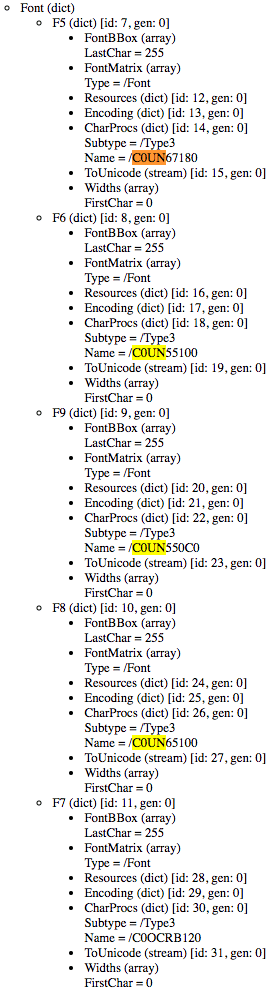
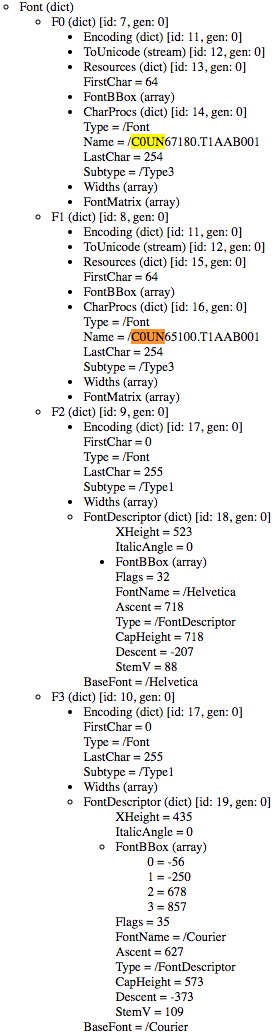 There are quite a few tools on [WayBack] Browse Internal PDF Structure – Super User and [WayBack] Best tool for inspecting PDF files? – Stack Overflow, including:
They also made me discover [WayBack] GitHub – pipwerks/PDFObject: A lightweight JavaScript utility for dynamically embedding PDFs in HTML documents documented at [WayBack] PDFObject: A JavaScript utility for embedding PDFs 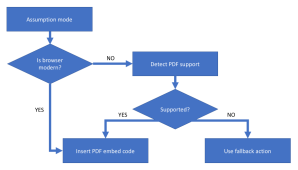
The quickest way to analyse these for me was [WayBack] PDF Object Browser based on [WayBack] GitHub – brendandahl/pdf.js.utils: PDF.js Utility Files which is also the foundation of [WayBack] Test PDF Creator.
It runs in your web browser as local JavaScript, so it is pretty OK to load a PDF file into it: it does no “phone home”.
In this case, for generating PDF files with the same content, ABN AMRO added five Type 3 fonts of which one font was not used at all, and two others used to be Type 1 fonts.
Type 1 (also known as PostScript, PostScript Type 1, PS1, T1or Adobe Type 1) is the font format for single-byte digital fonts for use with Adobe Type Manager software and with PostScript printers. It can support font hinting.
It was originally a proprietary specification, but Adobe released the specification to third-party font manufacturers provided that all Type 1 fonts adhere to it.
Type 1 fonts are natively supported in Mac OS X, and in Windows 2000 and later via the GDI API.[2] (They are not supported in the Windows GDI+, WPF or DirectWrite APIs.)
Type 3 font (also known as PostScript Type 3 or PS3, T3 or Adobe Type 3) consists of glyphs defined using the full PostScript language, rather than just a subset. Because of this, a Type 3 font can do some things that Type 1 fonts cannot do, such as specify shading, color, and fill patterns. However, it does not support hinting. Adobe Type Manager did not support Type 3 fonts, and they are not supported as native WYSIWYG fonts on any version of Mac OS or Windows.
So far for optimised PDF rendering…
Being in software development for this long, I am constantly reminded that The inmates are running the asylum – Wikipedia. I can definitely recommend reading “The Inmates Are Running the Asylum: Why High Tech Products Drive Us Crazy and How to Restore the Sanity”, by Alan Cooper:
–jeroen

Posted in Development, EPS/PostScript, PDF, Power User, Software Development | Leave a Comment »
Posted by jpluimers on 2020/03/04
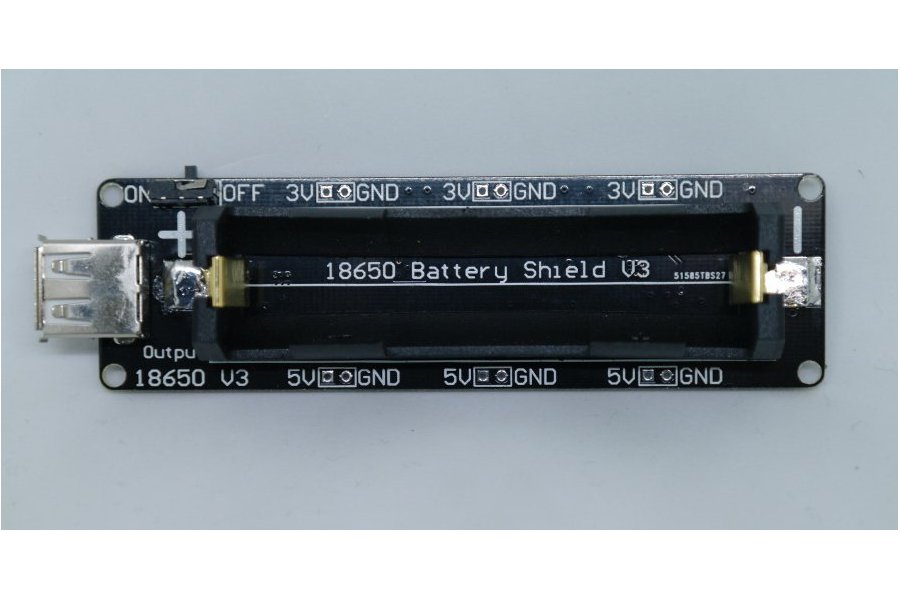
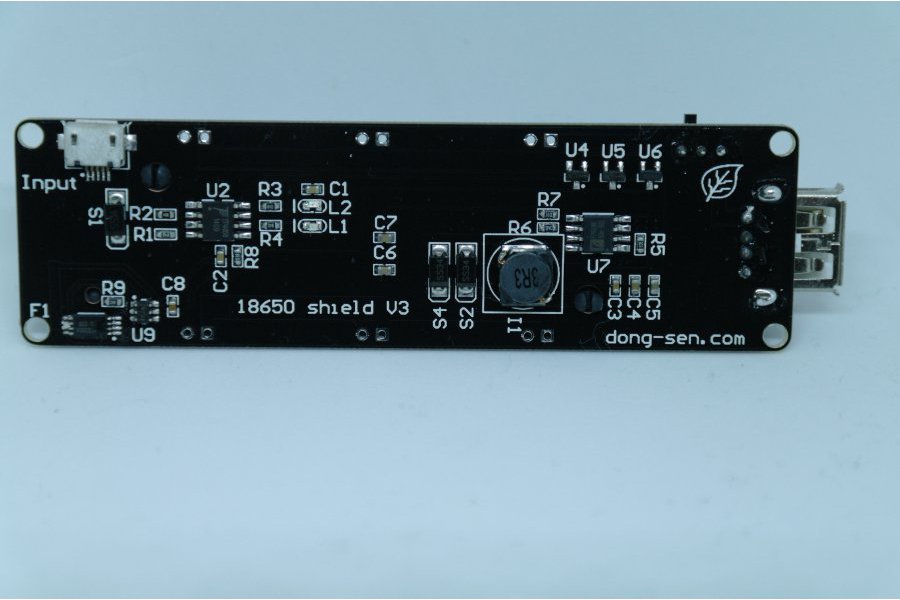
As you know Tesla has thousands of 18650 batteries. The 18650 battery is a strong existence. So we made this 18650 battery shield for maker.
Features:
- Battery protection(Over charge or Over discharge)
- Micro USB port Input
- Type-A USB Output
- 0.5A current charging
- 1 switch control USB output
- 5~8V Input Voltage
- 3V & 1A Output
- 5V & 2A Output
- LED indicate(Green means full,Red means charging)
- 3V output port x3
- 5V output port x3
Charging can only be done at 0.5A, so using it as a sort of UPS seems not possible, but an interesting device nonetheless.
The other products referenced from the same page are interesting too and will undoubtedly bring me some new ideas for some projects.
Source: [WayBack] 18650 Battery shield V3(RaspberryPi&Arduino) from lspoplove on Tindie
Via:
–jeroen

Posted in 18650, Arduino, Batteries, Development, ESP8266, Hardware Development, Li-Ion, Odroid, Power User, Raspberry Pi | Leave a Comment »
Posted by jpluimers on 2020/03/03
From 5 years ago, but now more relevant than it ever was: [WayBack] The Toxic Smog of the Information Age | Literary Hub
SCROOGLED
Give me six lines written by the most honorable of men, and I will find an excuse in them to hang him. –Cardinal Richelieu
We don’t know enough about you. –Google CEO Eric Schmidt
Via:
–jeroen
Posted in History, Opinions, Security | Leave a Comment »
Posted by jpluimers on 2020/03/03
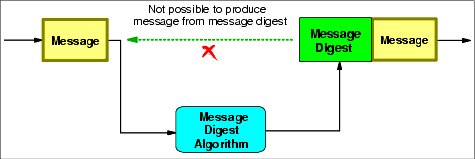
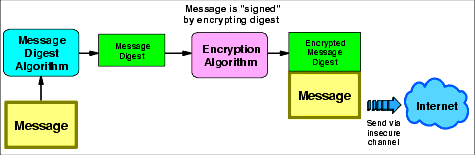
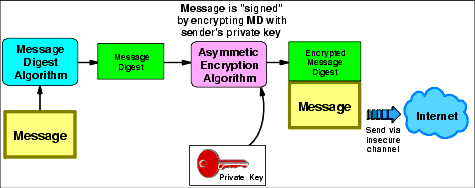
For me this is still a primary starting point in case I need to know something about security which has clear pictures: [WayBack] Appendix A. Introduction to TCP/IP security (sg245383.pdf/ftp://ftp.www.ibm.com/…/sg245383.pdf, thanks to Jac Las) all on one web page.
The links are to the “Digital signatures” portion, as that’s what I needed at the time, but they are just anchors in the page.
These were the diagrams I was after:
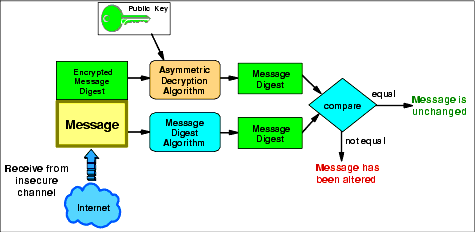
If you want much more in-depth slide then, then go for [WayBack] Cryptography, from Theory to Practice which you can find back searching for IBM “Cryptography, from Theory to Practice” or “sign then hash” or “hash then sign”.
It is very different from the equally interesting presentation
–jeroen

Posted in Development, Encryption, Power User, Security, Software Development | 2 Comments »
Posted by jpluimers on 2020/03/02
The software based reset worked perfectly for me: [WayBack]How to factory reset the OnePlus 2 – AndroidPIT
–jeroen
Posted in Android Devices, OnePlus Two, Power User | Leave a Comment »
Posted by jpluimers on 2020/03/02
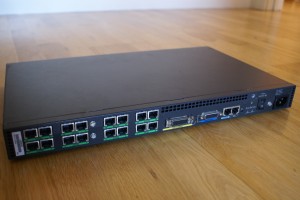
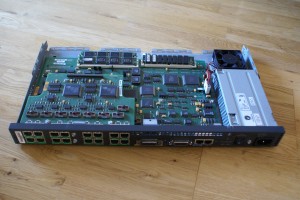
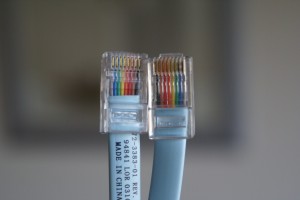
Relics from the serial communications history are still in use today: [WayBack] homecomputerlab » Cisco 2511-RJ remote access terminal server
–jeroen

Posted in History, Network-and-equipment, Power User | Leave a Comment »
Posted by jpluimers on 2020/02/28
Every now and then, when an Apple TV falls asleep with an app running, it wakes up without the app showing actual content on HDMI.
I’ve seen this quite a lot with the NPOStart app, but other apps suffer from this as well.
It happens more often with an Apple TV 4k than with an Apple TV4.
When this happens, the TV thinks there is no HDMI device connected to that source any more.
The solution is to reboot the Apple TV without active screen output:
- [WayBack] How to force restart the new Apple TV – CNET
To force restart the new Apple TV, press and hold both the Menu and Homebuttons. (The Home button has the silhouette of a TV or monitor on it.)
After holding in both buttons for roughly 10 seconds, the white light on the Apple TV box will begin flashing. Once that happens, let go of both buttons and the Apple TV will restart.
- [WayBack] How to restart your Apple TV – Apple Support
Use your remote
- [WayBack] Siri Remote or Apple TV Remote:* Hold down the
and Menu buttons. Let go when the light on your device flashes.
- [WayBack] Apple Remote (aluminum or white): Hold down the Menu and Down buttons. Let go when the light on your device flashes.
Unplug your Apple TV
If the Settings menu and your remote don’t restart your device, unplug your Apple TV from power. Wait six seconds, then plug it back in.
If the remote refuses to connect, then you have to pull the plug and reinsert it; either the power or HDMI plug will do.
Luckily this workaround I did not have to reboot my TV, as the only two ways to do that is to pull/reinsert the power plug, or to perform a [WayBack] How do I perform a Factory Data Reset on my Smart TV? | Samsung Support Australia.
–jeroen

Posted in Apple, Apple TV, iOS, Power User | Leave a Comment »
Posted by jpluimers on 2020/02/28
Two links that help me identify the Raspberry Pi devices from my collection (which misses quite a few, but is too extensive to get them all right in the blink of an eye):
cat /proc/cpuinfo and (on modern Linuces/Linxii: cat /proc/device-tree/model) [WayBack] Checking Your Raspberry Pi Board Version & Revision Number–jeroen
Posted in *nix, Development, Hardware Development, Power User, Raspberry Pi | Leave a Comment »

 The Wiert Corner - irregular stream of stuff