The Wiert Corner – irregular stream of stuff

Jeroen W. Pluimers on .NET, C#, Delphi, databases, and personal interests

  • My badges

  • Twitter Updates

  • Pages

  • All categories

  • Enter your email address to subscribe to this blog and receive notifications of new posts by email.

    Join 1,854 other subscribers

Archive for the ‘Power User’ Category

How to access a BitLocker-encrypted drive in Ubuntu 16.04?

Posted by jpluimers on 2019/10/07

Interesting: [WayBack] I am using Ubuntu 16.04 along with windows 10. I have encrypted my drives using BitLocker. Now my encrypted drives are not visible in ubuntu 16.04. But I want to access my encrypted drives using.

References: [WayBack] How to access BitLocker encrypted drive in Linux? This article introduces one way to access Bitlocker encrypted drive in Linux

via:

–jeroen

Posted in *nix, Power User, Windows | Leave a Comment »

Excel on Mac OS X / macOS: character that sorts after Z

Posted by jpluimers on 2019/10/04

Sometimes in a table, you want to have a key column where one of the rows sorts after Z (for instance having a total value further on).

The A-Z sort order sorts all non-letter ASCII characters in front of A-Z and a-z because [WayBack] Excel sorting is not in ASCII order – Microsoft Community, see ASCII Sort.xlsm – Microsoft Excel Online.

Using =NA() (which displays as  #N/A  ) is too visually intrusive (but works, see: [WayBack] Forcing an item to sort last in Excel [Archive] – Actuarial Outpost)

Luckily, putting in an Arabic character like  works. You can even put it in front of normaal ASCII characters like in 'ٴ ----- which then displays it at the right (since Arabic is Right-to-Left) -----ٴ .

The character is high Hamza – Wikipedia; [WayBack] Unicode Character ‘ARABIC LETTER HIGH HAMZA’ (U+0674)

via:

–jeroen

Posted in Excel, Office, Power User | Leave a Comment »

Fastener Reference Cheat Sheets, by @pighixxx | #ManufacturingMonday

Posted by jpluimers on 2019/10/04

[WayBackFastener Reference Cheat Sheets, by @pighixxx | #ManufacturingMonday

From pan flange to button washer, from socket cap to trim screw heads, not to mention threading types and drive head options, every workbench and workshop should have this fastener reference guide …

via:

–jeroen

Read the rest of this entry »

Posted in Development, Hardware Development, LifeHacker, Power User | Leave a Comment »

Excel Pivot notes: Table, Pivot Formula, 2D, 3D charts and secondary axes.

Posted by jpluimers on 2019/10/04

Since I don’t do Excel visualisations often enough, I always forget the details on Pivot Charts, some links and tips below.

TL;DR

You can’t have enough axes

The tips below assume you can create a pivot table from an existing table (that already can contain formulas), then show you:

  • additional formulas in your original table can make life easier
  • formulas for pivot tables themselves (named “Calculated Fields”)

Problem at hand

Creating graphs out of up and down time durations over time, aggregated by day.

Ideas for correlations that might matter:

  1. linear over time during a few weeks
  2. by week and by day of week

Incoming data:

  • end-timestamp
  • state (down or up)
  • duration of that state

Calculations

First of all, I needed “day of month”, “day of week”, and “week number” so I could group by those. Based on Readable weekdays in Excel, you get formulas like these:

  • =DAY(B4)
  • =WEEKDAY(B4) and =TEXT(B4;"dddd")
  • =WEEKNUM(B4)

Then I needed to split the duration of the state in distinct up/down durations. So I made a few formulas:

  • =("Up", A4) to have a boolean for up/down
  • =("Up", A4) to have a boolean for up/down
  • =IF(D4;C4;0)to split the up duration from the state duration
  • =IF(NOT(D4);C4;0)to split the down duration from the state duration

A pivot table could aggregate total up and down durations, but I wanted a measure of up ratio, so I needed a formula inside the pivot table itself.

Following the steps at [WayBackCalculate values in a PivotTable Use different ways to calculate values in calculated fields in a PivotTable report in Excel 2010, I got to this one:

This aggregates nicely: drag it to the aggregates column, then change the aggregation to “Average”:

Putting it in a 3D Pivot Chart

Read the rest of this entry »

Posted in Excel, Office, Power User | Leave a Comment »

Enabling IIS log files on Windows 7

Posted by jpluimers on 2019/10/01

Since each Windows version, Microsoft hides the way to first enable, then configure IIS Logging in a different place: [WayBack] Enabling IIS log files on Windows 7.

That should provide me some guidance on how to find it back when it is not displayed at all.

Related:

–jeroen

Posted in Development, IIS, Power User, Software Development, Windows | Leave a Comment »

Chronological Facebook

Posted by jpluimers on 2019/09/30

For people still using Facebook: visit it using www.facebook.com/?sk=h_chr.

This will open the chronological view of your Facebook feed.

Via:

–jeroen


Posted in Facebook, Power User, SocialMedia | Leave a Comment »

Readable weekdays in Excel

Posted by jpluimers on 2019/09/30

Since I always forget this: [WayBackExceljet: Get day name from date

If you need to get the day name (i.e. Monday, Tuesday, etc.) from a date, there are several options depending on your needs.

Basically there are four ways go get the day of the week; the first three are readable, but when ordered, they are ordered alphabetically. The last one is numeric.

Combining the numeric with the text is easier in for instance Pivot Legend Fields (Series).

So here they go (based on the above link), assuming that B4 contains a timestamp:

  1. =WEEKDAY(B4) gives you the numeric weekday (starting with Sunday=1 to Saturday=7) which allows sorting in a meaningful order
  2. =TEXT(B4,"dddd") gives you the full day name of B4 in your locale
  3. =TEXT(B4,"ddd") gives you the shortened day name of B4 in your locale
  4. =CHOOSE(WEEKDAY(B4),"Sun","Mon","Tue","Wed","Thu","Fri","Sat") gives you a name of your liking from a series of 7 texts

Note that depending on your locale, these formulas might actually need a semicolon:

  1. =WEEKDAY(B4)
  2. =TEXT(B4;"dddd")
  3. =TEXT(B4;"ddd")
  4. =CHOOSE(WEEKDAY(B4);"Sun";"Mon";"Tue";"Wed";"Thu";"Fri";"Sat")

–jeroen

Read the rest of this entry »

Posted in Excel, Office, Power User | Leave a Comment »

Meeting Agreements for High Performing Teams – Noteworthy — The Journal Blog

Posted by jpluimers on 2019/09/30

Worthy short read: [WayBackMeeting Agreements for High Performing Teams – Noteworthy — The Journal Blog

A quote from it:

[WayBackPatrick Lencioni‏ @patricklencioni: If someone offered me a single piece of evidence to assess the health of an org, I would want to observe the executive team during a meeting

–jeroen

via: [WayBack] Meeting Agreements for High Performing Teams – Noteworthy — The Journal Blog – Marjan Venema – Google+

Read the rest of this entry »

Posted in Agile, Development, LifeHacker, Power User, Software Development | Leave a Comment »

Sony STR-DE205 Receiver – storing FM stations into memory

Posted by jpluimers on 2019/09/27

Somehow I misplaced the manuals of my Sony STR-DE205 receiver, including the Operating Instructions.

Sony still makes receivers

I did find [WayBack] Sony STR-DE205 – Manual – AM/FM Stereo Receiver – HiFi Engine which has a Service Manual. It has no operating instructions though.

Luckily, the STR-DE205 is very similar to the Sony STR-DE305, which I found using sony str de205 filetype:pdf operating instructions and having an Operating Instructions copy at [WayBackpdf.crse.com/manuals/3810995221.pdf.

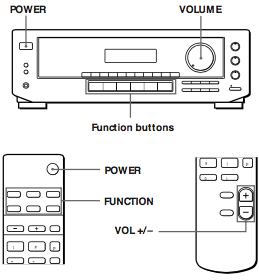
In fact, all the pictures in that manual look remarkably similar to the STR-DE205, except for one: the remote control:

It has one extra button POWER, which the STR-DE205 lacks, which likely means the STR-DE305 can be powered on remotely (like my trusty Sony MHC-3000 mini set that is slightly older).

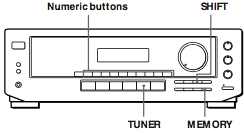
Anyway, programming is easy as long as you know you need to press one of the NUMERIC BUTTONS in step 5:

  1. Press TUNER.
    The last received station is tuned in.
  2. Tune in the station you want.
    If you are not familiar with how to tune in a station, see “Receiving Broadcasts” on the previous page.
  3. Press MEMORY.
    “MEMORY” appears for a few seconds.
    Do steps 4 and 5 before “MEMORY” goes out.
  4. Press SHIFT to select a character (A, B or C).
    Each time you press SHIFT, the letter “A”, “B” or “C” appears in the display.
    If “MEMORY” disappears, start again from step 3.
  5. While MEMORY is displayed, press the number you want to use (0 to 9).
  6. Repeat Steps 2 to 5 to preset other stations.

Getting the text out of the PDF was a bit of a pain, as even though it renders, DRM tried to prohibit copying.

Luckily there is a pdftohtml with a -nodrm feature in Poppler (software) – Wikipedia (unlike the Xpdf – Wikipedia it forked from that does not have this switch) which I got based on these links:

Some more images are below after some Sony STR-DE205 videos.

–jeroen

Read the rest of this entry »

Posted in Hardware, History, Power User | 2 Comments »

Running a feature branch from the letsencrypt certbot

Posted by jpluimers on 2019/09/27

So I won’t forget; the steps below based on and assumes ~/Versioned is the directory where you keep repositories in:

# cd ~/Versioned
# git clone https://github.com/certbot/certbot.git
...
# cd certbot
# git fetch --all
Fetching origin
# git checkout alt_override
Branch 'alt_override' set up to track remote branch 'alt_override' from 'origin'.
Switched to a new branch 'alt_override'
# ./certbot-auto --os-packages-only
OS packages installed.
# ./tools/venv.sh
... very long log ...
Please run the following command to activate developer environment:
source venv/bin/activate
# source ./venv/bin/activate
[venv] # venv/bin/certbot renew --force-renewal

–jeroen

Posted in Encryption, Let's Encrypt (letsencrypt/certbot), Power User, Security | Leave a Comment »